Protegrity AI Developer Edition Features
Explore the data discovery, protection, guardrail, anonymization, and synthetic data capabilities included in AI Developer Edition.
The following features are available with Protegrity AI Developer Edition:
- Data Discovery: Identify sensitive data across your organization using AI-powered scanning and classification.
- Semantic Guardrails: Implement AI-driven policies to protect sensitive data while allowing for flexible access controls.
- Synthetic Data: Create realistic synthetic data for testing and development without exposing real sensitive information.
- Anonymization: Use AI techniques to anonymize or mask sensitive data while preserving its utility for analysis and development.
- Data Protection: Implement encryption and tokenization to secure sensitive data.
In AI Developer Edition, a sample file is used by the sample application, which is processed by the Data Discovery container. The containers detect sensitive data. A Python module then redacts, masks, or protects and unprotects the data. The processed file is saved to a configured location. For more information about the sample application, refer to Sample applications.
Use the steps provided to run the application end-to-end. If required, run the APIs and functions provided for performing specific tasks. For more information about the APIs, refer to the respective Feature APIs.
The sample applications are grouped below based on whether they require a free account registration.
No registration required
The following sample applications can be run by deploying the respective containers without any registration:
Free registration required
Data Protection sample applications require a free account registration. The following sample applications can be run by deploying the respective containers after registering for a free account:
Sample Applications
Protegrity AI Developer Edition provides Python and Java applications that showcase the features of Protegrity products.
sample-app-find
The sample-app-find is a Python or Java application that processes and identifies sensitive data.
It can be customized to do the following functions:
- Specify a file name and output location for the source data. Only raw file formats are supported for Data Discovery. Multipart formats are not supported; only binary files are accepted.
sample-app-find-and-redact
The sample-app-find-and-redact is a Python or Java application that processes the identified data and redacts or masks the information.
It can be customized to do the following functions:
- Specify the items that must be identified.
- Specify the operation to be performed on the data, which is redact or mask.
- Specify a file name and output location for the source data. Only raw file formats are supported for Data Discovery. Multipart formats are not supported; only binary files are accepted.
- Specify a file name and output location for the transformed data.
sample-guardrail-python
The sample-guardrail-python is a Python application that submits a request to Semantic Guardrails for analysis.
It can be customized to do the following functions:
- Specify the data that must be processed.
- Specify the operation that must be performed, that is,
semantic processor for messages and pii processor for AI.
sample-app-find-and-protect
The sample-app-find-and-protect is a Python or Java application that processes the identified data and protects the information. Calls are made to the AI Developer Edition API Service for performing tokenization.
It can be customized to do the following functions:
- Specify the items that must be identified.
- Specify a file name and output location for the source data. Only raw file formats are supported for Data Discovery. Multipart formats are not supported; only binary files are accepted.
- Specify a file name and output location for the transformed data.
sample-app-find-and-unprotect
The sample-app-find-and-unprotect is a Python or Java application that unprotects the information protected by the sample-app-find-and-protect module. Calls are made to the AI Developer Edition API Service for performing detokenization.
It can be customized to do the following functions:
- Specify a file name and output location for the source data. Only data protected by the
sample-app-find-and-protect module can be unprotected. - Specify a file name and output location for the transformed data.
sample-app-protection
The sample-app-protection is a Python or Java application that protects and unprotects data. Calls are made to the AI Developer Edition API Service for performing tokenization. The Data Discovery and Semantic Guardrails containers are not required to be running for the sample-app-protection module to work.
It can be customized to do the following functions:
- Specify the items that must be protected, data element name, and user.
- Specify the operation that must be performed, protect and unprotect.
sample-classification-<type>-text
The sample-classification-<type>-text is a Python, Java, or Jupyter application that classifies the text data. Calls are made to the Data Discovery API Service for performing classification.
It can be customized to do the following functions:
- Specify the data that must be classified.
- Specify the type of classification, which is either
pii or semantic.
sample-classification-<type>-tabular
The sample-classification-<type>-tabular is a Python, Java, or Jupyter application that classifies the tabular data. Calls are made to the Data Discovery API Service for performing classification.
It can be customized to do the following functions:
- Specify the data that must be classified.
- Specify the type of classification, which is either
pii or semantic.
sample-redaction-<type>
The sample-redaction-<type> is a Python, Java, or Jupyter application that redacts the data. Calls are made to the Data Discovery API Service for performing classification and redaction.
It can be customized to do the following functions:
- Specify the data that must be redacted.
- Specify the type of redaction, which is either
pii or semantic.
1 - Data Discovery
Identify sensitive data across your organization using AI-powered scanning and classification.
Data Discovery is a powerful feature that helps organizations identify and classify sensitive data across their entire data estate. By leveraging AI-powered scanning and classification, Data Discovery enables organizations to gain visibility into their data landscape, understand where sensitive data resides, and take appropriate actions to protect it.
The documentation here for Data Discovery covers its specific requirements and relationship with AI Developer Edition. For more information, refer to the complete body of the Data Discovery documentation.
For the steps to set up and configure Data Discovery for AI Developer Edition, refer to the Setting up Data Discovery.
1.1 - Data Discovery Architecture
Architecture of the Data Discovery feature.
Data Discovery is a powerful, developer-friendly feature. For more information, refer to the complete body of the Data Discovery documentation.
Overview
Data Discovery Text Classification service provides real-time classification of sensitive data in text inputs. It specializes in the detection of Personally Identifiable Information (PII), Protected Health Information (PHI), and Payment Card Information (PCI) within plain text and free-text inputs. Designed for unstructured text such as chatbot conversations, call transcripts, and GenAI outputs.
Architecture
For more information about the general architecture and working of Data Discovery, refer to General architecture of Data Discovery.
1.2 - What's New
New features and enhancements of Data Discovery v2.0.0.
Data Discovery
- Standardized v2 APIs for Classify for Text and Tabular data, and Transform.
- New endpoints added for API docs, log level management, and version info.
- Improved Context Provider and Pattern Provider AI models.
- Updated Classify API default threshold to 0.7. The default threshold for v1.1 remains at 0.0 for compatibility.
- Added usage metrics and per‑language accuracy metrics.
- Extended PII detection to multiple Markdown dialects.
For more details, refer to What’s New in Data Discovery.
Major Changes
- Added Jupyter notebooks examples
data-discovery/samples/jupyter/sample-classification-jupyter-text.ipynbdata-discovery/samples/jupyter/sample-classification-jupyter-tabular.ipynbdata-discovery/samples/jupyter/sample-redaction-jupyter-text.ipynb
For more information on these examples, refer to Notebooks.
1.3 - Running the Data Discovery samples
Instructions for running the Data Discovery samples.
Use the information in this section to run the Data Discovery samples provided in the data-discovery/samples folder. These samples demonstrate how to use the Data Discovery API for classification and redaction of sensitive information in text and tabular data.
Running Data Discovery
The example scripts under the data-discovery/ folder demonstrate classification and redaction using the Data Discovery v2 API. For more information about the Data Discovery APIs, refer to Data Discovery APIs.
Note: A dedicated data-discovery/docker-compose.yml is provided to start only the Data Discovery service.
Open a command prompt.
Navigate to the directory where AI Developer Edition is cloned.
Launch data-discovery services. Refer to the docker compose setup page to know how to set up the package.
Run any of the example scripts from the data-discovery/ directory:
Classification - text input
python data-discovery/samples/python/sample-classification-python-text.py
bash data-discovery/samples/bash/sample-classification-bash-text.sh
Classification - tabular (CSV) input
python data-discovery/samples/python/sample-classification-python-tabular.py
bash data-discovery/samples/bash/sample-classification-bash-tabular.sh
Redaction
python data-discovery/samples/python/sample-redaction-python.py
bash data-discovery/samples/bash/sample-redaction-bash.sh
View the output of the files processed on the screen. The output displays the classification labels or redacted text returned by the Data Discovery service.
Using Notebooks for Classifying and Redacting unstructured documents
The notebook demonstrates how to use the Data Discovery API with Python’s requests library to classify and redact sensitive information in unstructured text and tabular data. It submits sample data containing sensitive information to a local Data Discovery service for classification. It also shows how the Transform API replaces detected PII entities with standardized labels, for example, [PERSON] or [SOCIAL_SECURITY_ID].
Make sure you have the Jupyter notebook installed in your system.
Navigate to the directory where AI Developer Edition is cloned.
Run the following command to start Jupyter Lab.
Copy the URL displayed and navigate to the site from a web browser. Ensure that localhost is replaced with the IP address of the system where the AI Developer Edition is set up.
Open the example at:
data-discovery/samples/jupyter/sample-classification-jupyter-text.ipynbdata-discovery/samples/jupyter/sample-classification-jupyter-tabular.ipynbdata-discovery/samples/jupyter/sample-redaction-jupyter-text.ipynb
Run all cells and see the results of the execution interactively.
1.4 - Using the Data Discovery APIs
The various APIs of Data Discovery.
Data Discovery has three types of API Endpoints:
- Classify to identify, classify, and locate sensitive data.
- Transform to identify, classify, and transform sensitive data.
- Common APIs, the standard operational endpoints available on the service.
For more information about Data Discovery APIs, refer to the complete body of the Data Discovery documentation.
1.5 - Uninstalling Data Discovery
Instructions for uninstalling the Data Discovery feature.
Open a command prompt.
Navigate to the cloned repository location.
Uninstall Semantic Guardrails if it is installed. For complete instructions, refer to Uninstalling Semantic Guardrails.
Navigate to the data-discovery directory.
Run the following command to remove the containers and images.
docker compose down --rmi all
2 - Semantic Guardrails
Implement AI-driven policies to protect sensitive data while allowing for flexible access controls.
Semantic Guardrails evaluates and mitigates risks in AI-generated content by scanning conversations for policy violations, sensitive data exposure, and off-topic responses. It enables organizations to enforce data protection policies, monitor data usage, and ensure compliance with regulatory requirements.
For the steps to set up and configure Semantic Guardrails for AI Developer Edition, refer to the Installation and Setup Guide.
2.1 - Semantic Guardrails Architecture
Architecture of the Semantic Guardrails feature.
GenAI Security Semantic Guardrails solution is a security guardrail engine for AI systems. It evaluates risks in GenAI chatbots, workflows, and agents through advanced semantic analytics and intent classification to detect potentially malicious messages. PII detection can also be leveraged for comprehensive security coverage.
The documentation here for Semantic Guardrails covers its specific requirements and relationship with AI Developer Edition. For more information, refer to the complete body of the Semantic Guardrails documentation.
Overview
Semantic Guardrails is trained on synthetic customer-service AI chatbot datasets. The system performs best when analyzing conversations expected to match the training domain, that is, English-language-based customer service interactions involving orders, tickets, and purchases.
For domain-specific and user-specific applications requiring high detection accuracy, fine-tuning is necessary to completely leverage the model’s ability. This helps the model to learn from expected conversation patterns and message structures in both the inputs and outputs of protected GenAI systems.
The system operates by analyzing conversations between participants. These participants are users and AI systems, such as LLMs, agents, or contextual information sources. Furthermore, the system utilizes Protegrity’s Data Discovery, if present in the same network environment, to leverage PII detection in its internal decision algorithm.
The solution provides individual message risk scores and classifications, and cumulative conversation risk scores and classifications. This dual-scoring approach ensures that while individual messages may appear benign, potentially risky cumulative conversation patterns are identified. This significantly enhances detection of sophisticated attack vectors, including LLM jailbreaks and prompt injection attempts.
Architecture
For more information about the general architecture and working of Semantic Guardrails, refer to General architecture of Semantic Guardrails.
2.2 - Running the Semantic Guardrails samples
Instructions for running the Semantic Guardrails samples.
The example scripts under the semantic-guardrail/ folder demonstrate the usage of Semantic Guardrails APIs. For more information about the Semantic Guardrails APIs, refer to Semantic Guardrails APIs.
Note: A dedicated semantic-guardrail/docker-compose.yml is provided to start the Data Discovery and the Semantic Guardrails services.
Open a command prompt.
Navigate to the directory where AI Developer Edition is cloned.
Run the following command to test Semantic Guardrails using Python scripts. The following command submits a multi-turn conversation for analysis. One for semantic and a second one for PII processing.
python semantic-guardrail/samples/python/sample-guardrail-python.py
Run the following command to start Jupyter Lab for running Semantic Guardrails.
Copy the URL displayed and navigate to the site from a web browser. Ensure that localhost is replaced with the IP address of the system where the AI Developer Edition is set up.
In the left pane of the Jupyter Lab, navigate to semantic-guardrail/samples/python/sample-app-semantic-guardrails.
Open the Sample Application.ipynb file.
Click the Play icon and follow the prompts in the Jupyter Lab.
2.3 - Using the Semantic Guardrails APIs
Listing the APIs for the Semantic Guardrails feature.
Semantic Guardrails has the following types of API Endpoints:
For more information about Semantic Guardrails APIs, refer to the complete body of the Semantic Guardrails documentation.
2.4 - Uninstalling Semantic Guardrails
Instructions for uninstalling the Semantic Guardrails feature.
Open a command prompt.
Navigate to the cloned repository location.
Navigate to the semantic-guardrails directory.
Run the following command to remove the containers and images.
docker compose down --rmi all
3 - Synthetic Data
Create realistic synthetic data for testing and development without exposing real sensitive information.
Synthetic Data generates datasets that mimic the statistical properties of real data without containing actual personal information. By leveraging AI, Synthetic Data enables organizations to generate high-quality synthetic data that maintains the statistical properties of the original data while ensuring privacy and compliance.
For the steps to set up and configure Synthetic Data for AI Developer Edition, refer to the Installation and Setup Guide.
3.1 - Synthetic Data Architecture
Architecture of the Synthetic Data feature.
Synthetic Data generates artificial data that is realistic, statistically accurate, and privacy-safe. This data unlocks the full potential of AI and analytics. By creating entirely new data that mirrors the patterns of your original datasets but contains no sensitive information, you can train and test AI models without risk. You can also scale these models without exposure or compliance violations.
An overview of the communication is shown in the following figure.

The Synthetic Data system includes the following core components:
Key Pods and Services
Synthetic Data App Pod
- Orchestrates Synthetic Data generation.
MLFlow Pod
- Captures model training and evaluation.
- Hosted in containers for scalability.
MinIO Pod
- Stores models, model artifacts, and generated reports.
- Used by both MLFlow and Synthetic Data App pods.
SQL Database Server Pod
- Provides storage for MLFlow experiments metadata.
Data Generation Interfaces
Synthetic Data can be generated using:
These interfaces allow developers and data scientists to interact with the system programmatically or visually.
Access and Networking
Users access the Protegrity Synthetic Data using HTTP over default port 8095 and other services using the following ports:
| Port | Communication Path |
|---|
| 5000 | MLFlow pod |
| 5432 | SQL Database Server |
| 8095 | Protegrity Synthetic Data Service |
| 9000 | MinIO |
Cloud Hosting Options
The entire Synthetic Data API can be hosted using any cloud-provided Kubernetes service, including:
- Amazon Elastic Kubernetes Service (EKS)
- Google Kubernetes Engine (GKE)
- Microsoft Azure Kubernetes Service (AKS)
- Red Hat OpenShift
- Other Kubernetes platforms
This flexibility allows organizations to scale Synthetic Data generation securely across environments.
3.2 - Running the Synthetic Data samples
Instructions for running the Synthetic Data samples.
The example scripts under the synthetic-data/ folder demonstrate the usage of Synthetic Data APIs. For more information about the Synthetic Data APIs, refer to Synthetic Data APIs.
Note: A dedicated synthetic-data/docker-compose.yml is provided to start the Synthetic Data services.
Open a command prompt.
Navigate to the directory where AI Developer Edition is cloned.
Run the following command to start Jupyter Lab.
Copy the URL displayed and navigate to the site from a web browser. Ensure that localhost is replaced with the IP address of the system where the AI Developer Edition is set up.
In the left pane of the Jupyter Lab, navigate to synthetic-data/samples/python/sample-app-synthetic-data.
Open the synthetic_data.ipynb file.
Click the Play icon and follow the prompts in the Jupyter Lab.
3.3 - Using the Synthetic Data APIs
Listing the APIs for Synthetic Data.
base
Base HTTP client for SDK communication
Provides low-level HTTP communication utilities shared across all SDK clients.
Handles request construction, response parsing, error handling, and retries.
dataframe_to_base64
def dataframe_to_base64(df: pd.DataFrame) -> str
Convert DataFrame to base64-encoded CSV string for inline data transfer.
Arguments:
df - DataFrame to encode.
Returns:
str - Base64-encoded CSV string.
Examples:
```
df = pd.DataFrame({"a": [1, 2], "b": [3, 4]})
encoded = dataframe_to_base64(df)
print(encoded[:20])
YSxiCjEsMwoyLDQK
```
BaseClient
Base HTTP client with common request/response logic.
Provides methods for making HTTP requests to the synthesis API with
automatic retry, error handling, and response parsing.
Arguments:
config ClientConfig - Client configuration with endpoint and settings.
Examples:
```python
config = ClientConfig(endpoint="http://localhost:8000")
client = BaseClient(config)
response = client._request("POST", "/pty/syntheticdata/v2/synthesize", data=payload)
```
__init__
def __init__(config: ClientConfig)
Initialize base client.
Arguments:
config - Client configuration.
client
Remote synthesizer clients for the Synthetic Data SDK
Provides client classes that mirror the local synthesizer interface but
delegate computation to a remote REST API. Enables distributed synthesis
workflows without local compute resources.
Classes:
SynthesisClient: Low-level API client for direct endpoint access.
RemoteVineCopula: Remote single-table vine copula synthesizer.
RemoteMultiTableVineCopula: Remote multi-table synthesizer.
Examples:
Single-table synthesis:
```python
from synthetic_data_sdk import RemoteVineCopula
import pandas as pd

# Initialize client
synth = RemoteVineCopula(
    endpoint="http://api.example.com:8000", categorical_cols=["city", "product"]
)

# Fit on training data
df = pd.read_csv("customers.csv")
synth.fit(df)

# Generate synthetic data
synthetic = synth.transform(n=10000)
synthetic.to_csv("synthetic_customers.csv", index=False)
```
Multi-table synthesis:
```python
from synthetic_data_sdk import RemoteMultiTableVineCopula

synth = RemoteMultiTableVineCopula(
    endpoint="http://api.example.com:8000",
    relationships=[
        ("customers", "customer_id", "orders", "customer_id"),
        ("orders", "order_id", "items", "order_id"),
    ],
    synthesizer_params={
        "customers": {"categorical_cols": ["city"]},
        "orders": {"categorical_cols": ["status"]},
    },
)

tables = {"customers": customers_df, "orders": orders_df, "items": items_df}
synth.fit(tables)
synthetic_tables = synth.transform(n=500)
```
Model persistence:
```python
# Fit and save on server
synth = RemoteVineCopula(endpoint="http://api.example.com:8000", model_version="prod_v2")
synth.fit(training_data)

# Later: load and use
synth = RemoteVineCopula(endpoint="http://api.example.com:8000", model_version="prod_v2")
synthetic = synth.transform(n=5000)  # No refitting needed
```
SynthesisClient
class SynthesisClient(BaseClient)
Low-level client for direct API interaction.
Provides a thin wrapper around the synthesis endpoint for applications
that need fine-grained control over request payloads. Most users should use
RemoteVineCopula or RemoteMultiTableVineCopula instead.
Arguments:
config ClientConfig - Client configuration.
Examples:
```python
from synthetic_data_sdk import SynthesisClient, ClientConfig

config = ClientConfig(endpoint="http://localhost:8000")
client = SynthesisClient(config)

# Manual request construction
response = client.synthesize(
    model_name="vine",
    action="fit_transform",
    training_data="data/customers.csv",
    n_samples=1000,
    parameters={"categorical_cols": ["city"]},
)
print(response["status"])
success
```
synthesize
def synthesize(model_name: str,
               action: str,
               training_data: str | None = None,
               training_data_path: str | None = None,
               training_data_tables: dict[str, str] | None = None,
               n_samples: int | None = None,
               model_version: str | None = None,
               parameters: dict[str, Any] | None = None,
               output_uri: str | None = None,
               mlops_config: dict[str, Any] | None = None) -> dict[str, Any]
Send synthesis request to API.
Arguments:
model_name - Model type (‘vine’ or ‘vine_multitable’).action - Action to perform (‘fit’, ’transform’, ‘fit_transform’).training_data - Base64-encoded CSV string for single-table inline data.training_data_path - Cloud URI or local path to single-table training data CSV.training_data_tables - Dict mapping table names to local paths/file:// URIs or cloud
URIs for multi-table. All tables must use the same input kind; mixing raises
ValueError.n_samples - Number of synthetic samples to generate.model_version - Version identifier for model persistence.parameters - Model-specific parameters.output_uri - Cloud URI to write synthetic data to (e.g. ‘s3://bucket/out.csv’).
When omitted, synthetic data is returned inline in the response.
Supported schemes: s3://, gs://, azure://, minio://.mlops_config - Per-request MLOps tracking configuration. When provided,
overrides the server’s default MLOps settings for this request only.
All keys are optional and fall back to the server configuration when
omitted. Useful for multi-tenant MLOps setups where each caller
tracks to their own Postgres / artifact store.
Accepted keys (all optional):database_dsn: connection string for the MLOps DB.storage_dsn: artifact storage URI
(s3://, local://, gs://, azure://, minio://).experiment_prefix: defaults to ‘synthetic-data’.
Example:
{"database_dsn" - “postgresql://user:pw@host:5432/mlops”,"storage_dsn" - “s3://key:secret@us-east-1/bucket/mlops/”}
Returns:
dict - API response with status, data, and metadata.
Raises:
SynthesisAPIError - If request fails.
Examples:
```python
response = client.synthesize(
    model_name="vine",
    action="fit_transform",
    training_data_path="s3://key:secret@region/bucket/data.csv",
    n_samples=1000,
    parameters={"categorical_cols": ["city"]},
    mlops_config={"database_dsn": "postgresql://user:pw@host:5432/mlops"},
)
data_synthesis = response["data"]
```
list_models
def list_models(model_type: str | None = None,
                all_metrics: bool = False) -> list[dict[str, Any]]
List model versions currently in Production.
Arguments:
model_type - Filter by algorithm class (e.g. "vine").all_metrics - When False (default), metrics contains only
the promotion metric. When True, all logged metrics
are returned.
Returns:
List of dicts with model_name, model_type,
model_version, semantic_version, stage,
input_schema, metrics, registered_at.
synthesize_async
def synthesize_async(model_name: str,
                     action: str,
                     training_data: str | None = None,
                     training_data_path: str | None = None,
                     training_data_tables: dict[str, str] | None = None,
                     n_samples: int | None = None,
                     model_version: str | None = None,
                     parameters: dict[str, Any] | None = None,
                     output_uri: str | None = None) -> dict[str, Any]
Submit a synthesis request for background execution.
Returns immediately with a job_id that can be polled using
:meth:get_job_status.
Arguments:
model_name - Model type (‘vine’ or ‘vine_multitable’).action - Action to perform (‘fit’, ’transform’, ‘fit_transform’).training_data - Base64-encoded CSV string for single-table inline data.training_data_path - Cloud URI or local path to single-table training data CSV.training_data_tables - Dict mapping table names to local paths/file:// URIs or cloud
URIs for multi-table. All tables must use the same input kind; mixing raises
ValueError.n_samples - Number of synthetic samples to generate.model_version - Version identifier for model persistence.parameters - Model-specific parameters.output_uri - Cloud URI to write synthetic data to. None means inline response.
Returns:
dict - {"job_id": "...", "status": "queued", ...}
get_job_status
def get_job_status(job_id: str) -> dict[str, Any]
Get the current status of a job.
Arguments:
job_id - Unique job identifier returned by :meth:synthesize_async.
Returns:
dict - Job status including job_id, status, progress,
step, message, error, synth_data_uri, timestamps.
list_jobs
def list_jobs(status: str | None = None,
              limit: int = 100,
              offset: int = 0) -> dict[str, Any]
List jobs with optional filtering and pagination.
Arguments:
status - Filter by status (pending, running, completed, failed, cancelled).limit - Page size (1-1000).offset - Page offset.
Returns:
dict - {"jobs": [...], "total": int, "limit": int, "offset": int}
get_job_history
def get_job_history(job_id: str) -> list[dict[str, Any]]
Get the full state-transition audit trail for a job.
Arguments:
job_id - Unique job identifier.
Returns:
list - List of history entry dicts with sequence, status,
progress, step, changed_at, etc.
delete_job
def delete_job(job_id: str) -> None
Delete a job record (or cancel if running).
Arguments:
job_id - Unique job identifier.
wait_for_job
def wait_for_job(job_id: str,
                 poll_interval: float = 2.0,
                 timeout: float = 600.0,
                 callback: Any | None = None) -> dict[str, Any]
Poll a job until it reaches a terminal state.
Arguments:
job_id - Unique job identifier.poll_interval - Seconds between polls (default 2s).timeout - Maximum seconds to wait (default 600s / 10 min).callback - Optional callable (status_dict) -> None invoked on each poll.
Returns:
Raises:
TimeoutError - If job doesn’t complete within timeout.
generate_conditional
def generate_conditional(real_data: str | pd.DataFrame,
                         model_name: str,
                         n_samples: int,
                         conditions: dict[str, Any] | None = None,
                         amplify_patterns: float | None = None,
                         inject_drift: dict[str, float] | None = None,
                         categorical_cols: list[str] | None = None,
                         random_state: int | None = None) -> dict[str, Any]
Generate synthetic data matching conditional scenarios.
Fits a synthesizer on real data and generates synthetic samples matching
specific conditions (filters), with optional pattern amplification and
distribution drift injection. Useful for scenario testing, edge case
generation, and what-if analysis.
Arguments:
real_data - Path to CSV file or DataFrame containing training data.model_name - Model type (‘vine’, ‘smote’, ’tabdiff’, ’tabulargan’).n_samples - Number of synthetic samples to generate.conditions - Dictionary of column conditions. Examples:- Exact match: {‘fraud’: 1, ‘status’: ‘active’}
- Comparison: {‘age’: ‘>65’, ‘income’: ‘<=50000’}
- Range: {‘age’: ‘between(30,50)’}
- Membership: {‘city’: ‘in(NYC,LA,Chicago)’}
amplify_patterns - Multiplier for conditional pattern amplification
(e.g., 1.5 for 50% increase).inject_drift - Dictionary of column drift shifts. Examples:- {‘income’: -20000, ‘age’: -5} # Recession scenario
- {‘credit_score’: -50} # Credit deterioration
categorical_cols - List of categorical column names for proper encoding.random_state - Random seed for reproducibility.
Returns:
dict - Response containing:- success (bool): Whether generation succeeded.
- n_samples (int): Number of samples generated.
- synthetic_data (str): Base64-encoded CSV data.
- conditions_applied (dict): Conditions that were applied.
- drift_applied (dict): Drift shifts that were applied.
- warnings (List[str]): Any warnings from generation.
- metadata (dict): Model and column information.
Raises:
SynthesisAPIError - If request fails.
Examples:
Fraud scenario - generate high-risk fraud cases:
```python
from synthetic_data_sdk import SynthesisClient, ClientConfig
import pandas as pd

config = ClientConfig(endpoint="http://localhost:8000")
client = SynthesisClient(config)

response = client.generate_conditional(
    real_data="data/transactions.csv",
    model_name="vine",
    n_samples=1000,
    conditions={"fraud": 1, "age": ">65"},
    categorical_cols=["status", "fraud"],
)

# Decode synthetic data
import base64, io
decoded = base64.b64decode(response["synthetic_data"])
synthetic = pd.read_csv(io.StringIO(decoded.decode("utf-8")))
print(f"Generated {len(synthetic)} fraud cases")
```
Recession scenario - income and employment impact:
```python
response = client.generate_conditional(
    real_data=customer_df,  # Can pass DataFrame directly
    model_name="vine",
    n_samples=5000,
    conditions={"age": ">55"},  # Focus on older customers
    inject_drift={
        "income": -20000,  # $20k income decrease
        "credit_score": -50,  # 50-point credit drop
    },
    categorical_cols=["status", "region"],
)
print(response["drift_applied"])
{'income': -20000, 'credit_score': -50}
```
Edge case generation - extreme values:
```python
response = client.generate_conditional(
    real_data="data/loans.csv",
    model_name="vine",
    n_samples=500,
    conditions={"loan_amount": ">100000", "credit_score": "<600"},
    amplify_patterns=2.0,  # 2x amplification for extreme patterns
    random_state=42,
)
```
_RemoteSingleTableSynthesizer
class _RemoteSingleTableSynthesizer()
Base class for remote single-table synthesizers.
Eliminates code duplication across RemoteVineCopula, RemoteTabDiff,
RemoteSMOTE, and RemoteTabularGAN. Subclasses need only set
_model_name and _version_prefix class attributes. Model-specific
methods (e.g. transform_conditional) can be added in the subclass.
__init__
def __init__(endpoint: str | None = None,
             model_version: str | None = None,
             config: ClientConfig | None = None,
             mlops_config: dict[str, Any] | None = None,
             **parameters)
Initialize a remote single-table synthesizer.
Arguments:
endpoint - API endpoint URL. Not required if config is provided.model_version - Version identifier for model persistence.config - Advanced client configuration (timeouts, auth, etc.).mlops_config - Per-request MLOps tracking configuration. When provided,
overrides the server’s default MLOps settings for this request only.
All keys are optional and fall back to the server configuration when
omitted. Accepted keys: database_dsn, storage_dsn,
experiment_prefix, auto_promote, promotion_metric,
promotion_direction.**parameters - Model-specific hyper-parameters forwarded to the
synthesizer constructor.
list_models
def list_models(all_metrics: bool = False) -> list[dict[str, Any]]
List Production model versions for this model type.
Calls the shared models endpoint with model_type=<_model_name> and returns all
versions currently in the Production stage.
Arguments:
all_metrics - When False (default), metrics contains only
the promotion metric. When True, all logged metrics
are returned.
Returns:
List of dicts with model_name, model_type,
model_version, semantic_version, stage,
input_schema, metrics, registered_at.
fit
def fit(df: pd.DataFrame | str | Path) -> "RemoteVineCopula"
Fit model on training data.
Uploads training data to the API and triggers model fitting. The
fitted model is stored on the server using the configured
model_version.
Arguments:
df - Training data as DataFrame, local file path, or cloud URI.
Returns:
Self (for method chaining).
Raises:
SynthesisAPIError - If fitting fails.
def transform(n: int, **kwargs) -> pd.DataFrame
Generate synthetic data using a fitted model.
Arguments:
n - Number of synthetic samples to generate.
Returns:
Synthetic data with the same schema as the training data.
Raises:
RuntimeError - If model is not fitted.SynthesisAPIError - If generation fails.
def fit_transform(df: pd.DataFrame, n: int, **kwargs) -> pd.DataFrame
Fit model and generate synthetic data in one call.
Arguments:
df - Training data.n - Number of synthetic samples to generate.
Returns:
Synthetic data.
Raises:
SynthesisAPIError - If operation fails.
summary
def summary() -> dict[str, Any]
Get summary statistics from a fitted model.
Returns:
Model summary with statistics and metadata.
Raises:
RuntimeError - If model is not fitted.SynthesisAPIError - If request fails.
evaluate
def evaluate(real_data: pd.DataFrame | str,
             synthetic_data: pd.DataFrame | str,
             categorical_cols: list[str] | None = None,
             target_col: str | None = None,
             task_type: str | None = None,
             eval_params: dict[str, Any] | None = None) -> dict[str, Any]
Evaluate synthetic data quality against real data.
Computes comprehensive quality metrics including univariate
distributions, correlation preservation, mutual information,
predictive performance, and privacy metrics.
Arguments:
real_data - Real training data.synthetic_data - Synthetic data to evaluate.categorical_cols - Categorical column names.target_col - Target column for TSTR/TRTR evaluation.task_type - 'classification' or 'regression' for TSTR.eval_params - Additional FidelityEvaluator configuration.
Returns:
Evaluation metrics dictionary.
Raises:
SynthesisAPIError - If evaluation fails.
RemoteVineCopula
class RemoteVineCopula(_RemoteSingleTableSynthesizer)
Remote client for single-table vine copula synthesis.
Mirrors the interface of the local VineCopula class but delegates all
computation to a remote REST API. Provides the same fit/transform
workflow without requiring local compute resources.
In addition to the shared single-table methods (fit, transform,
fit_transform, evaluate, summary), this class exposes
transform_conditional for scenario-based generation.
Arguments:
endpoint - Base URL of the synthesis API.model_version - Version identifier for model persistence.config - Advanced client configuration.storage_config - Artifact storage credentials/configuration.**parameters - Model parameters (categorical_cols, vine_type, etc.).
Examples:
```python
synth = RemoteVineCopula(
    endpoint="http://localhost:8000",
    categorical_cols=["city", "product"],
    vine_type="cvine",
)
synth.fit(df)
synthetic = synth.transform(n=1000)
```
def transform_conditional(df: pd.DataFrame,
                          n: int,
                          conditions: dict[str, Any] | None = None,
                          amplify_patterns: float | None = None,
                          inject_drift: dict[str, float] | None = None,
                          random_state: int | None = None) -> pd.DataFrame
Generate conditional synthetic data matching specific scenarios.
Fits a vine copula on the provided data and generates synthetic samples
matching specified conditions, with optional pattern amplification and
distribution drift.
Arguments:
df - Training data to fit the model on.n - Number of synthetic samples to generate.conditions - Column conditions (exact, comparison, range, membership).amplify_patterns - Multiplier for conditional pattern amplification.inject_drift - Column drift shifts (e.g. {'income': -20000}).random_state - Random seed for reproducibility.
Returns:
Synthetic data matching specified conditions.
Raises:
SynthesisAPIError - If generation fails.
RemoteMultiTableVineCopula
class RemoteMultiTableVineCopula()
Remote client for multi-table vine copula synthesis.
Mirrors the interface of MultiTableVineCopula but delegates computation
to a remote API. Preserves foreign key relationships across tables.
Arguments:
endpoint str - Base URL of the synthesis API.relationships List[Tuple[str, str, str, str]] - Foreign key relationships.model_version Optional[str] - Version identifier for model persistence.config Optional[ClientConfig] - Advanced client configuration.synthesizer_params Optional[Dict[str, Dict]] - Per-table parameters.
Examples:
Multi-table synthesis:
```python
from synthetic_data_sdk import RemoteMultiTableVineCopula

synth = RemoteMultiTableVineCopula(
    endpoint="http://localhost:8000",
    relationships=[("customers", "customer_id", "orders", "customer_id")],
    synthesizer_params={"customers": {"categorical_cols": ["city", "segment"]}},
)

tables = {"customers": customers_df, "orders": orders_df}
synth.fit(tables)
synthetic = synth.transform(n=100)
print(synthetic.keys())
dict_keys(['customers', 'orders'])
```
__init__
def __init__(relationships: list[tuple[str, str, str, str]],
             endpoint: str | None = None,
             model_version: str | None = None,
             config: ClientConfig | None = None,
             synthesizer_params: dict[str, dict[str, Any]] | None = None,
             primary_keys: dict[str, str] | None = None,
             mlops_config: dict[str, Any] | None = None)
Initialize remote multi-table client.
Arguments:
relationships - List of (parent_table, parent_col, child_table, child_col).endpoint - API endpoint URL. Not required if config is provided.model_version - Version identifier for persistence.config - Advanced client configuration. If provided, endpoint can be omitted.synthesizer_params - Per-table parameters (categorical_cols, etc.).primary_keys - Optional mapping of table name -> primary-key column name
for tables that are not inferred automatically (e.g. leaf tables).Example - {"order_items": "item_id"}.mlops_config - Per-request MLOps tracking configuration. When provided,
overrides the server’s default MLOps settings for this request only.
All keys are optional and fall back to the server configuration when
omitted. Accepted keys: database_dsn, storage_dsn,
experiment_prefix, auto_promote, promotion_metric,
promotion_direction.
list_models
def list_models(all_metrics: bool = False) -> list[dict[str, Any]]
List Production model versions for multi-table vine copula.
Calls the shared models endpoint with model_type=vine_multitable and returns all
versions currently in the Production stage.
Arguments:
all_metrics - When False (default), metrics contains only
the promotion metric. When True, all logged metrics
are returned.
Returns:
List of dicts with model_name, model_type,
model_version, semantic_version, stage,
input_schema, metrics, registered_at.
fit
def fit(
    tables: dict[str, pd.DataFrame] | dict[str, str] | dict[str, Path]
) -> "RemoteMultiTableVineCopula"
Fit multi-table model on training data.
Dual-Mode Data Loading:
The SDK automatically detects your input type for EACH table and selects
the appropriate loading mode:
- Dict of DataFrames → Inline Base64:
- Each DataFrame encoded as base64
- All tables sent in HTTP body as dict
- Server decodes using explicit
is_inline=True flag
- Dict of Local Files → Inline Base64:
- SDK reads each file on client side
- Converts to dict of base64 strings
- Server decodes using explicit
is_inline=True flag
- Dict of Cloud URIs → Server Load:
- URIs passed directly (no data transfer in HTTP)
- Server loads each table from cloud storage
- Uses explicit
is_inline=False flag
Mixed modes are NOT supported - all tables must use same mode.
Arguments:
tables - Training tables keyed by name. Each value can be:- DataFrame (mode 1)
- Local file path (mode 2)
- Cloud URI with supported scheme (mode 3)
All tables must be the same type.
Returns:
RemoteMultiTableVineCopula - Self (for method chaining).
Raises:
SynthesisAPIError - If fitting fails.ValueError - If tables use mixed modes (e.g., DataFrame + cloud URI).FileNotFoundError - If any local file path doesn’t exist.
Examples:
```python
synth = RemoteMultiTableVineCopula(
    endpoint="http://localhost:8000",
    relationships=[{"parent": "customers", "child": "orders"}],
)

# Mode 1: Dict of DataFrames (auto-detects → inline base64)
tables = {"customers": customers_df, "orders": orders_df}
synth.fit(tables)

# Mode 2: Dict of local files (SDK reads → inline base64)
tables = {"customers": "./data/customers.csv", "orders": "./data/orders.csv"}
synth.fit(tables)

# Mode 3: Dict of cloud URIs (passes URIs → server loads)
tables = {
    "customers": "s3://bucket/customers.csv",
    "orders": "s3://bucket/orders.csv",
}
synth.fit(tables)
```
def transform(n: int, **kwargs) -> dict[str, pd.DataFrame]
Generate synthetic multi-table data.
Arguments:
n int - Number of parent table samples.**kwargs - Additional generation parameters.
Returns:
Dict[str, pd.DataFrame]: Synthetic tables keyed by name.
Raises:
RuntimeError - If model not fitted.SynthesisAPIError - If generation fails.
Examples:
```python
synth.fit(tables)
synthetic = synth.transform(n=100)
print(f"Customers: {len(synthetic['customers'])} rows")
print(f"Orders: {len(synthetic['orders'])} rows")
```
def fit_transform(tables: dict[str, pd.DataFrame], n: int,
                  **kwargs) -> dict[str, pd.DataFrame]
Fit model and generate synthetic data in one call.
Arguments:
tables Dict[str, pd.DataFrame] - Training tables.n int - Number of parent table samples.**kwargs - Additional parameters.
Returns:
Dict[str, pd.DataFrame]: Synthetic tables.
Raises:
SynthesisAPIError - If operation fails.
Examples:
```python
synth = RemoteMultiTableVineCopula(
    endpoint="http://localhost:8000",
    relationships=[("customers", "id", "orders", "customer_id")],
)
synthetic = synth.fit_transform(tables, n=100)
```
summary
def summary() -> dict[str, Any]
Get summary statistics from fitted model.
Returns:
dict - Model summary with statistics and metadata.
Raises:
RuntimeError - If model not fitted.SynthesisAPIError - If request fails.
validate_relationships
def validate_relationships(tables: dict[str, pd.DataFrame]) -> dict[str, Any]
Validate foreign key relationships in multi-table data.
Arguments:
tables Dict[str, pd.DataFrame] - Tables to validate.
Returns:
dict - Validation results with ‘valid’ boolean and ‘violations’ list.
Raises:
RuntimeError - If model not fitted.SynthesisAPIError - If request fails.
relational_score
def relational_score(real_tables: dict[str, pd.DataFrame],
                     synth_tables: dict[str, pd.DataFrame]) -> dict[str, Any]
Compute relational fidelity score comparing real and synthetic data.
Evaluates relational integrity metrics:
- Foreign key violation rate
- Cardinality preservation (child count distributions)
- Join distribution similarity (cross-table correlations)
- Overall composite relational score
Arguments:
real_tables Dict[str, pd.DataFrame] - Real multi-table data.synth_tables Dict[str, pd.DataFrame] - Synthetic multi-table data.
Returns:
dict - Relational fidelity scores with structure:
{'fk_violation_rate' - float,'fk_violations' - list,'cardinality_preservation' - {'mean_error' - float,'max_error' - float,'details' - list
},'join_distribution_similarity' - float,'join_details' - list,'overall_relational_score' - float (0-1),'interpretation' - str
}
Raises:
RuntimeError - If model not fitted.SynthesisAPIError - If request fails.
Example:
```python
    # After fitting and generating synthetic data
    client = RemoteMultiTableVineCopula(...)
    client.fit(real_tables)
    synthetic = client.transform(n=1000)
    scores = client.relational_score(real_tables, synthetic)
    print(f"Overall score: {scores['overall_relational_score']:.2f}")
    print(f"FK violations: {scores['fk_violation_rate']:.2%}")
    print(f"Interpretation: {scores['interpretation']}")
```
get_table_order
def get_table_order() -> list[str]
Get the topological order of tables for sampling.
Returns:
list - List of table names in sampling order.
Raises:
RuntimeError - If model not fitted.SynthesisAPIError - If request fails.
evaluate
def evaluate(real_tables: dict[str, pd.DataFrame],
             synthetic_tables: dict[str, pd.DataFrame],
             categorical_cols: dict[str, list[str]] | None = None,
             target_col: str | None = None,
             task_type: str | None = None,
             eval_params: dict[str, Any] | None = None) -> dict[str, Any]
Evaluate multi-table synthetic data quality.
Evaluates each table individually and returns per-table metrics.
Arguments:
real_tables Dict[str, pd.DataFrame] - Real training tables.synthetic_tables Dict[str, pd.DataFrame] - Synthetic tables to evaluate.categorical_cols Dict[str, List[str]], optional - Per-table categorical columns.target_col str, optional - Target column for TSTR/TRTR.task_type str, optional - ‘classification’ or ‘regression’.eval_params dict, optional - FidelityEvaluator configuration.
Returns:
dict - Per-table evaluation metrics.
Raises:
SynthesisAPIError - If evaluation fails.
Examples:
```python
synth.fit(real_tables)
synthetic = synth.transform(n=100)

metrics = synth.evaluate(
    real_tables, synthetic, categorical_cols={"customers": ["city"]}
)
print(metrics["customers"]["correlation_error"])
```
RemoteTabDiff
class RemoteTabDiff(_RemoteSingleTableSynthesizer)
Remote client for TabDiff diffusion-based synthesis.
Mirrors the interface of the local TabDiff class but delegates all
computation to a remote REST API. Ideal for GPU-intensive synthesis
without local GPU resources.
Inherits fit, transform, fit_transform, evaluate, and
summary from :class:_RemoteSingleTableSynthesizer.
Arguments:
endpoint - Base URL of the synthesis API.model_version - Version identifier for model persistence.config - Advanced client configuration.storage_config - Artifact storage credentials/configuration.**parameters - Model parameters (categorical_cols, epochs, etc.).
Examples:
```python
synth = RemoteTabDiff(
    endpoint="http://localhost:8000",
    categorical_cols=["city", "product"],
    epochs=1000,
)
synth.fit(df)
synthetic = synth.transform(n=1000)
```
RemoteSMOTE
class RemoteSMOTE(_RemoteSingleTableSynthesizer)
Remote client for SMOTE-based synthesis.
Mirrors the interface of the local SMOTE class but delegates all
computation to a remote REST API. Useful for oversampling minority
classes in imbalanced datasets.
Inherits fit, transform, fit_transform, evaluate, and
summary from :class:_RemoteSingleTableSynthesizer.
Arguments:
endpoint - Base URL of the synthesis API.model_version - Version identifier for model persistence.config - Advanced client configuration.storage_config - Artifact storage credentials/configuration.**parameters - Model parameters (categorical_cols, k, noise_scale, etc.).
Examples:
```python
synth = RemoteSMOTE(
    endpoint="http://localhost:8000",
    categorical_cols=["class"],
    k=5,
)
synth.fit(df)
synthetic = synth.transform(n=1000)
```
RemoteTabularGAN
class RemoteTabularGAN(_RemoteSingleTableSynthesizer)
Remote client for TabularGAN-based synthesis.
Mirrors the interface of the local TabularGAN class but delegates all
computation to a remote REST API. Uses CTABGAN architecture with
mode-specific normalization for mixed continuous/categorical columns.
Inherits fit, transform, fit_transform, evaluate, and
summary from :class:_RemoteSingleTableSynthesizer.
Arguments:
endpoint - Base URL of the synthesis API.model_version - Version identifier for model persistence.config - Advanced client configuration.storage_config - Artifact storage credentials/configuration.**parameters - Model parameters (categorical_cols, epochs, etc.).
Examples:
```python
synth = RemoteTabularGAN(
    endpoint="http://localhost:8000",
    categorical_cols=["city", "product"],
    epochs=300,
)
synth.fit(df)
synthetic = synth.transform(n=1000)
```
PrivacyEvaluator
Remote client for privacy attack evaluation.
Provides methods to evaluate privacy risks in synthetic data using
membership inference attacks, sensitive attribute reconstruction,
and linkage attack risk analysis.
Arguments:
endpoint str, optional - Base URL of the synthesis API.config Optional[ClientConfig] - Advanced client configuration.
Attributes:
client SynthesisClient - Underlying HTTP client.
Examples:
Basic privacy evaluation:
```python
from synthetic_data_sdk import PrivacyEvaluator
import pandas as pd

evaluator = PrivacyEvaluator(endpoint="http://localhost:8000")

# Load datasets
train_real = pd.read_csv("data/train.csv")
test_real = pd.read_csv("data/test.csv")
synthetic = pd.read_csv("data/synthetic.csv")

# Evaluate privacy
results = evaluator.evaluate(
    train_real_data=train_real,
    test_real_data=test_real,
    synthetic_data=synthetic,
    sensitive_columns=["ssn", "salary", "diagnosis"],
)

print(f"Overall Risk: {results['overall_risk']}")
print(f"Successful Attacks: {results['summary']['successful_attacks']}")
```
Custom configuration:
```python
results = evaluator.evaluate(
    train_real_data=train_real,
    test_real_data=test_real,
    synthetic_data=synthetic,
    sensitive_columns=["income", "health_status"],
    k_values=[2, 5, 10, 20],
    config={"shadow_models": 10, "attack_model": "xgboost", "random_state": 42},
)
```
Access individual attack results:
```python
for attack in results["attacks"]:
    print(f"Attack: {attack['attack_type']}")
    print(f"Risk Level: {attack['risk_level']}")
    print(f"Metrics: {attack['metrics']}")
```
__init__
def __init__(endpoint: str | None = None, config: ClientConfig | None = None)
Initialize privacy evaluator client.
Arguments:
endpoint - API endpoint URL (e.g., ‘http://api.example.com:8000’).
Not required if config is provided.config - Advanced client configuration (timeout, retries, etc.).
If provided, endpoint can be omitted.
evaluate
def evaluate(train_real_data: pd.DataFrame | str,
             test_real_data: pd.DataFrame | str,
             synthetic_data: pd.DataFrame | str,
             sensitive_columns: list[str] | None = None,
             k_values: list[int] | None = None,
             config: dict[str, Any] | None = None) -> dict[str, Any]
Evaluate privacy risks in synthetic data.
Executes membership inference attacks, sensitive attribute reconstruction,
and linkage attack risk analysis to assess privacy preservation quality.
Arguments:
train_real_data - Real training data (DataFrame or path/URI to CSV).
This is the data used to train the synthesizer.test_real_data - Real test/holdout data (DataFrame or path/URI to CSV).
This data was NOT used to train the synthesizer.synthetic_data - Synthetic data (DataFrame or path/URI to CSV).sensitive_columns - List of column names considered sensitive.
If None, all columns are considered.k_values - List of k values for k-anonymity analysis.
Defaults to [2, 3, 5, 10].config - Advanced configuration options:- shadow_models (int): Number of shadow models for MIA (default: 5)
- attack_model (str): ML model for MIA (‘catboost’, ‘xgboost’, ‘rf’)
- sarp_target_model (str): ML model for SARP (‘xgboost’, ‘catboost’)
- optuna_trials (int): Number of Optuna optimization trials
- random_state (int): Random seed for reproducibility
Returns:
dict - Privacy evaluation results containing:- request_id (str): Request identifier
- status (str): ‘success’ or ’error’
- overall_risk (str): Overall risk level (’low’, ‘medium’, ‘high’, ‘critical’)
- attacks (List[dict]): Results for each attack type
- summary (dict): High-level summary with:
- total_attacks: Number of attacks executed
- successful_attacks: Number of successful attacks
- risk_distribution: Count by risk level
- recommendations: List of recommended actions
- metadata (dict): Execution details (time, dataset sizes, etc.)
Raises:
SynthesisAPIError - If evaluation fails.ValidationError - If data schemas don’t match or inputs are invalid.ConnectionError - If API is unreachable.
Notes:
Attack Types:
- Membership Inference Attack (MIA):
- Determines if a record was in training data
- Reports: precision, recall, AUC-ROC
- High success rate indicates privacy risk
- Sensitive Attribute Reconstruction (SARP):
- Attempts to predict sensitive attributes
- Reports: accuracy, F1 score per sensitive column
- High accuracy indicates information leakage
- Linkage Attack Risk:
- Analyzes k-anonymity of synthetic data
- Reports: violation percentage for each k value
- High violations indicate re-identification risk
Examples:
DataFrame inputs:
```python
evaluator = PrivacyEvaluator(endpoint="http://localhost:8000")

results = evaluator.evaluate(
    train_real_data=train_df,
    test_real_data=test_df,
    synthetic_data=synth_df,
    sensitive_columns=["ssn", "salary"],
)

print(f"Overall Risk: {results['overall_risk']}")
print(f"Attacks: {len(results['attacks'])}")
```
Path/URI inputs:
```python
results = evaluator.evaluate(
    train_real_data="s3://data/train.csv",
    test_real_data="s3://data/test.csv",
    synthetic_data="s3://data/synthetic.csv",
    sensitive_columns=["income", "diagnosis"],
)
```
Custom configuration:
```python
results = evaluator.evaluate(
    train_real_data=train_df,
    test_real_data=test_df,
    synthetic_data=synth_df,
    sensitive_columns=["health_status"],
    k_values=[2, 5, 10, 20],
    config={
        "shadow_models": 10,
        "attack_model": "xgboost",
        "sarp_target_model": "catboost",
        "optuna_trials": 50,
        "random_state": 42,
    },
)
```
Accessing results:
```python
# Overall assessment
print(f"Risk: {results['overall_risk']}")
print(f"Recommendations: {results['summary']['recommendations']}")

# Individual attacks
for attack in results["attacks"]:
    if attack["attack_type"] == "membership_inference":
        print(f"MIA AUC: {attack['metrics']['auc_roc']:.3f}")
        print(f"MIA Risk: {attack['risk_level']}")

# Linkage risk
for attack in results["attacks"]:
    if "linkage" in attack["attack_type"]:
        violations = attack["metrics"]["k_anonymity_violations"]
        for k, pct in violations.items():
            print(f"k={k}: {pct:.1f}% at risk")
```
CertificationClient
class CertificationClient()
Client for certifying synthetic data quality using remote API.
Provides a comprehensive certification score (0-100) with letter grade (A+ to F)
by aggregating fidelity, privacy, utility, and completeness metrics.
Score Components:
- Fidelity (40%): Statistical similarity to real data
- Privacy (30%): Protection against attacks and memorization
- Utility (20%): Usefulness for downstream tasks
- Completeness (10%): Coverage and diversity
Grade Scale:
- A+ (97-100): Production-ready, exceptional quality
- A (93-96): Production-ready, excellent quality
- A- (90-92): Production-ready, very good quality
- B+ (87-89): Production-ready with minor concerns
- B (83-86): Production-ready, acceptable quality
- B- (80-82): Conditional production use
- C+ (75-79): Development/testing only
- C (70-74): Significant improvements needed
- F (<60): Failure - do not use
Examples:
```python
from synthetic_data_sdk import CertificationClient
import pandas as pd

# Initialize client
cert = CertificationClient(endpoint="http://localhost:8000")

# Certify synthetic data (basic)
real = pd.read_csv("real.csv")
synthetic = pd.read_csv("synthetic.csv")

result = cert.certify(
    real_data=real,
    synthetic_data=synthetic,
    categorical_cols=["city", "gender"],
    target_col="income",
    task_type="regression",
)

print(f"Grade: {result['grade']}")
print(f"Score: {result['overall_score']:.1f}/100")
print(f"Risk: {result['risk_level']}")
print(f"Summary: {result['summary']}")

# Certify with privacy attacks
train_real = pd.read_csv("train_real.csv")
test_real = pd.read_csv("test_real.csv")

result = cert.certify(
    real_data=real,
    synthetic_data=synthetic,
    categorical_cols=["city", "gender"],
    target_col="income",
    task_type="regression",
    include_privacy_attacks=True,
    train_real_data=train_real,
    test_real_data=test_real,
    feature_cols=["age", "income", "education"],
    sensitive_col="medical_condition",
    quasi_identifiers=["zipcode", "age", "gender"],
)

print(f"Grade: {result['grade']}")
print("Recommendations:")
for rec in result["recommendations"]:
    print(f"  - {rec}")
```
__init__
def __init__(endpoint: str = "http://localhost:8000",
             api_key: str | None = None,
             config: ClientConfig | None = None)
Initialize certification client.
Arguments:
endpoint - Base URL of the synthesis API server (ignored if config is provided)api_key - Optional API key for authentication (ignored if config is provided)config - Optional ClientConfig object. If not provided, will create one
from endpoint and api_key
certify
def certify(real_data: pd.DataFrame | str,
            synthetic_data: pd.DataFrame | str,
            categorical_cols: list[str] | None = None,
            target_col: str | None = None,
            task_type: str | None = None,
            include_privacy_attacks: bool = False,
            train_real_data: pd.DataFrame | str | None = None,
            test_real_data: pd.DataFrame | str | None = None,
            feature_cols: list[str] | None = None,
            sensitive_col: str | None = None,
            quasi_identifiers: list[str] | None = None,
            fidelity_weight: float = 0.40,
            privacy_weight: float = 0.30,
            utility_weight: float = 0.20,
            completeness_weight: float = 0.10) -> dict[str, Any]
Certify synthetic data quality with comprehensive scoring.
Arguments:
real_data - Real dataset (DataFrame or CSV path)synthetic_data - Synthetic dataset (DataFrame or CSV path)categorical_cols - List of categorical column namestarget_col - Target column for utility evaluation (TSTR/TRTR)task_type - Task type: ‘classification’ or ‘regression’include_privacy_attacks - Run privacy attack evaluation (MIA, SARP, Linkage)train_real_data - Training split of real data (required if include_privacy_attacks=True)test_real_data - Test split of real data (required if include_privacy_attacks=True)feature_cols - Feature columns for MIA (privacy attacks)sensitive_col - Sensitive column for SARP (privacy attacks)quasi_identifiers - Quasi-identifier columns for linkage analysisfidelity_weight - Weight for fidelity component (default 40%)privacy_weight - Weight for privacy component (default 30%)utility_weight - Weight for utility component (default 20%)completeness_weight - Weight for completeness component (default 10%)
Returns:
Dict with certification results:
- overall_score: 0-100 certification score
- grade: Letter grade (A+ to F)
- risk_level: ’low’, ‘medium’, ‘high’, or ‘critical’
- breakdown: Detailed score components
- recommendations: List of actionable recommendations
- summary: Natural language summary
- metadata: Certification metadata
Raises:
SynthesisAPIError - If certification fails
Example:
cert = CertificationClient(endpoint=“http://localhost:8000”)
result = cert.certify(
real_data=“data/real.csv”,
synthetic_data=“data/synthetic.csv”,
categorical_cols=[“city”],
target_col=“income”,
task_type=“regression”,
)
print(f"Grade - {result[‘grade’]} ({result[‘overall_score’]:.1f}/100)")print(f"Risk - {result[‘risk_level’]}")
CausalEvaluator
Remote client for causal fidelity evaluation.
Provides methods to evaluate whether synthetic data preserves causal
relationships, decision boundaries, and fairness properties from the
original real data.
Arguments:
endpoint str, optional - Base URL of the synthesis API.config Optional[ClientConfig] - Advanced client configuration.
Attributes:
client SynthesisClient - Underlying HTTP client.
Examples:
Treatment effect evaluation:
```python
from synthetic_data_sdk import CausalEvaluator
import pandas as pd

evaluator = CausalEvaluator(endpoint="http://localhost:8000")

# Load datasets
real = pd.read_csv("data/real.csv")
synthetic = pd.read_csv("data/synthetic.csv")

# Evaluate treatment effect stability
results = evaluator.evaluate(
    real_data=real,
    synthetic_data=synthetic,
    treatment_col="received_treatment",
    outcome_col="recovery_time",
    covariates=["age", "severity"],
)

print(f"Overall Preserved: {results['overall_preserved']}")
print(f"Preservation Rate: {results['summary']['preservation_rate']:.1f}%")
```
Decision consistency evaluation:
```python
results = evaluator.evaluate(
    real_data=real,
    synthetic_data=synthetic,
    target_col="purchased",
    feature_cols=["age", "income", "score"],
    task_type="classification",
)

print(
    "Decision Agreement: "
    f"{results['evaluations'][0]['metrics']['decision_agreement']:.2%}"
)
```
Comprehensive evaluation:
```python
results = evaluator.evaluate(
    real_data=real,
    synthetic_data=synthetic,
    treatment_col="treatment",
    outcome_col="outcome",
    target_col="target",
    feature_cols=["age", "income"],
    task_type="classification",
    sensitive_attr="gender",
)

for evaluation in results["evaluations"]:
    print(f"{evaluation['evaluation_type']}: {evaluation['preserved']}")
```
__init__
def __init__(endpoint: str | None = None, config: ClientConfig | None = None)
Initialize causal evaluator client.
Arguments:
endpoint - API endpoint URL (e.g., ‘http://api.example.com:8000’).
Not required if config is provided.config - Advanced client configuration (timeout, retries, etc.).
If provided, endpoint can be omitted.
evaluate
def evaluate(real_data: pd.DataFrame | str,
             synthetic_data: pd.DataFrame | str,
             treatment_col: str | None = None,
             outcome_col: str | None = None,
             covariates: list[str] | None = None,
             target_col: str | None = None,
             feature_cols: list[str] | None = None,
             task_type: str | None = None,
             sensitive_attr: str | None = None,
             config: dict[str, Any] | None = None) -> dict[str, Any]
Evaluate causal fidelity in synthetic data.
Executes treatment effect stability, decision consistency, and/or
fairness shift analyses based on the parameters provided.
Arguments:
real_data - Real/original data (DataFrame or path/URI to CSV).synthetic_data - Synthetic data (DataFrame or path/URI to CSV).treatment_col - Column name for treatment indicator (binary 0/1).
Required for treatment effect analysis.outcome_col - Column name for outcome/response variable.
Required for treatment effect analysis.covariates - List of covariate columns for treatment effect adjustment.
Optional for treatment effect analysis.target_col - Target/label column name.
Required for decision consistency and fairness analysis.feature_cols - List of feature column names for modeling.
Required for decision consistency analysis.task_type - Machine learning task type (‘classification’ or ‘regression’).
Required for decision consistency analysis.sensitive_attr - Sensitive attribute column (e.g., ‘gender’, ‘race’).
Required for fairness shift analysis.config - Advanced configuration options:- ate_threshold (float): Threshold for treatment effect preservation
- fairness_threshold (float): Threshold for fairness shift
- test_size (float): Train/test split ratio
- random_state (int): Random seed for reproducibility
Returns:
dict - Causal evaluation results containing:- request_id (str): Request identifier
- status (str): ‘success’ or ’error’
- overall_preserved (bool): Whether all evaluations passed
- evaluations (List[dict]): Results for each evaluation type
- summary (dict): High-level summary with:
- total_evaluations: Number of evaluations executed
- preserved_evaluations: Number that passed
- preservation_rate: Percentage preserved
- recommendations: List of recommended actions
- metadata (dict): Execution details (time, dataset sizes, config)
Raises:
SynthesisAPIError - If evaluation fails.ValidationError - If data schemas don’t match or inputs are invalid.ConnectionError - If API is unreachable.
Notes:
Evaluation Types:
- Treatment Effect Stability:
- Compares Average Treatment Effect (ATE) between real and synthetic
- Required: treatment_col, outcome_col
- Optional: covariates for adjustment
- Reports: ate_preserved, ate_relative_error
- Decision Consistency:
- Compares decision boundaries of models trained on real vs synthetic
- Required: target_col, feature_cols, task_type
- Reports: decision_agreement, consistency_score
- Fairness Shift:
- Measures changes in demographic parity
- Required: sensitive_attr, target_col
- Reports: fairness_preserved, fairness_shift
At least one evaluation type must be specified by providing the
required parameters for that evaluation.
Examples:
Treatment effect only:
        ```python
        evaluator = CausalEvaluator(endpoint="http://localhost:8000")

        results = evaluator.evaluate(
            real_data=real_df,
            synthetic_data=synth_df,
            treatment_col="treatment",
            outcome_col="outcome",
            covariates=["age", "income"],
        )

        te_result = results["evaluations"][0]
        print(f"ATE Preserved: {te_result['preserved']}")
        print(f"ATE Real: {te_result['metrics']['ate_real']:.3f}")
        print(f"ATE Synth: {te_result['metrics']['ate_synth']:.3f}")
        ```
Decision consistency only:
        ```python
        results = evaluator.evaluate(
            real_data="s3://data/real.csv",
            synthetic_data="s3://data/synthetic.csv",
            target_col="purchased",
            feature_cols=["age", "income", "score"],
            task_type="classification",
        )

        dc_result = results["evaluations"][0]
        print(f"Decision Agreement: {dc_result['metrics']['decision_agreement']:.2%}")
        ```
Fairness shift only:
        ```python
        results = evaluator.evaluate(
            real_data=real_df,
            synthetic_data=synth_df,
            sensitive_attr="gender",
            target_col="hired",
        )

        fs_result = results["evaluations"][0]
        print(f"Fairness Preserved: {fs_result['preserved']}")
        ```
Comprehensive evaluation (all three):
        ```python
        results = evaluator.evaluate(
            real_data=real_df,
            synthetic_data=synth_df,
            treatment_col="treatment",
            outcome_col="outcome",
            covariates=["age", "income"],
            target_col="target",
            feature_cols=["age", "income", "score"],
            task_type="classification",
            sensitive_attr="gender",
            config={"ate_threshold": 0.15, "fairness_threshold": 0.1, "random_state": 42},
        )

        print(f"Total Evaluations: {results['summary']['total_evaluations']}")
        print(f"Preservation Rate: {results['summary']['preservation_rate']:.1f}%")

        for evaluation in results["evaluations"]:
            print(f"
{evaluation[’evaluation_type’]}:")
print(f" Preserved: {evaluation[‘preserved’]}")
print(f" {evaluation[‘interpretation’]}")
```
Path/URI inputs:
        ```python
        results = evaluator.evaluate(
            real_data="gs://bucket/real.parquet",
            synthetic_data="gs://bucket/synthetic.parquet",
            treatment_col="treatment",
            outcome_col="outcome",
        )
        ```
config
Configuration for the Synthetic Data SDK
Manages client-side settings for API communication, including endpoint URLs,
timeouts, retry policies, and authentication.
Cloud data can be passed to any SDK method that accepts a str path.
The server resolves URIs using pty-ai-artifact-storage-lib.
Credentials are embedded directly in the URI, there is no separate
storage_config field.
AWS S3
s3://bucket/path/to/file.csv # IAM / instance role
s3://ACCESS_KEY:SECRET_KEY@REGION/bucket/prefix/ # explicit credentials
s3://bucket/path?region=us-east-1&connect_timeout=5&read_timeout=600
Google Cloud Storage
gs://bucket/path/to/file.csv # Application Default Creds
gs://project@/bucket/prefix/?credentials=/path/to/sa.json
Azure Blob Storage
azure://container/blob.csv # DefaultAzureCredential
Connection string and account URL are server-side settings only
MinIO (S3-compatible)
minio://ACCESS_KEY:SECRET_KEY@HOST:PORT/bucket/prefix/
http://bucket.HOST:PORT/prefix # virtual-hosted style
Local filesystem (SDK reads client-side and sends inline)
- file:///abs/path/to/file.csv
- /abs/path/to/file.csv
- ./relative/path.csv
The SDK detects these, reads the file locally, and sends data as inline base64. The server never receives a local path.
Multi-table (dict of URIs or local paths)
Pass a dict[str, str] mapping table names to any of the URI formats
above when using multi-table synthesizers. All tables must use the same
input kind: either all local paths/file:// URIs (SDK reads and sends
inline) or all cloud URIs (passed to the server). Mixing the two raises
ValueError.
Timeout query parameters (all cloud backends)
| Parameter | Default | Range |
|---|
| connect_timeout | 10 s | 1 – 300 s |
| read_timeout | 300 s | 1 – 3600 s |
Examples:
```python
from synthetic_data_sdk import ClientConfig, RemoteVineCopula

# Custom configuration
config = ClientConfig(endpoint="http://api.example.com:8000", timeout=60, max_retries=3)

synth = RemoteVineCopula(config=config)

# Pass S3 URI with embedded credentials
synth.fit("s3://AKID:SECRET@us-east-1/my-bucket/train.csv")

# Pass GCS URI (uses Application Default Credentials)
synth.fit("gs://my-bucket/data/train.csv")

# Multi-table with MinIO
from synthetic_data_sdk import RemoteMultiTableVineCopula
mt = RemoteMultiTableVineCopula(
    endpoint="http://api.example.com:8000",
    relationships=[("customers", "id", "orders", "customer_id")],
)
mt.fit(
    {
        "customers": "minio://key:secret@minio.example.com:9000/bucket/customers.csv",
        "orders": "minio://key:secret@minio.example.com:9000/bucket/orders.csv",
    }
)
```
ClientConfig
@dataclass
class ClientConfig()
Configuration for SDK clients.
Attributes:
endpoint str - Base URL of the synthesis API (e.g., ‘http://localhost:8000’).timeout int - Request timeout in seconds. Default: 300 (5 minutes).max_retries int - Maximum number of retry attempts for failed requests. Default: 3.verify_ssl bool - Whether to verify SSL certificates. Default: True.api_key Optional[str] - API key for authentication (if required). Default: None.headers dict - Additional HTTP headers to include in all requests.
Examples:
Production configuration:
```python
config = ClientConfig(
    endpoint="https://api.example.com",
    timeout=120,
    max_retries=5,
    verify_ssl=True,
    api_key="your-api-key-here",
)
```
Development configuration:
```python
config = ClientConfig(
    endpoint="http://localhost:8000",
    timeout=60,
    verify_ssl=False,  # For self-signed certs
)
```
Custom headers:
```python
config = ClientConfig(
    endpoint="http://api.example.com:8000",
    headers={"X-Organization-ID": "org-123", "X-Environment": "staging"},
)
```
__post_init__
Validate and normalize configuration.
from_env
@classmethod
def from_env(cls) -> "ClientConfig"
Create configuration from environment variables.
Reads:
- SYNTHESIS_ENDPOINT: API endpoint URL (may include path prefix)
- SYNTHESIS_API_KEY: API key for authentication
- SYNTHESIS_TIMEOUT: Request timeout (seconds)
- SYNTHESIS_VERIFY_SSL: Whether to verify SSL (true/false)
Returns:
ClientConfig - Configuration instance.
Examples:
```python
import os
os.environ["SYNTHESIS_ENDPOINT"] = "http://api.example.com:8000"
os.environ["SYNTHESIS_API_KEY"] = "sk-..."
config = ClientConfig.from_env()
print(config.endpoint)
http://api.example.com:8000
```
constants
Constants for Synthetic Data SDK.
This module provides standardized constants for field names used in API requests,
ensuring consistency and type safety across the SDK.
DataFieldNames
Standard field names for data parameters in API requests.
All data fields map to DataInput objects on the server side, a single
field that holds exactly one of: inline (base64 CSV), uri (cloud/file URI),
inline_tables (multi-table base64 dict), or uri_tables (multi-table URI dict).
Examples:
```python
# Using constants for clarity
payload = {DataFieldNames.TRAINING: {"inline": base64_data}}

# Cloud URI
payload = {DataFieldNames.TRAINING: {"uri": "s3://bucket/train.csv"}}
```
ModelNames
Standard model names supported by the API.
Examples:
```python
client = RemoteVineCopula(endpoint="http://localhost:8000")
assert client.model_name == ModelNames.VINE
```
ActionNames
Standard action names for synthesis operations.
Examples:
```python
payload = {"action": ActionNames.FIT_TRANSFORM}
```
exceptions
Exceptions for the Synthetic Data SDK
Custom exception hierarchy for distinguishing between different types of
API errors, enabling granular error handling in client applications.
Exception Hierarchy:
SynthesisAPIError (base)
├── ConnectionError (network failures)
├── ValidationError (4xx client errors)
└── ServerError (5xx server errors)
Examples:
```python
from synthetic_data_sdk import RemoteVineCopula, ValidationError, ServerError
try:
    synth = RemoteVineCopula(endpoint="http://localhost:8000")
    synth.fit(invalid_data)
except ValidationError as e:
    print(f"Invalid request: {e}")
    print(f"Fix your data and retry")
except ServerError as e:
    print(f"Server error: {e}")
    print(f"Contact support with request_id: {e.request_id}")
except ConnectionError as e:
    print(f"Network error: {e}")
    print(f"Check server availability")
```
SynthesisAPIError
class SynthesisAPIError(Exception)
Base exception for all Synthesis API errors.
Attributes:
message str - Human-readable error description.status_code Optional[int] - HTTP status code if available.request_id Optional[str] - Request ID for tracking/debugging.response_body Optional[dict] - Full API response for detailed inspection.
Examples:
```python
try:
    synth.fit(data)
except SynthesisAPIError as e:
    logger.error(
        f"API error: {e.message}",
        extra={"request_id": e.request_id, "status_code": e.status_code},
    )
```
__init__
def __init__(message: str,
             status_code: int | None = None,
             request_id: str | None = None,
             response_body: dict | None = None)
Initialize API error.
Arguments:
message - Human-readable error description.status_code - HTTP status code (e.g., 400, 500).request_id - Unique request identifier from API response.response_body - Full JSON response from API for debugging.
__str__
Format error message with optional metadata.
ConnectionError
class ConnectionError(SynthesisAPIError)
Network or connection-related errors.
Raised when:
- Server is unreachable
- Network timeout
- DNS resolution failure
- SSL/TLS errors
Examples:
```python
try:
    synth = RemoteVineCopula(endpoint="http://nonexistent:8000")
    synth.fit(df)
except ConnectionError:
    print("Server unreachable - check endpoint URL and network")
```
ValidationError
class ValidationError(SynthesisAPIError)
Request validation errors (HTTP 4xx).
Raised when:
- Missing required fields
- Invalid parameter values
- Malformed request body
- Unknown model name
Examples:
```python
try:
    synth = RemoteVineCopula(endpoint="http://localhost:8000")
    synth.transform(n=-10)  # Invalid n_samples
except ValidationError as e:
    print(f"Invalid request: {e}")
    # Fix the issue and retry
```
ServerError
class ServerError(SynthesisAPIError)
Server-side errors (HTTP 5xx).
Raised when:
- Internal server error
- Service temporarily unavailable
- Synthesis operation failed
Examples:
```python
try:
    synth = RemoteVineCopula(endpoint="http://localhost:8000")
    synth.fit(df)
except ServerError as e:
    print(f"Server error - contact support")
    print(f"Request ID: {e.request_id}")
    # Implement retry logic with exponential backoff
```
TierRestrictionError
class TierRestrictionError(SynthesisAPIError)
Feature not available in the server’s active tier (HTTP 403).
Raised when the server returns 403 because the requested feature
requires a higher product tier than the one currently deployed.
Attributes:
feature - Gated feature name (e.g. "tabdiff").component - Component category (e.g. "models").current_tier - Tier running on the server.required_tier - Lowest tier that unlocks the feature.
Examples:
```python
try:
    synth = RemoteTabDiff(endpoint="http://localhost:8000")
    synth.fit(df)
except TierRestrictionError as e:
    print(f"Upgrade required: current={e.current_tier}, need={e.required_tier}")
```
3.4 - Uninstalling Synthetic Data
Instructions for uninstalling the Synthetic Data feature.
Open a command prompt.
Navigate to the cloned repository location.
Navigate to the synthetic-data directory.
Run the following command to remove the containers and images.
docker compose down --rmi all
4 - Anonymization
Protect sensitive data by anonymizing it while maintaining its utility for analysis and development.
Anonymization is a powerful feature that helps organizations protect sensitive data by anonymizing it while maintaining its utility for analysis and development. By leveraging AI, Anonymization enables organizations to transform sensitive data into anonymized data that preserves its analytical value while ensuring privacy and compliance.
For the steps to set up and configure Anonymization for AI Developer Edition, refer to the Installation and Setup Guide.
4.1 - Anonymization Architecture
Architecture of the Anonymization feature.
Anonymization allows processing of the datasets through generalization, to ensure the risk of re-identification is within tolerable thresholds. The anonymization process will have an impact on data utility, but Protegrity Anonymization optimizes this fundamental privacy-utility trade-off to ensure maximum data quality within the privacy goals.
Anonymization leverages Kubernetes for data anonymization at scale and it provides instructions and support for deployment and usage on AWS EKS and Microsoft Azure AKS.
An overview of the communication is shown in the following figure.
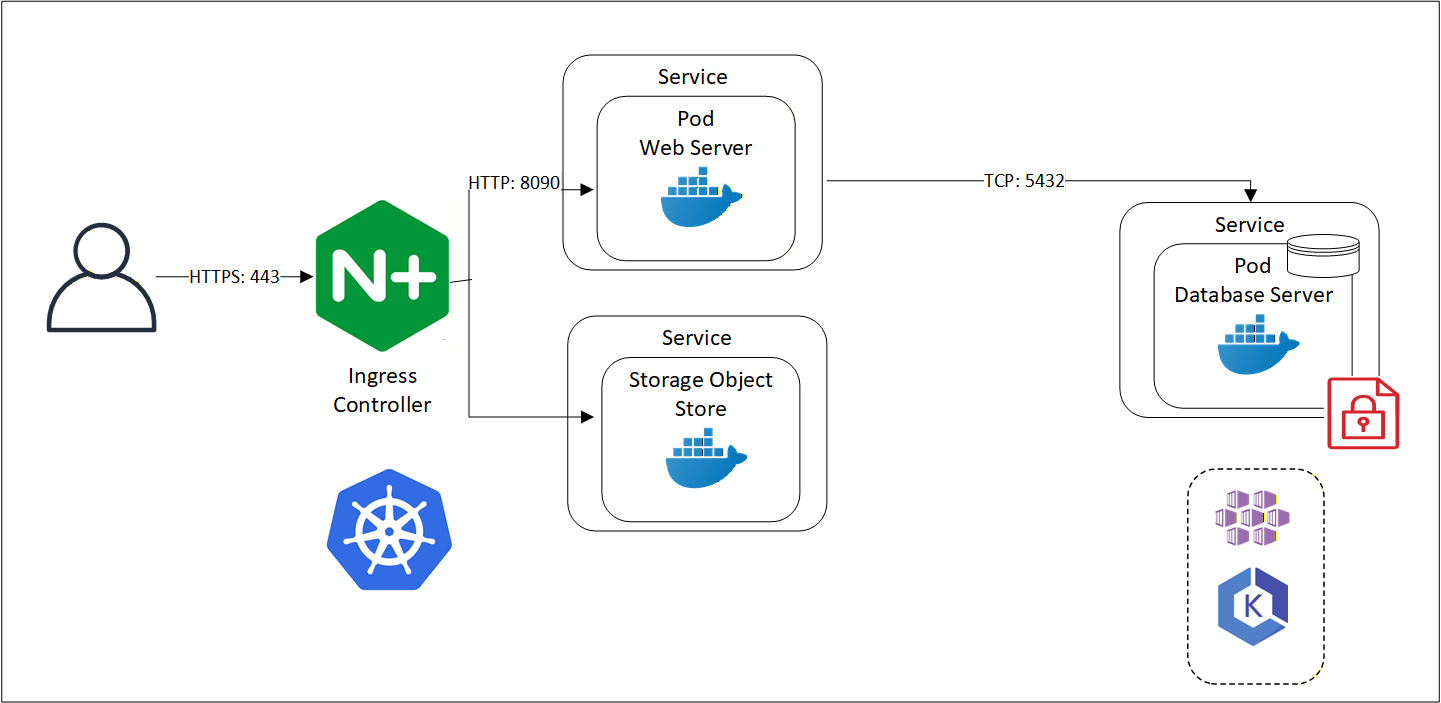
Architecture
Protegrity Anonymization uses several pods on Kubernetes. The Protegrity Anonymization Web Server processes requests and stores the data securely in an internal Database Server. The Protegrity Anonymization request is received by the Nginx-Ingress component. Ingress forwards the request to the Anon-App. The Anon-App processes the request and submits the tasks to the cluster. The scheduler schedules tasks on the workers. The Anon-app stores the metadata about the job in the Anon-DB container. Next, the workers read, write, and process the data that is stored in the Anon-Storage, the request stream, or the Cloud storage. The Anon-Storage uses S3 bucket for storing data. The communication between the scheduler and the workers is handled by the scheduler. The workers run on random ports.
The user accesses Protegrity Anonymization using HTTPS over port 443. The user requests are directed to an Ingress Controller, and the controller in turn communicates with the required pods using the following ports:
- 8090: Ingress controller and the Protegrity Anonymization API Web Service
- 8786: Ingress controller
- 8100: Ingress controller and S3 bucket
Protegrity Anonymization leverages Kubernetes for data anonymization at scale and it provides instructions and support for deployment and usage on AWS EKS and Microsoft Azure AKS.
Components
Protegrity Anonymization is composed of the following main components:
- Protegrity Anonymization REST Server: This core component exposes a REST interface through which clients can interact with the Protegrity Anonymization service. It uses an in-memory task queue and stores anonymized datasets and respective metadata on persistent storage. Protegrity Anonymization tasks are submitted to a queue and are handled in first-in first out fashion.
Note: Only one anonymization task is executed at a time in Protegrity Anonymization.
- REST Client: The client connects to the Protegrity Anonymization REST Server using an API tool, such as Postman, to create, send, and receive the Protegrity Anonymization request. It also provides a Swagger interface detailing the APIs available. The Swagger interface can also be used as a REST client for raising API requests.
- Python SDK: It is the Python programmatic interface used to communicate with the REST server.
- Anon-Storage*: It is used to read data from and write data to the storage. It uses the S3 bucket framework to perform file operations.
- Anon-DB: It is a PostgreSQL database that is used to store metadata related to Protegrity Anonymization jobs.
4.2 - Running the Anonymization samples
Instructions for running the Anonymization samples.
The example scripts under the anonymization/ folder demonstrate the usage of Anonymization APIs. For more information about the Anonymization APIs, refer to Anonymization APIs.
Note: A dedicated anonymization/docker-compose.yml is provided to start the Anonymization services.
Open a command prompt.
Navigate to the directory where AI Developer Edition is cloned.
Run the following command to start Jupyter Lab.
Copy the URL displayed and navigate to the site from a web browser. Ensure that localhost is replaced with the IP address of the system where the AI Developer Edition is set up.
In the left pane of the Jupyter Lab, navigate to anonymization/samples/python/sample-app-anonymization.
Open the anonymization.ipynb file.
Click the Play icon and follow the prompts in the Jupyter Lab.
4.3 - Using the Anonymization APIs
Listing the APIs for Anonymization.
client
Anonymization SDK Client.
Provides synchronous (AnonymizationClient) and asynchronous (AsyncAnonymizationClient)
Python clients for the Anonymization anonymization API.
Public models, enums, and exceptions are re-exported here for backward
compatibility so that from anonymization_sdk.client import X continues to work.
AnonymizationClient
class AnonymizationClient()
Synchronous client for the Anonymization anonymization API.
Arguments:
base_url - Base URL of the Anonymization API (default: http://localhost:8000)timeout - Request timeout in seconds (default: 30)headers - Additional headers to include in requests
__init__
def __init__(base_url: str = DEFAULT_BASE_URL,
             timeout: float = DEFAULT_TIMEOUT,
             headers: dict[str, str] | None = None,
             mlops_config: dict[str, Any] | None = None)
Initialize the Anonymization client.
Arguments:
base_url - Base URL of the Anonymization APItimeout - Request timeout in secondsheaders - Additional HTTP headers to include in requestsmlops_config - Default MLOps tracking configuration applied to every
anonymize, auto_anonymize, apply_anon, and
calculate_risk call. Can be overridden per-call by passing
mlops_config explicitly.
close
Close the HTTP client.
is_healthy
Check if the API is healthy and responding.
Returns:
True if the API is reachable and healthy, False otherwise.
get_health
def get_health() -> dict[str, Any]
Get detailed health information from the API.
Returns:
Dictionary with health status, version, and component states.
Raises:
APIError - If the API returns an error status.
detect_qi
def detect_qi(data: DataInputType,
              *,
              mode: DetectionMode | str = DetectionMode.AUTO,
              sampling_method: SamplingMethod | str = SamplingMethod.FAST,
              cumulative_importance_threshold: float = 0.8,
              max_quasi_identifiers: int = 10,
              uniqueness_threshold: float = 0.95,
              known_identifiers: list[str] | None = None,
              known_sensitive: list[str] | None = None,
              ignore_columns: list[str] | None = None) -> DetectionResult
Detect quasi-identifiers in a dataset.
Arguments:
data - Inline records (List[Dict]), local file path / file:// URI,
or cloud URI (s3://, gs://, azure://, etc.).
Local paths are read and encoded automatically.mode - Detection algorithm (“auto”, “ml”, “heuristic”).sampling_method - Sampling strategy (“fast”, “full”, “adaptive”).cumulative_importance_threshold - Stop adding QIs at this cumulative
importance threshold (0.0–1.0, default 0.8).max_quasi_identifiers - Maximum QIs to return (default 10).uniqueness_threshold - Columns above this uniqueness ratio are flagged
as direct identifiers (0.0–1.0, default 0.95).known_identifiers - Columns you know are direct identifiers.known_sensitive - Columns you know are sensitive.ignore_columns - Columns to skip during detection.
Returns:
DetectionResult with quasi_identifiers, direct_identifiers,
sensitive_attributes, attributes, and optional model_metrics.
Raises:
APIError - If the API returns an error.ValidationError - If the request is invalid.
generate_config
def generate_config(data: DataInputType,
                    *,
                    privacy_model: PrivacyModel
                    | str = PrivacyModel.K_ANONYMITY,
                    k: int = 5,
                    l: int | None = None,
                    t: float | None = None,
                    mode: DetectionMode | str = DetectionMode.AUTO,
                    **kwargs) -> AutoConfigResult
Generate anonymization configuration automatically.
Arguments:
data - Inline records (List[Dict]), local file path, or cloud URI.privacy_model - Privacy model (“k-anonymity”, “l-diversity”, “t-closeness”).k - K value (default 5).l - L value for l-diversity.t - T threshold for t-closeness.mode - Detection algorithm (“auto”, “ml”, “heuristic”).**kwargs - max_suppression, diversity_type, distance_metric, sampling_method.
Returns:
AutoConfigResult with detection results and a ready-to-use
anonymize_request configuration dict.
calculate_risk
def calculate_risk(data: DataInputType,
                   quasi_identifiers: list[str] | None = None,
                   *,
                   risk_threshold: float = 0.2,
                   suppress_value: str = "*",
                   include_prosecutor: bool = True,
                   include_journalist: bool = True,
                   include_marketer: bool = True,
                   mlops_config: dict[str, Any] | None = None) -> RiskResult
Calculate re-identification risk metrics.
Arguments:
data - Inline records (List[Dict]), local file path, or cloud URI.quasi_identifiers - QI column names to consider for risk.risk_threshold - Records above this threshold are “at risk” (default 0.2).suppress_value - Value marking suppressed records (default “*”).include_prosecutor - Calculate prosecutor risk (default True).include_journalist - Calculate journalist risk (default True).include_marketer - Calculate marketer risk (default True).mlops_config - MLOps config override.
Returns:
RiskResult with prosecutor, journalist, marketer risk models and
k_anonymity, highest_risk_level, equivalence class statistics.
anonymize
def anonymize(data: DataInputType,
              *,
              privacy_model: PrivacyModel | str = PrivacyModel.K_ANONYMITY,
              k: int = 5,
              l: int | None = None,
              t: float | None = None,
              attributes: list[dict[str, Any]] | None = None,
              max_suppression: float = 0.0,
              output_uri: str | None = None,
              output_format: str = "csv",
              mlops_config: dict[str, Any] | None = None,
              **kwargs) -> AnonymizeResult
Anonymize data synchronously using the specified privacy model.
Arguments:
data - Inline records (List[Dict]), local file path / file:// URI,
or cloud URI (s3://, gs://, azure://, etc.).
Local paths are read and encoded automatically.privacy_model - Privacy model (“k-anonymity”, “l-diversity”, “t-closeness”).k - K value for k-anonymity (default 5).l - L value for l-diversity.t - T threshold for t-closeness (0.0–1.0).attributes - Attribute configurations - list of dicts with name,
type (“quasi_identifier”, “sensitive”, “identifier”, “insensitive”),
and optional hierarchy.max_suppression - Maximum fraction of records to suppress (0.0–1.0).output_uri - Cloud URI to write results to instead of returning inline
(e.g. "s3://bucket/output.csv"). When set, result_path is
populated in the response instead of data.output_format - Format for cloud output (“csv”, “parquet”, “json”).mlops_config - MLOps tracking configuration.**kwargs - diversity_type, distance_metric, use_lattice_search, etc.
Returns:
AnonymizeResult with data (inline), or result_path (cloud output),
row_count, suppressed_count, and metrics.
submit_job
def submit_job(data: DataInputType,
               *,
               privacy_model: PrivacyModel | str = PrivacyModel.K_ANONYMITY,
               k: int = 5,
               l: int | None = None,
               t: float | None = None,
               attributes: list[dict[str, Any]] | None = None,
               max_suppression: float = 0.0,
               **kwargs) -> JobResponse
Submit an anonymization job for asynchronous processing.
Arguments:
data - Inline records (List[Dict]), local file path, or cloud URI.privacy_model - Privacy model (“k-anonymity”, “l-diversity”, “t-closeness”).k - K value for k-anonymity (default 5).l - L value for l-diversity.t - T threshold for t-closeness.attributes - Attribute configurations.max_suppression - Maximum suppression rate (0.0–1.0).**kwargs - Additional parameters (diversity_type, distance_metric).
Returns:
JobResponse with job_id, status, message, and created_at timestamp.
get_job_status
def get_job_status(job_id: str) -> JobStatusResponse
Get the status of an anonymization job.
Poll this method to track progress of jobs submitted using submit_job().
The response includes progress percentage, status, timestamps, and
any error messages if the job failed.
Arguments:
job_id - Unique job identifier returned by submit_job()
Returns:
JobStatusResponse with:
- job_id: Job identifier
- status: Current status (pending, running, completed, failed, cancelled)
- progress: Progress percentage (0-100)
- message: Status message
- created_at: Job creation timestamp
- updated_at: Last update timestamp
- completed_at: Completion timestamp (if completed)
- result_path: Path to result file (if completed)
- error: Error message (if failed)
Raises:
APIError - If job not found or API call fails
cancel_job
def cancel_job(job_id: str) -> None
Cancel a pending or running anonymization job.
Cancels a job that was submitted using submit_job(). Only jobs with
status PENDING or RUNNING can be cancelled. Completed, failed, or
already cancelled jobs cannot be cancelled.
Arguments:
job_id - Unique job identifier returned by submit_job()
Raises:
APIError - If job not found or cannot be cancelled
apply_anon
def apply_anon(job_id: str,
               data: DataInputType,
               *,
               mlops_config: dict[str, Any] | None = None) -> "ApplyResult"
Apply a saved anonymization solution to new data.
Re-uses the generalization levels computed during a prior
anonymize() call identified by job_id. The lattice is
not recomputed.
Arguments:
job_id - Solution identifier returned in AnonymizeResult.job_id.data - Inline records (List[Dict]), local file path, or cloud URI.mlops_config - Optional per-request MLOps tracking configuration.
Returns:
ApplyResult with anonymized data, row/suppressed counts,
source_job_id, and privacy_model.
list_models
def list_models(*,
                model_type: str | None = None,
                all_metrics: bool = False) -> dict[str, Any]
List tracked anonymization models in Production.
Arguments:
model_type - Optional filter by privacy model type (e.g. “k-anonymity”).all_metrics - If True, return all metrics instead of only the promotion metric.
Returns:
Raw response dict with ‘models’ list and ‘count’.
list_jobs
def list_jobs(*,
              status: JobStatus | str | None = None,
              limit: int = 100,
              offset: int = 0) -> "JobListResult"
List / browse all jobs with optional status filter and pagination.
Returns newest jobs first.
Arguments:
status - Optional filter (e.g. JobStatus.COMPLETED or “failed”)limit - Page size (1-1000, default 100)offset - Page offset (default 0)
Returns:
JobListResult with jobs list, total count, limit, and offset.
Raises:
APIError - If the API call fails.
get_job_history
def get_job_history(job_id: str) -> list["JobHistoryEntry"]
Get the full state-transition audit trail for a job.
Each create/update call on the server appends an entry with the
status, step, progress, and timestamp at that point.
Arguments:
job_id - Unique job identifier.
Returns:
List of JobHistoryEntry ordered by sequence.
Raises:
APIError - If job not found or API call fails.
wait_for_job
def wait_for_job(job_id: str,
                 *,
                 poll_interval: float = 2.0,
                 timeout: float = 600.0,
                 callback: Any | None = None) -> JobStatusResponse
Poll a job until it reaches a terminal state and return its status.
Arguments:
job_id - Unique job identifier returned by submit_job().poll_interval - Seconds between status polls (default 2s).timeout - Maximum seconds to wait (default 600s / 10 min).callback - Optional callable (JobStatusResponse) -> None
invoked after each poll.
Returns:
JobStatusResponse at the terminal state. The anonymization
result (if completed) is available in status.context["result"].
Raises:
APIError - If the job ends in a failed state.TimeoutError - If the job does not complete within timeout.
auto_anonymize
def auto_anonymize(data: DataInputType,
                   *,
                   privacy_model: PrivacyModel
                   | str = PrivacyModel.K_ANONYMITY,
                   k: int = 5,
                   l: int | None = None,
                   t: float | None = None,
                   mode: DetectionMode | str = DetectionMode.AUTO,
                   mlops_config: dict[str, Any] | None = None,
                   **kwargs) -> AutoAnonymizeResult
Automatically detect QIs and anonymize in one step.
Arguments:
data - Inline records (List[Dict]), local file path, or cloud URI.privacy_model - Privacy model (“k-anonymity”, “l-diversity”, “t-closeness”).k - K value (default 5).l - L value for l-diversity.t - T threshold for t-closeness.mode - Detection algorithm (“auto”, “ml”, “heuristic”).mlops_config - MLOps tracking configuration.**kwargs - max_suppression, sampling_method, use_lattice_search, etc.
Returns:
AutoAnonymizeResult with detection results and anonymized data.
validate
def validate(
        data: DataInputType,
        quasi_identifiers: list[str] | None = None,
        *,
        privacy_model: PrivacyModel | str = PrivacyModel.K_ANONYMITY,
        k: int = 5,
        l: int | None = None,
        t: float | None = None,
        sensitive_attributes: list[str] | None = None) -> ValidationResult
Validate that data meets privacy requirements.
Arguments:
data - Inline records (List[Dict]), local file path, or cloud URI.quasi_identifiers - QI column names to check.privacy_model - Privacy model to validate against.k - Required k for k-anonymity (default 5).l - Required l for l-diversity.t - Required t for t-closeness.sensitive_attributes - Sensitive columns (required for l-diversity/t-closeness).
Returns:
ValidationResult with is_valid, model_type, violations, statistics.
measure
def measure(original_data: DataInputType,
            anonymized_data: DataInputType,
            quasi_identifiers: list[str] | None = None) -> MetricsResult
Measure anonymization quality metrics.
Arguments:
original_data - Original dataset - inline records, local path, or cloud URI.anonymized_data - Anonymized dataset - inline records, local path, or cloud URI.quasi_identifiers - QI column names that were generalized.
Returns:
MetricsResult with information_loss and detailed metrics.
create_pattern
def create_pattern(name: str,
                   classification: str,
                   column_patterns: list[str],
                   *,
                   priority: int = 50,
                   value_patterns: list[str] | None = None,
                   min_match_ratio: float = 0.8,
                   description: str | None = None) -> Pattern
Create a custom detection pattern.
Patterns are used during QI detection to automatically classify columns
based on their names and values. Custom patterns take precedence over
built-in patterns.
Arguments:
name - Unique name for the pattern (e.g., ‘customer_id’)classification - Classification type - one of:- “DI”: Direct Identifier (e.g., SSN, email)
- “QI”: Quasi-Identifier (e.g., age, zipcode)
- “SI”: Sensitive Identifier (e.g., salary, diagnosis)
- “NSI”: Non-Sensitive Identifier (safe to publish)
column_patterns - List of column name patterns to match.
Case-insensitive. Use ‘’ as wildcard (e.g., [’_id’, ‘user*’])priority - Priority level (1-1000, lower = checked first). Default: 50value_patterns - Optional list of regex patterns for value validationmin_match_ratio - Minimum ratio of values that must match (0-1). Default: 0.8description - Optional description of what this pattern detects
Returns:
Pattern object with assigned ID and metadata
Raises:
APIError - If creation fails (e.g., duplicate name)ValidationError - If parameters are invalid
list_patterns
def list_patterns(classification: str | None = None) -> PatternListResult
List all custom detection patterns.
Arguments:
classification - Optional filter by classification (DI, QI, SI, NSI)
Returns:
PatternListResult containing list of patterns and total count
get_pattern
def get_pattern(pattern_id: str) -> Pattern
Get a specific pattern by ID.
Arguments:
pattern_id - The pattern ID to retrieve
Returns:
Pattern object
Raises:
APIError - If pattern not found (404)
update_pattern
def update_pattern(pattern_id: str,
                   *,
                   name: str | None = None,
                   classification: str | None = None,
                   column_patterns: list[str] | None = None,
                   priority: int | None = None,
                   value_patterns: list[str] | None = None,
                   min_match_ratio: float | None = None,
                   description: str | None = None) -> Pattern
Update an existing pattern.
Only provided fields will be updated; others remain unchanged.
Arguments:
pattern_id - The pattern ID to updatename - New name for the patternclassification - New classification (DI, QI, SI, NSI)column_patterns - New column name patternspriority - New priority (1-1000)value_patterns - New value regex patternsmin_match_ratio - New minimum match ratio (0-1)description - New description
Returns:
Updated Pattern object
Raises:
APIError - If pattern not found or update failsValidationError - If parameters are invalid
delete_pattern
def delete_pattern(pattern_id: str) -> dict[str, Any]
Delete a pattern by ID.
Arguments:
pattern_id - The pattern ID to delete
Returns:
Dictionary with confirmation message
Raises:
APIError - If pattern not found (404)
delete_all_patterns
def delete_all_patterns() -> dict[str, Any]
Delete all custom patterns.
WARNING: This removes all customer-defined patterns.
Built-in patterns from the YAML config are not affected.
Returns:
Dictionary with count of deleted patterns
reload_patterns
def reload_patterns() -> dict[str, Any]
Reload patterns from storage file.
Use this to sync after manual file edits.
Returns:
Dictionary with count of reloaded patterns
dp_compute
def dp_compute(data: DataInputType,
               *,
               mechanism: DPMechanismType | str = DPMechanismType.MEAN,
               column: str | None = None,
               columns: list[str] | None = None,
               group_by: str | None = None,
               epsilon: float = 1.0,
               delta: float = 0.0,
               noise_type: DPNoiseType | str = DPNoiseType.LAPLACE,
               bounds: tuple | None = None,
               bins: int | None = None,
               histogram_range: tuple | None = None,
               session_id: str | None = None,
               predicate: str | None = None,
               candidates: list | None = None,
               utility_scores: list[float] | None = None,
               sensitivity: float | None = None,
               epsilon_map: dict[str, float] | None = None,
               min_group_size: int | None = None) -> DPComputeResult
Compute a differentially private statistic on a data column.
Arguments:
data - Inline records (List[Dict]), local file path, or cloud URI.mechanism - DP mechanism (“mean”, “sum”, “variance”,
“histogram”, “count”, “exponential”).column - Column name for single-column queries.columns - Column names for multi-column queries.group_by - Categorical column to group by.epsilon - Privacy parameter epsilon (>0).delta - Privacy parameter delta (>=0, <1).noise_type - “laplace” or “gaussian”.bounds - (lower, upper) clipping bounds. Required for mean/sum/variance.bins - Number of histogram bins (histogram only).histogram_range - (min, max) range for histogram bins.session_id - Budget session ID for cumulative tracking.predicate - Filter expression (e.g., “> 50”, “<= 100”).candidates - Candidate outputs (exponential mechanism only).utility_scores - Utility scores for candidates (exponential only).sensitivity - Utility function sensitivity (exponential only).epsilon_map - Per-column or per-group epsilon overrides.min_group_size - Minimum rows per group (default 5).
Returns:
DPComputeResult with private_value (single) or results dict (multi/group).
dp_stream_update
def dp_stream_update(session_id: str | None = None,
                     data: DataInputType | None = None,
                     *,
                     column: str | None = None,
                     columns: list[str] | None = None,
                     group_by: str | None = None,
                     mechanism: DPStreamMechanismType | str | None = None,
                     epsilon: float | None = None,
                     delta: float | None = None,
                     noise_type: DPNoiseType | str | None = None,
                     bounds: tuple | None = None,
                     get_result: bool = False,
                     window_size: int | None = None,
                     epsilon_map: dict[str, float] | None = None,
                     min_group_size: int | None = None,
                     budget_session_id: str | None = None) -> DPStreamResult
Feed data into a streaming DP session.
On the first call for a session_id, provide mechanism, epsilon, and bounds.
Subsequent calls only need session_id, data, and column.
Arguments:
session_id - Unique session identifier.data - Batch of records. Mutually exclusive with data_path.data_path - Cloud/local URI for data batch.column - Column name for single-column streaming.columns - Column names for multi-column streaming.group_by - Categorical column to group by.mechanism - Streaming mechanism. Required on first call.epsilon - Privacy epsilon. Required on first call.delta - Privacy delta.noise_type - Noise mechanism.bounds - Clipping bounds. Required on first call (except for count).get_result - If True, also return the current private result.window_size - Window size for sliding/tumbling window mechanisms.epsilon_map - Per-column or per-group epsilon overrides.min_group_size - Minimum rows per group (default 5).budget_session_id - Link to a budget session for automatic deduction.
Returns:
DPStreamResult with session status and optional results.
dp_stream_delete
def dp_stream_delete(session_id: str) -> None
Delete a streaming DP session.
Arguments:
session_id - Session to delete.
dp_stream_list_sessions
def dp_stream_list_sessions() -> list
List all active streaming DP sessions.
Returns:
List of dicts with session_id, mechanism, column,
batches_processed, total_count.
dp_budget_create
def dp_budget_create(session_id: str,
                     epsilon_budget: float,
                     delta_budget: float = 0.0,
                     composition: str = "basic") -> DPBudgetStatus
Create a privacy budget session.
Arguments:
session_id - Unique session identifier.epsilon_budget - Total epsilon budget.delta_budget - Total delta budget.composition - Composition mode (“basic” or “rdp”). RDP requires
delta_budget > 0 and yields tighter privacy accounting.
Returns:
DPBudgetStatus with initial budget state.
dp_budget_status
def dp_budget_status(session_id: str) -> DPBudgetStatus
Get privacy budget status for a session.
Arguments:
session_id - Session to query.
Returns:
DPBudgetStatus with current spend and remaining budget.
dp_budget_delete
def dp_budget_delete(session_id: str) -> None
Delete a privacy budget session.
Arguments:
session_id - Session to delete.
dp_advise_composition
def dp_advise_composition(epsilon_budget: float,
                          num_queries: int,
                          delta_budget: float = 0.0,
                          delta_per_query: float = 0.0) -> dict
Get composition advice for planned queries.
Returns optimal per-query epsilon under basic and RDP composition
with a recommendation.
Arguments:
epsilon_budget - Total epsilon budget available.num_queries - Number of planned queries.delta_budget - Total delta budget (required for RDP comparison).delta_per_query - Delta per query for Gaussian noise. 0 = Laplace.
Returns:
Dict with basic/rdp analysis, recommendation, and savings_pct.
audit_list
def audit_list(*,
               operation: str | None = None,
               status: str | None = None,
               limit: int = 50,
               offset: int = 0) -> list[AuditEntry]
List audit log entries.
Arguments:
operation - Filter by operation (dp_compute, anonymize_sync, …).status - Filter by outcome (‘success’ or ’error’).limit - Max entries to return (1–500).offset - Pagination offset.
Returns:
List of AuditEntry objects.
audit_get
def audit_get(entry_id: str) -> AuditEntry
Get a single audit entry.
Arguments:
entry_id - Audit entry ID.
Returns:
AuditEntry with full details.
Raises:
APIError - If entry not found (404).
AsyncAnonymizationClient
class AsyncAnonymizationClient()
Asynchronous client for the Anonymization anonymization API.
Same interface as AnonymizationClient but with async/await support.
__init__
def __init__(base_url: str = DEFAULT_BASE_URL,
             timeout: float = DEFAULT_TIMEOUT,
             headers: dict[str, str] | None = None,
             mlops_config: dict[str, Any] | None = None)
Initialize the async Anonymization client.
Arguments:
base_url - Base URL of the Anonymization APItimeout - Request timeout in secondsheaders - Additional HTTP headers to include in requestsmlops_config - Default MLOps tracking configuration applied to every
anonymize, auto_anonymize, apply_anon, and
calculate_risk call. Can be overridden per-call.
close
async def close() -> None
Close the HTTP client.
is_healthy
async def is_healthy() -> bool
Check if the API is healthy and responding.
get_health
async def get_health() -> dict[str, Any]
Get detailed health information.
detect_qi
async def detect_qi(
        data: DataInputType,
        *,
        mode: DetectionMode | str = DetectionMode.AUTO,
        sampling_method: SamplingMethod | str = SamplingMethod.FAST,
        cumulative_importance_threshold: float = 0.8,
        max_quasi_identifiers: int = 10,
        uniqueness_threshold: float = 0.95,
        known_identifiers: list[str] | None = None,
        known_sensitive: list[str] | None = None,
        ignore_columns: list[str] | None = None) -> DetectionResult
Detect quasi-identifiers (async version).
Refer to synchronous detect_qi() for full documentation.
generate_config
async def generate_config(data: DataInputType,
                          *,
                          privacy_model: PrivacyModel
                          | str = PrivacyModel.K_ANONYMITY,
                          k: int = 5,
                          l: int | None = None,
                          t: float | None = None,
                          mode: DetectionMode | str = DetectionMode.AUTO,
                          **kwargs) -> AutoConfigResult
Generate anonymization configuration automatically (async version).
calculate_risk
async def calculate_risk(
        data: DataInputType,
        quasi_identifiers: list[str] | None = None,
        *,
        risk_threshold: float = 0.2,
        suppress_value: str = "*",
        include_prosecutor: bool = True,
        include_journalist: bool = True,
        include_marketer: bool = True,
        mlops_config: dict[str, Any] | None = None) -> RiskResult
Calculate re-identification risk metrics (async version).
anonymize
async def anonymize(data: DataInputType,
                    *,
                    privacy_model: PrivacyModel
                    | str = PrivacyModel.K_ANONYMITY,
                    k: int = 5,
                    l: int | None = None,
                    t: float | None = None,
                    attributes: list[dict[str, Any]] | None = None,
                    max_suppression: float = 0.0,
                    output_uri: str | None = None,
                    output_format: str = "csv",
                    mlops_config: dict[str, Any] | None = None,
                    **kwargs) -> AnonymizeResult
Anonymize data (async version). Refer to synchronous anonymize() for full documentation.
submit_job
async def submit_job(data: DataInputType,
                     *,
                     privacy_model: PrivacyModel
                     | str = PrivacyModel.K_ANONYMITY,
                     k: int = 5,
                     l: int | None = None,
                     t: float | None = None,
                     attributes: list[dict[str, Any]] | None = None,
                     max_suppression: float = 0.0,
                     **kwargs) -> JobResponse
Submit anonymization job (async version).
Refer to synchronous submit_job() for full documentation.
get_job_status
async def get_job_status(job_id: str) -> JobStatusResponse
Get job status (async version).
Refer to synchronous get_job_status() for full documentation.
cancel_job
async def cancel_job(job_id: str) -> None
Cancel job (async version). Refer to synchronous cancel_job() for full documentation.
apply_anon
async def apply_anon(
        job_id: str,
        data: DataInputType,
        *,
        mlops_config: dict[str, Any] | None = None) -> "ApplyResult"
Apply saved anonymization (async). Refer to synchronous apply_anon() for full docs.
list_models
async def list_models(*,
                      model_type: str | None = None,
                      all_metrics: bool = False) -> dict[str, Any]
List tracked anonymization models (async).
Refer to synchronous list_models() for full docs.
list_jobs
async def list_jobs(*,
                    status: JobStatus | str | None = None,
                    limit: int = 100,
                    offset: int = 0) -> "JobListResult"
List jobs (async version). Refer to synchronous list_jobs() for full documentation.
get_job_history
async def get_job_history(job_id: str) -> list["JobHistoryEntry"]
Get job history (async version).
Refer to synchronous get_job_history() for full documentation.
wait_for_job
async def wait_for_job(job_id: str,
                       *,
                       poll_interval: float = 2.0,
                       timeout: float = 600.0,
                       callback: Any | None = None) -> JobStatusResponse
Async version of wait_for_job().
Refer to synchronous wait_for_job() for full documentation.
auto_anonymize
async def auto_anonymize(data: DataInputType,
                         *,
                         privacy_model: PrivacyModel
                         | str = PrivacyModel.K_ANONYMITY,
                         k: int = 5,
                         l: int | None = None,
                         t: float | None = None,
                         mode: DetectionMode | str = DetectionMode.AUTO,
                         mlops_config: dict[str, Any] | None = None,
                         **kwargs) -> AutoAnonymizeResult
Auto-detect and anonymize (async version).
Refer to synchronous auto_anonymize() for full docs.
validate
async def validate(
        data: DataInputType,
        quasi_identifiers: list[str] | None = None,
        *,
        privacy_model: PrivacyModel | str = PrivacyModel.K_ANONYMITY,
        k: int = 5,
        l: int | None = None,
        t: float | None = None,
        sensitive_attributes: list[str] | None = None) -> ValidationResult
Validate privacy requirements (async version).
measure
async def measure(original_data: DataInputType,
                  anonymized_data: DataInputType,
                  quasi_identifiers: list[str] | None = None) -> MetricsResult
Measure anonymization quality metrics (async version).
create_pattern
async def create_pattern(name: str,
                         classification: str,
                         column_patterns: list[str],
                         *,
                         priority: int = 50,
                         value_patterns: list[str] | None = None,
                         min_match_ratio: float = 0.8,
                         description: str | None = None) -> Pattern
Create a custom detection pattern (async version).
list_patterns
async def list_patterns(
        classification: str | None = None) -> PatternListResult
List all custom detection patterns (async version).
get_pattern
async def get_pattern(pattern_id: str) -> Pattern
Get a specific pattern by ID (async version).
update_pattern
async def update_pattern(pattern_id: str,
                         *,
                         name: str | None = None,
                         classification: str | None = None,
                         column_patterns: list[str] | None = None,
                         priority: int | None = None,
                         value_patterns: list[str] | None = None,
                         min_match_ratio: float | None = None,
                         description: str | None = None) -> Pattern
Update an existing pattern (async version).
delete_pattern
async def delete_pattern(pattern_id: str) -> dict[str, Any]
Delete a pattern by ID (async version).
delete_all_patterns
async def delete_all_patterns() -> dict[str, Any]
Delete all custom patterns (async version).
reload_patterns
async def reload_patterns() -> dict[str, Any]
Reload patterns from storage file (async version).
audit_list
async def audit_list(*,
                     operation: str | None = None,
                     status: str | None = None,
                     limit: int = 50,
                     offset: int = 0) -> list[AuditEntry]
List audit log entries (async version).
audit_get
async def audit_get(entry_id: str) -> AuditEntry
Get a single audit entry (async version).
exceptions
Anonymization SDK Exceptions.
Custom exception hierarchy for the Anonymization SDK client library.
All SDK exceptions inherit from AnonymizationClientError.
AnonymizationClientError
class AnonymizationClientError(Exception)
Base exception for all SDK errors.
ValidationError
class ValidationError(AnonymizationClientError)
Request validation failed (422 from server or client-side validation).
APIError
class APIError(AnonymizationClientError)
API returned an error response (4xx or 5xx status code).
AnonymizationConnectionError
class AnonymizationConnectionError(AnonymizationClientError)
Failed to connect to the API (network/timeout error).
TierRestrictionError
class TierRestrictionError(AnonymizationClientError)
Feature not available in the current server tier (403 from server).
The server returned a tier-restriction error indicating the requested
feature requires a higher tier. Inspect the structured fields for details.
models
Anonymization SDK Response Models and Enums.
Contains all enums (PrivacyModel, DetectionMode, etc.) and response
dataclasses (DetectionResult, RiskResult, AnonymizeResult, etc.) used
by both the synchronous and asynchronous Anonymization clients.
PrivacyModel
class PrivacyModel(StrEnum)
Supported privacy models.
DetectionMode
class DetectionMode(StrEnum)
QI detection algorithm modes.
SamplingMethod
class SamplingMethod(StrEnum)
Sampling methods for detection.
RiskLevel
Risk level classifications.
JobStatus
Job execution status.
AttributeClassification
@dataclass
class AttributeClassification()
Classification result for a single attribute.
ModelMetrics
@dataclass
class ModelMetrics()
ML model performance metrics.
DetectionResult
@dataclass
class DetectionResult()
Result of QI detection.
from_dict
@classmethod
def from_dict(cls, data: dict[str, Any]) -> "DetectionResult"
Create from API response dict.
ProsecutorRisk
@dataclass
class ProsecutorRisk(_BaseAttackerRisk)
Prosecutor risk model result.
JournalistRisk
@dataclass
class JournalistRisk(_BaseAttackerRisk)
Journalist risk model result.
MarketerRisk
@dataclass
class MarketerRisk()
Marketer risk model result.
from_dict
@classmethod
def from_dict(cls, data: dict[str, Any]) -> "MarketerRisk"
Create from API response dict.
RiskResult
@dataclass
class RiskResult()
Complete risk metrics result.
from_dict
@classmethod
def from_dict(cls, data: dict[str, Any]) -> "RiskResult"
Create from API response dict.
is_k_anonymous
def is_k_anonymous(k: int) -> bool
Check if data satisfies k-anonymity.
MetricsResult
@dataclass
class MetricsResult()
Anonymization quality metrics.
from_dict
@classmethod
def from_dict(cls, data: dict[str, Any]) -> "MetricsResult"
Create from API response dict.
AnonymizeResult
@dataclass
class AnonymizeResult()
Result of anonymization operation.
result_path
Cloud storage URI if saved to cloud
job_id
Solution identifier for apply_anon()
from_dict
@classmethod
def from_dict(cls, data: dict[str, Any]) -> "AnonymizeResult"
Create from API response dict.
ApplyResult
@dataclass
class ApplyResult()
Result of applying a saved anonymization solution to new data.
from_dict
@classmethod
def from_dict(cls, data: dict[str, Any]) -> "ApplyResult"
Create from API response dict.
ValidationResult
@dataclass
class ValidationResult()
Result of privacy validation.
from_dict
@classmethod
def from_dict(cls, data: dict[str, Any]) -> "ValidationResult"
Create from API response dict.
AutoConfigResult
@dataclass
class AutoConfigResult()
Result of auto-configuration generation.
from_dict
@classmethod
def from_dict(cls, data: dict[str, Any]) -> "AutoConfigResult"
Create from API response dict.
AutoAnonymizeResult
@dataclass
class AutoAnonymizeResult()
Result of combined detection + anonymization.
from_dict
@classmethod
def from_dict(cls, data: dict[str, Any]) -> "AutoAnonymizeResult"
Create from API response dict.
Pattern
@dataclass
class Pattern()
Detection pattern for automatic QI classification.
from_dict
@classmethod
def from_dict(cls, data: dict[str, Any]) -> "Pattern"
Create from API response dict.
PatternListResult
@dataclass
class PatternListResult()
Result of pattern list operation.
from_dict
@classmethod
def from_dict(cls, data: dict[str, Any]) -> "PatternListResult"
Create from API response dict.
JobResponse
@dataclass
class JobResponse()
Response for job submission.
from_dict
@classmethod
def from_dict(cls, data: dict[str, Any]) -> "JobResponse"
Create from API response dict.
JobStatusResponse
@dataclass
class JobStatusResponse()
Response for job status query.
from_dict
@classmethod
def from_dict(cls, data: dict[str, Any]) -> "JobStatusResponse"
Create from API response dict.
JobHistoryEntry
@dataclass
class JobHistoryEntry()
A single point-in-time snapshot from the job audit trail.
from_dict
@classmethod
def from_dict(cls, data: dict[str, Any]) -> "JobHistoryEntry"
Create from API response dict.
JobListResult
@dataclass
class JobListResult()
Paginated list of jobs.
from_dict
@classmethod
def from_dict(cls, data: dict[str, Any]) -> "JobListResult"
Create from API response dict.
DPMechanismType
class DPMechanismType(StrEnum)
Supported batch DP mechanisms.
DPStreamMechanismType
class DPStreamMechanismType(StrEnum)
Supported streaming DP mechanisms.
DPNoiseType
class DPNoiseType(StrEnum)
Supported noise mechanisms.
DPComputeResult
@dataclass
class DPComputeResult()
Result of a batch DP computation.
from_dict
@classmethod
def from_dict(cls, data: dict[str, Any]) -> "DPComputeResult"
Create from API response dict.
DPStreamResult
@dataclass
class DPStreamResult()
Result of a streaming DP update.
from_dict
@classmethod
def from_dict(cls, data: dict[str, Any]) -> "DPStreamResult"
Create from API response dict.
DPBudgetStatus
@dataclass
class DPBudgetStatus()
Privacy budget status for a session.
from_dict
@classmethod
def from_dict(cls, data: dict[str, Any]) -> "DPBudgetStatus"
Create from API response dict.
AuditEntry
@dataclass
class AuditEntry()
A single audit log entry.
from_dict
@classmethod
def from_dict(cls, data: dict[str, Any]) -> "AuditEntry"
Create from API response dict.
4.4 - Uninstalling Anonymization
Instructions for uninstalling the Anonymization feature.
Open a command prompt.
Navigate to the cloned repository location.
Navigate to the anonymization directory.
Run the following command to remove the containers and images.
docker compose down --rmi all
5 - Data Protection
Protect and unprotect sensitive data using tokenization and encryption.
Protegrity AI Developer Edition API Service provides tokenization and encryption using REST API endpoints. The API endpoints are easy-to-use and require minimal configuration. Registration is required to send API requests to the service for protecting and unprotecting data. A set of predefined users and roles are provided. Based on the role used, the different scenarios can be tried and tested.
Verify that the AI Developer Edition Service is running before using the APIs. The service availability can be monitored on the status page, refer to AI Developer Edition System Status.
For the steps to set up and configure Data Protection for AI Developer Edition, refer to Installation and Setup Guide.
5.1 - Running the Data Protection samples
Instructions for running the Data Protection samples.
Applications are provided out-of-the-box to test and understand the capabilities of AI Developer Edition.
Before running the samples, verify that the AI Developer Edition Service is running. The service availability can be monitored on the status page, refer to AI Developer Edition System Status.
Running the sample find application
This sample requires that the Data Discovery feature is installed and running.
- Open a command prompt.
- Navigate to the directory where AI Developer Edition is cloned.
- Run the sample application using the following command.
python solutions/find-and-redact/sample-app-find.py
bash solutions/find-and-redact/sample-app-find.sh
- View the output of the files processed on the screen. The output displays a list of sensitive items in the source file.
Running the sample find and redact application
This sample requires that the Data Discovery feature is installed and running.
- Open a command prompt.
- Navigate to the directory where AI Developer Edition is cloned.
- Run the sample application using the following command.
python solutions/find-and-redact/sample-app-find-and-redact.py
bash solutions/find-and-redact/sample-app-find-and-redact.sh
- View the output of the files processed on the screen. The output displays a list of sensitive items in the source file. It also displays the location and name of the output file with the redacted output.
- View the processed output file in the output directory.
Using the protection notebook
The online notebook provides a quick way to test tokenization using just a browser.
Ensure that the required credentials are obtained and environment variables specified, using the steps from Obtaining access to the AI Developer Edition API Service.
Navigate to the online notebook, refer to Protegrity Data Protection Jupyter notebook.
Click the Play button to progress through the notebook. Specify the email address, password, and API key when prompted.
Running the sample find and protect application
This sample requires that the Data Discovery feature is installed and running.
- Ensure that the required credentials are obtained and environment variables specified, using the steps from Obtaining access to the AI Developer Edition API Service.
- Open a command prompt.
- Navigate to the directory where AI Developer Edition is cloned.
- Run the sample application using the following command.
python solutions/find-and-protect/sample-app-find-and-protect.py
bash solutions/find-and-protect/sample-app-find-and-protect.sh
View the output of the files processed on the screen. The output displays the protected data and unprotected data.
View the processed output file in the output directory. The solutions/find-and-protect/output-protect.txt file is generated with protected, tokenized-like, values.
To obtain the original data, run the following command.
python solutions/find-and-protect/sample-app-find-and-unprotect.py
bash solutions/find-and-protect/sample-app-find-and-unprotect.sh
This reads the `solutions/find-and-protect/output-protect.txt` file and produces the `solutions/find-and-protect/output-unprotect.txt` file with original values.
Running the script for protecting data
The sample-app-protection showcases the various scenarios to protect, unprotect, and reprotect data.
Understanding Users and Roles
The users and roles are built-in for impersonate testing. Leverage any of the preconfigured users to showcase Protegrity’s Role-Based Access Controls. Using a different user will result in distinct views over sensitive data. Some users will only be able to protect data but will not be able to reverse the operation. Some users will only be able to re-identify selected attributes.
To use any of the roles, simply pass the chosen value to the payload in the user attribute during the protect or unprotect operation. If the user is not specified, the request will default to superuser.
The following roles and users have been configured and are available for use:
| Role | User | Description |
|---|
| ADMIN | admin, devops, jay.banerjee | The role can protect all data but cannot unprotect. If this role attempts to unprotect, they will only see protected values. |
| FINANCE | finance, robin.goodwill | The role can unprotect all PII and PCI data. The role cannot protect any data. If this role attempts to unprotect data without authorization they will only see null values. |
| MARKETING | marketing, merlin.ishida | The role can unprotect some PII data that is required for analytical research and campaign outreach. When attempting to unprotect data without authorization, they will only see null values. The role cannot protect any data. |
| HR | hr, paloma.torres | The role can unprotect all PII data but cannot view any PCI data. When attempting to unprotect data without authorization, they will only see null values. The role cannot protect any data. |
| OTHER | superuser | The role can perform any protect and unprotect operation. This superuser role has been made available for testing only. It is strongly advised that superuser roles should not be created. |
Additionally, it is possible to enter in any username to simulate unauthorized user behavior.
Understanding the Data Elements
Provided here is a list of supported data elements. For a mapping of the Data Element and the Entity Type, refer to Supported Sensitive Entity Types.
For more information about the data elements policy, refer to Policy Definition.
| Name | Description |
|---|
| name | Protect or unprotect name of a person. |
| name_de | Protect or unprotect name of a person in the German language. |
| name_fr | Protect or unprotect name of a person in the French language. |
| address | Protect or unprotect an address. |
| address_de | Protect or unprotect an address in the German language. |
| address_fr | Protect or unprotect an address in the French language. |
| city | Protect or unprotect a town or city. |
| city_de | Protect or unprotect a town or city name in the German language. |
| city_fr | Protect or unprotect a town or city name in the French language. |
| postcode | Protect or unprotect a postal code with digits and characters. |
| zipcode | Protect or unprotect a postal code with digits only. |
| phone | Protect or unprotect a phone number. |
| email | Protect or unprotect an email. |
| datetime | Protect or unprotect all components of a datetime string date, month, and year. The input for the datetime data element must be in the yyyy-mm-dd [hh:mm:ss] format. |
| datetime_yc | Protect or unprotect a datetime string. Year will be in the clear. The input for the datetime data element must be in the yyyy-mm-dd [hh:mm:ss] format. |
| int | Protect or unprotect a 4-byte integer string. |
| nin | Protect or unprotect a National Insurance Number UK. |
| ssn | Protect or unprotect a Social Security Number US. |
| ccn | Protect or unprotect a Credit Card Number. |
| ccn_bin | Protect or unprotect a Credit Card Number. Leaves 8-digit BIN in the clear. |
| passport | Protect or unprotect a passport number. |
| iban | Protect or unprotect an International Banking Account Number. |
| iban_cc | Protect or unprotect an International Banking Account Number. Leaves letters in the clear. |
| string | Protect or unprotect a string. |
| number | Protect or unprotect a number. |
| text | Protect or unprotect text using encryption. |
| mask | Unprotect with any user not having permission to perform unprotect operation. The output is masked. |
| fpe_numeric | Protect or unprotect a number using a Format Preserving Encryption data element. |
| fpe_alpha | Protect or unprotect a string containing alphabets using a Format Preserving Encryption data element. |
| fpe_alphanumeric | Protect or unprotect a string containing alphabets and numbers using a Format Preserving Encryption data element. |
| fpe_latin1_alpha | Protect or unprotect a string containing basic latin and latin-1 supplement characters using a Format Preserving Encryption data element. |
| fpe_latin1_alphanumeric | Protect or unprotect a string containing numbers, basic latin and latin-1 supplement characters using a Format Preserving Encryption data element. |
| no_encryption | When applied, the No Encryption protection method lets sensitive data be stored in the clear. It is highly transparent, which means that the implementation of this method does not cause any changes in the target environment. |
| short | Protect or unprotect a 2-byte integer string. |
| long | Protect or unprotect a 8-byte integer string. |
Testing the sample file
- Ensure that the required credentials are obtained and environment variables specified, using the steps from Obtaining access to the AI Developer Edition API Service.
- Open a command prompt.
- Navigate to the directory where AI Developer Edition is cloned.
- Protect data using the following command.
python data-protection/samples/python/sample-app-protection.py --input_data "John Smith" --policy_user superuser --data_element name --protect
bash data-protection/samples/java/sample-app-protection.sh --input_data "John Smith" --policy_user superuser --data_element name --protect
View the protected output.
Unprotect the data obtained from the earlier step using the following command.
python data-protection/samples/python/sample-app-protection.py --input_data "<protected_data>" --policy_user superuser --data_element name --unprotect
bash data-protection/samples/java/sample-app-protection.sh --input_data "<protected_data>" --policy_user superuser --data_element name --unprotect
View the unprotected output.
Encrypt data using the following command.
python data-protection/samples/python/sample-app-protection.py --input_data "John Smith" --policy_user superuser --data_element text --enc
bash data-protection/samples/java/sample-app-protection.sh --input_data "John Smith" --policy_user superuser --data_element text --enc
View the encrypted output.
Decrypt the data obtained from the earlier step using the following command.
python data-protection/samples/python/sample-app-protection.py --input_data "<encrypted_data>" --policy_user superuser --data_element text --dec
bash data-protection/samples/java/sample-app-protection.sh --input_data "<encrypted_data>" --policy_user superuser --data_element text --dec
View the decrypted output.
Use the help command for more information about using the sample file.
python data-protection/samples/python/sample-app-protection.py --help
bash data-protection/samples/java/sample-app-protection.sh --help
FPE, Masking, and No Encryption Samples
- Open a command prompt.
- Navigate to the directory where AI Developer Edition is cloned.
- Run the Format Preserving Encryption (FPE) using the following command.
python data-protection/samples/python/sample-app-protection.py --input_data "ELatin1_S+NSABC¹º»¼½¾¿ÄÅÆÇÈAlice1234567Bob" --policy_user superuser --data_element fpe_latin1_alphanumeric --protect
bash data-protection/samples/java/sample-app-protection.sh --input_data "ELatin1_S+NSABC¹º»¼½¾¿ÄÅÆÇÈAlice1234567Bob" --policy_user superuser --data_element fpe_latin1_alphanumeric --protect
View the protected output.
Unprotect the data obtained from the earlier step using the following command.
python data-protection/samples/python/sample-app-protection.py --input_data "VðÈuXñ5_À+Áîg1ÿ¹º»¼½¾¿12ÔP1ëÕÖlgxÏHóFÚ6O3W" --policy_user superuser --data_element fpe_latin1_alphanumeric --unprotect
bash data-protection/samples/java/sample-app-protection.sh --input_data "VðÈuXñ5_À+Áîg1ÿ¹º»¼½¾¿12ÔP1ëÕÖlgxÏHóFÚ6O3W" --policy_user superuser --data_element fpe_latin1_alphanumeric --unprotect
- View the unprotected output.
- Use the no_encryption data element using the following command.
python data-protection/samples/python/sample-app-protection.py --input_data "John Smith" --policy_user superuser --data_element no_encryption --protect
bash data-protection/samples/java/sample-app-protection.sh --input_data "John Smith" --policy_user superuser --data_element no_encryption --protect
View the output. The output data will be in clear.
Unprotect the data using masking data element.
python data-protection/samples/python/sample-app-protection.py --input_data "John Smith" --policy_user hr --data_element mask --unprotect
bash data-protection/samples/java/sample-app-protection.sh --input_data "John Smith" --policy_user hr --data_element mask --unprotect
Additional use cases
This section demonstrates the expected behavior of various user roles when running the sample-app-protection.py. Each section describes the permissions and restrictions for a role, followed by example commands and their outputs.
ADMIN
Users: admin, devops, jay.banerjee
This role can protect all data but cannot unprotect. When attempting to unprotect, protected values are displayed.
python data-protection/samples/python/sample-app-protection.py --input_data "Protegrity$" --policy_user devops --data_element name --protect
bash data-protection/samples/java/sample-app-protection.sh --input_data "Protegrity$" --policy_user devops --data_element name --protect
python data-protection/samples/python/sample-app-protection.py --input_data "2839874358655598" --policy_user admin --data_element ccn --protect
bash data-protection/samples/java/sample-app-protection.sh --input_data "2839874358655598" --policy_user admin --data_element ccn --protect
python data-protection/samples/python/sample-app-protection.py --input_data "CxWHeztVNp$" --policy_user jay.banerjee --data_element name --protect --unprotect
bash data-protection/samples/java/sample-app-protection.sh --input_data "CxWHeztVNp$" --policy_user jay.banerjee --data_element name --protect --unprotect
python data-protection/samples/python/sample-app-protection.py --input_data "6211214171366290" --policy_user admin --data_element ccn --protect --unprotect
bash data-protection/samples/java/sample-app-protection.sh --input_data "6211214171366290" --policy_user admin --data_element ccn --protect --unprotect
FINANCE
Users: finance, robin.goodwill
This role can unprotect all PII and PCI data. The role cannot protect any data. When attempting to unprotect data without authorization, the value Null is displayed.
python data-protection/samples/python/sample-app-protection.py --input_data "xzrT sqdVc" --policy_user finance --data_element name --unprotect
bash data-protection/samples/java/sample-app-protection.sh --input_data "xzrT sqdVc" --policy_user finance --data_element name --unprotect
python data-protection/samples/python/sample-app-protection.py --input_data "4321567898765432" --policy_user finance --data_element ccn --unprotect
bash data-protection/samples/java/sample-app-protection.sh --input_data "4321567898765432" --policy_user finance --data_element ccn --unprotect
python data-protection/samples/python/sample-app-protection.py --input_data "John Smith" --policy_user finance --data_element name --protect
bash data-protection/samples/java/sample-app-protection.sh --input_data "John Smith" --policy_user finance --data_element name --protect
python data-protection/samples/python/sample-app-protection.py --input_data "2839874358655598" --policy_user robin.goodwill --data_element ccn --protect
bash data-protection/samples/java/sample-app-protection.sh --input_data "2839874358655598" --policy_user robin.goodwill --data_element ccn --protect
python data-protection/samples/python/sample-app-protection.py --input_data "1998/10/11" --policy_user finance --data_element datetime --unprotect
bash data-protection/samples/java/sample-app-protection.sh --input_data "1998/10/11" --policy_user finance --data_element datetime --unprotect
python data-protection/samples/python/sample-app-protection.py --input_data "1998/10/11" --policy_user robin.goodwill --data_element datetime --unprotect
bash data-protection/samples/java/sample-app-protection.sh --input_data "1998/10/11" --policy_user robin.goodwill --data_element datetime --unprotect
MARKETING
Users: marketing, merlin.ishida
This role can unprotect some PII data that is required for analytical research and campaign outreach. The role cannot protect any data. When attempting to unprotect data without authorization, the value Null is displayed.
python data-protection/samples/python/sample-app-protection.py --input_data "DnZQHKcpVJ, J.G." --policy_user marketing --data_element city --unprotect
bash data-protection/samples/java/sample-app-protection.sh --input_data "DnZQHKcpVJ, J.G." --policy_user marketing --data_element city --unprotect
python data-protection/samples/python/sample-app-protection.py --input_data "4321567898765432" --policy_user merlin.ishida --data_element ccn --unprotect
bash data-protection/samples/java/sample-app-protection.sh --input_data "4321567898765432" --policy_user merlin.ishida --data_element ccn --unprotect
python data-protection/samples/python/sample-app-protection.py --input_data "Washington, D.C." --policy_user marketing --data_element city --protect
bash data-protection/samples/java/sample-app-protection.sh --input_data "Washington, D.C." --policy_user marketing --data_element city --protect
python data-protection/samples/python/sample-app-protection.py --input_data "2839874358655598" --policy_user merlin.ishida --data_element ccn --protect
bash data-protection/samples/java/sample-app-protection.sh --input_data "2839874358655598" --policy_user merlin.ishida --data_element ccn --protect
HR
Users: hr, paloma.torres
This role can unprotect all PII data but cannot view any PCI data. The role cannot protect any data. When attempting to unprotect data without authorization, the value Null is displayed.
python data-protection/samples/python/sample-app-protection.py --input_data "2839874358655598" --policy_user paloma.torres --data_element ccn --unprotect
bash data-protection/samples/java/sample-app-protection.sh --input_data "2839874358655598" --policy_user paloma.torres --data_element ccn --unprotect
python data-protection/samples/python/sample-app-protection.py --input_data "CIF123654987" --policy_user hr --data_element passport --unprotect
bash data-protection/samples/java/sample-app-protection.sh --input_data "CIF123654987" --policy_user hr --data_element passport --unprotect
python data-protection/samples/python/sample-app-protection.py --input_data "John Doe" --policy_user hr --data_element name --protect
bash data-protection/samples/java/sample-app-protection.sh --input_data "John Doe" --policy_user hr --data_element name --protect
python data-protection/samples/python/sample-app-protection.py --input_data "John Doe" --policy_user paloma.torres --data_element name --protect
bash data-protection/samples/java/sample-app-protection.sh --input_data "John Doe" --policy_user paloma.torres --data_element name --protect
python data-protection/samples/python/sample-app-protection.py --input_data "4321567898765432" --policy_user paloma.torres --data_element ccn --protect
bash data-protection/samples/java/sample-app-protection.sh --input_data "4321567898765432" --policy_user paloma.torres --data_element ccn --protect
OTHER
User: superuser
This role can perform any protect and unprotect operation. The role is only made available for testing. It is strongly advised against creating superuser roles in an environment.
python data-protection/samples/python/sample-app-protection.py --input_data "John Smith" --policy_user superuser --data_element name --protect --unprotect
bash data-protection/samples/java/sample-app-protection.sh --input_data "John Smith" --policy_user superuser --data_element name --protect --unprotect
python data-protection/samples/python/sample-app-protection.py --input_data "2839874358655598" --policy_user superuser --data_element ccn --protect --unprotect
bash data-protection/samples/java/sample-app-protection.sh --input_data "2839874358655598" --policy_user superuser --data_element ccn --protect --unprotect
5.2 - Using the Application Protector Python APIs
The various APIs of the AP Python.
The various APIs supported by the AP Python are described in this section. It describes the syntax of the AP Python APIs and provides sample use cases.
Before running the APIs in this section, ensure that the required credentials are obtained and environment variables are specified, using the steps from Obtaining access to the AI Developer Edition API Service.
Initialize the protector
The Protector API returns the Protector object associated with the AP Python APIs. After instantiation, this object is used to create a session. The session object provides APIs to perform the protect, unprotect, or reprotect operations.
Note: Do not pass the self parameter while invoking the API.
Parameters
None
Returns
Protector: Object associated with the AP Python APIs.
Exceptions
InitializationError: This exception is thrown if the protector fails to initialize.
Example
In the following example, the AP Python is initialized.
from appython import Protector
protector = Protector()
create_session
The create_session API creates a new session. The sessions that are created using this API automatically time out after the session timeout value has been reached. The default session timeout value is 15 minutes. However, you can also pass the session timeout value as a parameter to this API.
Note: If the session is invalid or has timed out, then the AP Python APIs that are invoked using this session object, may throw an InvalidSessionError exception. Application developers can catch the InvalidSessionError exception and create a session again by invoking the create_session API.
def create_session(self, policy_user, timeout=15)
Note: Do not pass the self parameter while invoking the API.
Parameters
policy_user: Username defined in the policy, as a string value.
timeout: Session timeout, specified in minutes. By default, the value of this parameter is set to 15. This parameter is optional.
Returns
session: Object of the Session class. A session object is required for calling the data protection operations, such as protect, unprotect, and reprotect.
Exceptions
ProtectorError: This exception is thrown if a null or empty value is passed as the policy_user parameter.
Example
In the following example, superuser is passed as the policy_user parameter.
from appython import Protector
protector = Protector()
session = protector.create_session("superuser")
get_version
The get_version API returns the version of the AP Python in use. Ensure that the version number of the AP Python matches with the AP Python build package.
Note: You do not need to create a session for invoking the get_version API.
Note: Do not pass the self parameter while invoking the API.
Parameters
None
Returns
String: Product version of the installed AP Python.
Exceptions
None
Example
In the following example, the current version of the installed AP Python is retrieved.
from appython import Protector
protector = Protector()
print(protector.get_version())
Result
protect
The protect API protects the data using tokenization, data type preserving encryption, No Encryption, or an encryption data element. It supports both single and bulk protection without a maximum bulk size limit. However, it is recommended not to pass more than 1 MB of input data for each protection call.
For String and Byte data types, the maximum length for tokenization is 4096 bytes, while no maximum length is defined for encryption.
def protect(self, data, de, **kwargs)
Note: Do not pass the self parameter while invoking the API.
Parameters
- data: Data to be protected. You can provide the data of any type that is supported by the AP Python. For example, you can specify data of type string, or integer. However, you cannot provide the data of multiple data types at the same time in a bulk call.
- de: String containing the data element name defined in policy.
- kwargs: Specify one or more of the following keyword arguments:
- external_iv: Specify the external initialization vector for Tokenization. This argument is optional.
- encrypt_to: Specify this argument for encrypting the data and set its value to bytes. This argument is mandatory. It must not be used for Tokenization.
- charset: This is an optional argument. It indicates the byte order of the input buffer. You can specify a value for this argument from the charset constants, such as UTF8, UTF16LE, or UTF16BE. The default value for the charset argument is UTF8.
The charset argument is only applicable for the input data of byte type.
The charset parameter is mandatory for the data elements created with Unicode Gen2 tokenization method for byte APIs. The encoding set for the charset parameter must match the encoding of the input data passed.
Note: Keyword arguments are case sensitive.
Returns
- For single data: Returns the protected data
- For bulk data: Returns a tuple of the following data:
- List or tuple of the protected data
- Tuple of error codes
Exceptions
InvalidSessionError: This exception is thrown if the session is invalid or has timed out.
ProtectError: This exception is thrown if the API is unable to protect the data.
Note: If the protect API is used with bulk data, then it does not throw any exception. Instead, it only returns an error code.
For more information about the return codes, refer to Log return codes for Protectors.
Example - Tokenizing String Data
The examples for using the protect API for tokenizing the string data are described in this section.
Example 1: Input string data
In the following example, the Protegrity1 string is used as the data, which is tokenized using the
string Alpha Numeric data element.
from appython import Protector
protector = Protector()
session = protector.create_session("superuser")
output = session.protect("Protegrity1", "string")
print("Protected Data: %s" %output)
Result
Protected Data: 4l0z9SQrhtk
Example 2: Input string data using session as Context Manager
In the following example, the Protegrity1 string is used as the data, which is tokenized using the string Alpha Numeric data element.
from appython import Protector
protector = Protector()
with protector.create_session("superuser") as session:
    output = session.protect("Protegrity1", "string")
    print("Protected Data: %s" %output)
Result
Protected Data: 4l0z9SQrhtk
Example 3: Input date passed as a string
In the following example, the 1998/05/29 date string is used as the data, which is tokenized using the datetime Date data element.
If a date string is provided as input, then the data element with the same tokenization type as the input date format must be used to protect the data. For example, if you have provided the input date string in YYYY/MM/DD format, then you must use only the Date (YYYY/MM/DD) data element to protect the data.
from appython import Protector
protector = Protector()
session = protector.create_session("superuser")
output = session.protect("1998/05/29", "datetime")
print("Protected data: "+str(output))
Result
Protected data: 0634/01/28
Example 4: Input date and time passed as a string
In the following example, the 1998/05/29 10:54:47 datetime string is used as the data, which is tokenized using the datetime Datetime data element.
If a date and time string is provided as input, then the data element with the same tokenization type as the input format must be used for data protection. For example, if the input date and time string in YYYY/MM/DD HH:MM:SS MMM format is provided, then only the Datetime (YYYY-MM-DD HH:MM:SS MMM) data element must be used to protect the data.
from appython import Protector
protector = Protector()
session = protector.create_session("superuser")
output = session.protect("1998/05/29 10:54:47", "datetime")
print("Protected data: "+str(output))
Result
Protected data: 0634/01/28 10:54:47
Example 5: Unicode Input passed as a String
In the following example, the protegrity1234ÀÁÂÃÄÅÆÇÈÉ Unicode data is used as the input data, which is tokenized using the string data element.
from appython import Protector
protector = Protector()
session = protector.create_session("superuser")
output = session.protect('protegrity1234ÀÁÂÃÄÅÆÇÈÉ', "string")
print("Protected Data: %s" %output)
Result
Protected Data: VSYaLoLxo8GMyqÀÁÂÃÄÅÆÇÈÉ
Example - Tokenizing String Data with External Initialization Vector (IV)
The example for using the protect API for tokenizing string data using external initialization
vector (IV) is described in this section.
If you want to pass the external IV as a keyword argument to the protect API, then you must first pass the external IV as bytes to the API.
Example
In this example, the Protegrity1 string is used as the data tokenized using the string data element, with the help of the external IV 1234 passed as bytes.
from appython import Protector
protector = Protector()
session = protector.create_session("superuser")
output = session.protect("Protegrity1", "string",
external_iv=bytes("1234", encoding="utf-8"))
print("Protected Data: %s" %output)
Result
Protected Data: oEquECC2JYb
Example - Encrypting String Data
The example for using the protect API for encrypting the string data is described in this section.
If you want to encrypt the data, then you must use bytes in the encrypt_to keyword.
To avoid data corruption, do not convert the encrypted bytes data into the string format. It is recommended to convert the encrypted bytes data to a Hexadecimal, Base 64, or any other appropriate format.
Example
In the following example, the Protegrity1 string is used as the data. This data is encrypted using the text data element, a generic placeholder for an encryption-capable element. Therefore, the encrypt_to parameter is passed as a keyword argument and its value is set to bytes.
from appython import Protector
protector = Protector()
session = protector.create_session("superuser")
output = session.protect("Protegrity1", "text",
 encrypt_to=bytes)
print("Encrypted Data: %s" %output)
Result
Encrypted Data: b'\x84\x84\xaf\x10fwh\xd7w\x06)`"p\xe0V'
Example - Tokenizing Bulk String Data
An example for using the protect API for tokenizing bulk string data is described in this section. The bulk string data can be passed as a list or a tuple.
The individual elements of the list or tuple must be of the same data type.
Example 1: Input bulk string data
In the following example, protegrity1234, Protegrity1, and Protegrity56 strings are stored in a list and used as bulk data, which is tokenized using the string data element.
from appython import Protector
protector = Protector()
session = protector.create_session("superuser")
data = ["protegrity1234", "Protegrity1", "Protegrity56"]
p_out = session.protect(data, "string")
print("Protected Data: ")
print(p_out)
Result
Protected Data:
(['VSYaLoLxo8GMyq', '4l0z9SQrhtk', '9xP5wBuXJuce'], (6, 6, 6))
The success return code for the protect operation of each element on the list is 6.
Example 2: Input bulk string data
In Example 1, the protected output was a tuple of the tokenized data and the error list. This example shows how the code can be tweaked to ensure that the protected output and the error list are retrieved separately, and not as part of a tuple.
from appython import Protector
protector = Protector()
session = protector.create_session("superuser")
data = ["protegrity1234", "Protegrity1", "Protegrity56"]
p_out, error_list = session.protect(data, "string")
print("Protected Data: ")
print(p_out)
print("Error List: ")
print(error_list)
Result
Protected Data:
['VSYaLoLxo8GMyq', '4l0z9SQrhtk', '9xP5wBuXJuce']
Error List:
(6, 6, 6)
The success return code for the protect operation of each element on the list is 6.
Example 3: Input date passed as bulk strings
In the following example, the 2019/02/14 and 2018/03/11 strings are stored in a list and used as bulk data, which is tokenized using the datetime Date data element.
If a date string is provided as input, then the data element with the same tokenization type as the input date format must be used to protect the data. For example, if you have provided the input date string in YYYY/MM/DD format, then you must use only the Date (YYYY/MM/DD) data element to protect the data.
from appython import Protector
protector = Protector()
session = protector.create_session("superuser")
data = ["2019/02/14", "2018/03/11"]
output = session.protect(data, "datetime")
print("Protected data: "+str(output))
Result
Protected data: (['1072/07/29', '0907/12/30'], (6, 6))
The success return code for the protect operation of each element on the list is 6.
Example 4: Input date and time passed as bulk strings
In the following example, the 2019/02/14 10:54:47 and 2019/11/03 11:01:32 strings are used as the data, which is tokenized using the datetime Datetime data element.
If a date and time string is provided as input, then the data element with the same tokenization type as the input format must be used for data protection. For example, if you have provided the input date and time string in YYYY/MM/DD
HH:MM:SS MMM format, then you must use only the Datetime (YYYY-MM-DD HH:MM:SS MMM) data element to protect the data.
from appython import Protector
protector = Protector()
session = protector.create_session("superuser")
data = ["2019/02/14 10:54:47", "2019/11/03 11:01:32"]
output = session.protect(data, "datetime")
print("Protected data: "+str(output))
Result
Protected data: (['1072/07/29 10:54:47', '2249/12/17 11:01:32'], (6, 6))
The success return code for the protect operation of each element on the list is 6.
Example - Encrypting Bulk String Data
The example for using the protect API for encrypting bulk string data is described in this section. The bulk string data can be passed as a list or a tuple.
The individual elements of the list or tuple must be of the same data type.
Example
In the following example, protegrity1234, Protegrity1, and Protegrity56 strings are stored in a list and used as bulk data, which is encrypted using the text data element.
from appython import Protector
protector = Protector()
session = protector.create_session("superuser")
data = ["protegrity1234", "Protegrity1", "Protegrity56"]
p_out = session.protect(data, "text", encrypt_to=bytes)
print("Encrypted Data: ")
print(p_out)
Result
Encrypted Data:
([b"I\xc1\xf0S\x0f\xaf\t\x06\xb5;\xb5'%\xab\x9b\x18", b'\x84\x84\xaf\x10fwh\xd7w\x06)`"p\xe0V', b'\xfd\x99\xa7\xd1V(\x02K\xc9\xbdZ\x97\xd6\xea\xcc\x13'], (6, 6, 6))
The success return code for the protect operation of each element on the list is 6.
Example - Tokenizing Bulk String Data with External IV
The example for using the protect API for tokenizing bulk string data using external IV is described in this section. The bulk string data can be passed as a list or a tuple.
The individual elements of the list or tuple must be of the same data type.
If you want to pass the external IV as a keyword argument to the protect API, then you must pass external IV as bytes.
Example
In this example, protegrity1234, Protegrity1, and Protegrity56 strings are stored in a list and used as bulk data. This bulk data is tokenized using the string data element, with the help of external IV 123 that is passed as bytes.
from appython import Protector
protector = Protector()
session = protector.create_session("superuser")
data = ["protegrity1234", "Protegrity1", "Protegrity56"]
p_out = session.protect(data, "string",
 external_iv=bytes("123", encoding="utf-8"))
print("Protected Data: ")
print(p_out)
Result
Protected Data:
(['qMrwdI3iiT9D14', 'JpytdIbc16c', 'fTY1RhNGRJAa'], (6, 6, 6))
The success return code for the protect operation of each element on the list is 6.
Example - Tokenizing Integer Data
The example for using the protect API for tokenizing integer data is described in this section.
Example
In the following example, 21 is used as the integer data, which is tokenized using the int data element.
from appython import Protector
protector = Protector()
session = protector.create_session("superuser")
output = session.protect(21, "int")
print("Protected Data: %s" %output)
Result
Protected Data: -94623223
Example - Tokenizing Integer Data with External IV
The example for using the protect API for tokenizing integer data using the external IV is described in this section.
If you want to pass the external IV as a keyword argument to the protect API, then you must pass the
external IV as bytes to the API.
Example
In this example, 21 is used as the integer data, which is tokenized using the int data element, with the help of external IV 1234 passed as bytes.
from appython import Protector
protector = Protector()
session = protector.create_session("superuser")
output = session.protect(21, "int", external_iv=bytes("1234", encoding="utf-8"))
print("Protected Data: %s" %output)
Result
Protected Data: 1983567415
Example - Encrypting Integer Data
The example for using the protect API for encrypting integer data is described in this section.
If you want to encrypt the data, then you must use bytes in the encrypt_to keyword.
To avoid data corruption, do not convert the encrypted bytes data into string format. It is recommended to convert the encrypted bytes data to a Hexadecimal, Base 64, or any other appropriate format.
Example
In the following example, 21 is used as the integer data, which is encrypted using the text data element. Therefore, the encrypt_to parameter is passed as a keyword argument, and its value is set to bytes.
from appython import Protector
protector = Protector()
session = protector.create_session("superuser")
output = session.protect(21, "text", encrypt_to=bytes)
print("Encrypted Data: %s" %output)
Result
Encrypted Data: b'\xf73\xb9\x7f\x94\xdf;\xbd\x02=\x877\x91]\x1b#'
Example - Tokenizing Bulk Integer Data
The example for using the protect API for tokenizing bulk integer data is described in this section. The bulk integer data can be passed as a list or a tuple.
The individual elements of the list or tuple must be of the same data type.
Example
In the following example, 21, 42, and 55 integers are stored in a list and used as bulk data, which is tokenized using the int data element.
from appython import Protector
protector = Protector()
session = protector.create_session("superuser")
data = [21, 42, 55]
p_out = session.protect(data, "int")
print("Protected Data: ")
print(p_out)
Result
Protected Data:
([-94623223, -572010955, 2021989009], (6, 6, 6))
The success return code for the protect operation of each element on the list is 6.
Example - Tokenizing Bulk Integer Data with External IV
The example for using the protect API for tokenizing bulk integer data using external IV is described in this section. The bulk integer data can be passed as a list or a tuple.
The individual elements of the list or tuple must be of the same data type.
If you want to pass the external IV as a keyword argument to the protect API, then you must pass the external IV as bytes to the API.
Example
In the following example, 21, 42, and 55 integers are stored in a list and used as bulk data, which is tokenized using the int data element. This is done with the help of external IV 1234 that is passed as bytes.
from appython import Protector
protector = Protector()
session = protector.create_session("superuser")
data = [21, 42, 55]
p_out = session.protect(data, "int", external_iv=bytes("1234", encoding="utf-8"))
print("Protected Data: ")
print(p_out)
Result
Protected Data:
([1983567415, -1471024670, 1465229692], (6, 6, 6))
The success return code for the protect operation of each element on the list is 6.
Example - Encrypting Bulk Integer Data
The example for using the protect API for encrypting bulk integer data is described in this section. The bulk integer data can be passed as a list or a tuple.
If you want to encrypt the data, then you must use bytes in the encrypt_to keyword.
To avoid data corruption, do not convert the encrypted bytes data into string format. It is recommended to convert the encrypted bytes data to a Hexadecimal, Base 64, or any other appropriate format.
Example
In the following example, 21, 42, and 55 integers are stored in a list and used as bulk data, which is encrypted using the text data element. Therefore, the encrypt_to parameter is passed as a keyword argument and its value is set to bytes.
from appython import Protector
protector = Protector()
session = protector.create_session("superuser")
data = [21, 42, 55]
p_out = session.protect(data, "text", encrypt_to=bytes)
print("Encrypted Data: ")
print(p_out)
Result
Encrypted Data:
([b'\xf73\xb9\x7f\x94\xdf;\xbd\x02=\x877\x91]\x1b#', b'\x13\x92\xcd+\xb5\xb5\x8a\x98-$3\xa4\x00bNx', b'\xe5\xa1C\xf4HI\xe8\xe1F\x90=\xd9\xb4*pG'], (6, 6, 6))
The success return code for the protect operation of each element on the list is 6.
Example - Tokenizing Bytes Data
The example for using the protect API for tokenizing bytes data is described in this section.
Example
In the following example, Protegrity1 string is first converted to bytes using the Python bytes() method. The bytes data is then tokenized using the string data element.
from appython import Protector
protector = Protector()
session = protector.create_session("superuser")
data=bytes("Protegrity1", encoding="utf-8")
p_out = session.protect(data, "string")
print("Protected Data: %s" %p_out)
Result
Protected Data: b'4l0z9SQrhtk'
Example - Tokenizing Bytes Data with External IV
The example for using the protect API for tokenizing bytes data using external IV is described in this section.
Example
In the following example, Protegrity1 string is first converted to bytes using the Python bytes() method. The bytes data is then tokenized using the string data element, with the help of external IV 1234 that is passed as bytes.
from appython import Protector
protector = Protector()
session = protector.create_session("superuser")
data=bytes("Protegrity1", encoding="utf-8")
output = session.protect(data, "string",
 external_iv=bytes("1234", encoding="utf-8"))
print("Protected Data: %s" %output)
Result
Protected Data: b'oEquECC2JYb'
Example - Encrypting Bytes Data
The example for using the protect API for encrypting bytes data is described in this section.
To avoid data corruption, do not convert the encrypted bytes data into string format. It is recommended to convert the encrypted bytes data to a Hexadecimal, Base 64, or any other appropriate format.
Example
In the following example, Protegrity1 string is first converted to bytes using the Python bytes() method. The bytes data is then encrypted using the text
data element. Therefore, the encrypt_to parameter is passed as a keyword argument and its value is set to bytes.
from appython import Protector
protector = Protector()
session = protector.create_session("superuser")
data=bytes("Protegrity1", encoding="utf-8")
p_out = session.protect(data, "text", encrypt_to = bytes)
print("Encrypted Data: %s" %p_out)
Result
Encrypted Data: b'\x84\x84\xaf\x10fwh\xd7w\x06)`"p\xe0V'
Example - Tokenizing Bulk Bytes Data
The example for using the protect API for tokenizing bulk bytes data. The bulk bytes data can be passed as a list or a tuple.
The individual elements of the list or tuple must be of the same data type.
Example
In the following example, protegrity1234, Protegrity1, and Protegrity56 strings are first converted to bytes using the Python bytes() method. The converted bytes
are then stored in a list and used as bulk data, which is tokenized using the string data element.
from appython import Protector
protector = Protector()
session = protector.create_session("superuser")
data = [bytes("protegrity1234", encoding="UTF-8"), bytes("Protegrity1",
 encoding="UTF-8"), bytes("Protegrity56", encoding="UTF-8")]
p_out = session.protect(data, "string")
print("Protected Data: ")
print(p_out)
Result
Protected Data:
([b'VSYaLoLxo8GMyq', b'4l0z9SQrhtk', b'9xP5wBuXJuce'], (6, 6, 6))
The success return code for the protect operation of each element on the list is 6.
Example - Tokenizing Bulk Bytes Data with External IV
An example for using the protect API for tokenizing bulk bytes data using external IV is described in this section. The bulk bytes data can be passed as a list or a tuple.
The individual elements of the list or tuple must be of the same data type.
Example
In the following example, protegrity1234, Protegrity1, and Protegrity56 strings are first converted to bytes using the Python bytes() method. The converted bytes are then stored in a list and used as bulk data. This bulk data is tokenized using the string data element, with the help of external IV 1234 that is passed as bytes.
Example - Encrypting Bulk Bytes Data
The example for using the protect API for encrypting bulk bytes data is described in this section. The bulk bytes data can be passed as a list or a tuple.
The individual elements of the list or tuple must be of the same data type.
To avoid data corruption, do not convert the encrypted bytes data into string format. It is recommended to convert the encrypted bytes data to a Hexadecimal, Base 64, or any other appropriate format.
Example
In the following example, protegrity1234, Protegrity1, and Protegrity56 strings are first converted to bytes using the Python bytes() method. The converted bytes are then stored in a list and used as bulk data, which is encrypted using the text data element. Therefore, the encrypt_to parameter is passed as a keyword argument and its value is set to bytes.
from appython import Protector
protector = Protector()
session = protector.create_session("superuser")
data = [bytes("protegrity1234", encoding="UTF-8"), bytes("Protegrity1",
 encoding="UTF-8"), bytes("Protegrity56", encoding="UTF-8")]
p_out = session.protect(data, "text", encrypt_to = bytes)
print("Encrypted Data: ")
print(p_out)
Result
Encrypted Data:
([b"I\xc1\xf0S\x0f\xaf\t\x06\xb5;\xb5'%\xab\x9b\x18", b'\x84\x84\xaf\x10fwh\xd7w\x06)`"p\xe0V', b'\xfd\x99\xa7\xd1V(\x02K\xc9\xbdZ\x97\xd6\xea\xcc\x13'], (6, 6, 6))
The success return code for the protect operation of each element on the list is 6.
Example - Tokenizing Bytes Data
The example for using the protect API for tokenizing bytes data is described in this section.
Example
In the following example, Protegrity1 string is first converted to bytes using the Python bytes() method. The bytes data is then tokenized using the string data element.
from appython import Protector
protector = Protector()
session = protector.create_session("superuser")
data=bytes("Protegrity1", encoding="utf-8")
p_out = session.protect(data, "string")
print("Protected Data: %s" %p_out)
Result
Protected Data: b'4l0z9SQrhtk'
In the following example, Protegrity1 string is first converted to bytes using the Python bytes() method. The bytes data is then tokenized using the string data element.
from appython import Protector
from appython import Charset
protector = Protector()
session = protector.create_session("superuser")
data = bytes("Protegrity1", encoding="utf-16le")
p_out = session.protect(data, "string", encrypt_to=bytes, charset=Charset.UTF16LE)
print("Protected Data: %s" %p_out)
Result
Protected Data: b'4\x00l\x000\x00z\x009\x00S\x00Q\x00r\x00h\x00t\x00k\x00'
Example - Tokenizing Bulk Bytes Data
The example for using the protect API for tokenizing bulk bytes data is described in this section. The bulk bytes data can be passed as a list or a tuple.
The individual elements of the list or tuple must be of the same data type.
Example
In the following example, protegrity1234, Protegrity1, and Protegrity56 strings are first converted to bytes using the Python bytes() method. The converted bytes are then stored in a list and used as bulk data, which is tokenized using the string data element.
from appython import Protector
protector = Protector()
session = protector.create_session("superuser")
data = [bytes("protegrity1234", encoding="UTF-8"), bytes("Protegrity1",
 encoding="UTF-8"), bytes("Protegrity56", encoding="UTF-8")]
p_out = session.protect(data, "string")
print("Protected Data: ")
print(p_out)
Result
Protected Data:
([b'VSYaLoLxo8GMyq', b'4l0z9SQrhtk', b'9xP5wBuXJuce'], (6, 6, 6))
The success return code for the protect operation of each element on the list is 6.
Example - Tokenizing Bulk Bytes Data with External IV
An example for using the protect API for tokenizing bulk bytes data using external IV is described in this section. The bulk bytes data can be passed as a list or a tuple.
The individual elements of the list or tuple must be of the same data type.
Example
In the following example, protegrity1234, Protegrity1, and Protegrity56 strings are first converted to bytes using the Python bytes() method. The converted bytes are then stored in a list and used as bulk data, which is tokenized using the string data element,
with the help of external IV 1234 that is passed as bytes.
from appython import Protector
protector = Protector()
session = protector.create_session("superuser")
data = [bytes("protegrity1234", encoding="UTF-8"), bytes("Protegrity1",
 encoding="UTF-8"), bytes("Protegrity56", encoding="UTF-8")]
p_out = session.protect(data, "string",
 external_iv=bytes("1234", encoding="utf-8"))
print("Protected Data: ")
print(p_out)
Result
Protected Data:
([b'aCzyqwijkSDqiG', b'oEquECC2JYb', b't0Ly7KYx7Wyo'], (6, 6, 6))
The success return code for the protect operation of each element on the list is 6.
Example - Encrypting Bulk Bytes Data
The example for using the protect API for encrypting bulk bytes data is described in this section. The bulk bytes data can be passed as a list or a tuple.
The individual elements of the list or tuple must be of the same data type.
To avoid data corruption, do not convert the encrypted bytes data into string format. It is recommended to convert the encrypted bytes data to a Hexadecimal, Base 64, or any other appropriate format.
Example
In the following example, protegrity1234, Protegrity1, and Protegrity56 strings are first converted to bytes using the Python bytes() method. The converted bytes are then stored in a list and used as bulk data, which is encrypted using the text data element. Therefore, the
encrypt_to parameter is passed as a keyword argument and its value is set to bytes.
from appython import Protector
protector = Protector()
session = protector.create_session("superuser")
data = [bytes("protegrity1234", encoding="UTF-8"), bytes("Protegrity1",
 encoding="UTF-8"), bytes("Protegrity56", encoding="UTF-8")]
p_out = session.protect(data, "text", encrypt_to = bytes)
print("Encrypted Data: ")
print(p_out)
Result
Encrypted Data:
([b"I\xc1\xf0S\x0f\xaf\t\x06\xb5;\xb5'%\xab\x9b\x18", b'\x84\x84\xaf\x10fwh\xd7w\x06)`"p\xe0V', b'\xfd\x99\xa7\xd1V(\x02K\xc9\xbdZ\x97\xd6\xea\xcc\x13'], (6, 6, 6))
The success return code for the protect operation of each element on the list is 6.
Example - Tokenizing Date Objects
The examples for using the protect API for tokenizing the date objects are described in this section.
If a date string is provided as input, then the data element with the same tokenization type as the input format must be used for data protection. For example, if you have provided the input date object in YYYY/MM/DD format, then you must use only the Date (YYYY/MM/DD) data element to protect the data.
Example : Input date object in YYYY/MM/DD format
In the following example, the 1998/05/29 date string is used as the data. This is first converted to a date object using the Python date method of the datetime module.
The date object is then tokenized using the datetime data element.
from appython import Protector
from datetime import datetime
protector = Protector()
session = protector.create_session("superuser")
data = datetime.strptime("1998/05/29", "%Y/%m/%d").date()
print("\nInput date as a Date object : "+str(data))
p_out = session.protect(data, "datetime")
print("Protected date: "+str(p_out))
Result
Input date as a Date object : 1998-05-29
Protected date: 0634-01-28
Example - Tokenizing Bulk Date Objects
The example for using the protect API for tokenizing bulk date objects is described in this section. The bulk date objects can be passed as a list or a tuple.
The individual elements of the list or tuple must be of the same data type.
If a date object is provided as input, then the data element with the same tokenization type as the input date format must be used to protect the data. For example, if you have provided the input date object in YYYY/MM/DD format, then you must use only the Date (YYYY/MM/DD) data element to protect the data.
Example: Input as a Date Object
In the following example, the 2019/02/12 and 2018/01/11 date strings are used as the data. These are first converted to date objects using the Python date method of the datetime module. The two date objects are then used to create a list, which is used as the input data.
The input list is then tokenized using the datetime data element.
from appython import Protector
from datetime import datetime
protector = Protector()
session = protector.create_session("superuser")
data1 = datetime.strptime("2019/02/12", "%Y/%m/%d").date()
data2 = datetime.strptime("2018/01/11", "%Y/%m/%d").date()
data = [data1, data2]
print("Input data: ", str(data))
p_out = session.protect(data, "datetime")
print("Protected data: "+str(p_out))
Result
Input data: [datetime.date(2019, 2, 12), datetime.date(2018, 1, 11)]
Protected data: ([datetime.date(1154, 10, 29), datetime.date(1543, 1, 5)], (6, 6))
The success return code for the protect operation of each element on the list is 6.
unprotect
This function returns the data in its original form.
def unprotect(self, data, de, **kwargs)
Note: Do not pass the self parameter while invoking the API.
Parameters
- data: Data to be unprotected.
- de: String containing the data element name defined in policy.
- kwargs: Specify one or more of the following keyword arguments:
- external_iv: Specify the external initialization vector for Tokenization. This argument is optional.
- decrypt_to: Specify this argument for decrypting the data and set its value to the data type of the original data. For example, if you are unprotecting string data, then you must specify the output data type as str. This argument is mandatory. This argument must not be used for Tokenization. The possible values for the decrypt_to argument are:
- charset: This is an optional argument. It indicates the byte order of the input buffer. You can specify a value for this argument from the charset constants, such as UTF8, UTF16LE, or UTF16BE. The default value for the charset argument is UTF8.
The charset argument is only applicable for the input data of byte type.
The charset parameter is mandatory for the data elements created with Unicode Gen2 tokenization method for byte APIs. The encoding set for the charset parameter must match the encoding of the input data passed.
Note: Keyword arguments are case-sensitive.
Returns
- For single data: Returns the unprotected data
- For bulk data: Returns a tuple of the following data:
- List or tuple of the unprotected data
- Tuple of error codes
Exceptions
InvalidSessionError: This exception is thrown if the session is invalid or has timed out.
ProtectError: This exception is thrown if the API is unable to protect the data.
Note: If the unprotect API is used with bulk data, then it does not throw any exception. Instead, it only
returns an error code.
For more information about the return codes, refer to Log return codes for Protectors.
Example - Detokenizing String Data
The examples for using the unprotect API for retrieving the original string data from the token data are described in this section.
Example 1: Input string data
In the following example, the Protegrity1 string that was tokenized using the string data element, is now detokenized using the same data element.
from appython import Protector
protector = Protector()
session = protector.create_session("superuser")
output = session.protect("Protegrity1", "string")
print("Protected Data: %s" %output)
org = session.unprotect(output, "string")
print("Unprotected Data: %s" %org)
Result
Protected Data: 4l0z9SQrhtk
Unprotected Data: Protegrity1
Example 2: Input date passed as a string
In the following example, the 1998/05/29 string that was tokenized using the datetime Date data element, is now detokenized using the same data element.
If a date string is provided as input, then the data element with the same tokenization type as the input date format must be used to protect the data. For example, if you have provided the input date string in YYYY/MM/DD format, then you must use only the Date (YYYY/MM/DD) data element to protect the data.
from appython import Protector
protector = Protector()
session = protector.create_session("superuser")
output = session.protect("1998/05/29", "datetime")
print("Protected data: "+str(output))
org = session.unprotect(output, "datetime")
print("Unprotected data: "+str(org))
Result
Protected data: 0634/01/28
Unprotected data: 1998/05/29
Example 3: Input date and time passed as a string
In the following example, the 1998/05/29 10:54:47 string that was tokenized using the datetime data element is now detokenized using the same data element.
If a date and time string is provided as input, then the data element with the same tokenization type as the input format must be used for data protection. For example, if the input date and time string in YYYY/MM/DD HH:MM:SS MMM format is provided, then only the Datetime (YYYY-MM-DD HH:MM:SS MMM) data element must be used to protect the data.
from appython import Protector
protector = Protector()
session = protector.create_session("superuser")
output = session.protect("1998/05/29 10:54:47", "datetime")
print("Protected data: "+str(output))
org = session.unprotect(output, "datetime")
print("Unprotected data: "+str(org))
Result
Protected data: 0634/01/28 10:54:47
Unprotected data: 1998/05/29 10:54:47
Example 4: Detokenizing Unicode Data passed as String
In the following example, the protegrity1234ÀÁÂÃÄÅÆÇÈÉ Unicode data that was tokenized using the string data element, is now detokenized using the same data element.
from appython import Protector
protector = Protector()
session = protector.create_session("superuser")
output = session.protect('protegrity1234ÀÁÂÃÄÅÆÇÈÉ', "string")
print("Protected Data: %s" %output)
org = session.unprotect(output, "string")
print("Unprotected Data: %s" %org)
Result
Protected Data: VSYaLoLxo8GMyqÀÁÂÃÄÅÆÇÈÉ
Unprotected Data: protegrity1234ÀÁÂÃÄÅÆÇÈÉ
Example - Detokenizing String Data with External IV
The example for using the unprotect API for retrieving the original string data from token data, using external IV is described in this section.
If you want to pass the external IV as a keyword argument to the unprotect API, then you must pass the external IV as bytes to the API.
Example
In the following example, the Protegrity1 string that was tokenized using the string data element and the external IV 1234. It is now detokenized using the same data element and external IV.
from appython import Protector
protector = Protector()
session = protector.create_session("superuser")
output = session.protect("Protegrity1", "string",
external_iv=bytes("1234", encoding="utf-8"))
print("Protected Data: %s" %output)
org = session.unprotect(output, "string",
external_iv=bytes("1234", encoding="utf-8"))
print("Unprotected Data: %s" %org)
Result
Protected Data: oEquECC2JYb
Unprotected Data: Protegrity1
Example - Decrypting String Data
An example for using the unprotect API for decrypting string data is described in this section.
If you want to decrypt the data, then you must use bytes in the decrypt_to keyword.
Example
In the following example, the Protegrity1 string that was encrypted using the text data element is now decrypted using the same data element. Therefore,
the decrypt_to parameter is passed as a keyword argument and its value is set to str.
from appython import Protector
protector = Protector()
session = protector.create_session("superuser")
output = session.protect("Protegrity1", "text",
encrypt_to=bytes)
print("Encrypted Data: %s" %output)
org = session.unprotect(output, "text", decrypt_to=str)
print("Decrypted Data: %s" %org)
Result
Encrypted Data: b'\x84\x84\xaf\x10fwh\xd7w\x06)`"p\xe0V'
Decrypted Data: Protegrity1
Example - Detokenizing Bulk String Data
The examples for using the unprotect API for retrieving the original bulk string data from the token data are described in this section.
Example 1: Input bulk string data
In the following example, protegrity1234, Protegrity1, and Protegrity56 strings are stored in a list and used as bulk data, which is tokenized using the string data element. The bulk string data is then detokenized using the same data element.
from appython import Protector
protector = Protector()
session = protector.create_session("superuser")
data = ["protegrity1234", "Protegrity1", "Protegrity56"]
p_out = session.protect(data, "string")
print("Protected Data: ")
print(p_out)
out = session.unprotect(p_out[0], "string")
print("Unprotected Data: ")
print(out)
Result
Protected Data:
(['VSYaLoLxo8GMyq', '4l0z9SQrhtk', '9xP5wBuXJuce'], (6, 6, 6))
Unprotected Data:
(['protegrity1234', 'Protegrity1', 'Protegrity56'], (8, 8, 8))
- The success return code for the protect operation of each element on the list is 6.
- The success return code for the unprotect operation of each element on the list is 8.
Example 2: Input bulk string data
In Example 1, the unprotected output was a tuple of the detokenized data and the error list. This example shows how the code can be tweaked to ensure that the unprotected output and the error list are retrieved separately, and not as part of a tuple.
from appython import Protector
protector = Protector()
session = protector.create_session("superuser")
data = "protegrity1234"
data = [data]*5
p_out, error_list = session.protect(data, "string")
print("Protected Data: ")
print(p_out)
print("Error List: ")
print(error_list)
org, error_list = session.unprotect(p_out, "string")
print("Unprotected Data: ")
print(org)
print("Error List: ")
print(error_list)
Result
Protected Data:
['VSYaLoLxo8GMyq', 'VSYaLoLxo8GMyq', 'VSYaLoLxo8GMyq', 'VSYaLoLxo8GMyq', 'VSYaLoLxo8GMyq']
Error List:
(6, 6, 6, 6, 6)
Unprotected Data:
['protegrity1234', 'protegrity1234', 'protegrity1234', 'protegrity1234', 'protegrity1234']
Error List:
(8, 8, 8, 8, 8)
- The success return code for the protect operation of each element on the list is 6.
- The success return code for the unprotect operation of each element on the list is 8.
Example 3: Input date passed as bulk strings
In the following example, the 2019/02/14 and 2018/03/11 strings are stored in a list and used as bulk data, which is tokenized using the datetime Date data element. The bulk string data is then detokenized using the same data element.
If a date string is provided as input, then the data element with the same tokenization type as the input date format must be used to protect the data. For example, if you have provided the input date string in YYYY/MM/DD format, then you must use only the Date (YYYY/MM/DD) data element to protect the data.
from appython import Protector
protector = Protector()
session = protector.create_session("superuser")
data = ["2019/02/14", "2018/03/11"]
output = session.protect(data, "datetime")
print("Protected data: "+str(output))
org = session.unprotect(output[0], "datetime")
print("Unprotected data: "+str(org))
Result
Protected data: (['1072/07/29', '0907/12/30'], (6, 6))
Unprotected data: (['2019/02/14', '2018/03/11'], (8, 8))
- The success return code for the protect operation of each element on the list is 6.
- The success return code for the unprotect operation of each element on the list is 8.
Example 4: Input date and time passed as bulk strings
In the following example, the 2019/02/14 10:54:47 and 2019/11/03 11:01:32 strings are used as the data, which is tokenized using the datetime Datetime data element. The bulk string data is then detokenized using the same data element.
If a date and time string is provided as input, then the data element with the same tokenization type as the input format must be used for data protection. For example, if you have provided the input date and time string in YYYY/MM/DD
HH:MM:SS MMM format, then you must use only the Datetime (YYYY-MM-DD HH:MM:SS MMM) data element to protect the data.
from appython import Protector
protector = Protector()
session = protector.create_session("superuser")
data = ["2019/02/14 10:54:47", "2019/11/03 11:01:32"]
output = session.protect(data, "datetime")
print("Protected data: "+str(output))
org = session.unprotect(output[0], "datetime")
print("Unprotected data: "+str(org))
Result
Protected data: (['1072/07/29 10:54:47', '2249/12/17 11:01:32'], (6, 6))
Unprotected data: (['2019/02/14 10:54:47', '2019/11/03 11:01:32'], (8, 8))
- The success return code for the protect operation of each element on the list is 6.
- The success return code for the unprotect operation of each element on the list is 8.
Example - Detokenizing Bulk String Data with External IV
The example for using the unprotect API for retrieving the original bulk string data from token data using the external IV is described in this section.
If you want to pass the external IV as a keyword argument to the unprotect API, then you must pass the external IV as bytes to the API.
Example
In the following example, protegrity1234, Protegrity1, and Protegrity56 strings are stored in a list and used as bulk data. This data is tokenized using the string data element, with the help of external IV 123 that is passed as bytes. The bulk string data is then detokenized using the same data element and external IV.
from appython import Protector
protector = Protector()
session = protector.create_session("superuser")
data = ["protegrity1234", "Protegrity1", "Protegrity56"]
p_out = session.protect(data, "string",
external_iv=bytes("123", encoding="UTF-8"))
print("Protected Data: ")
print(p_out)
out = session.unprotect(p_out[0], "string",
external_iv=bytes("123", encoding="UTF-8"))
print("Unprotected Data: ")
print(out)
Result
Protected Data:
(['qMrwdI3iiT9D14', 'JpytdIbc16c', 'fTY1RhNGRJAa'], (6, 6, 6))
Unprotected Data:
(['protegrity1234', 'Protegrity1', 'Protegrity56'], (8, 8, 8))
- The success return code for the protect operation of each element on the list is 6.
- The success return code for the unprotect operation of each element on the list is 8.
Example - Decrypting Bulk String Data
The example for using the unprotect API for decrypting bulk string data is described in this section.
If you want to decrypt the data, then you must use bytes in the decrypt_to keyword.
Example
In the following example, protegrity1234, Protegrity1, and Protegrity56 strings are stored in a list and used as bulk data, which is encrypted using the text data element. The bulk string data is then decrypted using the same data element. Therefore, the decrypt_to parameter is passed as a keyword argument and its value is set to str.
from appython import Protector
protector = Protector()
session = protector.create_session("superuser")
data = ["protegrity1234", "Protegrity1", "Protegrity56"]
p_out = session.protect(data, "text", encrypt_to=bytes)
print("Encrypted Data: ")
print(p_out)
out = session.unprotect(p_out[0], "text", decrypt_to=str)
print("Decrypted Data: ")
print(out)
Result
Encrypted Data:
([b"I\xc1\xf0S\x0f\xaf\t\x06\xb5;\xb5'%\xab\x9b\x18", b'\x84\x84\xaf\x10fwh\xd7w\x06)`"p\xe0V', b'\xfd\x99\xa7\xd1V(\x02K\xc9\xbdZ\x97\xd6\xea\xcc\x13'], (6, 6, 6))
Decrypted Data:
(['protegrity1234', 'Protegrity1', 'Protegrity56'], (8, 8, 8))
- The success return code for the protect operation of each element on the list is 6.
- The success return code for the unprotect operation of each element on the list is 8.
Example - Detokenizing Integer Data
The example for using the unprotect API for retrieving the original integer data from token data is described in this section.
Example
In the following example, the integer data 21 that was tokenized using the int data element, is now detokenized using the same data element.
from appython import Protector
protector = Protector()
session = protector.create_session("superuser")
output = session.protect(21, "int")
print("Protected Data: %s" %output)
org = session.unprotect(output, "int")
print("Unprotected Data: %s" %org)
Result
Protected Data: -94623223
Unprotected Data: 21
Example - Detokenizing Integer Data with External IV
The example for using the unprotect API for retrieving the original integer data from token data, using external IV is described in this section.
If you want to pass the external IV as a keyword argument to the unprotect API, then you must pass the external IV as bytes to the API.
Example
In the following example, the integer data 21 that was tokenized using the int data element and the external IV 1234. It is now detokenized using the same data element and external IV.
from appython import Protector
protector = Protector()
session = protector.create_session("superuser")
output = session.protect(21, "int",
external_iv=bytes("1234", encoding="utf-8"))
print("Protected Data: %s" %output)
org = session.unprotect(output, "int",
external_iv=bytes("1234", encoding="utf-8"))
print("Unprotected Data: %s" %org)
Result
Protected Data: 1983567415
Unprotected Data: 21
Example - Decrypting Integer Data
The example for using the unprotect API for decrypting integer data is described in this section.
If you want to decrypt the data, then you must use bytes in the decrypt_to keyword.
Example
In the following example, the integer data 21 that was encrypted using the text data element is now decrypted using the same data element. Therefore, the decrypt_to parameter is passed as a keyword argument and its value is set to int.
from appython import Protector
protector = Protector()
session = protector.create_session("superuser")
output = session.protect(21, "text", encrypt_to=bytes)
print("Encrypted Data: %s" %output)
org = session.unprotect(output, "text", decrypt_to=int)
print("Decrypted Data: %s" %org)
Result
Encrypted Data: b'\xf73\xb9\x7f\x94\xdf;\xbd\x02=\x877\x91]\x1b#'
Decrypted Data: 21
Example - Detokenizing Bulk Integer Data
The example for using the unprotect API for retrieving the original bulk integer data from token data is described in this section.
The AP Python APIs support integer values only between -2147483648 and 2147483648, both inclusive.
Example
In the following example, 21, 42, and 55 integers are stored in a list and used as bulk data, which is tokenized using the int data element. The bulk integer data is then detokenized using the same data element.
from appython import Protector
protector = Protector()
session = protector.create_session("superuser")
data = [21, 42, 55]
p_out = session.protect(data, "int")
print("Protected Data: ")
print(p_out)
out = session.unprotect(p_out[0], "int")
print("Unprotected Data: ")
print(out)
Result
Protected Data:
([-94623223, -572010955, 2021989009], (6, 6, 6))
Unprotected Data:
([21, 42, 55], (8, 8, 8))
- The success return code for the protect operation of each element on the list is 6.
- The success return code for the unprotect operation of each element on the list is 8.
Example - Detokenizing Bulk Integer Data with External IV
The example for using the unprotect API for retrieving the original bulk integer data from token data using external IV is described in this section.
If you want to pass the external IV as a keyword argument to the unprotect API, then you must pass the external IV as bytes to the API.
Example
In this example, 21, 42, and 55 integers are stored in a list and used as bulk data. This bulk data is tokenized using the int data element, with the help of external IV 1234 that is passed as bytes. The bulk integer data is then detokenized using the same data element and external IV.
from appython import Protector
protector = Protector()
session = protector.create_session("superuser")
data = [21, 42, 55]
p_out = session.protect(data, "int", external_iv=bytes("1234", encoding="utf-8"))
print("Protected Data: ")
print(p_out)
out = session.unprotect(p_out[0], "int", external_iv=bytes("1234", encoding="utf-8"))
print("Unprotected Data: ")
print(out)
Result
Protected Data:
([1983567415, -1471024670, 1465229692], (6, 6, 6))
Unprotected Data:
([21, 42, 55], (8, 8, 8))
- The success return code for the protect operation of each element on the list is 6.
- The success return code for the unprotect operation of each element on the list is 8.
Example - Decrypting Bulk Integer Data
The example for using the unprotect API for decrypting bulk integer data is described in this section.
If you want to decrypt the data, then you must use bytes in the decrypt_to keyword.
Example
In the following example, 21, 42, and 55 integers are stored in a list and used as bulk data, which is encrypted using the text data element. The bulk integer data is then decrypted using the same data element. Therefore, the decrypt_to parameter is passed as a keyword argument and its value is set to int.
from appython import Protector
protector = Protector()
session = protector.create_session("superuser")
data = [21, 42, 55]
p_out = session.protect(data, "text", encrypt_to=bytes)
print("Encrypted Data: ")
print(p_out)
out = session.unprotect(p_out[0], "text", decrypt_to=int)
print("Decrypted Data: ")
print(out)
Result
Encrypted Data:
([b'\xf73\xb9\x7f\x94\xdf;\xbd\x02=\x877\x91]\x1b#', b'\x13\x92\xcd+\xb5\xb5\x8a\x98-$3\xa4\x00bNx', b'\xe5\xa1C\xf4HI\xe8\xe1F\x90=\xd9\xb4*pG'], (6, 6, 6))
Decrypted Data:
([21, 42, 55], (8, 8, 8))
- The success return code for the protect operation of each element on the list is 6.
- The success return code for the unprotect operation of each element on the list is 8.
Example - Detokenizing Bytes Data
The example for using the unprotect API for retrieving the original bytes data from the token data is described in this section.
Example
In the following example, the bytes data Protegrity1 that was tokenized using the string data element, is now detokenized using the same data element.
from appython import Protector
protector = Protector()
session = protector.create_session("superuser")
data=bytes("Protegrity1", encoding="utf-8")
p_out = session.protect(data, "string")
print("Protected Data: %s" %p_out)
org = session.unprotect(p_out, "string")
print("Unprotected Data: %s" %org)
Result
Protected Data: b'4l0z9SQrhtk'
Unprotected Data: b'Protegrity1'
In the following example, the bytes data Protegrity1 that was tokenized using the string data element, is now detokenized using the same data element.
from appython import Protector
from appython import Charset
protector = Protector()
session = protector.create_session("superuser")
data = bytes("Protegrity1", encoding="utf-16le")
p_out = session.protect(data, "string", encrypt_to=bytes, charset=Charset.UTF16LE)
print("Protected Data: %s" %p_out)
org = session.unprotect(p_out, "string", decrypt_to=bytes, charset=Charset.UTF16LE)
print("Unprotected Data: %s" %org)
Result
Protected Data: b'4\x00l\x000\x00z\x009\x00S\x00Q\x00r\x00h\x00t\x00k\x00'
Unprotected Data: b'P\x00r\x00o\x00t\x00e\x00g\x00r\x00i\x00t\x00y\x001\x00'
Example - Detokenizing Bytes Data with External IV
The example for using the unprotect API for retrieving the original bytes data from the token data using external IV is described in this section.
Example
In this example, the bytes data Protegrity1 was tokenized using the string data element and the external IV 1234. It is now detokenized using the same data element and external IV.
from appython import Protector
protector = Protector()
session = protector.create_session("superuser")
data=bytes("Protegrity1", encoding="utf-8")
p_out = session.protect(data, "string",
external_iv=bytes("1234", encoding="utf-8"))
print("Protected Data: %s" %p_out)
org = session.unprotect(p_out, "string",
external_iv=bytes("1234", encoding="utf-8"))
print("Unprotected Data: %s" %org)
Result
Protected Data: b'oEquECC2JYb'
Unprotected Data: b'Protegrity1'
Example - Decrypting Bytes Data
An example for using the unprotect API for decrypting bytes data is described in this section.
Example
In the following example, the bytes data Protegrity1 that was encrypted using the text data element, is now decrypted using the same data element. Therefore, the decrypt_to parameter is passed as a keyword argument and its value is set to bytes.
from appython import Protector
protector = Protector()
session = protector.create_session("superuser")
data=bytes("Protegrity1", encoding="utf-8")
p_out = session.protect(data, "text", encrypt_to=bytes)
print("Encrypted Data: %s" %p_out)
org = session.unprotect(p_out, "text", decrypt_to=bytes)
print("Decrypted Data: %s" %org)
Result
Encrypted Data: b'\x84\x84\xaf\x10fwh\xd7w\x06)`"p\xe0V'
Decrypted Data: b'Protegrity1'
Example - Detokenizing Bulk Bytes Data
The example for using the unprotect API for retrieving the original bulk bytes data from the token data is described in this section.
Example
In the following example, protegrity1234, Protegrity1, and Protegrity56 strings are first converted to bytes using the Python bytes() method. The converted bytes are then stored in a list and used as bulk data, which is tokenized using the string data element. The bulk bytes data is then detokenized using the same data element.
from appython import Protector
protector = Protector()
session = protector.create_session("superuser")
data = [bytes("protegrity1234","utf-8"), bytes("Protegrity1","utf-8"), bytes("Protegrity56","utf-8")]
p_out = session.protect(data, "string")
print("Protected Data: ")
print(p_out)
org = session.unprotect(p_out[0], "string")
print("Unprotected Data: ")
print(org)
Result
Protected Data:
([b'VSYaLoLxo8GMyq', b'4l0z9SQrhtk', b'9xP5wBuXJuce'], (6, 6, 6))
Unprotected Data:
([b'protegrity1234', b'Protegrity1', b'Protegrity56'], (8, 8, 8))
- The success return code for the protect operation of each element on the list is 6.
- The success return code for the unprotect operation of each element on the list is 8.
Example - Detokenizing Bulk Bytes Data with External IV
An example for using the unprotect API for retrieving the original bulk bytes data from the token data using external IV is described in this section.
Example
In the following example, protegrity1234, Protegrity1, and Protegrity56 strings are first converted to bytes using the Python bytes() method. The converted bytes are then stored in a list and used as bulk data. This bulk data is tokenized using the string data element, with the help of external IV 1234 passed as bytes. The bulk bytes data is then detokenized using the same data element and external IV.
from appython import Protector
protector = Protector()
session = protector.create_session("superuser")
data = [bytes("protegrity1234","utf-8"), bytes("Protegrity1","utf-8"), bytes("Protegrity56","utf-8")]
p_out = session.protect(data, "string",
external_iv=bytes("1234","utf-8"))
print("Protected Data: ")
print(p_out)
org = session.unprotect(p_out[0], "string",
external_iv=bytes("1234","utf-8"))
print("Unprotected Data: ")
print(org)
Result
Protected Data:
([b'aCzyqwijkSDqiG', b'oEquECC2JYb', b't0Ly7KYx7Wyo'], (6, 6, 6))
Unprotected Data:
([b'protegrity1234', b'Protegrity1', b'Protegrity56'], (8, 8, 8))
- The success return code for the protect operation of each element on the list is 6.
- The success return code for the unprotect operation of each element on the list is 8.
Example - Decrypting Bulk Bytes Data
The example for using the unprotect API for decrypting bulk bytes data is described in this section.
Example
In the following example, protegrity1234, Protegrity1, and Protegrity56 strings are first converted to bytes using the Python bytes() method. The converted bytes are then stored in a list and used as bulk data, which is encrypted using the text data element. The bulk bytes
data is then decrypted using the same data element. Therefore, the decrypt_to parameter is passed as a keyword argument and its value is set to bytes.
from appython import Protector
protector = Protector()
session = protector.create_session("superuser")
data = [bytes("protegrity1234", encoding ="UTF-8"), bytes("Protegrity1", encoding
="UTF-8"), bytes("Protegrity56", encoding ="UTF-8")]
p_out = session.protect(data, "text", encrypt_to=bytes)
print("Encrypted Data: ")
print(p_out)
org = session.unprotect(p_out[0], "text", decrypt_to=bytes)
print("Decrypted Data: ")
print(org)
Result
Encrypted Data:
([b"I\xc1\xf0S\x0f\xaf\t\x06\xb5;\xb5'%\xab\x9b\x18", b'\x84\x84\xaf\x10fwh\xd7w\x06)`"p\xe0V', b'\xfd\x99\xa7\xd1V(\x02K\xc9\xbdZ\x97\xd6\xea\xcc\x13'], (6, 6, 6))
Decrypted Data:
([b'protegrity1234', b'Protegrity1', b'Protegrity56'], (8, 8, 8))
- The success return code for the protect operation of each element on the list is 6.
- The success return code for the unprotect operation of each element on the list is 8.
Example - Detokenizing Date Objects
The example for using the unprotect API for retrieving the original data objects from token data is described in this section.
If a date object is provided as input, then the data element with the same tokenization type as the input date format must be used to protect the data. For example, if you have provided the input date object in YYYY/MM/DD format, then you must use only the Date (YYYY/MM/DD) data element to protect the data.
Example 1: Input date object in MM.DD.YYYY format
In this example, the 2019/12/02 date string is used as the data, which is first converted to a date object using the Python date method of the datetime module.
The date object is then tokenized using the datetime data element and then detokenized using the same data element.
from appython import Protector
from datetime import datetime
protector = Protector()
session = protector.create_session("superuser")
data = datetime.strptime("2019/12/02", "%Y/%m/%d").date()
print("\nInput date as a Date object : "+str(data))
p_out = session.protect(data, "datetime")
print("Protected date: "+str(p_out))
unprotected_output = session.unprotect(p_out, "datetime")
print("Unprotected date: "+str(unprotected_output))
Result
Input date as a Date object : 2019-12-02
Protected date: 2936-03-31
Unprotected date: 2019-12-02
Example 2: Input date object in YYYY-MM-DD format
In this example, the 2019/02/12 date string is used as the data, which is first converted to a date object using the Python date method of the datetime module.
The date object is then tokenized using the datetime data element and then detokenized using the same data element.
from appython import Protector
from datetime import datetime
protector = Protector()
session = protector.create_session("superuser")
data = datetime.strptime("2019/02/12", "%Y/%m/%d").date()
print("\nInput date as a Date object : "+str(data))
p_out = session.protect(data, "datetime")
print("Protected date: "+str(p_out))
unprotected_output = session.unprotect(p_out, "datetime")
print("Unprotected date: "+str(unprotected_output))
Result
Input date as a Date object : 2019-02-12
Protected date: 1154-10-29
Unprotected date: 2019-02-12
Example - Detokenizing Bulk Date Objects
The example for using the unprotect API for retrieving the original bulk date objects from the token data is described in this section.
If a date object is provided as input, then the data element with the same tokenization type as the input date format must be used to protect the data. For example, if you have provided the input date object in YYYY/MM/DD format, then you must use only the Date (YYYY/MM/DD) data element to protect the data.
Example: Input as a Date Object
In this example, the 2019/02/12 and 2018/01/11 date strings are used as the data. These are first converted to date objects using the Python date method of the datetime module. The two date objects are then used to create a list, which is used as the input data.
The input list is then tokenized using the datetime data element and then detokenized using the same data element.
from appython import Protector
from datetime import datetime
protector = Protector()
session = protector.create_session("superuser")
data1 = datetime.strptime("2019/02/12", "%Y/%m/%d").date()
data2 = datetime.strptime("2018/01/11", "%Y/%m/%d").date()
data = [data1, data2]
print("Input data: "+str(data))
p_out = session.protect(data, "datetime")
print("Protected data: "+str(p_out))
unprotected_output = session.unprotect(p_out[0], "datetime")
print("Unprotected date: "+str(unprotected_output))
Result
Input data: [datetime.date(2019, 2, 12), datetime.date(2018, 1, 11)]
Protected data: ([datetime.date(1154, 10, 29), datetime.date(1543, 1, 5)], (6, 6))
Unprotected date: ([datetime.date(2019, 2, 12), datetime.date(2018, 1, 11)], (8, 8))
- The success return code for the protect operation of each element on the list is 6.
- The success return code for the unprotect operation of each element on the list is 8.
reprotect
The reprotect API reprotects data using tokenization, data type preserving encryption, No Encryption, or an encryption data element. The protected data is first unprotected and then protected again with a new data element. It supports bulk protection without a maximum data limit. However, it is recommended not to pass more than 1 MB of input data for each protection call.
For String and Byte data types, the maximum length for tokenization is 4096 bytes, while no maximum length is defined for encryption.
Note: If you are retokenizing the data using the reprotect API, then the old data element and the new data element must have the same tokenization type. For example, if you have used Alpha-Numeric data element to protect the data, then you must use only Alpha-Numeric data element to reprotect the data.
def reprotect(self, data, old_de, new_de, **kwargs)
Note: Do not pass the self parameter while invoking the API.
Parameters
data: Protected data to be reprotected. The data is first unprotected with the old data element and then protected with the new data element.
old_de: String containing the data element name defined in the policy for the input data. This data element is used to unprotect the protected data as part of the reprotect operation.
new_de: String containing the data element name defined in the policy to create the output data. This data element is used to protect the data as part of the reprotect operation.
kwargs: Specify one or more of the following keyword arguments:
- old_external_iv: Specify the old external IV in bytes for Tokenization. This old external IV is used to unprotect the protected data as part of the reprotect operation. This argument is optional.
- new_external_iv: Specify the new external IV in bytes for Tokenization. This new external IV is used to protect the data as part of the reprotect operation. This argument is optional.
- encrypt_to: Specify this argument for re-encrypting the bytes data and set its value to bytes. This argument is mandatory. This argument must not be used for Tokenization.
- charset: This is an optional argument. It indicates the byte order of the input buffer. You can specify a value for this argument from the charset constants, such as UTF8, UTF16LE, or UTF16BE. The default value for the charset argument is UTF8.
The charset argument is only applicable for the input data of byte type.
The charset parameter is mandatory for the data elements created with Unicode Gen2 tokenization method for byte APIs. The encoding set for the charset parameter must match the encoding of the input data passed.
Note: Keyword arguments are case-sensitive.
Returns
- For single data: Returns the reprotected data
- For bulk data: Returns a tuple of the following data:
- List or tuple of the reprotected data
- Tuple of error codes
Exceptions
InvalidSessionError: This exception is thrown if the session is invalid or has timed out.
ProtectError: This exception is thrown if the API is unable to protect the data.
Note: If the reprotect API is used with bulk data, then it does not throw any exception. Instead, it only
returns an error code.
For more information about the return codes, refer to Log return codes for Protectors.
Example - Retokenizing String Data
The examples for using the reprotect API for retokenizing string data are described in this section.
If you are retokenizing the data using the reprotect API, then the old data element and the new data element must have the same tokenization type. For example, if you have used the Alpha-Numeric data element to protect the data, then you must use only the Alpha-Numeric data element to reprotect the data.
Example 1: Input string data
In the following example, the Protegrity1 string is used as the input data, which is first tokenized using the string data element.
The tokenized input data, the old data element string, and a new data element string are then passed as inputs to the reprotect API. The reprotect API detokenizes the protected input data using the old data element and then retokenizes it using the new data element, as part of a single reprotect operation.
from appython import Protector
protector = Protector()
session = protector.create_session("superuser")
output = session.protect("Protegrity1", "string")
print("Protected Data: %s" %output)
r_out = session.reprotect(output, "string", "address")
print("Reprotected Data: %s" %r_out)
Result
Protected Data: 4l0z9SQrhtk
Reprotected Data: hFReRmrqzzB
Example 2: Input date passed as a string
In the following example, the 2019/02/14 date string is used as the input data, which is first tokenized using the datetime data element.
If a date string is provided as input, then the data element with the same tokenization type as the input date format must be used to protect the data. For example, if you have provided the input date string in YYYY/MM/DD format, then you must use only the Date (YYYY/MM/DD) data element to protect the data.
The tokenized input data, the old data element datetime, and a new data element
datetime are then passed as inputs to the reprotect API. The reprotect API detokenizes the protected input data using the old data element and then retokenizes it using the new data element, as part of a single reprotect operation.
from appython import Protector
protector = Protector()
session = protector.create_session("superuser")
output = session.protect("2019/02/14", "datetime")
print("Protected data: "+str(output))
r_out = session.reprotect(output, "datetime", "datetime_yc")
print("Reprotected data: "+str(r_out))
Result
Protected data: 1072/07/29
Reprotected data: 2019/07/13
Example 3: Input date and time passed as a string
In the following example, the 2019/02/14 10:54:47 datetime string is used as the input data, which is first tokenized using the datetime data element.
If a date and time string is provided as input, then the data element with the same tokenization type as the input format must be used for data protection. For example, if the input date and time string in YYYY/MM/DD HH:MM:SS MMM format is provided, then only the Datetime (YYYY-MM-DD HH:MM:SS MMM) data element must be used to protect the data.
The tokenized input data, the old data element datetime, and a new data element datetime are then passed as inputs to the reprotect API. The reprotect API detokenizes the protected input data using the old data element and then retokenizes it using the new data element, as part of a single reprotect operation.
from appython import Protector
protector = Protector()
session = protector.create_session("superuser")
output = session.protect("2019/02/14 10:54:47", "datetime")
print("Protected data: "+str(output))
r_out = session.reprotect(output, "datetime", "datetime_yc")
print("Reprotected data: "+str(r_out))
Result
Protected data: 1072/07/29 10:54:47
Reprotected data: 2019/07/13 10:54:47
Example 4: Retokenizing Unicode Data as String
In the following example, the protegrity1234ÀÁÂÃÄÅÆÇÈÉ Unicode data is used as the input data, which is first tokenized using the string data element.
The tokenized input data, the old data element string, and a new data element string are then passed as inputs to the reprotect API. The reprotect API detokenizes the protected input data using the old data element and then retokenizes it using the new data element, as part of a single reprotect operation.
from appython import Protector
protector = Protector()
session = protector.create_session("superuser")
output = session.protect('protegrity1234ÀÁÂÃÄÅÆÇÈÉ', "string")
print("Protected Data: %s" %output)
r_out = session.reprotect(output, "string", "address")
print("Reprotected Data: %s" %r_out)
Result
Protected Data: VSYaLoLxo8GMyqÀÁÂÃÄÅÆÇÈÉ
Reprotected Data: sOcSzhEwXTrclwÀÁÂÃÄÅÆÇÈÉ
Example - Retokenizing String Data with External IV
The example for using the reprotect API for retokenizing string data using external IV is described in this section.
If you are retokenizing the data using the reprotect API, then the old data element and the new data element must have the same tokenization type. For example, if you have used the Alpha-Numeric data element to protect the data, then you must use only the Alpha-Numeric data element to reprotect the data.
If you want to pass the external IV as a keyword argument to the reprotect API, then you must pass the external IV as bytes to the API.
Example
In the following example, the Protegrity1 string is used as the input data. It is first tokenized using the string data element, with the help of external IV 1234 that is passed as bytes.
The tokenized input data, the string data element, the old external IV 1234 in bytes, and a new external IV 123456 in bytes are then passed as inputs to the reprotect API. As part of a single reprotect operation, the reprotect API first detokenizes the protected input data using the given data element and old external IV. It then retokenizes the data using the same data element, but with the new external IV.
from appython import Protector
protector = Protector()
session = protector.create_session("superuser")
p_out = session.protect("Protegrity1", "string",
external_iv=bytes("1234", encoding="utf-8"))
print("Protected Data: %s" %p_out)
r_out = session.reprotect(p_out, "string",
"string", old_external_iv=bytes("1234", encoding="utf-8"),
new_external_iv=bytes("123456", encoding="utf-8"))
print("Reprotected Data: %s" %r_out)
Result
Protected Data: oEquECC2JYb
Reprotected Data: m6AROToSQ71
Example - Retokenizing Bulk String Data
The examples for using the reprotect API for retokenizing bulk string data are described in this section. The bulk
string data can be passed as a list or a tuple.
The individual elements of the list or tuple must be of the same data type.
If you are retokenizing the data using the reprotect API, then the old data element and the new data element must have the same tokenization type. For example, if you have used the Alpha-Numeric data element to protect the data, then you must use only the Alpha-Numeric data element to reprotect the data.
Example 1: Input bulk string data
In the following example, protegrity1234, Protegrity1, and Protegrity56 strings are stored in a list and used as bulk data, which is tokenized using the string data element.
The tokenized input data, the old data element string, and a new data element string are then passed as inputs to the reprotect API. The reprotect API detokenizes the protected input data using the old data element and then retokenizes it using the new data element, as part of a single reprotect operation.
from appython import Protector
protector = Protector()
session = protector.create_session("superuser")
data = ["protegrity1234", "Protegrity1", "Protegrity56"]
p_out = session.protect(data, "string")
print("Protected Data: ")
print(p_out)
r_out = session.reprotect(p_out[0], "string", "address")
print("Reprotected Data: ")
print(r_out)
Result
Protected Data:
(['VSYaLoLxo8GMyq', '4l0z9SQrhtk', '9xP5wBuXJuce'], (6, 6, 6))
Reprotected Data:
(['sOcSzhEwXTrclw', 'hFReRmrqzzB', 'imoJL6U4mWPk'], (50, 50, 50))
The success return code for the protect operation of each element on the list is 6.
Example 2: Input date passed as bulk strings
In the following example, the 2019/02/14 and 2018/03/11 strings are stored in a list and used as bulk data, which is tokenized using the datetime data element.
If a date string is provided as input, then the data element with the same tokenization type as the input date format must be used to protect the data. For example, if you have provided the input date string in YYYY/MM/DD format, then you must use only the Date (YYYY/MM/DD) data element to protect the data.
The tokenized input data, the old data element datetime, and a new data element datetime are then passed as inputs to the reprotect API. The reprotect API detokenizes the protected input data using the old data element and then retokenizes it using the new data element, as part of a single reprotect operation.
from appython import Protector
protector = Protector()
session = protector.create_session("superuser")
data = ["2019/02/14", "2018/03/11"]
output = session.protect(data, "datetime")
print("Protected data: "+str(output))
r_out = session.reprotect(output[0], "datetime", "datetime_yc")
print("Reprotected data: "+str(r_out))
Result
Protected data: (['1072/07/29', '0907/12/30'], (6, 6))
Reprotected data: (['2019/07/13', '2018/12/14'], (50, 50))
- The success return code for the protect operation of each element on the list is 6.
- The success return code for the reprotect operation of each element on the list is 50.
Example 3: Input date and time passed as bulk strings
In the following example, the 2019/02/14 10:54:47 and 2019/11/03 11:01:32 strings are used as the data, which is tokenized using the datetime Datetime data element.
If a date and time string is provided as input, then the data element with the same tokenization type as the input format must be used for data protection. For example, if you have provided the input date and time string in YYYY-MM-DD
HH:MM:SS MMM format, then you must use only the Datetime (YYYY-MM-DD HH:MM:SS MMM) data element to protect the data.
The tokenized input data, the old data element datetime, and a new data element datetime are then passed as inputs to the reprotect API. The reprotect API detokenizes the protected input data using the old data element and then retokenizes it using the new data element, as part of a single reprotect operation.
from appython import Protector
protector = Protector()
session = protector.create_session("superuser")
data = ["2019/02/14 10:54:47", "2019/11/03 11:01:32"]
output = session.protect(data, "datetime")
print("Protected data: "+str(output))
r_out = session.reprotect(output[0], "datetime", "datetime_yc")
print("Reprotected data: "+str(r_out))
Result
Protected data: (['1072/07/29 10:54:47', '2249/12/17 11:01:32'], (6, 6))
Reprotected data: (['2019/07/13 10:54:47', '2019/05/29 11:01:32'], (50, 50))
The success return code for the protect operation of each element on the list is 6.
Example - Retokenizing Bulk String Data with External IV
The example for using the reprotect API for retokenizing bulk string data using external IV is described in this section. The bulk string data can be passed as a list or a tuple.
The individual elements of the list or tuple must be of the same data type.
If you are retokenizing the data using the reprotect API, then the old data element and the new data element must have the same tokenization type. For example, if you have used the Alpha-Numeric data element to protect the data, then you must use only the Alpha-Numeric data element to reprotect the data.
If you want to pass the external IV as a keyword argument to the reprotect API, then you must pass the external IV as bytes to the API.
Example
In the following example, protegrity1234, Protegrity1, and Protegrity56 strings are stored in a list. It is used as bulk data, which is tokenized using the string data element, with the help of external IV 123 that is passed as bytes.
The tokenized input data, the string data element and the old external IV 1234 in bytes are prepared. These along with a new external IV 123456 in bytes are then passed as inputs to the reprotect API. As part of a single reprotect operation, the reprotect API first detokenizes the protected input data using the given data element and old external IV. Then it retokenizes the data using the same data element, but with the new external IV.
from appython import Protector
protector = Protector()
session = protector.create_session("superuser")
data = ["protegrity1234", "Protegrity1", "Protegrity56"]
p_out = session.protect(data, "string",
external_iv=bytes("1234", encoding="utf-8"))
print("Protected Data: ")
print(p_out)
r_out = session.reprotect(p_out[0], "string","string",
old_external_iv=bytes("1234", encoding="utf-8"),
new_external_iv=bytes("123456", encoding="utf-8"))
print("Reprotected Data: ")
print(r_out)
Result
Protected Data:
(['aCzyqwijkSDqiG', 'oEquECC2JYb', 't0Ly7KYx7Wyo'], (6, 6, 6))
Reprotected Data:
(['EqDxRW2QhMqZJV', 'm6AROToSQ71', 'DTWuFfYK2ZpL'], (50, 50, 50))
The success return code for the protect operation of each element on the list is 6.
Example - Retokenizing Integer Data
The example for using the reprotect API for retokenizing integer data is described in this section.
If you are retokenizing the data using the reprotect API, then the old data element and the new data element must have the same tokenization type. For example, if you have used an Integer data element to protect the data, then you must use only Integer data element to reprotect the data.
Example
In the following example, 21 is used as the input integer data, which is first tokenized using the int data element.
The tokenized input data, the old data element int, and a new data element int are then passed as inputs to the reprotect API. The reprotect API detokenizes the protected input data using the old data element and then retokenizes it using the new data element, as part of a single reprotect operation.
from appython import Protector
protector = Protector()
session = protector.create_session("superuser")
output = session.protect(21, "int")
print("Protected Data: %s" %output)
r_out = session.reprotect(output, "int", "int")
print("Reprotected Data: %s" %r_out)
Result
Protected Data: -94623223
Reprotected Data: -94623223
Example - Retokenizing Integer Data with External IV
The example for using the reprotect API for retokenizing integer data using external IV is described in this section.
If you are retokenizing the data using the reprotect API, then the old data element and the new data element must have the same tokenization type. For example, if you have used the Integer data element to protect the data, then you must use only the Integer data element to reprotect the data.
If you want to pass the external IV as a keyword argument to the reprotect API, then you must pass the external IV as bytes to the API.
The AP Python APIs support integer values only between -2147483648 and 2147483648, both inclusive.
Example
In the following example, 21 is used as the input integer data, which is first tokenized using the int data element. This is done with the help of external IV 1234 that is passed as bytes.
The tokenized input data, the int data element, the old external IV 1234 in bytes, and a new external IV 123456 in bytes are then passed as inputs to the reprotect API. As part of a single reprotect operation, the reprotect API first detokenizes the protected input data using the given data element and old external IV. It then retokenizes the data using the same data element, but with the new external IV.
from appython import Protector
protector = Protector()
session = protector.create_session("superuser")
p_out = session.protect(21, "int",
external_iv=bytes("1234", encoding="utf-8"))
print("Protected Data: %s" %p_out)
r_out = session.reprotect(p_out, "int", "int",
old_external_iv=bytes("1234", encoding="utf-8"), new_external_iv=bytes("123456", encoding="utf-8"))
print("Reprotected Data: %s" %r_out)
Result
Protected Data: 1983567415
Reprotected Data: 16592685
Example - Retokenizing Bulk Integer Data
The example for using the reprotect API for retokenizing bulk integer data is described in this section. The bulk integer data can be passed as a list or a tuple.
The individual elements of the list or tuple must be of the same data type.
If you are retokenizing the data using the reprotect API, then the old data element and the new data element must have the same tokenization type. For example, if you have used the Integer data element to protect the data, then you must use only the Integer data element to reprotect the data.
Example
In the following example, 21, 42, and 55 integers are stored in a list and used as bulk data, which is tokenized using the int data element.
The tokenized input data, the old data element int, and a new data element int are then passed as inputs to the reprotect API. The reprotect API detokenizes the protected input data using the old data element and then retokenizes it using the new data element, as part of a single reprotect operation.
from appython import Protector
protector = Protector()
session = protector.create_session("superuser")
data = [21, 42, 55]
p_out = session.protect(data, "int")
print("Protected Data: ")
print(p_out)
r_out = session.reprotect(p_out[0], "int", "int")
print("Reprotected Data: ")
print(r_out)
Result
Protected Data:
([-94623223, -572010955, 2021989009], (6, 6, 6))
Reprotected Data:
([-94623223, -572010955, 2021989009], (50, 50, 50))
The success return code for the protect operation of each element on the list is 6.
Example - Retokenizing Bulk Integer Data with External IV
The example for using the reprotect API for retokenizing bulk integer data using external IV is described in this section. The bulk integer data can be passed as a list or a tuple.
The individual elements of the list or tuple must be of the same data type.
If you are retokenizing the data using the reprotect API, then the old data element and the new data element must have the same tokenization type. For example, if you have used the Integer data element to protect the data, then you must use only the Integer data element to reprotect the data.
If you want to pass the external IV as a keyword argument to the reprotect API, then you must pass the external IV as bytes to the API.
Example
In the following example, 21, 42, and 55 integers are stored in a list and used as bulk data, which is tokenized using the int data element. This is done with the help of external IV 1234 that is passed as bytes.
The tokenized input data, the int data element, the old external IV 1234 in bytes, and a new external IV 123456 in bytes are prepared. These elements are then passed as inputs to the reprotect API. As part of a single reprotect operation, the reprotect API first detokenizes the protected input data using the given data element and old external IV. It then retokenizes the data using the same data element, but with the new external IV.
from appython import Protector
protector = Protector()
session = protector.create_session("superuser")
data = [21, 42, 55]
p_out = session.protect(data, "int", external_iv=bytes("1234", encoding="utf-8"))
print("Protected Data: ")
print(p_out)
r_out = session.reprotect(p_out[0], "int", "int",
old_external_iv=bytes("1234", encoding="utf-8"), new_external_iv=bytes("123456", encoding="utf-8"))
print("Reprotected Data: ")
print(r_out)
Result
Protected Data:
([1983567415, -1471024670, 1465229692], (6, 6, 6))
Reprotected Data:
([16592685, -2026434677, 262981938], (50, 50, 50))
The success return code for the protect operation of each element on the list is 6.
Example - Retokenizing Bytes Data
The example for using the reprotect API for retokenizing bytes data is described in this section.
If you are retokenizing the data using the reprotect API, then the old data element and the new data element must have the same tokenization type. For example, if you have used the Alpha-Numeric data element to protect the data, then you must use only the Alpha-Numeric data element to reprotect the data.
Example
In the following example, Protegrity1 string is first converted to bytes using the Python bytes() method. The bytes data is then tokenized using the string data element.
The tokenized input data, the old data element string, and a new data element string are then passed as inputs to the reprotect API. The reprotect API detokenizes the protected input data using the old data element and then retokenizes it using the new data element, as part of a single reprotect operation.
from appython import Protector
protector = Protector()
session = protector.create_session("superuser")
data=bytes("Protegrity1", encoding="utf-8")
p_out = session.protect(data, "string")
print("Protected Data: %s" %p_out)
r_out = session.reprotect(p_out, "string", "address")
print("Reprotected Data: %s" %r_out)
Result
Protected Data: b'4l0z9SQrhtk'
Reprotected Data: b'hFReRmrqzzB'
In the following example, Protegrity1 string is first converted to bytes using the Python bytes() method. The bytes data is then tokenized using the string data element.
The tokenized input data, the old data element string, and a new data element string are then passed as inputs to the reprotect API. The reprotect API detokenizes the protected input data using the old data element and then retokenizes it using the new data element, as part of a single reprotect operation.
from appython import Protector
from appython import Charset
protector = Protector()
session = protector.create_session("superuser")
data=bytes("Protegrity1", encoding="utf-16be")
p_out = session.protect(data, "string", encrypt_to=bytes, charset=Charset.UTF16BE)
print("Protected Data: %s" %p_out)
r_out = session.reprotect(p_out, "string", "string", encrypt_to=bytes, charset=Charset.UTF16BE)
print("Reprotected Data: %s" %r_out)
Result
Protected Data: b'\x004\x00l\x000\x00z\x009\x00S\x00Q\x00r\x00h\x00t\x00k'
Reprotected Data: b'\x004\x00l\x000\x00z\x009\x00S\x00Q\x00r\x00h\x00t\x00k'
Example - Retokenizing Bytes Data with External IV
The example for using the reprotect API for retokenizing bytes data using external IV is described in this section.
If you are retokenizing the data using the reprotect API, then the old data element and the new data element must have the same tokenization type. For example, if you have used the Alpha-Numeric data element to protect the data, then you must use only the Alpha-Numeric data element to reprotect the data.
Example
In the following example, Protegrity1 string is first converted to bytes using the Python bytes() method. The bytes data is then tokenized using the string data element, with the help of external IV 1234 that is passed as bytes.
The tokenized input data, the string data element, the old external IV 1234 in bytes, and a new external IV 123456 in bytes are then passed as inputs to the reprotect API. As part of a single reprotect operation, the reprotect API first detokenizes the protected input data using the given data element and old external IV, and then retokenizes it using the same data
element, but with the new external IV.
from appython import Protector
protector = Protector()
session = protector.create_session("superuser")
data=bytes("Protegrity1", encoding="utf-8")
p_out = session.protect(data, "string",
external_iv=bytes("1234", encoding="utf-8"))
print("Protected Data: %s" %p_out)
r_out = session.reprotect(p_out, "string",
"string", old_external_iv=bytes("1234", encoding="utf-8"),
new_external_iv=bytes("123456", encoding="utf-8"))
print("Reprotected Data: %s" %r_out)
Result
Protected Data: b'oEquECC2JYb'
Reprotected Data: b'm6AROToSQ71'
Example - Re-Encrypting Bytes Data
The example for using the reprotect API for re-encrypting bytes data is described in this section.
If you are using the reprotect API, then the old data element and the new data element must be of the same protection method. For example, if you have used the text data element to protect the data, then you must use only the text data element to reprotect the data.
Example
In the following example, Protegrity1 string is first converted to bytes using the Python bytes() method. The bytes data is then encrypted using the text data element. Therefore, the encrypt_to parameter is passed as a keyword argument, and its value is set to bytes.
The encrypted input data, the old data element text, and a new data element text are then passed as inputs to the reprotect API. The reprotect API first decrypts the protected input data using the old data element and then re-encrypts it using the new data element. This occurs as part of a single reprotect operation. Therefore, the encrypt_to parameter is passed as a keyword argument, and its value is set to bytes.
from appython import Protector
protector = Protector()
session = protector.create_session("superuser")
data=bytes("Protegrity1", encoding="utf-8")
p_out = session.protect(data, "text", encrypt_to = bytes)
print("Encrypted Data: %s" %p_out)
r_out = session.reprotect(p_out, "text", "text", encrypt_to = bytes)
print("Re-encrypted Data: %s" %r_out)
Result
Encrypted Data: b'\x84\x84\xaf\x10fwh\xd7w\x06)`"p\xe0V'
Re-encrypted Data: b'\x84\x84\xaf\x10fwh\xd7w\x06)`"p\xe0V'
Example - Retokenizing Bulk Bytes Data
The example for using the reprotect API for retokenizing bulk bytes data is described in this section. The bulk
bytes data can be passed as a list or a tuple.
The individual elements of the list or tuple must be of the same data type.
If you are retokenizing the data using the reprotect API, then the old data element and the new data element must have the same tokenization type. For example, if you have used the Alpha-Numeric data element to protect the data, then you must use only the Alpha-Numeric data element to reprotect the data.
Example
In the following example, protegrity1234, Protegrity1, and Protegrity56 strings are first converted to bytes using the Python bytes() method. The converted bytes are then stored in a list and used as bulk data, which is tokenized using the string data element.
The tokenized input data, the old data element string, and a new data element
string are then passed as inputs to the reprotect API. The reprotect API detokenizes the protected input data using the old data element and then retokenizes it using the new data element, as part of a single reprotect operation.
from appython import Protector
protector = Protector()
session = protector.create_session("superuser")
data = [bytes("protegrity1234","utf-8"), bytes("Protegrity1","utf-8"), bytes("Protegrity56","utf-8")]
p_out = session.protect(data, "string")
print("Protected Data: ")
print(p_out)
r_out = session.reprotect(p_out[0], "string", "address")
print("Reprotected Data: ")
print(r_out)
Result
Protected Data:
([b'VSYaLoLxo8GMyq', b'4l0z9SQrhtk', b'9xP5wBuXJuce'], (6, 6, 6))
Reprotected Data:
([b'sOcSzhEwXTrclw', b'hFReRmrqzzB', b'imoJL6U4mWPk'], (50, 50, 50))
- The success return code for the protect operation of each element on the list is 6.
- The success return code for the reprotect operation of each element on the list is 50.
Example - Retokenizing Bulk Bytes Data with External IV
The example for using the reprotect API for retokenizing bulk bytes data using external IV is described in this section. The bulk bytes data can be passed as a list or a tuple.
The individual elements of the list or tuple must be of the same data type.
If you are retokenizing the data using the reprotect API, then the old data element and the new data element must have the same tokenization type. For example, if you have used the Alpha-Numeric data element to protect the data, then you must use only the Alpha-Numeric data element to reprotect the data.
Example
In the following example, protegrity1234, Protegrity1, and Protegrity56 strings are first converted to bytes using the Python bytes() method. The converted bytes are then stored in a list and used as bulk data, which is tokenized using the string data element. This tokenization uses the help of external IV 1234 that is passed as bytes.
The tokenized input data, the string data element, the old external IV 1234 in bytes, and a new external IV 123456 in bytes are then passed as inputs to the reprotect API. As part of a single reprotect operation, the reprotect API first detokenizes the protected input data using the given data element and old external IV. It then retokenizes the data using the same data element, but with the new external IV.
from appython import Protector
protector = Protector()
session = protector.create_session("superuser")
data = [bytes("protegrity1234", encoding="utf-8"), bytes("Protegrity1",
encoding="utf-8"), bytes("Protegrity56", encoding="utf-8")]
p_out = session.protect(data, "string",
external_iv=bytes("1234", encoding="utf-8"))
print("Protected Data: ")
print(p_out)
r_out = session.reprotect(p_out[0], "string",
"string", old_external_iv=bytes("1234", encoding="utf-8"),
new_external_iv=bytes("123456", encoding="utf-8"))
print("Reprotected Data: ")
print(r_out)
Result
Protected Data:
([b'aCzyqwijkSDqiG', b'oEquECC2JYb', b't0Ly7KYx7Wyo'], (6, 6, 6))
Reprotected Data:
([b'EqDxRW2QhMqZJV', b'm6AROToSQ71', b'DTWuFfYK2ZpL'], (50, 50, 50))
The success return code for the protect operation of each element on the list is 6.
Example - Re-Encrypting Bulk Bytes Data
The example for using the reprotect API for re-encrypting bulk bytes data is described in this section. The bulk bytes data can be passed as a list or a tuple. The individual elements of the list or tuple must be of the same data type.
If you are using the reprotect API, then the old data element and the new data element must be of the same protection method. For example, if you have used the text data element to protect the data, then you must use only the text data element to reprotect the data.
To avoid data corruption, do not convert the encrypted bytes data into string format. It is recommended to convert the encrypted bytes data to a Hexadecimal, Base 64, or any other appropriate format.
Example
In the following example, protegrity1234, Protegrity1, and Protegrity56 strings are first converted to bytes using the Python bytes() method. The converted bytes are then stored in a list and used as bulk data, which is encrypted using the text data element. Therefore, the encrypt_to parameter is passed as a keyword argument, and its value is set to bytes.
The encrypted input data, the old data element text, and a new data element text are then passed as inputs to the reprotect API. The reprotect API first decrypts the protected input data using the old data element and then re-encrypts it using the new data element, as part of a single reprotect operation. Therefore, the encrypt_to parameter is passed as a keyword argument, and its value is set to bytes.
from appython import Protector
protector = Protector()
session = protector.create_session("superuser")
data = [bytes("protegrity1234", encoding ="UTF-8"), bytes("Protegrity1", encoding
="UTF-8"), bytes("Protegrity56", encoding ="UTF-8")]
p_out = session.protect(data, "text", encrypt_to = bytes)
print("Encrypted Data: ")
print(p_out)
r_out = session.reprotect(p_out[0], "text", "text", encrypt_to = bytes)
print("Re-encrypted Data: ")
print(r_out)
Result
Encrypted Data:
([b"I\xc1\xf0S\x0f\xaf\t\x06\xb5;\xb5'%\xab\x9b\x18", b'\x84\x84\xaf\x10fwh\xd7w\x06)`"p\xe0V', b'\xfd\x99\xa7\xd1V(\x02K\xc9\xbdZ\x97\xd6\xea\xcc\x13'], (6, 6, 6))
Re-encrypted Data:
([b"I\xc1\xf0S\x0f\xaf\t\x06\xb5;\xb5'%\xab\x9b\x18", b'\x84\x84\xaf\x10fwh\xd7w\x06)`"p\xe0V', b'\xfd\x99\xa7\xd1V(\x02K\xc9\xbdZ\x97\xd6\xea\xcc\x13'], (50, 50, 50))
Example - Retokenizing Date Objects
The example for using the reprotect API for retokenizing date objects is described in this section.
If you are retokenizing the data using the reprotect API, then the old data element and the new data element must have the same tokenization type. For example, if you have used the Date (YYYY/MM/DD) data element to protect the data, then you must use only the Date (YYYY/MM/DD) data element to reprotect the data.
Example: Input as a data object
In the following example, the 2019/02/12 date string is used as the data, which is first converted to a date object using the Python date method of the datetime module. The date object is then tokenized using the datetime data element.
The tokenized input data, the old data element datetime, and a new data element datetime are then passed as inputs to the reprotect API. The reprotect API detokenizes the protected input data using the old data element and then retokenizes it using the new data element, as part of a single reprotect operation.
from appython import Protector
from datetime import datetime
protector = Protector()
session = protector.create_session("superuser")
data = datetime.strptime("2019/02/12", "%Y/%m/%d").date()
print("Input date as a Date object : "+str(data))
p_out = session.protect(data, "datetime")
print("Protected date: "+str(p_out))
r_out = session.reprotect(p_out, "datetime", "datetime_yc")
print("Reprotected date: "+str(r_out))
Result
Input date as a Date object : 2019-02-12
Protected date: 1154-10-29
Reprotected date: 2019-02-03
Example - Retokenizing Bulk Date Objects
The example for using the reprotect API for retokenizing bulk date objects is described in this section. The bulk date objects can be passed as a list or a tuple.
The individual elements of the list or tuple must be of the same data type.
If you are retokenizing the data using the reprotect API, then the old data element and the new data element must have the same tokenization type. For example, if you have used the Date (YYYY/MM/DD) data element to protect the data, then you must use only the Date (YYYY/MM/DD) data element to reprotect the data.
Example: Input as a Date Object
In the following example, the 2019/02/12 and 2018/01/11 date strings are used as the data, which are first converted to date objects using the Python date method of the datetime module. The two date objects are then used to create a list, which is used as the input data.
The input list is then tokenized using the datetime data element.
The tokenized input data, the old data element datetime, and a new data element datetime are then passed as inputs to the reprotect API. The reprotect API detokenizes the protected input data using the old data element and then retokenizes it using the new data element, as part of a single reprotect operation.
from appython import Protector
from datetime import datetime
protector = Protector()
session = protector.create_session("superuser")
data1 = datetime.strptime("2019/02/12", "%Y/%m/%d").date()
data2 = datetime.strptime("2018/01/11", "%Y/%m/%d").date()
data = [data1, data2]
print("Input data: ", str(data))
p_out = session.protect(data, "datetime")
print("Protected data: "+str(p_out))
r_out = session.reprotect(p_out[0], "datetime", "datetime_yc")
print("Reprotected date: "+str(r_out))
Result
Input data: [datetime.date(2019, 2, 12), datetime.date(2018, 1, 11)]
Protected data: ([datetime.date(1154, 10, 29), datetime.date(1543, 1, 5)], (6, 6))
Reprotected date: ([datetime.date(2019, 2, 3), datetime.date(2018, 11, 14)], (50, 50))
- The success return code for the protect operation of each element on the list is 6.
- The success return code for the reprotect operation of each element on the list is 50.
Log return codes for Protectors
Log return codes are generated for each operation performed by the Protector. These codes are useful to reference during troubleshooting. For the list of the log codes and their descriptions, refer to Log Return Codes.
5.3 - Using the Application Protector Java APIs
The various APIs of the AP Java.
The various APIs supported by the AP Java are described in this section. It describes the syntax of the AP Java APIs and provides sample use cases.
Before running the APIs in this section, ensure that the required credentials are obtained and environment variables specified, using the steps from Obtaining access to the AI Developer Edition API Service.
Note: The AP Java only supports bytes converted from the string data type.
If any other data type is directly converted to bytes and passed as an input to the API that supports byte as an input and provides byte as an output, then data corruption might occur.
Supported data types for the AP Java
The AP Java supports the following data types:
- byte[][]
- Double[][]
- Float[]
- Integer[]
- java.util.Date[]
- Long[]
- Short[]
- String[]
- char[][]
The following are the various APIs provided by the AP Java.
getProtector
The getProtector method returns the Protector object associated with the AP Java APIs. After initialization, this object is used to create a session. The session is passed as a parameter to protect, unprotect, or reprotect methods.
static Protector getProtector()
Parameters
None
Returns
Protector Object: Object associated with the Protegrity Application Protector API.
Exception
ProtectorException: If the configurations are invalid, then an exception is thrown indicating a
failed initialization.
getVersion
The getVersion method returns the version of the AP Java in use.
public java.lang.String getVersion()
Parameters
None
Returns
String[]: Product version
getVersionEx
The getVersionEx method returns the extended version of the AP Java in use. The extended version consists of the Product version number and the CORE version number.
Note: The Core version is a sub-module which is required for troubleshooting protector issues.
public java.lang.String getVersionEx()
Parameters
None
Returns
String: Product version and CORE version
getLastError
The getLastError method returns the last error and a description of why this error was returned. When the methods used for protecting, unprotecting, or reprotecting data return an exception or a Boolean false, the getLastError method is called that describes why the method failed.
public java.lang.String getLastError(SessionObject session)
Parameters
Session: Session ID that is obtained by calling the createSession method.
Returns
String: Error message
Exception
ProtectorException: If the SessionObject is null, then an exception is thrown.
SessionTimeoutException: If the session is invalid or has timed out, then an exception is thrown.
For more information about the return codes, refer to Application Protector API Return Codes.
createSession
The createSession method creates a new session. The sessions that have not been utilized for a while, are automatically removed according to the sessiontimeout parameter defined in the [protector] section of the config.ini file.
The methods in the Protector API that take the SessionObject as a parameter might throw an exception SessionTimeoutException if the session is invalid or has timed out. The application developers can handle the SessionTimeoutException and create a new session with a new SessionObject.
public SessionObject createSession(java.lang.String policyUser)
Parameters
policyUser: Username defined in the policy, as a string value.
Returns
SessionObject: Object of the SessionObject class.
Exception
ProtectionException: If input is null or empty, then an exception is thrown.
protect - Short array data
It protects the data provided as a short array that uses the preservation data type or No Encryption data element. It supports bulk protection. There is no maximum data limit. For more information about the data limit, refer to AES Encryption.
If the data type preservation methods are used for data protection, then the protected data can be stored in the same data type as used for the input data.
public boolean protect(SessionObject sessionObj, java.lang.String dataElementName, short[] input, short[] output, byte[] externalIv)
Parameters
sessionObj: SessionObject that is obtained by calling the createSession method.
dataElementName: String containing the data element name defined in policy.
input: Input array with short format data.
output: Resultant output array with short format data.
externalIv: Buffer containing data that will be used as external IV, when externalIv = null, the value is ignored.
Result
True: The data is successfully protected.
False: The parameters passed are accurate, but the method failed when:
- The protection methods failed to perform the required action
- The data element is null or empty
For more information, such as a text explanation and reason for the failure, call getLastError(session).
Exception
Protector Exception: If the SessionObject is null or if policy is configured to throw an exception, then an exception is thrown.
SessionTimeoutException: If the session is invalid or has timed out, then an exception is thrown.
protect - Short array data for encryption
It protects the data provided as a short array that uses an encryption data element. It supports bulk protection. There is no maximum data limit.
For more information about the data limit, refer to AES Encryption.
When the encryption method is used to protect data, the output of data protection (protected data) should be stored in byte[].
public boolean protect(SessionObject sessionObj, java.lang.String dataElementName, short[] input, byte[][] output, byte[] externalIv)
Parameters
sessionObj: SessionObject that is obtained by calling the createSession method.
dataElementName: String containing the data element name defined in policy.
input: Input array with short format data.
output: Resultant output array with byte format data.
externalIv: Optional parameter, which is a buffer containing data that will be used as external IV, when externalIv = null, the value is ignored.
Note: Encryption data elements do not support external IV.
Result
True: The data is successfully protected.
False: The parameters passed are accurate, but the method failed when:
- The protection methods failed to perform the required action
- The data element is null or empty
For more information, such as a text explanation and reason for the failure, call getLastError(session).
Exception
Protector Exception: If the SessionObject is null or if policy is configured to throw an exception, then an exception is thrown.
SessionTimeoutException: If the session is invalid or has timed out, then an exception is thrown.
protect - Int array data
It protects the data provided as an int array that uses the preservation data type or No Encryption data element. It supports bulk protection. However, you are recommended to pass not more than 1 MB of input data for each protection call.
If the data type preservation methods are used for data protection, then the protected data can be stored in the same data type as used for the input data.
public boolean protect(SessionObject sessionObj, java.lang.String dataElementName, int[] input, int[] output, byte[] externalIv)
Parameters
sessionObj: SessionObject that is obtained by calling the createSession method.
dataElementName: String containing the data element name defined in policy.
input: Input array with int data.
output: Resultant output array with int data.
externalIv: Optional parameter, which is a buffer containing data that will be used as external IV, when externalIv = null, the value is ignored.
Result
True: The data is successfully protected.
False: The parameters passed are accurate, but the method failed when:
- The protection methods failed to perform the required action
- The data element is null or empty
For more information, such as a text explanation and reason for the failure, call getLastError(session).
Exception
Protector Exception: If the SessionObject is null or if policy is configured to throw an exception, then an exception is thrown.
SessionTimeoutException: If the session is invalid or has timed out, then an exception is thrown.
protect - Int array data for encryption
It protects the data provided as an int array that uses an encryption data element. It supports bulk protection. There is no maximum data limit. However, you are recommended to pass not more than 1 MB of input data for each protection call.
Data protected by using encryption data elements with input as integers, long or short data types, and output as bytes, cannot move between platforms with different endianness.
For example, you cannot move the protected data from the AIX platform to Linux or Windows platform and vice versa while using encryption data elements in the following scenarios:
- Input as integers and output as bytes
- Input as short integers and output as bytes
- Input as long integers and output as bytes
When the encryption method is used to protect data, the output of data protection (protected data) should be stored in byte[].
public boolean protect(SessionObject sessionObj, java.lang.String dataElementName, int[] input, byte[][] output, byte[] externalIv)
Parameters
sessionObj: SessionObject that is obtained by calling the createSession method.
dataElementName: String containing the data element name defined in policy.
input: Input array with int data.
output: Resultant output array with byte data.
externalIv: Optional parameter, which is a buffer containing data that will be used as external IV, when externalIv = null, the value is ignored.
Note: Encryption data elements do not support external IV.
Result
True: The data is successfully protected.
False: The parameters passed are accurate, but the method failed when:
- The protection methods failed to perform the required action
- The data element is null or empty
For more information, such as a text explanation and reason for the failure, call getLastError(session).
Exception
Protector Exception: If the SessionObject is null or if policy is configured to throw an exception, then an exception is thrown.
SessionTimeoutException: If the session is invalid or has timed out, then an exception is thrown.
protect - Long array data
It protects the data provided as a long array that uses the preservation data type or No Encryption data element. It supports bulk protection. There is no maximum data limit. However, you are recommended to pass not more than 1 MB of input data for each protection call.
If the data type preservation methods are used for data protection, then the protected data can be stored in the same data type as used for the input data.
public boolean protect(SessionObject sessionObj, java.lang.String dataElementName, long[] input, long[] output, byte[] externalIv)
Parameters
sessionObj: SessionObject that is obtained by calling the createSession method.
dataElementName: String containing the data element name defined in policy.
input: Input array with long format data.
output: Resultant output array with long format data.
externalIv: Optional parameter, which is a buffer containing data that will be used as external IV, when externalIv = null, the value is ignored.
Result
True: The data is successfully protected.
False: The parameters passed are accurate, but the method failed when:
- The protection methods failed to perform the required action
- The data element is null or empty
For more information, such as a text explanation and reason for the failure, call getLastError(session).
Exception
Protector Exception: If the SessionObject is null or if policy is configured to throw an exception, then an exception is thrown.
SessionTimeoutException: If the session is invalid or has timed out, then an exception is thrown.
protect - Long array data for encryption
It protects the data provided as a long array that uses an encryption data element. It supports bulk protection. There is no maximum data limit. However, you are recommended to pass not more than 1 MB of input data for each protection call.
When the encryption method is used to protect data, the output of data protection (protected data) should be stored in byte[].
protect(SessionObject sessionObj, java.lang.String dataElementName, long[] input, byte[][] output)
Parameters
sessionObj: SessionObject that is obtained by calling the createSession method.
dataElementName: String containing the data element name defined in policy.
input: Input array with long format data.
output: Resultant output array with byte format data.
externalIv: Optional parameter, which is a buffer containing data that will be used as external IV, when externalIv = null, the value is ignored.
Note: Encryption data elements do not support external IV.
Result
True: The data is successfully protected.
False: The parameters passed are accurate, but the method failed when:
- The protection methods failed to perform the required action
- The data element is null or empty
For more information, such as a text explanation and reason for the failure, call getLastError(session).
Exception
Protector Exception: If the SessionObject is null or if policy is configured to throw an exception, then an exception is thrown.
SessionTimeoutException: If the session is invalid or has timed out, then an exception is thrown.
protect - Float array data
It protects the data provided as a float array that uses the No Encryption data element. It supports bulk protection. There is no maximum data limit. However, you are recommended to pass not more than 1 MB of input data for each protection call.
If the data type preservation methods are used for data protection, then the protected data can be stored in the same data type as used for the input data.
public boolean protect(SessionObject sessionObj, java.lang.String dataElementName, float[] input, float[] output, byte[] externalIv)
Parameters
sessionObj: SessionObject that is obtained by calling the createSession method.
dataElementName: String containing the data element name defined in policy.
input: Input array with float format data.
output: Resultant output array with float format data.
Result
True: The data is successfully protected.
False: The parameters passed are accurate, but the method failed when:
- The protection methods failed to perform the required action
- The data element is null or empty
For more information, such as a text explanation and reason for the failure, call getLastError(session).
Exception
Protector Exception: If the SessionObject is null or if policy is configured to throw an exception, then an exception is thrown.
SessionTimeoutException: If the session is invalid or has timed out, then an exception is thrown.
protect - Float array data for encryption
It protects the data provided as a float array that uses an encryption data element. It supports bulk protection. There is no maximum data limit. However, you are recommended to pass not more than 1 MB of input data for each protection call.
When the encryption method is used to protect data, the output of data protection (protected data) should be stored in byte[].
public boolean protect(SessionObject sessionObj, java.lang.String dataElementName, float[] input, byte[][] output)
Parameters
sessionObj: SessionObject that is obtained by calling the createSession method.
dataElementName: String containing the data element name defined in policy.
input: Input array with float format data.
output: Resultant output array with byte format data.
Result
True: The data is successfully protected.
False: The parameters passed are accurate, but the method failed when:
- The protection methods failed to perform the required action
- The data element is null or empty
For more information, such as a text explanation and reason for the failure, call getLastError(session).
Exception
Protector Exception: If the SessionObject is null or if policy is configured to throw an exception, then an exception is thrown.
SessionTimeoutException: If the session is invalid or has timed out, then an exception is thrown.
protect - Double array data
It protects the data provided as a double array that uses the No Encryption data element. It supports bulk protection. There is no maximum data limit. However, you are recommended to pass not more than 1 MB of input data for each protection call.
When the data type preservation methods are used to protect data, the output of data protection can be stored in the same data type that was used for the input data.
public boolean protect(SessionObject sessionObj, java.lang.String dataElementName, double[] input, double[] output)
Parameters
sessionObj: SessionObject that is obtained by calling the createSession method.
dataElementName: String containing the data element name defined in policy.
input: Input array with double format data.
output: Resultant output array with double format data.
Result
True: The data is successfully protected.
False: The parameters passed are accurate, but the method failed when:
- The protection methods failed to perform the required action
- The data element is null or empty
For more information, such as a text explanation and reason for the failure, call getLastError(session).
Exception
Protector Exception: If the SessionObject is null or if policy is configured to throw an exception, then an exception is thrown.
SessionTimeoutException: If the session is invalid or has timed out, then an exception is thrown.
protect - Double array data for encryption
It protects the data provided as a double array that uses an encryption data element. It supports bulk protection. There is no maximum data limit. However, you are recommended to pass not more than 1 MB of input data for each protection call.
When the encryption method is used to protect data, the output of data protection (protected data) should be stored in byte[].
public boolean protect(SessionObject sessionObj, java.lang.String dataElementName, double[] input, byte[][] output)
Parameters
sessionObj: SessionObject that is obtained by calling the createSession method.
dataElementName: String containing the data element name defined in policy.
input: Input array with double format data.
output: Resultant output array with byte format data.
Result
True: The data is successfully protected.
False: The parameters passed are accurate, but the method failed when:
- The protection methods failed to perform the required action
- The data element is null or empty
For more information, such as a text explanation and reason for the failure, call getLastError(session).
Exception
Protector Exception: If the SessionObject is null or if policy is configured to throw an exception, then an exception is thrown.
SessionTimeoutException: If the session is invalid or has timed out, then an exception is thrown.
protect - Date array data
It protects the data provided as a java.util.Date array that uses a preservation data type. It supports bulk protection. There is no maximum data limit. However, you are recommended to pass not more than 1 MB of input data for each protection call.
If the data type preservation methods are used for data protection, then the protected data can be stored in the same data type as used for the input data.
If the protect and unprotect operations are performed in different time zones using the java.util.Date API, then the unprotected data does not match with the input data.
For example, if you perform the protect operation in EDT time zone using the java.util.Date API, then you must perform the unprotect operation only in EDT time zone. This ensures that the unprotect operation returns back the original data.
public boolean protect(SessionObject sessionObj, java.lang.String dataElementName, java.util.Date[] input, java.util.Date[] output)
Parameters
sessionObj: SessionObject that is obtained by calling the createSession method.
dataElementName: String containing the data element name defined in policy.
input: Input array with date format data.
output: Resultant output array with date format data.
Result
True: The data is successfully protected.
False: The parameters passed are accurate, but the method failed when:
- The protection methods failed to perform the required action
- The data element is null or empty
For more information, such as a text explanation and reason for the failure, call getLastError(session).
Exception
Protector Exception: If the SessionObject is null or if policy is configured to throw an exception, then an exception is thrown.
SessionTimeoutException: If the session is invalid or has timed out, then an exception is thrown.
protect - String array data
It protects the data provided as a string array that uses a preservation data type or the No Encryption data element. It supports bulk protection. There is no maximum data limit. However, you are recommended to pass not more than 1 MB of input data for each protection call.
For String and Byte data types, the maximum length for tokenization is 4096 bytes, while for encryption there is no maximum length defined.
If the data type preservation methods are used for data protection, then the protected data can be stored in the same data type as used for the input data.
For Date and Datetime type of data elements, an invalid input data error is returned by the protect API if the input value falls between the non-existent date range. It ranges from 05-OCT-1582 to 14-OCT-1582 of the Gregorian Calendar.
public boolean protect(SessionObject sessionObj, java.lang.String dataElementName, java.lang.String[] input, java.lang.String[] output, byte[] externalIv)
Parameters
sessionObj: SessionObject that is obtained by calling the createSession method.
dataElementName: String containing the data element name defined in policy.
input: Input array with string format data.
output: Resultant output array with string format data.
externalIv: Optional parameter, which is a buffer containing data that will be used as external IV, when externalIv = null, the value is ignored.
Result
True: The data is successfully protected.
False: The parameters passed are accurate, but the method failed when:
- The protection methods failed to perform the required action
- The data element is null or empty
For more information, such as a text explanation and reason for the failure, call getLastError(session).
Exception
Protector Exception: If the SessionObject is null or if policy is configured to throw an exception, then an exception is thrown.
SessionTimeoutException: If the session is invalid or has timed out, then an exception is thrown.
protect - String array data for encryption
It protects the data provided as a string array that uses an encryption data element. It supports bulk protection. There is no maximum data limit. However, you are recommended to pass not more than 1 MB of input data for each protection call.
For String and Byte data types, the maximum length for tokenization is 4096 bytes, while for encryption there is no maximum length defined.
The output of data protection is stored in byte[] when:
- Encryption method is used to protect data
- Format Preserving Encryption (FPE) method is used for Char and String APIs
The string as an input and byte as an output API is unsupported by Unicode Gen2 and FPE data elements for the AP Java.
public boolean protect(SessionObject sessionObj, java.lang.String dataElementName, java.lang.String[] input, byte[][] output, byte[] externalIv)
Parameters
sessionObj: SessionObject that is obtained by calling the createSession method.
dataElementName: String containing the data element name defined in policy.
input: Input array with string format data.
output: Resultant output array with byte format data.
externalIv: Optional parameter, which is a buffer containing data that will be used as external IV, when externalIv = null, the value is ignored.
Note: Encryption data elements do not support external IV.
Result
True: The data is successfully protected.
False: The parameters passed are accurate, but the method failed when:
- The protection methods failed to perform the required action
- The data element is null or empty
For more information, such as a text explanation and reason for the failure, call getLastError(session).
Exception
Protector Exception: If the SessionObject is null or if policy is configured to throw an exception, then an exception is thrown.
SessionTimeoutException: If the session is invalid or has timed out, then an exception is thrown.
protect - Char array data
It protects the data provided as a char array that uses a preservation data type or the No Encryption data element. It supports bulk protection. There is no maximum data limit. However, you are recommended to pass not more than 1 MB of input data for each protection call.
If the data type preservation methods are used for data protection, then the protected data can be stored in the same data type as used for the input data.
For Date and Datetime type of data elements, an invalid input data error is returned by the protect API if the input value falls between the non-existent date range. It ranges from 05-OCT-1582 to 14-OCT-1582 of the Gregorian Calendar.
public boolean protect(SessionObject sessionObj, java.lang.String dataElementName, char[][] input, char[][] output, byte[] externalIv)
Parameters
sessionObj: SessionObject that is obtained by calling the createSession method.
dataElementName: String containing the data element name defined in policy.
input: Input array with char format data.
output: Resultant output array with char format data.
externalIv: Optional parameter, which is a buffer containing data that will be used as external IV, when externalIv = null, the value is ignored.
Result
True: The data is successfully protected.
False: The parameters passed are accurate, but the method failed when:
- The protection methods failed to perform the required action
- The data element is null or empty
For more information, such as a text explanation and reason for the failure, call getLastError(session).
Exception
Protector Exception: If the SessionObject is null or if policy is configured to throw an exception, then an exception is thrown.
SessionTimeoutException: If the session is invalid or has timed out, then an exception is thrown.
protect - Char array data for encryption
It protects the data provided as a char array that uses an encryption data element. It supports bulk protection. There is no maximum data limit. However, you are recommended to pass not more than 1 MB of input data for each protection call.
The output of data protection is stored in byte[] when:
- Encryption method is used to protect data
- Format Preserving Encryption (FPE) method is used for Char and String APIs
public boolean protect(SessionObject sessionObj, java.lang.String dataElementName, char[][] input, byte[][] output, byte[] externalIv)
Parameters
sessionObj: SessionObject that is obtained by calling the createSession method.
dataElementName: String containing the data element name defined in policy.
input: Input array with char format data.
output: Resultant output array with byte format data.
externalIv: Optional parameter, which is a buffer containing data that will be used as external IV, when externalIv = null, the value is ignored.
Note: Encryption data elements do not support external IV.
Result
True: The data is successfully protected.
False: The parameters passed are accurate, but the method failed when:
- The protection methods failed to perform the required action
- The data element is null or empty
For more information, such as a text explanation and reason for the failure, call getLastError(session).
Exception
Protector Exception: If the SessionObject is null or if policy is configured to throw an exception, then an exception is thrown.
SessionTimeoutException: If the session is invalid or has timed out, then an exception is thrown.
protect - Byte array data
It protects the data provided as a byte array that uses the encryption data element, No Encryption data element, and preservation data type. It supports bulk protection. There is no maximum data limit. However, you are recommended to pass not more than 1 MB of input data for each protection call.
For String and Byte data types, the maximum length for tokenization is 4096 bytes, while for encryption there is no maximum length defined.
The Protegrity AP Java protector only supports bytes converted from the string data type.
If any data type is converted to bytes and passed as input to the API supporting byte as input and providing byte as output, then data corruption might occur.
If the data type preservation methods are used for data protection, then the protected data can be stored in the same data type as used for the input data.
For Date and Datetime type of data elements, an invalid input data error is returned by the protect API if the input value falls between the non-existent date range. It ranges from 05-OCT-1582 to 14-OCT-1582 of the Gregorian Calendar.
public boolean protect(SessionObject sessionObj, java.lang.String dataElementName, byte[][] input, byte[][] output, PTYCharset ...ptyCharsets)
Parameters
sessionObj: SessionObject that is obtained by calling the createSession method.
dataElementName: String containing the data element name defined in policy.
input: Input array with byte format data.
output: Resultant output array with byte format data.
ptyCharsets: Encoding associated with the bytes of the input data.
PTYCharset ptyCharsets = PTYCharset.<encoding>;
The ptyCharsets parameter supports the following encodings:
The ptyCharsets parameter is mandatory for the data elements created with Unicode Gen2 tokenization method and the FPE encryption method for byte APIs.
The encoding set for the ptyCharsets parameter must match the encoding of the input data passed.
The default value for the ptyCharsets parameter is UTF-8.
Result
True: The data is successfully protected.
False: The parameters passed are accurate, but the method failed when:
- The protection methods failed to perform the required action
- The data element is null or empty
For more information, such as a text explanation and reason for the failure, call getLastError(session).
Exception
Protector Exception: If the SessionObject is null or if policy is configured to throw an exception, then an exception is thrown.
SessionTimeoutException: If the session is invalid or has timed out, then an exception is thrown.
unprotect - Short array data
It unprotects the data provided as a short array that uses the preservation data type or the No Encryption data element. It supports the bulk unprotection. There is no maximum data limit. However, you are recommended to pass not more than 1 MB of input data for each unprotection call.
public boolean unprotect(SessionObject sessionObj, java.lang.String dataElementName, short[] input, short[] output, byte[] externalIv)
Parameters
sessionObj: SessionObject that is obtained by calling the createSession method.
dataElementName: String containing the data element name defined in policy.
input: Input array with short format data.
output: Resultant output array with short format data.
externalIv: Optional parameter, which is a buffer containing data that will be used as external IV, when externalIv = null, the value is ignored.
Result
True: The data is successfully unprotected.
False: The parameters passed are accurate, but the method failed to perform the required action
For more information, such as a text explanation and reason for the failure, call getLastError(session).
Exception
Protector Exception: If the SessionObject is null or if policy is configured to throw an exception, then an exception is thrown.
SessionTimeoutException: If the session is invalid or has timed out, then an exception is thrown.
unprotect - Short array data for encryption
It unprotects the data provided as a short array that uses an encryption data element. It supports the bulk unprotection. There is no maximum data limit. However, you are recommended to pass not more than 1 MB of input data for each unprotection call.
public boolean unprotect(SessionObject sessionObj, java.lang.String dataElementName, byte[][] input, short[] output, byte[] externalIv)
Parameters
sessionObj: SessionObject that is obtained by calling the createSession method.
dataElementName: String containing the data element name defined in policy.
input: Input array with byte format data.
output: Resultant output array with short format data.
externalIv: Optional parameter, which is a buffer containing data that will be used as external IV, when externalIv = null, the value is ignored.
Note: Encryption data elements do not support external IV.
Result
True: The data is successfully unprotected.
False: The parameters passed are accurate, but the method failed to perform the required action.
For more information, such as a text explanation and reason for the failure, call getLastError(session).
Exception
Protector Exception: If the SessionObject is null or if policy is configured to throw an exception, then an exception is thrown.
SessionTimeoutException: If the session is invalid or has timed out, then an exception is thrown.
unprotect - Int array data
It unprotects the data provided as an int array that uses a preservation data type or a No Encryption data element. It supports the bulk unprotection. There is no maximum data limit. However, you are recommended to pass not more than 1 MB of input data for each unprotection call.
public boolean unprotect(SessionObject sessionObj, java.lang.String dataElementName, int[] input, int[] output, byte[] externalIv)
Parameters
sessionObj: SessionObject that is obtained by calling the createSession method.
dataElementName: String containing the data element name defined in policy.
input: Input array with int format data.
output: Resultant output array with int format data.
externalIv: Optional parameter, which is a buffer containing data that will be used as external IV, when externalIv = null, the value is ignored.
Result
True: The data is successfully unprotected.
False: The parameters passed are accurate, but the method failed to perform the required action.
For more information, such as a text explanation and reason for the failure, call getLastError(session).
Exception
Protector Exception: If the SessionObject is null or if policy is configured to throw an exception, then an exception is thrown.
SessionTimeoutException: If the session is invalid or has timed out, then an exception is thrown.
unprotect - Int array data for encryption
It unprotects the data provided as an int array that uses an encryption data element. It supports the bulk unprotection. There is no maximum data limit. However, you are recommended to pass not more than 1 MB of input data for each unprotection call.
public boolean unprotect(SessionObject sessionObj, java.lang.String dataElementName, byte[][] input, int[] output, byte[] externalIv)
Parameters
sessionObj: SessionObject that is obtained by calling the createSession method.
dataElementName: String containing the data element name defined in policy.
input: Input array with byte format data.
output: Resultant output array with int format data.
externalIv: Optional parameter, which is a buffer containing data that will be used as external IV, when externalIv = null, the value is ignored.
Note: Encryption data elements do not support external IV.
Result
True: The data is successfully unprotected.
False: The parameters passed are accurate, but the method failed to perform the required action.
For more information, such as a text explanation and reason for the failure, call getLastError(session).
Exception
Protector Exception: If the SessionObject is null or if policy is configured to throw an exception, then an exception is thrown.
SessionTimeoutException: If the session is invalid or has timed out, then an exception is thrown.
unprotect - Long array data
It unprotects the data provided as a long array that uses the preservation data type or the No Encryption data element. It supports the bulk unprotection. However, you are recommended to pass not more
than 1 MB of input data for each unprotection call.
public boolean unprotect(SessionObject sessionObj, java.lang.String dataElementName, long[] input, long[] output, byte[] externalIv)
Parameters
sessionObj: SessionObject that is obtained by calling the createSession method.
dataElementName: String containing the data element name defined in policy.
input: Input array with long format data.
output: Resultant output array with long format data.
externalIv: Optional parameter, which is a buffer containing data that will be used as external IV, when externalIv = null, the value is ignored.
Result
True: The data is successfully unprotected.
False: The parameters passed are accurate, but the method failed to perform the required action.
For more information, such as a text explanation and reason for the failure, call getLastError(session).
Exception
Protector Exception: If the SessionObject is null or if policy is configured to throw an exception, then an exception is thrown.
SessionTimeoutException: If the session is invalid or has timed out, then an exception is thrown.
unprotect - Long array data for encryption
It unprotects the data provided as a long array that uses an encryption data element. It supports the bulk unprotection. There is no maximum data limit. However, you are recommended to pass not more than 1 MB of input data for each unprotection call.
public boolean unprotect(SessionObject sessionObj, java.lang.String dataElementName, byte[][] input, long[] output, byte[] externalIv)
Parameters
sessionObj: SessionObject that is obtained by calling the createSession method.
dataElementName: String containing the data element name defined in policy.
input: Input array with byte format data.
output: Resultant output array with long format data.
externalIv: Optional parameter, which is a buffer containing data that will be used as external IV, when externalIv = null, the value is ignored.
Note: Encryption data elements do not support external IV.
Result
True: The data is successfully unprotected.
False: The parameters passed are accurate, but the method failed to perform the required action.
For more information, such as a text explanation and reason for the failure, call getLastError(session).
Exception
Protector Exception: If the SessionObject is null or if policy is configured to throw an exception, then an exception is thrown.
SessionTimeoutException: If the session is invalid or has timed out, then an exception is thrown.
unprotect - Float array data
It unprotects the data provided as a float array that uses a No Encryption data element. It supports the bulk unprotection. There is no maximum data limit. However, you are recommended to pass not more than 1 MB of input data for each unprotection call.
public boolean unprotect(SessionObject sessionObj, java.lang.String dataElementName, float[] input, float[] output)
Parameters
sessionObj: SessionObject that is obtained by calling the createSession method.
dataElementName: String containing the data element name defined in policy.
input: Input array with float format data.
output: Resultant output array with float format data.
Result
True: The data is successfully unprotected.
False: The parameters passed are accurate, but the method failed to perform the required action.
For more information, such as a text explanation and reason for the failure, call getLastError(session).
Exception
Protector Exception: If the SessionObject is null or if policy is configured to throw an exception, then an exception is thrown.
SessionTimeoutException: If the session is invalid or has timed out, then an exception is thrown.
unprotect - Float array data for encryption
It unprotects the data provided as a float array that uses an encryption data element. It supports the bulk unprotection. There is no maximum data limit. However, you are recommended to pass not more than 1 MB of input data for each unprotection call.
public boolean unprotect(SessionObject sessionObj, java.lang.String dataElementName, byte[][] input, float[] output)
Parameters
sessionObj: SessionObject that is obtained by calling the createSession method.
dataElementName: String containing the data element name defined in policy.
input: Input array with byte format data.
output: Resultant output array with float format data.
Result
True: The data is successfully unprotected.
False: The parameters passed are accurate, but the method failed to perform the required action.
For more information, such as a text explanation and reason for the failure, call getLastError(session).
Exception
Protector Exception: If the SessionObject is null or if policy is configured to throw an exception, then an exception is thrown.
SessionTimeoutException: If the session is invalid or has timed out, then an exception is thrown.
unprotect - Double array data
It unprotects the data provided as a double array that uses the No Encryption data element. It supports the bulk unprotection. There is no maximum data limit. However, you are recommended to pass not more than 1 MB of input data for each unprotection call.
public boolean unprotect(SessionObject sessionObj, java.lang.String dataElementName, double[] input, double[] output)
Parameters
sessionObj: SessionObject that is obtained by calling the createSession method.
dataElementName: String containing the data element name defined in policy.
input: Input array with double format data.
output: Resultant output array with double format data.
Result
True: The data is successfully unprotected.
False: The parameters passed are accurate, but the method failed to perform the required action.
For more information, such as a text explanation and reason for the failure, call getLastError(session).
Exception
Protector Exception: If the SessionObject is null or if policy is configured to throw an exception, then an exception is thrown.
SessionTimeoutException: If the session is invalid or has timed out, then an exception is thrown.
unprotect - Double array data for encryption
It unprotects the data provided as a double array that uses an encryption data element. It supports the bulk unprotection. There is no maximum data limit. However, you are recommended to pass not more than 1 MB of input data for each unprotection call.
public boolean unprotect(SessionObject sessionObj, java.lang.String dataElementName, byte[][] input, double[] output)
Parameters
sessionObj: SessionObject that is obtained by calling the createSession method.
dataElementName: String containing the data element name defined in policy.
input: Input array with byte format data.
output: Resultant output array with double format data.
Result
True: The data is successfully unprotected.
False: The parameters passed are accurate, but the method failed to perform the required action.
For more information, such as a text explanation and reason for the failure, call getLastError(session).
Exception
Protector Exception: If the SessionObject is null or if policy is configured to throw an exception, then an exception is thrown.
SessionTimeoutException: If the session is invalid or has timed out, then an exception is thrown.
unprotect - Date array data
It unprotects the data provided as a java.util.Date array using the preservation data type. It supports the bulk unprotection. There is no maximum data limit. However, you are recommended to pass not more than 1 MB of input data for each unprotection call.
If the protect and unprotect operations are performed in different time zones using the java.util.Date API, then the unprotected data does not match with the input data.
For example, if you perform the protect operation in EDT time zone using the java.util.Date API, then you must perform the unprotect operation only in EDT time zone. This ensures that the unprotect operation returns back the original data.
public boolean unprotect(SessionObject sessionObj, java.lang.String dataElementName, java.util.Date[] input, java.util.Date[] output)
Parameters
sessionObj: SessionObject that is obtained by calling the createSession method.
dataElementName: String containing the data element name defined in policy.
input: Input array with date format data.
output: Resultant output array with date format data.
Result
True: The data is successfully unprotected.
False: The parameters passed are accurate, but the method failed to perform the required action.
For more information, such as a text explanation and reason for the failure, call getLastError(session).
Exception
Protector Exception: If the SessionObject is null or if policy is configured to throw an exception, then an exception is thrown.
SessionTimeoutException: If the session is invalid or has timed out, then an exception is thrown.
unprotect - String array data
It unprotects the data provided as a string array that uses a preservation data type or a No Encryption data element. It supports the bulk unprotection. There is no maximum data limit. However, you are recommended to pass not more than 1 MB of input data for each unprotection call.
public boolean unprotect(SessionObject sessionObj, java.lang.String dataElementName, String[] input, String[] output, byte[] externalIv)
Parameters
sessionObj: SessionObject that is obtained by calling the createSession method.
dataElementName: String containing the data element name defined in policy.
input: Input array with string format data.
output: Resultant output array with string format data.
externalIv: This is optional. Buffer containing data that will be used as external IV, when externalIv = null, the value is ignored.
Result
True: The data is successfully unprotected.
False: The parameters passed are accurate, but the method failed to perform the required action.
For more information, such as a text explanation and reason for the failure, call getLastError(session).
Exception
Protector Exception: If the SessionObject is null or if policy is configured to throw an exception, then an exception is thrown.
SessionTimeoutException: If the session is invalid or has timed out, then an exception is thrown.
unprotect - String array data for encryption
It unprotects the data provided as a string array that uses an encryption data element. It supports the bulk unprotection. There is no maximum data limit. However, you are recommended to pass not more than 1 MB of input data for each unprotection call.
public boolean unprotect(SessionObject sessionObj, java.lang.String dataElementName, byte[][] input, String[] output, byte[] externalIv)
Parameters
sessionObj: SessionObject that is obtained by calling the createSession method.
dataElementName: String containing the data element name defined in policy.
input: Input array with byte format data.
output: Resultant output array with string format data.
externalIv: This is optional. Buffer containing data that will be used as external IV, when externalIv = null, the value is ignored.
Note: Encryption data elements do not support external IV.
Result
True: The data is successfully unprotected.
False: The parameters passed are accurate, but the method failed to perform the required action.
For more information, such as a text explanation and reason for the failure, call getLastError(session).
Exception
Protector Exception: If the SessionObject is null or if policy is configured to throw an exception, then an exception is thrown.
SessionTimeoutException: If the session is invalid or has timed out, then an exception is thrown.
unprotect - Char array data
It unprotects the data provided as a char array that uses a preservation data type or a No Encryption data element. It supports the bulk unprotection. There is no maximum data limit. However, you are recommended to pass not more than 1 MB of input data for each unprotection call.
public boolean unprotect(SessionObject sessionObj, java.lang.String dataElementName, char[][] input, char[][] output, byte[] externalIv)
Parameters
sessionObj: SessionObject that is obtained by calling the createSession method.
dataElementName: String containing the data element name defined in policy.
input: Input array with char format data.
output: Resultant output array with char data.
externalIv: Optional parameter, which is a buffer containing data that will be used as external IV, when externalIv = null, the value is ignored.
Result
True: The data is successfully unprotected.
False: The parameters passed are accurate, but the method failed to perform the required action.
For more information, such as a text explanation and reason for the failure, call getLastError(session).
Exception
Protector Exception: If the SessionObject is null or if policy is configured to throw an exception, then an exception is thrown.
SessionTimeoutException: If the session is invalid or has timed out, then an exception is thrown.
unprotect - Char array data for encryption
It unprotects the data provided as a char array that uses an encryption data element. It supports the bulk unprotection. There is no maximum data limit. However, you are recommended to pass not more than 1 MB of input data for each unprotection call.
public boolean unprotect(SessionObject sessionObj, java.lang.String dataElementName, byte[][] input, char[][] output, byte[] externalIv)
Parameters
sessionObj: SessionObject that is obtained by calling the createSession method.
dataElementName: String containing the data element name defined in policy.
input: Input array with byte format data.
output: Resultant output array with char format data.
externalIv: This is optional. Buffer containing data that will be used as external IV, when externalIv = null, the value is ignored.
Result
True: The data is successfully unprotected.
False: The parameters passed are accurate, but the method failed to perform the required action.
For more information, such as a text explanation and reason for the failure, call getLastError(session).
Exception
Protector Exception: If the SessionObject is null or if policy is configured to throw an exception, then an exception is thrown.
SessionTimeoutException: If the session is invalid or has timed out, then an exception is thrown.
unprotect - Byte array data
It unprotects the data provided as a byte array that uses an encryption data element or a No Encryption data element, or a preservation data type. It supports the bulk unprotection. There is no maximum data limit. However, you are recommended to pass not more than 1 MB of input data for each unprotection call.
The Protegrity AP Java protector only supports bytes converted from the string data type.
If any data type is converted to bytes and passed as input to the API supporting byte as input and providing byte as output, then data corruption might occur.
public boolean unprotect(SessionObject sessionObj, java.lang.String dataElementName, byte[][] input, byte[][] output, byte[] externalIv, PTYCharset ...ptyCharsets)
Parameters
sessionObj: SessionObject that is obtained by calling the createSession method.
dataElementName: String containing the data element name defined in policy.
input: Input array with byte format data.
output: Resultant output array with byte format data.
externalIv: This is optional. Buffer containing data that will be used as external IV, when externalIv = null, the value is ignored.
ptyCharsets: Encoding associated with the bytes of the input data.
PTYCharset ptyCharsets = PTYCharset.<encoding>;
The ptyCharsets parameter supports the following encodings:
The ptyCharsets parameter is mandatory for the data elements created with Unicode Gen2 tokenization method and the FPE encryption method for byte APIs. The encoding set for the ptyCharsets parameter must match the encoding of the input data passed.
The default value for the ptyCharsets parameter is UTF-8.
Result
True: The data is successfully unprotected.
False: The parameters passed are accurate, but the method failed to perform the required action.
For more information, such as a text explanation and reason for the failure, call getLastError(session).
Exception
Protector Exception: If the SessionObject is null or if policy is configured to throw an exception, then an exception is thrown.
SessionTimeoutException: If the session is invalid or has timed out, then an exception is thrown.
reprotect - String array data
It reprotects the data provided as a string array that uses a preservation data type or a No Encryption data element. The protected data is first unprotected and then protected again with a new data element. It supports the bulk reprotection. There is no maximum data limit. However, you are recommended to pass not more than 1 MB of input data for each reprotection call.
For String and Byte data types, the maximum length for tokenization is 4096 bytes.
If you are using the reprotect API, then the old data element and the new data element must have the same data type.
For example, if you have used Alpha-Numeric data element to protect the data, then you must use only Alpha-Numeric data element to reprotect the data.
public boolean reprotect(SessionObject sessionObj, String newDataElementName, String oldDataElementName, java.lang.String[] input, java.lang.String[] output, byte[] newExternalIv, byte[] oldExternalIv)
Parameters
sessionObj: SessionObject that is obtained by calling the createSession method.
newdataElementName: String containing the data element name defined in policy to create the output data.
olddataElementName: String containing the data element name defined in policy for the input data.
input: Input array with string format data.
output: Resultant output array with string format data.
newexternalIv: Optional parameter, which is a buffer containing data that will be used as external IV, when newExternalIv = null, the value is ignored.
oldexternalIv: Optional parameter, which is a buffer containing data that will be used as external IV, when oldExternalIv = null, the value is ignored.
Result
True: The data is successfully reprotected.
False: The parameters passed are accurate, but the method failed to perform the required action.
For more information, such as a text explanation and reason for the failure, call getLastError(session).
Exception
ProtectorException: If the SessionObject is null or if policy is configured to throw an exception, then an exception is thrown.
SessionTimeoutException: If the session is invalid or has timed out, then an exception is thrown.
reprotect - Short array data
It reprotects the data provided as a short array that uses a preservation data type or a No Encryption data element. The protected data is first unprotected and then protected again with a new data element. It supports the bulk reprotection. There is no maximum data limit. However, you are recommended to pass not more than 1 MB of input data for each reprotection call.
If you are using the reprotect API, then the old data element and the new data element must have the same data type.
For example, if you have used Alpha-Numeric data element to protect the data, then you must use only Alpha-Numeric data element to reprotect the data.
public boolean reprotect(SessionObject sessionObj, String newDataElementName, String oldDataElementName, short[] input, short[] output, byte[] newExternalIv, byte[] oldExternalIv)
Parameters
sessionObj: SessionObject that is obtained by calling the createSession method.
newdataElementName: String containing the data element name defined in policy to create the output data.
olddataElementName: String containing the data element name defined in policy for the input data.
input: Input array with short format data.
output: Resultant output array with short format data.
newexternalIv: Optional parameter, which is a buffer containing data that will be used as external IV, when newExternalIv = null, the value is ignored.
oldexternalIv: Optional parameter, which is a buffer containing data that will be used as external IV, when oldExternalIv = null, the value is ignored.
Result
True: The data is successfully reprotected.
False: The parameters passed are accurate, but the method failed to perform the required action.
For more information, such as a text explanation and reason for the failure, call getLastError(session).
Exception
Protector Exception: If the SessionObject is null or if policy is configured to throw an exception, then an exception is thrown.
SessionTimeoutException: If the session is invalid or has timed out, then an exception is thrown.
reprotect - Int array data
It reprotects the data provided as an int array that uses a preservation data type or a No Encryption data element. The protected data is first unprotected and then protected again with a new data element. It supports the bulk reprotection. There is no maximum data limit. However, you are recommended to pass not more than 1 MB of input data for each reprotection call.
If you are using the reprotect API, then the old data element and the new data element must have the same data type.
For example, if you have used an Alpha-Numeric data element to protect the data, then you must use only an Alpha-Numeric data element to reprotect the data.
public boolean reprotect(SessionObject sessionObj, String newDataElementName, String oldDataElementName, int[] input, int[] output, byte[] newExternalIv, byte[] oldExternalIv)
Parameters
sessionObj: SessionObject that is obtained by calling the createSession method.
newdataElementName: String containing the data element name defined in policy to create the output data.
olddataElementName: String containing the data element name defined in policy for the input data.
input: Input array with int format data.
output: Resultant output array with int format data.
newexternalIv: Optional parameter, which is a buffer containing data that will be used as external IV, when newExternalIv = null, the value is ignored.
oldexternalIv: Optional parameter, which is a buffer containing data that will be used as external IV, when oldExternalIv = null, the value is ignored.
Result
True: The data is successfully reprotected.
False: The parameters passed are accurate, but the method failed to perform the required action.
For more information, such as a text explanation and reason for the failure, call getLastError(session).
Exception
Protector Exception: If the SessionObject is null or if policy is configured to throw an exception, then an exception is thrown.
SessionTimeoutException: If the session is invalid or has timed out, then an exception is thrown.
reprotect - Long array data
It reprotects the data provided as a long array that uses a preservation data type or a No Encryption data element. The protected data is first unprotected and then protected again with a new data element. It supports the bulk reprotection. There is no maximum data limit. However, you are recommended to pass not more than 1 MB of input data for each reprotection call.
If you are using the reprotect API, then the old data element and the new data element must have the same data type.
For example, if you have used Alpha-Numeric data element to protect the data, then you must use only Alpha-Numeric data element to reprotect the data.
public boolean reprotect(SessionObject sessionObj, String newDataElementName, String oldDataElementName, long[] input, long[] output, byte[] newExternalIv, byte[] oldExternalIv)
Parameters
sessionObj: SessionObject that is obtained by calling the createSession method.
newdataElementName: String containing the data element name defined in policy to create the output data.
olddataElementName: String containing the data element name defined in policy for the input data.
input: Input array with long format data.
output: Resultant output array with long format data.
newexternalIv: Optional parameter, which is a buffer containing data that will be used as external IV, when newExternalIv = null, the value is ignored.
oldexternalIv: Optional parameter, which is a buffer containing data that will be used as external IV, when oldExternalIv = null, the value is ignored.
Result
True: The data is successfully reprotected.
False: The parameters passed are accurate, but the method failed to perform the required action.
For more information, such as a text explanation and reason for the failure, call getLastError(session).
Exception
Protector Exception: If the SessionObject is null or if policy is configured to throw an exception, then an exception is thrown.
SessionTimeoutException: If the session is invalid or has timed out, then an exception is thrown.
reprotect - Float array data
It reprotects the data provided as a float array that uses a No Encryption data element. The protected data is first unprotected and then protected again with a new data element. It supports the bulk reprotection. There is no maximum data limit. However, you are recommended to pass not more than 1 MB of input data for each reprotection call.
If you are using the reprotect API, then the old data element and the new data element must have the same data type.
For example, if you have used an Alpha-Numeric data element to protect the data, then you must use only an Alpha-Numeric data element to reprotect the data.
public boolean reprotect(SessionObject sessionObj, String newDataElementName, String oldDataElementName, float[] input, float[] output)
Parameters
sessionObj: SessionObject that is obtained by calling the createSession method.
newdataElementName: String containing the data element name defined in policy to create the output data.
olddataElementName: String containing the data element name defined in policy for the input data.
input: Input array with float format data.
output: Resultant output array with float format data.
newexternalIv: Optional parameter, which is a buffer containing data that will be used as external IV, when newExternalIv = null, the value is ignored.
oldexternalIv: Optional parameter, which is a buffer containing data that will be used as external IV, when oldExternalIv = null, the value is ignored.
Result
True: The data is successfully reprotected.
False: The parameters passed are accurate, but the method failed to perform the required action.
For more information, such as a text explanation and reason for the failure, call getLastError(session).
Exception
Protector Exception: If the SessionObject is null or if policy is configured to throw an exception, then an exception is thrown.
SessionTimeoutException: If the session is invalid or has timed out, then an exception is thrown.
reprotect - Double array data
It reprotects the data provided as a double array that uses a No Encryption data element. The protected data is first unprotected and then protected again with a new data element. It supports the bulk reprotection. There is no maximum data limit. However, you are recommended to pass not more than 1 MB of input data for each reprotection call.
If you are using the reprotect API, then the old data element and the new data element must have the same data type.
For example, if you have used an Alpha-Numeric data element to protect the data, then you must use only an Alpha-Numeric data element to reprotect the data.
public boolean reprotect(SessionObject sessionObj, String newDataElementName, String oldDataElementName, double[] input, double[] output)
Parameters
sessionObj: SessionObject that is obtained by calling the createSession method.
newdataElementName: String containing the data element name defined in policy to create the output data
olddataElementName: String containing the data element name defined in policy for the input data.
input: Input array with double format data.
output: Resultant output array with double format data.
Result
True: The data is successfully reprotected.
False: The parameters passed are accurate, but the method failed to perform the required action.
For more information, such as a text explanation and reason for the failure, call getLastError(session).
Exception
Protector Exception: If the SessionObject is null or if policy is configured to throw an exception, then an exception is thrown.
SessionTimeoutException: If the session is invalid or has timed out, then an exception is thrown.
reprotect - Date array data
It reprotects the data provided as a date array that uses a preservation data type. The protected data is first unprotected and then protected again with a new data element. It supports the bulk reprotection. There is no maximum data limit. However, you are recommended to pass not more than 1 MB of input data for each reprotection call.
If you are using the reprotect API, then the old data element and the new data element must have the same data type.
For example, if you have used an Alpha-Numeric data element to protect the data, then you must use only an Alpha-Numeric data element to reprotect the data.
If the protect and unprotect operations are performed in different time zones using the java.util.Date API, then the unprotected data does not match with the input data.
For example, if you perform the protect operation in EDT time zone using the java.util.Date API, then you must perform the unprotect operation only in EDT time zone. This ensures that the unprotect operation returns back the original data.
public boolean reprotect(SessionObject sessionObj, String newDataElementName, String oldDataElementName, java.util.Date[] input, java.util.Date[] output)
Parameters
sessionObj: SessionObject that is obtained by calling the createSession method.
newdataElementName: String containing the data element name defined in policy to create the output data.
olddataElementName: String containing the data element name defined in policy for the input data.
input: Input array with date format data.
output: Resultant output array with date format data.
Result
True: The data is successfully reprotected.
False: The parameters passed are accurate, but the method failed to perform the required action.
For more information, such as a text explanation and reason for the failure, call getLastError(session).
Exception
Protector Exception: If the SessionObject is null or if policy is configured to throw an exception, then an exception is thrown.
SessionTimeoutException: If the session is invalid or has timed out, then an exception is thrown.
reprotect - Byte array data
It reprotects the data provided as a byte array that uses an encryption data element or a No Encryption data element, or a preservation data type. The protected data is first unprotected and then protected again with a new data element. However, you are recommended to pass not more than 1 MB of input data for each reprotection call.
When the data type preservation methods, such as Tokenization and No Encryption are used to reprotect data, the output of data protection is protected data. This protected data can be stored in the same data type that was used for input data.
The Protegrity AP Java protector only supports bytes converted from the string data type.
If any data type is converted to bytes and passed as input to the API supporting byte as input and providing byte as output, then data corruption might occur.
If you are using the reprotect API, then the old data element and the new data element must have the same data type.
For example, if you have used an Alpha-Numeric data element to protect the data, then you must use only an Alpha-Numeric data element to reprotect the data.
public boolean reprotect(SessionObject sessionObj, String newDataElementName, String oldDataElementName, byte[][] input, byte[][] output, byte[] newExternalIv, byte[] oldExternalIv, PTYCharset ...ptyCharsets)
Parameters
sessionObj: SessionObject that is obtained by calling the createSession method.
newdataElementName: String containing the data element name defined in policy to create the output data.
olddataElementName: String containing the data element name defined in policy for the input data.
input: Input array with byte format data.
output: Resultant output array with byte format data.
newexternalIv: Optional parameter, which is a buffer containing data that will be used as external IV, when newExternalIv = null, the value is ignored.
oldexternalIv: Optional parameter, which is a buffer containing data that will be used as external IV, when oldExternalIv = null, the value is ignored.
ptyCharsets: Encoding associated with the bytes of the input data.
PTYCharset ptyCharsets = PTYCharset.<encoding>;
The ptyCharsets parameter supports the following encodings:
The ptyCharsets parameter is mandatory for the data elements created with Unicode Gen2 tokenization method and the FPE encryption method for byte APIs. The encoding set for the ptyCharsets parameter must match the encoding of the input data passed.
The default value for the ptyCharsets parameter is UTF-8.
Result
True: The data is successfully reprotected.
False: The parameters passed are accurate, but the method failed to perform the required action.
For more information, such as a text explanation and reason for the failure, call getLastError(session).
Exception
Protector Exception: If the SessionObject is null or if policy is configured to throw an exception, then an exception is thrown.
SessionTimeoutException: If the session is invalid or has timed out, then an exception is thrown.
reprotect - Char array data
It reprotects the data provided as a char array that uses a preservation data type or a No Encryption data element. The protected data is first unprotected and then protected again with a new data element. It supports the bulk reprotection. There is no maximum data limit. However, you are recommended to pass not more than 1 MB of input data for each reprotection call.
If you are using the reprotect API, then the old data element and the new data element must have the same data type.
For example, if you have used Alpha-Numeric data element to protect the data, then you must use only Alpha-Numeric data element to reprotect the data.
public boolean reprotect(SessionObject sessionObj, String newDataElementName, String oldDataElementName, char[][] input, char[][] output, byte[] newExternalIv, byte[] oldExternalIv)
Parameters
sessionObj: SessionObject that is obtained by calling the createSession method.
newdataElementName: String containing the data element name defined in policy to create the output data.
olddataElementName: String containing the data element name defined in policy for the input data.
input:Input array with char format data.
output: Resultant output array with char format data.
newexternalIv: Optional parameter, which is a buffer containing data that will be used as external IV, when newExternalIv = null, the value is ignored.
oldexternalIv: Optional parameter, which is a buffer containing data that will be used as external IV, when oldExternalIv = null, the value is ignored.
Result
True: The data is successfully reprotected.
False: The parameters passed are accurate, but the method failed to perform the required action.
For more information, such as a text explanation and reason for the failure, call getLastError(session).
Exception
ProtectorException: If the SessionObject is null or if policy is configured to throw an exception, then an exception is thrown.
SessionTimeoutException: If the session is invalid or has timed out, then an exception is thrown.
5.4 - Uninstalling Data Protection
Instructions for uninstalling the Data Protection feature.
Open a command prompt.
Run the following command to remove the Python module.
pip uninstall protegrity-ai-developer-python