This is the multi-page printable view of this section. Click here to print.
Developer Edition
1 - Introduction to Protegrity Developer Edition
Protegrity Developer Edition is a lightweight, containerized sandbox. It lets developers and data scientists quickly prototype, test, and integrate data protection and discovery into their workflows. It does not require setting up a complex infrastructure and managing its operational overhead.
It is a self-contained, Docker-based environment designed to help developers, data scientists, and architects quickly explore and prototype data protection and discovery workflows. It enables a user to have a hands-on experimentation without the need for enterprise infrastructure. With a modular architecture, built-in sample data, and a developer-first experience, Developer Edition is ideal for evaluating Protegrity’s capabilities in a fast, flexible, and frictionless way.
What is Protegrity Developer Edition?
Protegrity Developer Edition is designed to help a developer move quickly from idea to implementation, using familiar tools, sample apps, and open APIs in a fully self-contained environment.
It provides a streamlined environment to:
- Discover and redact sensitive data using REST APIs and sample apps
- Test real-world use cases with sample datasets and guided walkthroughs
Developer Edition runs entirely on Docker, making it easy to spin up, tear down, and iterate quickly. It helps the user build a proof of concept, validate integration points, and get familiar with Protegrity’s core concepts. This edition provides the tools to set up the product fast and independently.
This product is not meant for production use, but it is the perfect launchpad for innovation.
Key Features
Developer Edition is purpose-built for fast, frictionless exploration of Protegrity’s core capabilities.
The following features make it ideal for prototyping and integration:
Modular, Containerized Architecture: Developer Edition runs on Docker, making it easy to test, isolate, and iterate.
Sample Apps and Data: Jumpstart evaluation with ready-to-run sample apps that demonstrate real-world use cases, such as finding sensitive data in unstructured text or finding and redacting sensitive data.
Python Module: This version includes an open-source Python module to use Protegrity in the development environment.
Lightweight and Self-Contained: No external dependencies. No Enterprise Software Administrator (ESA). No orchestration overhead. Just deploy the container and use the sample application.
This product is continuously improving. The features mentioned here are either already available or will be available shortly.
Protegrity Developer Edition Personas
The primary personas who benefit most from Developer Edition.
| Persona | Role Description | Goals | Typical Activities |
|---|---|---|---|
| Application Developer | Builds and integrates applications that handle sensitive data | - Embed protection APIs - Prototype quickly - Validate integration points | - Run sample apps |
| Data Scientist / ML Engineers | Works with sensitive datasets in analytics and machine learning workflows | - Discover and classify PII - Protect training data - Ensure compliance | - Use discovery APIs - Integrate with Jupyter notebooks - Test module |
| Solution Architect | Designs end-to-end data protection strategies across systems and teams | - Evaluate platform fit - Define architecture - Guide implementation | - Review sample apps - Test modular deployment - Assess performance |
| Security / Privacy Lead | Ensures data protection aligns with compliance and governance requirements | - Understand protection methods - Validate policy behavior - Review audit paths | - Inspect logs - Simulate policy scenarios - Review discovery results |
Use Cases
A range of use cases across both Data Protection, Security, and emerging GenAI-driven applications are supported.
Data Protection and Security Use Cases
These use cases focus on helping developers and data scientists secure sensitive data in conventional applications, services, and pipelines.
| Use Case | Description |
|---|---|
| Find and Redact | Discover sensitive data using Data Discovery API and redact or mask them. |
| Sample App Prototyping | Use prebuilt apps to simulate real-world scenarios like protecting PII unstructured text. Helps accelerate evaluation and integration. |
| Python Module Integration | Integrate protection APIs into Python using lightweight modules. Useful for embedding Protegrity into existing development pipelines. |
| REST API Evaluation | Directly test protection and discovery APIs using tools like Postman or curl. Enables low-friction exploration of Protegrity’s core capabilities. |
GenAI Use Cases
Developer Edition supports emerging GenAI workflows where sensitive data may be used in prompts, training datasets, or inference pipelines. These use cases help developers and data scientists ensure privacy and compliance when working with large language models (LLMs) and AI-driven applications.
| Use Case | Description |
|---|---|
| Chatbot Input Protection | Protect sensitive user inputs, such as names, emails, IDs, before passing them to GenAI models. Ensures privacy compliance in conversational AI workflows. |
| Prompt Sanitization | Automatically detect and mask PII in prompts used for LLM-based applications. Helps reduce risk in prompt engineering and inference. |
| Training Data Anonymization | Discover and redact sensitive fields in datasets used to train GenAI models. Supports responsible AI development practices. |
| Notebook-Based Experimentation | Use Jupyter notebooks to test protection and discovery workflows in GenAI pipelines. Ideal for data scientists working with unstructured or semi-structured data. |
These use cases are especially relevant for teams building AI-powered tools that interact with real-world user data, where privacy and data protection are critical.
2 - Developer Edition Architecture
A high-level architecture of Developer Edition is provided in the following image.
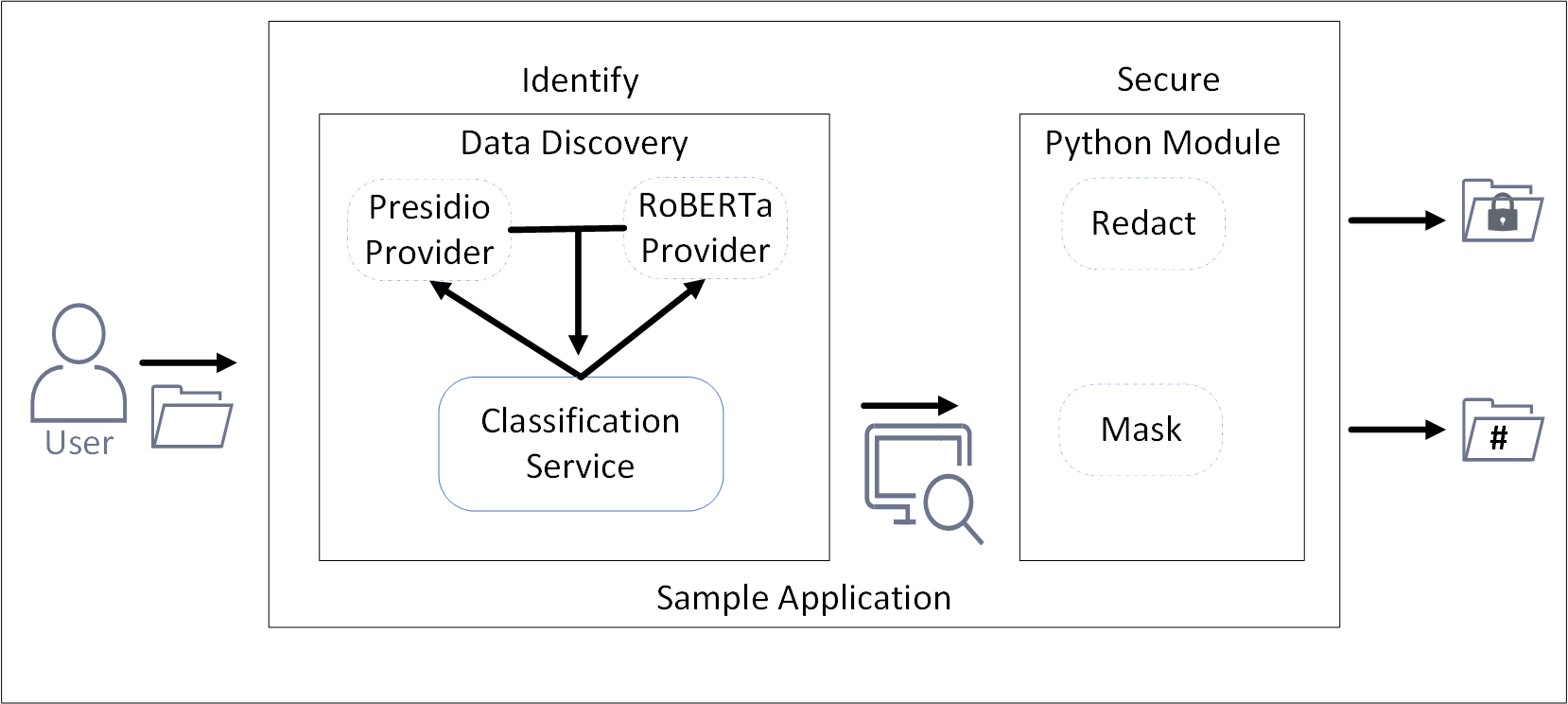
This release of Developer Edition consists of a sample application that utilizes and showcases the capabilities of Data Discovery and a simple Python module. The Data Discovery component is used for identifying sensitive data. After identification, the Python module redacts or masks the sensitive information.
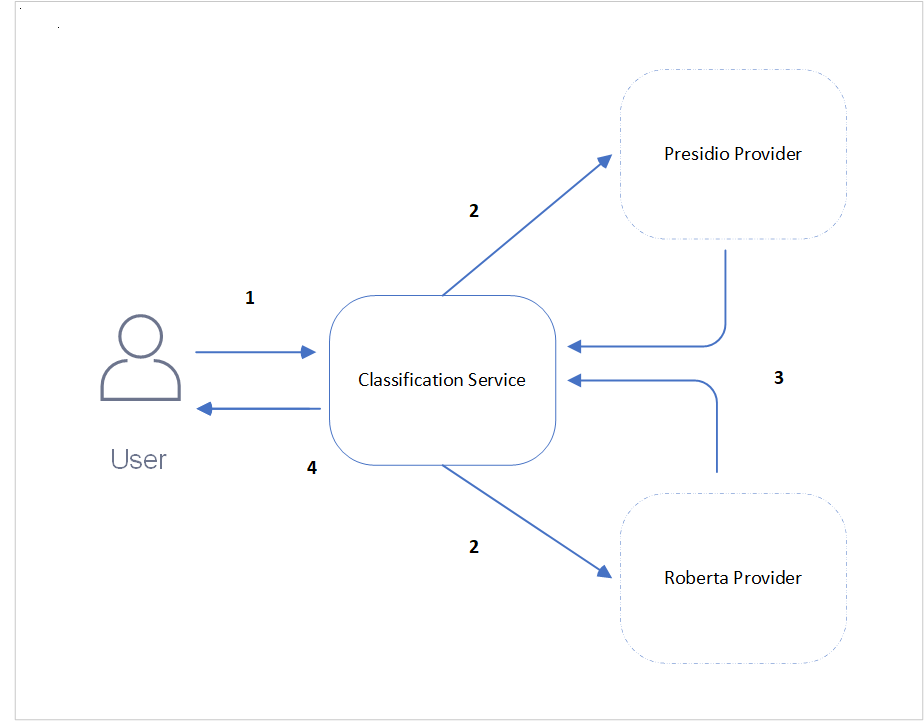
- Data Discovery: Data Discovery consists of three containers that are hosted on Docker, the Classification container, the Presidio provider container, and similarly, the RoBERTa provider container. The general architecture is illustrated in the following figure.
| Callout | Description |
|---|---|
| 1 | The user enters the data to be classified for sensitive data as text body and sends the request to the Classification service. |
| 2 | This Classification service then distributes the request to the Presidio and RoBERTa service providers to process the data. |
| 3 | The Presidio and RoBERTa providers process the data based on their logic and classify them in the form of a response to the Classification service. |
| 4 | The Classification service then aggregates the responses from the service providers and sends it to the user. |
For more information about Data Discovery, refer to Data Discovery.
- sample-app-find-and-redact module: The sample-app-find-and-redact module is a Python library that process the identified data and redacts or masks the information.
The module can be customized to do the following functions:
- Specify the items that must be identified.
- Specify the operation to be performed on the data, that is redact or mask.
- Specify a file name and output location for the source data.
- Specify a file name and output location for the transformed data.
Sample application
The sample application brings together Data Discovery and the sample-app-find-and-redact module together to identify and redact or mask the data.
The Developer Edition flow is as follows:
- The user submits the file using the sample application.
- The sample application sends the file to the Data Discovery container.
- The Data Discovery container processes the file and identifies the sensitive data in the file.
- The Python module receives the file and redacts or masks the sensitive information.
- The output file is saved to the location specified in the configuration.
3 - Installing Developer Edition
Prerequisites
Ensure that the following prerequisites are met.
Hardware requirements
For the local docker deployment mode, a machine with the following specifications will enable you to experiment with the main features:
- RAM: 16 GB
- CPU: 8 core
- Hard Disk: 30GB available
For the local docker deployment mode, a machine with the following specifications will enable you to experiment with the main features:
- RAM: 16 GB
- CPU: 8 core
- Hard Disk: 30GB available
For the local docker deployment mode, a machine with the following specifications will enable you to experiment with the main features:
- RAM: 16 GB
- CPU: 4 core
- Hard Disk: 30GB available
Software requirements
- Python v3.9.23 and above is installed. For more information about installing Python, refer to the Python website.
- pip for installing packages.
- Python Virtual Environment.
- Docker CLI is installed to manage Docker containers.
- Docker Compose is installed for local containerized deployments. This application supports Docker Compose V2. Ensure that your installation supports this version.
- Git is installed for cloning the repository.
- Python v3.9.23 and above is installed. For more information about installing Python, refer to the Python website.
- pip for installing packages.
- Python Virtual Environment.
- Docker CLI is installed to manage Docker containers.
- Docker Compose is installed for local containerized deployments. This application supports Docker Compose V2. Ensure that your installation supports this version.
- Git is installed for cloning the repository.
- Python v3.9.23 and above is installed. For more information about installing Python, refer to the Python website.
- pip for installing packages.
- Python Virtual Environment.
- Docker Desktop or Colima is installed.
- Docker Compose is installed for local containerized deployments. This application supports Docker Compose V2. Ensure that your installation supports this version.
- Git is installed for cloning the repository.
Additional settings for macOS
macOS requires additional steps for Docker and for systems with Apple Silicon chips. Complete the following steps before using Developer Edition.
Complete one of the following options to apply the settings.
- For Colima:
- Open a command prompt.
- Run the following command.
colima start --vm-type vz --vz-rosetta
- For Docker Desktop:
- Open Docker Desktop.
- Go to Settings > General.
- Enable the following check boxes:
- Use Virtualization framework
- Use Rosetta for x86_64/amd64 emulation on Apple Silicon
- Click Apply & restart.
- For Colima:
Update one of the following options for resolving certificate related errors.
- For Colima:
Open a command prompt.
Navigate and open the following file.
~/.colima/default/colima.yamlUpdate the following configuration in
colima.yamlto add the path for obtaining the required images.Before update:
docker: {}After update:
docker:
    insecure-registries:
        - ghcr.io
Save and close the file.
Stop colima.
colima stopClose and start the command prompt.
Start colima.
colima start --vm-type vz --vz-rosetta
- For Docker Desktop:
Open Docker Desktop.
Click the gear or settings icon.
Click Docker Engine from the sidebar. The editor opens the current Docker daemon configuration
daemon.json.Locate and add the
insecure-registrieskey in the root JSON object. Ensure that a comma is added after the last value in the existing configuration.After update:
{
    .
    .
    <existing configuration>,
    "insecure-registries": [
        "ghcr.io",
        "githubusercontent.com"
    ]
}
Click Apply & Restart to save the changes and restart Docker Desktop.
Verify: After Docker restarts, run
docker infoin your terminal and confirm that the required registry is listed under Insecure Registries.
- For Colima:
Optional: If the The requested image’s platform (linux/amd64) does not match the detected host platform (linux/arm64/v8) and no specific platform was requested error is displayed.
Start a command prompt.
Navigate and open the following file.
~/.docker/config.jsonAdd the following paramater.
"default-platform": "linux/amd64"Save and close the file.
Run
docker compose up -dfrom theprotegrity-developer-editiondirectory if already cloned, else continue with the installation.
Obtaining the package
- Navigate to the Protegrity Developer Edition repository.
- Clone or download the repositories.
- protegrity-developer-edition: Contains the files to launch the required containers. It also contains the sample application and files.
- protegrity-developer-python: Contains the source files for customizing and using the Python module.
- Verify the files in the package. The list of files in the git package can be obtained from the files list.
Installing Data Discovery
The containers contain the Data Discovery components required for identifying sensitive data.
Open a command prompt.
Navigate to the cloned repository location for protegrity-developer-edition.
Run the following command to download and start the containers. The dependent containers are large in size. Based on the network connection, the containers might take time to download and deploy.
docker compose up -dBased on your configuration use the
docker-compose up -dcommand.
To customize and deploy Data Discovery, refer to the Working with the Data Discovery containers.
Installing the protegrity-developer-python Module
The module has built-in functions to find and redact or mask data.
Open a command prompt.
Install the protegrity-developer-python module. It is recommended to install and activate the Python virtual environment.
pip install protegrity-developer-pythonThe installation completes and the success message is displayed. To compile and install the Python module from source, refer to Building the Python module.
List of files in the Protegrity Developer Edition package
The following files are available in the Developer Edition repositories.
protegrity-developer-edition repository
The repository for the obtaining and running the sample application.
- docker-compose.yml: This file contains the configuration for deploying the Data Discovery containers.
- README.md: The readme file specifying the steps to install the product.
- samples: The directory with the sample application and scripts for the Python module.
- sample-app-find-and-redact.py: The sample application Python file for detecting and redacting sensitive information in the source file.
- sample-app-find.py: The sample application Python file for detecting and listing sensitive information in the source file.
- config.json: The configuration file for the Python application.
- sample-data: The directory with the sample file.
- sample-find-redact.txt: The sample file that is processed.
- data-discovery: The directory with the sample application and scripts for Data Discovery.
- sample-classification-commands.sh: A file with the sample curl command for identifying sensitive data.
- sample-classification-python.py: A sample Python module for identifying sensitive data.
protegrity-developer-python repository
The repository with the source files for customizing and compiling the Python file.
- LICENSE: The license file with the terms and conditions for using the application.
- README.md: The readme file for working with the Python file.
- pyproject.toml: The configuration file for the script.
- requirements.txt: The configuration file for the script.
- protegrity-developer-python: The directory for the source file.
- init.py: The initializing script.
- securefind.py: The source file for the script.
4 - Running the sample application
In the Developer Edition, a user uploads a file using the sample application, which is processed by the Data Discovery container. The containers detect sensitive data. A Python module then redacts or masks the data. The sanitized file is saved to a configured location. For more information about the sample application, refer to Sample application.
Use the steps provided here to run the application end-to-end. If required, run the APIs and functions provided for performing specific tasks. For more information about the identification APIs, refer to Data Discovery API.
Running the sample application
The sample application is configured out-of-the-box to identify and redact data from the sample file.
Open a command prompt.
Navigate to the directory where Developer Edition is cloned.
Run the sample application using the following command.
python samples/sample-app-find-and-redact.pyView the output of the files processed on the screen. The output displays a list of sensitive items in the source file. It also displays the location and name of the output file with the redacted output.

- View the processed output file in the output directory.
Integrating the Python module in an application
Alternatively, to integrate and use the Protegrity Python module in a Python application, customize and use the sample code provided here.
Open a command prompt.
Create a Python file.
Import the installed Python module.
import protegrity_developer_pythonSpecify the configuration. For more information about the settings, refer to the Python module configuration.
protegrity_developer_python.configure(
endpoint_url="http://localhost:8580/pty/data-discovery/v1.0/classify",
named_entity_map={"PERSON": "NAME", "SOCIAL_SECURITY_NUMBER": "SSN"},
masking_char="#",
classification_score_threshold=0.6,
method="redact",
enable_logging=True,
log_level="info"
)
Specify the input text.
input_text = "John Doe's SSN is 123-45-6789."Call the module to process the data.
output_text = protegrity_developer_python.find_and_redact(input_text)View the redacted output.
print(output_text)Save, close, and run the file.
4.1 - Data Discovery API
Data Discovery Classification Service
This API identifies, classifies, and locates sensitive data.
Endpoint
https://{Host Address}/pty/data-discovery/v1.0/classify
Path
/pty/data-discovery/v1.0/classify
Method
POST
Parameters
Define the value in the score_threshold parameter to exclude results with a low score. This parameter is optional and accepts the following values:
Type: float
Values: minimum 0, maximum 1.0
Default: 0.00
For example, score_threshold = 0.75
Example Data
You can reach Dave Elliot by phone 203-555-1286.
The data should be in UTF-8 format. Also, the limit on the length of the characters is 10,000.
Sample Request
https://{Host address}/pty/data-discovery/v1.0/classify
Response Codes
Successful Response.{
"providers": [
{
"name": "Presidio Classification Provider",
"version": "1.0.0",
"status": 200,
"elapsed_time": 1.014178991317749,
"exception": null,
"config_provider": {
"name": "Presidio",
"address": "http://presidio_provider_service",
"supported_content_types": []
}
},
{
"name": "Roberta Classification Provider",
"version": "1.0.0",
"status": 200,
"elapsed_time": 19.091534852981567,
"exception": null,
"config_provider": {
"name": "Roberta",
"address": "http://roberta_provider_service",
"supported_content_types": []
}
}
],
"classifications": {
"PERSON": [
{
"score": 0.9236000061035157,
"location": {
"start_index": 14,
"end_index": 25
},
"classifiers": [
{
"provider_index": 0,
"name": "SpacyRecognizer",
"score": 0.85,
"details": {}
},
{
"provider_index": 1,
"name": "roberta",
"score": 0.9972000122070312,
"details": {}
}
]
}
],
"PHONE_NUMBER": [
{
"score": 0.8746500015258789,
"location": {
"start_index": 35,
"end_index": 47
},
"classifiers": [
{
"provider_index": 0,
"name": "PhoneRecognizer",
"score": 0.75,
"details": {}
},
{
"provider_index": 1,
"name": "roberta",
"score": 0.9993000030517578,
"details": {}
}
]
}
]
}
}Request must have a body, but no request body was provided.Payload too large.Unsupported media type.Unexpected internal server error. Check server logs.Internal server error. Check server logs.Sample Request
curl -X POST "https://<SERVER_IP>/pty/data-discovery/v1.0/classify?score_threshold=0.85" \
          -H "Content-Type: text/plain" \
          --data "You can reach Dave Elliot by phone 203-555-1286"
import requests
url = "https://<SERVER_IP>/pty/data-discovery/v1.0/classify"
params = {"score_threshold": 0.85}
headers = {"Content-Type": "text/plain"}
data = "You can reach Dave Elliot by phone 203-555-1286"
response = requests.post(url, params=params, headers=headers, data=data, verify=False)
print("Status code:", response.status_code)
print("Response JSON:", response.json())URL: POST `https://<SERVER_IP>/pty/data-discovery/v1.0/classify`
Query Parameters:
-score_threshold (optional), float between 0.0 and 1.0, default: 0.
Headers:
-Content-Type: text/plain
Body:
-You can reach Dave Elliot by phone 203-555-12865 - Configuring the sample application
The steps mentioned in this section are optional. The sample application can run to detect and redact the data with the default configurations. These configurations are only required when a change is required in the way that the files are processed. For example, a change in the name of the input or output file.
Sample application configuration
Specifying the source file
The source file contains the data that must be processed. This file can have a paragraph of text or a table with values. Protegrity Developer Edition can process various files. However, for security reasons, certain characters are not processed and rejected. To enable or disable these security settings, refer to the section Input Sanitization. This version of the release only supports files containing plain text.
To specify the source file:
Navigate to the location where Protegrity Developer Edition is cloned.
Open the
sample-app-find-and-redact.pyfile from thesamplesdirectory.Locate the following statement.
INPUT_FILE = BASE_DIR / "sample-data" / "sample-find-redact.txt"Update the path and name for the source file.
Save and close the file.
Run the Python file.
Specifying the output file
The output file location specifies where the processed output file must be stored.
To specify the source file:
Navigate to the location where Protegrity Developer Edition is cloned.
Open the
sample-app-find-and-redact.pyfile from thesamplesdirectory.Locate the following statement.
OUTPUT_FILE = BASE_DIR / "sample-data" / "output.txt"Update the path and name for the output file.
Save and close the file.
Run the Python file.
Specifying the configuration settings
Use the config.json configuration file to specify the data that must be redacted or masked. The character that must be used for masking can also be specified.
Before you begin:
Identify the sensitive fields that are present in the source file.
Open a command prompt.
Navigate to the directory where the sample application is extracted.
Run the following command.
python sample/sample-app-find.pyView the list of sensitive items. For a complete list of items that can be identified, refer to the List of items.
Updating the configuration file.
Navigate to the location where Protegrity Developer Edition is cloned.
Open the
config.jsonfile.Specify the masking character to use in the following code.
"masking_char": "#"Specify the text to use for the redacted data in the
named_entity_mapparameter. The following code shows the value used for the sample source file."named_entity_map": { "PERSON": "PERSON", "PHONE_NUMBER": "PHONE", "CREDIT_CARD": "CCN", "DATE_TIME": "DATE", "EMAIL_ADDRESS": "EMAIL" }Specify the operation to perform on the source file. The available options are
maskandredact."method": "mask"Save and close the file.
Run the Python file.
Specifying the classification score threshold settings
The classification score threshold sets the minimum confidence level needed for the system to treat detected data as valid. It helps filter out uncertain matches so only high-confidence results are flagged. Adjust this threshold during setup. It is a value, such as, 0.6 for 60%. Lowering it makes the system more sensitive, while raising it reduces false positives.
To set the value:
Navigate to the location where Protegrity Developer Edition is cloned.
Open the
sample-app-find-and-redact.pyfile from thesamplesdirectory.Locate the following statement.
"classification_score_threshold", 0.6Set the required value.
Save and close the file.
Run the Python file.
Specifying the logging parameters
The log messages are sent to the terminal. To capture logging data, transfer and save the output of the commands to a log file.
To set the logging level:
Navigate to the location where Protegrity Developer Edition is cloned.
Open the
config.jsonfile.Locate the following statement.
"enable_logging": True,
"log_level": "INFO",
Ensure that logging is set to True and set the required log level that must be displayed.
Save and close the file.
Run the Python file.
Python module configuration
The following parameters are configurable for Developer Edition.
| Parameter | Description | Values | Example |
|---|---|---|---|
| endpoint_url | The Data Discovery endpoint for classifying sensitive data. | Specify a URL. | http://localhost:8580/pty/data-discovery/v1.0/classify |
| named_entity_map | A dictionary or map of entities and their corresponding replacement names. | List of items | named_entity_map": { “PERSON”: “PERSON”,“PHONE_NUMBER”: “PHONE”} |
| masking_char | The character to be used for masking. | Specify a special character. | # |
| classification_score_threshold | The minimum confidence level needed for the system to treat detected data as valid. | Specify a number between 0 and 1.0 | 0.6 |
| method | The method for processing sensitive data. | redact or mask | mask |
| enable_logging | Specify whether to enable logging. | True or False | True |
6 - Building the Python module
The protegrity-developer-python repository is part of the Protegrity Developer Edition suite. This repository provides the Python module for integrating Protegrity’s Data Discovery and Protection APIs into GenAI and traditional applications.
Customize, compile, and use the module as per your requirement.
💡Note: This module should be built and used, only if you intend to change the source and default behavior.
💡Note: Ensure that the Protegrity Developer Edition is running before installing this module. For setup instructions, please refer to the installation steps.
Prerequisites
- Git
- Python >= 3.9.23
- pip
- Python Virtual Environment
- Uninstall the
protegrity_developer_pythonmodule from the Python virtual environmentif it is already installed.pip uninstall protegrity_developer_python
Build the protegrity-developer-python module
- Clone the repository.
git clone https://github.com/Protegrity-Developer-Edition/protegrity-developer-python.git - Navigate to the
protegrity-developer-pythondirectory in the cloned location. - Optional: Update the Python source file
/src/protegrity_developer_python/securefind.pyas required. - Activate the Python virtual environment.
- Install the dependencies.
pip install -r requirements.txt - Build and install the Python module by running the following command from the root directory of the repository.The installation completes and the success message is displayed.
pip install .
7 - Appendix
7.1 - Input Sanitization
The Classification service in Data Discovery offers a security feature that rejects unsanitized data. Data that is malformed, non-normalized, containing homoglyphs, hieroglyphs, mixed Unicode variants, or control characters are considered as unsanitized data. These are rejected for classification.
The following are few examples of data that will be rejected:
- Ⅷ
- 𝓉𝑒𝓍𝓉
- Pep
Before invoking the Classification endpoint, ensure that the input text is normalized. Replace invalid characters by their corresponding normalized plaintext characters. If the input text contains any invalid character, a status code of 422 and a message Untrusted input is returned.
For security purposes, the application rejects unsanitized data by default. It is recommended that this feature remains enabled. However, to override this feature, perform the following steps.
Navigate to the
docker_composedirectory.Edit the
docker-compose.yamlfile.Under the
environmentsection ofclassification_service, append the security parameter as follows.
- SECURITY_SETTINGS={"ENABLE_ALL_SECURITY_CONTROLS":false}
Save the changes.
Run the
docker compose downcommand to undeploy the application.Run the
docker compose upcommand to redeploy the application.
7.2 - Working with the Data Discovery containers
Use Data Discovery by setting up and deploying the containers.
7.2.1 - Understanding the Docker Compose File
The following variables can be configured in the docker-compose.yml file.
| Variable | Description | Mandatory |
|---|---|---|
| networks:name | Specify the name of the Docker network. | No |
| services:enviroment | Specify the location for the logs in the logging_config parameter. | No |
| classification_service:ports | Specify the listening port for the classification service. By default, the port is set to 8580. | No |
7.2.2 - Deploying the Application
Ensure that the prerequisites are completed before deploying the application.
Run the following steps to deploy the Data Discovery application on Docker.
Open a command prompt.
Navigate to the Developer Edition package directory.
Run the command to start the containers. For example, the following command starts the Classification service container.
docker compose up -d
7.3 - Supported Sensitive Entity Types
| Entity Name | Description |
|---|---|
| ABA_ROUTING_NUMBER | Routing number used to identify financial institutions in the United States. |
| ACCOUNT_NAME | Name associated with a financial account. |
| ACCOUNT_NUMBER | Bank account number used to identify financial accounts. |
| AGE | Age information used to identify individuals. |
| AMOUNT | Specific amount of money, which can be linked to financial transactions. |
| AU_ABN | Australian Business Number used to identify businesses in Australia. |
| AU_ACN | Australian Company Number used to identify businesses in Australia. |
| AU_MEDICARE | Medicare number used to identify individuals for healthcare services in Australia. |
| AU_TFN | Tax File Number used to identify taxpayers in Australia. |
| BIC | Bank Identifier Code used to identify financial institutions. |
| BITCOIN_ADDRESS | Bitcoin wallet address used for digital transactions. |
| BUILDING | Building information used to identify specific locations. |
| CITY | City information used to identify geographic locations. |
| COMPANY_NAME | Name of a company used to identify businesses. |
| COUNTRY | Country information used to identify geographic locations. |
| COUNTY | County information used to identify geographic locations. |
| CREDIT_CARD | Credit card number used for financial transactions. |
| CREDIT_CARD_CVV | Card Verification Value used to secure credit card transactions. |
| CRYPTO | Cryptocurrency wallet address used for digital transactions. |
| CURRENCY | Currency information used in financial transactions. |
| CURRENCY_CODE | Code representing currency used in financial transactions. |
| CURRENCY_NAME | Name of currency used in financial transactions. |
| CURRENCY_SYMBOL | Symbol representing currency, sometimes linked to financial transactions. |
| DATE | Specific date that can be linked to personal activities. |
| DATE_OF_BIRTH | Date of birth used to identify individuals. |
| DATE_TIME | Specific date and time that can be linked to personal activities. |
| DRIVER_LICENSE | Driver’s license number used to identify individuals. |
| EMAIL_ADDRESS | Email address used for communication and identification. |
| ES_NIE | Foreigner Identification Number used to identify non-residents in Spain. |
| ES_NIF | Tax Identification Number used to identify taxpayers in Spain. |
| ETHEREUM_ADDRESS | Ethereum wallet address used for digital transactions. |
| FI_PERSONAL_IDENTITY_CODE | Personal identity code used to identify individuals in Finland. |
| GENDER | Gender information used to identify individuals. |
| GEO_CCORDINATE | Geographic coordinates used to identify specific locations. |
| IBAN_CODE | International Bank Account Number used to identify bank accounts globally. |
| ID_CARD | Identity card number used to identify individuals. |
| IN_AADHAAR | Unique identification number used to identify residents in India. |
| IN_PAN | Permanent Account Number used to identify taxpayers in India. |
| IN_PASSPORT | Passport number used to identify individuals in India. |
| IN_VEHICLE_REGISTRATION | Vehicle registration number used to identify vehicles in India. |
| IN_VOTER | Voter ID number used to identify registered voters in India. |
| IP_ADDRESS | Internet Protocol address used to identify devices on a network. |
| IPV4 | IPv4 address used to identify devices on a network. |
| IPV6 | IPv6 address used to identify devices on a network. |
| IT_DRIVER_LICENSE | Driver’s license number used to identify individuals in Italy. |
| IT_FISCAL_CODE | Fiscal code used to identify taxpayers in Italy. |
| IT_IDENTITY_CARD | Identity card number used to identify individuals in Italy. |
| IT_PASSPORT | Passport number used to identify individuals in Italy. |
| LITECOIN_ADDRESS | Litecoin wallet address used for digital transactions. |
| LOCATION | Specific location or address that can be linked to an individual. |
| MAC | Media Access Control address used to identify devices on a network. |
| MEDICAL_LICENSE | License number used to identify medical professionals. |
| NRP | A person’s nationality, religious or political group. |
| ORGANIZATION | Name or identifier used to identify an organization. |
| PASSPORT | Passport number used to identify individuals. |
| PASSWORD | Password used to secure access to personal accounts. |
| PERSON | Name or identifier used to identify an individual. |
| PHONE_NUMBER | Number used to contact or identify an individual. |
| PIN | Personal Identification Number used to secure access to accounts. |
| PL_PESEL | Personal Identification Number used to identify individuals in Poland. |
| SECONDARY_ADDRESS | Additional address information used to identify locations. |
| SG_NRIC_FIN | National Registration Identity Card number used to identify residents in Singapore. |
| SG_UEN | Unique Entity Number used to identify businesses in Singapore. |
| SOCIAL_SECURITY_NUMBER | Social Security Number used to identify individuals. |
| STATE | State information used to identify geographic locations. |
| STREET | Street address used to identify specific locations. |
| TIME | Specific time that can be linked to personal activities. |
| TITLE | Title or honorific used to identify individuals. |
| UK_NHS | National Health Service number used to identify individuals for healthcare services in the United Kingdom. |
| URL | Web address that can sometimes contain personal information. |
| US_BANK_NUMBER | Bank account number used to identify financial accounts in the United States. |
| US_DRIVER_LICENSE | Driver’s license number used to identify individuals in the United States. |
| US_ITIN | Individual Taxpayer Identification Number used to identify taxpayers in the United States. |
| US_PASSPORT | Passport number used to identify individuals in the United States. |
| US_SSN | Social Security Number used to identify individuals in the United States. |
| USERNAME | Username used to identify individuals in online systems. |
| ZIP_CODE | Postal code used to identify specific geographic areas. |
7.4 - Uninstalling Developer Edition
Open a command prompt.
Navigate to the cloned repository location.
Run the following command to remove the containers.
docker compose down --rmi allRun the following command to remove the Python module.
pip uninstall protegrity-developer-python==0.9.0