This is the multi-page printable view of this section. Click here to print.
AI Developer Edition
- 1: Introduction to Protegrity AI Developer Edition
- 1.1: Release Highlights
- 2: AI Developer Edition Architecture
- 3: Setting up AI Developer Edition
- 3.1: Prerequisites
- 3.2: Optional - Obtaining access to the AI Developer Edition API Service
- 3.3: Setting up the packages
- 3.4: Verifying the files in the Protegrity AI Developer Edition package
- 4: Running the sample application
- 5: AI Developer Edition APIs
- 5.1: Data Discovery APIs
- 5.2: Semantic Guardrails APIs
- 5.3: Synthetic Data APIs
- 5.4: Application Protector Python APIs
- 5.5: Application Protector Java APIs
- 6: Customizing the sample application
- 7: Building modules
- 8: Promoting to AI Team Edition
- 9: Policy Definition
- 10: Removing AI Developer Edition
- 11: Supported Classification Entities
1 - Introduction to Protegrity AI Developer Edition
Protegrity AI Developer Edition is a lightweight, containerized sandbox. It helps developers, data scientists, and architects to quickly explore and integrate prototype data protection and discovery workflows. It does not require setting up a complex infrastructure and managing its operational overhead.
It is a self-contained, Docker-based environment designed to enable a user to have a hands-on experimentation without the need for enterprise infrastructure. With modular architecture, built-in sample data, and a developer-first experience, AI Developer Edition is ideal for evaluating Protegrity’s capabilities in a fast, flexible, and frictionless way.
What is Protegrity AI Developer Edition?
Protegrity AI Developer Edition is designed to help a developer move quickly from idea to implementation, using familiar tools, sample apps, and open APIs.
It provides a streamlined environment to:
- Discover and redact sensitive data using APIs and sample apps.
- Discover and protect or unprotect sensitive data using APIs and sample apps.
- Experience tokenization using the online Protegrity notebook.
- Perform message and conversation level risk scoring.
- Scan Personally identifiable information (PII) for GenAI flows.
- Provide a streamlined environment to test real world usecases with sample datasets and guided walkthroughs.
- Generate synthetic data.
AI Developer Edition runs entirely on Docker, making it easy to spin up, tear down, and iterate quickly. It helps the user build a proof of concept, validate integration points, and get familiar with Protegrity’s core concepts. This edition provides the tools to set up the product fast and independently.
Note: This product is not meant for production use, but it is the perfect launchpad for innovation.
Key Features
AI Developer Edition is purpose-built for fast, frictionless exploration of Protegrity’s core capabilities.
The following features make it ideal for prototyping and integration:
Modular, Containerized Architecture: AI Developer Edition runs on Docker, making it easy to test, isolate, and iterate.
Sample Apps and Data: Jumpstart evaluation with ready-to-run sample apps that demonstrate real-world use cases. These include finding sensitive data in unstructured text or finding and redacting or finding and protecting/unprotecting sensitive data.
Python Module: An open-source Python module providing APIs to protect, unprotect, and reprotect sensitive data in Python-based applications. It is available through
PyPIfor easy installation.Java Library: An open-source Java library providing APIs to protect, unprotect, and reprotect sensitive data in Java-based applications. It is distributed using
Maven Centralfor easy integration.Lightweight: No Enterprise Security Administrator (ESA). No orchestration overhead. Just deploy the container and use the sample application.
Data Discovery: This container identifies and classifies sensitive data. It uses built-in and custom classifiers to detect sensitive data with confidence scoring.
AI Developer Edition API Service: A service hosted by Protegrity that allows developers to interact with Protegrity’s protection and discovery services through intuitive endpoints. It supports protection and unprotection of sensitive data, enabling rapid prototyping and testing of data protection scenarios without needing full-scale infrastructure. Registration is required for this service. The credentials can be obtained for free.
Synthetic Data: This container analyzes a data set and generates data that mimics the properties of real data, such as data types, ranges, correlations, and distributions. It does not contain any actual personal information.
Semantic Guardrails: It is a security guardrail engine for AI systems. It evaluates risks in GenAI systems such as chatbots, workflows, and agents, through advanced semantic analytics and intent classification to detect potentially malicious messages.
Note: This product is continuously improving. The features mentioned here are either already available or will be available shortly.
Protegrity AI Developer Edition Personas
The primary personas who benefit most from AI Developer Edition.
| Persona | Role Description | Goals | Typical Activities |
|---|---|---|---|
| Application Developer | Builds and integrates applications that handle sensitive data. | - Embed protection APIs. - Prototype quickly. - Validate integration points. | - Run sample apps. |
| Data Scientist / ML Engineers | Works with sensitive datasets in analytics and machine learning workflows. | - Discover and classify PII. - Protect training data. - Ensure compliance. | - Use discovery APIs. - Integrate with Jupyter notebooks. - Test module. |
| Solution Architect | Designs end-to-end data protection strategies across systems and teams. | - Evaluate platform fit. - Define architecture. - Guide implementation. | - Review sample apps. - Test modular deployment. - Assess performance. |
| Security / Privacy Lead | Ensures data protection aligns with compliance and governance requirements. | - Understand protection methods. - Validate policy behavior. - Review audit paths. | - Inspect logs. - Simulate policy scenarios. - Review discovery results. |
Use Cases
A range of use cases across Data Protection, Security, and emerging GenAI-driven applications are supported.
Data Protection and Security Use Cases
These use cases focus on helping developers and data scientists secure sensitive data in conventional applications, services, and pipelines.
| Use Case | Description |
|---|---|
| Find and Redact | Discover sensitive data using Data Discovery API and redact or mask them. |
| Find and Protect | Discover sensitive data using Data Discovery API and protect (tokenize or encrypt) them. |
| Sample App Prototyping | Use prebuilt apps to simulate real-world scenarios like protecting PII unstructured text. Helps accelerate evaluation and integration. |
| Python Module and Java Library Integration | Integrate protection APIs into Python and Java using lightweight modules. Useful for embedding Protegrity into existing development pipelines. |
| API Evaluation | Directly test protection and discovery APIs using tools like Postman or curl. Enables low-friction exploration of Protegrity’s core capabilities. |
GenAI Use Cases
AI Developer Edition supports emerging GenAI workflows where sensitive data may be used in prompts, training datasets, or inference pipelines. These use cases help developers and data scientists ensure privacy and compliance when working with large language models (LLMs) and AI-driven applications.
The Semantic Guardrails feature and samples are provided with the Developer Edition. The use cases listed here are potential applications that users can develop using the feature.
| Use Case | Description |
|---|---|
| Chatbot Input Protection | Protect sensitive user inputs, such as names, emails, IDs, before passing them to GenAI models. Ensures privacy compliance in conversational AI workflows. |
| Prompt Sanitization | Automatically detect and mask PII in prompts used for LLM-based applications. Helps reduce risk in prompt engineering and inference. |
| Training Data Anonymization | Discover and redact sensitive fields in datasets used to train GenAI models. Supports responsible AI development practices. |
| Training Data Synthetic Data | Generate datasets to train GenAI models. The dataset generated can be adjusted for various scenarios. |
| Notebook-Based Experimentation | Use Jupyter notebooks to test protection and discovery workflows in GenAI pipelines. Ideal for data scientists working with unstructured or semi-structured data. |
These use cases are especially relevant for teams building AI-powered tools that interact with real-world user data, where privacy and data protection are critical.
1.1 - Release Highlights
General
- Added badges to the README for improved visibility and quick access to key resources.
- Restructured folders for better organization of samples and source code.
Data Discovery
- Upgraded to Data Discovery version 2.0.
- Added direct-API example scripts for text classification, tabular (CSV) classification, and redaction — both Python and bash variants.
- Introduced an isolated
data-discovery/docker-compose.ymlfor starting only the Data Discovery service. - Updated API endpoints to the v2 paths:
v2/classify/text,v2/classify/csv, andv2/transform/label.
Semantic Guardrails
- Included richer examples in the sample files for easier understanding.
- Added pre-trained support for additional verticals, Finance and Healthcare.
- Added a Jupyter notebook sample for seamless evaluation and execution.
API Wrappers
- Online notebook to quickly test tokenization.
- Provided support and sample implementations for both Python and Java.
- Ensured Java samples are fully compatible across Linux, macOS, and Windows.
- Delivered Java source code for customization and compilation flexibility.
Synthetic Data
- Introduced a new feature for synthetic data generation to support testing and experimentation.
- Added Jupyter notebook samples for quick evaluation and execution.
2 - AI Developer Edition Architecture
A high-level architecture of AI Developer Edition is provided in the following image.
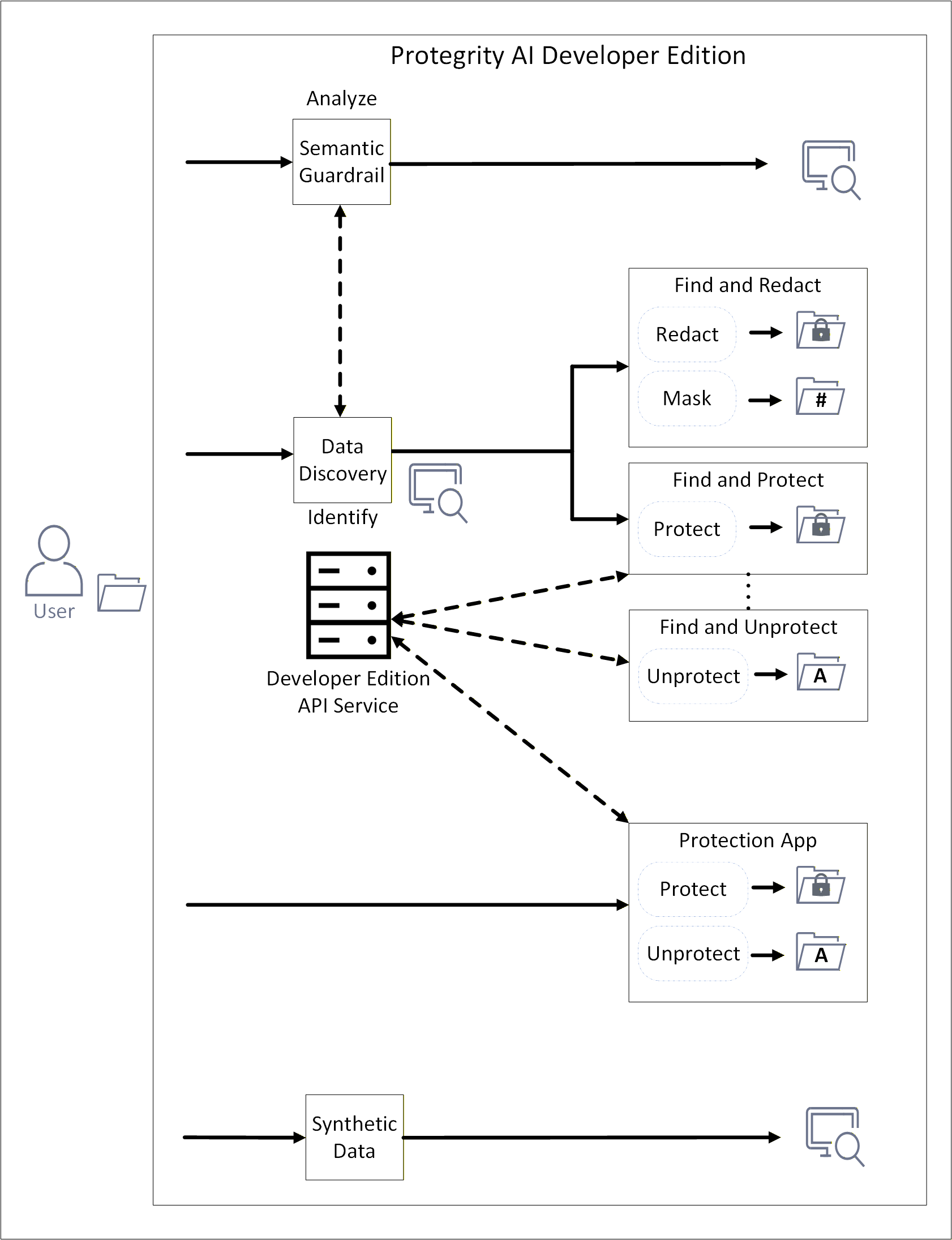
This release of AI Developer Edition includes sample applications. It showcases the capabilities of Data Discovery, Semantic Guardrail, Synthetic Data. The applications demonstrate protection and unprotection using simple Python modules or Java libraries. The Data Discovery component is used for identifying sensitive data. After identification, the Python module or Java library redacts, masks, or protects the sensitive information. Protection is done using the AI Developer Edition API Service.
Data Discovery
Data Discovery is a powerful, developer-friendly product designed specifically to address this challenge.
For more information, refer to the Data Discovery documentation.
Overview
Data Discovery Text Classification service advances data discovery and classification. It specializes in the detection of Personally Identifiable Information (PII), Protected Health Information (PHI), Payment Card Information (PCI) within plain text and free-text inputs. Unlike traditional structured data tools, it excels in dynamic, unstructured environments such as chatbot conversations, call transcripts, and Generative AI (GenAI) outputs.
Architecture
For more information about the general architecture and working of Data Discovery, refer to General architecture of Data Discovery.
Semantic Guardrails
Protegrity’s GenAI Security Semantic Guardrails solution is a security guardrail engine for AI systems. It evaluates risks in GenAI chatbots, workflows, and agents through advanced semantic analytics and intent classification to detect potentially malicious messages. PII detection can also be leveraged for comprehensive security coverage.
For more information, refer to the Semantic Guardrails documentation.
Overview
The current implementation is trained on synthetic customer-service AI chatbot datasets. The system performs best when analyzing conversations expected to match the training domain, that is, English-language based customer service interactions involving orders, tickets, and purchases.
For domain-specific and user-specific applications requiring high detection accuracy, fine-tuning is necessary to completely leverage the model’s ability. This helps the model to learn from expected conversation patterns and message structures in both the inputs and outputs of protected GenAI systems.
The system operates by analyzing conversations between participants. These participants are users and AI systems, such as LLMs, agents, or contextual information sources. Furthermore, the system leverages Protegrity’s Data Discovery, if present in the same network environment, to leverage PII detection in its internal decision algorithm.
The solution provides individual message risk scores and classifications, and cumulative conversation risk scores and classifications. This dual-scoring approach ensures that while individual messages may appear benign, potentially risky cumulative conversation patterns are identified. This significantly enhances detection of sophisticated attack vectors, including LLM jailbreaks and prompt injection attempts.
Architecture
For more information about the general architecture and working of Semantic Guardrails, refer to General architecture of Semantic Guardrails
Synthetic Data
Protegrity’s Synthetic Data solution is a Synthetic Data generator which generates artificial data that is realistic, statistically accurate, and privacy-safe. This data unlocks the full potential of AI and analytics. By creating entirely new data that mirrors the patterns of your original datasets but contains no sensitive information you can train and test AI models without risk. You can also scale these models without exposure or compliance violations.
For more information, refer to Synthetic Data documentation.
An overview of the communication is shown in the following figure.
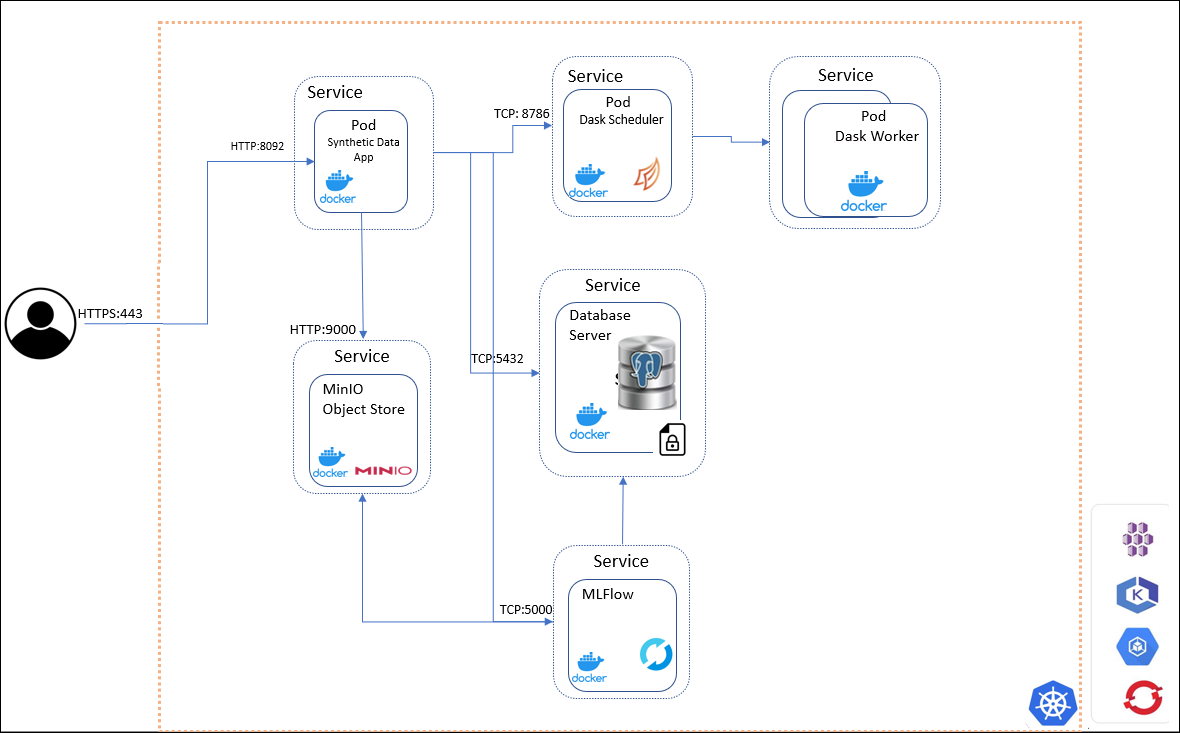
The Synthetic Data system includes the following core components:
Key Pods and Services
Synthetic Data App Pod
- Orchestrates Synthetic Data generation.
MLFlow Pod
- Captures model training and evaluation.
- Hosted in containers for scalability.
MinIO Pod
- Stores models, model artifacts, and generated reports.
- Used by both MLFlow and Synthetic Data App pods.
SQL Database Server Pod
- Provides storage for MLFlow experiments metadata.
Data Generation Interfaces
Synthetic Data can be generated using:
- REST APIs
- Swagger UI
These interfaces allow developers and data scientists to interact with the system programmatically or visually.
Access and Networking
Users access the Protegrity Synthetic Data using HTTP over default port 8095 and other services using the following ports:
| Port | Communication Path |
|---|---|
| 5000 | MLFlow pod |
| 5432 | SQL Database Server |
| 8095 | Protegrity Synthetic Data Service |
| 9000 | MinIO |
Cloud Hosting Options
The entire Synthetic Data API can be hosted using any cloud-provided Kubernetes service, including:
- Amazon Elastic Kubernetes Service (EKS)
- Google Kubernetes Engine (GKE)
- Microsoft Azure Kubernetes Service (AKS)
- Red Hat OpenShift
- Other Kubernetes platforms
This flexibility allows organizations to scale Synthetic Data generation securely across environments.
AI Developer Edition API Service for Python and Java
Protegrity AI Developer Edition API Service features functionality derived from the original suite of Protegrity products in the form of API calls. The API endpoints are easy-to-use and require minimal configuration. Registration is required to send API requests to the service for protecting and unprotecting data. A set of predefined users and roles are provided. Based on the role used, the different scenarios can be tried and tested.
Sample Applications
Protegrity AI Developer Edition provides Python and Java application that showcase the features of Protegrity products.
sample-app-find
The sample-app-find is a Python or Java application that processes and identifies sensitive data.
It can be customized to do the following functions:
- Specify a file name and output location for the source data. Only raw file formats are supported for Data Discovery. Multipart formats are not supported; only binary files are accepted.
sample-app-find-and-redact
The sample-app-find-and-redact is a Python or Java application that processes the identified data and redacts or masks the information.
It can be customized to do the following functions:
- Specify the items that must be identified.
- Specify the operation to be performed on the data, which is redact or mask.
- Specify a file name and output location for the source data. Only raw file formats are supported for Data Discovery. Multipart formats are not supported; only binary files are accepted.
- Specify a file name and output location for the transformed data.
sample-guardrail-python
The sample-guardrail-python is a Python application that submits a request to Semantic Guardrails for analysis.
It can be customized to do the following functions:
- Specify the data that must be processed.
- Specify the operation that must be performed, that is,
semanticprocessor for messages andpiiprocessor for AI.
sample-app-find-and-protect
The sample-app-find-and-protect is a Python or Java application that processes the identified data and protects the information. Calls are made to the AI Developer Edition API Service for performing tokenization.
It can be customized to do the following functions:
- Specify the items that must be identified.
- Specify a file name and output location for the source data. Only raw file formats are supported for Data Discovery. Multipart formats are not supported; only binary files are accepted.
- Specify a file name and output location for the transformed data.
sample-app-find-and-unprotect
The sample-app-find-and-unprotect is a Python or Java application that unprotects the information protected by the sample-app-find-and-protect module. Calls are made to the AI Developer Edition API Service for performing detokenization.
It can be customized to do the following functions:
- Specify a file name and output location for the source data. Only data protected by the
sample-app-find-and-protectmodule can be unprotected. - Specify a file name and output location for the transformed data.
sample-app-protection
The sample-app-protection is a Python or Java application that protects and unprotects data. Calls are made to the AI Developer Edition API Service for performing tokenization. The Data Discovery and Semantic Guardrails containers are not required to be running for the sample-app-protection module to work.
It can be customized to do the following functions:
- Specify the items that must be protected, data element name, and user.
- Specify the operation that must be performed, protect and unprotect.
3 - Setting up AI Developer Edition
Complete the prerequisites, optionally register for access to AI Developer Edition API Service, set up, verify, and run the required files for using Protegrity AI Developer Edition.
3.1 - Prerequisites
General requirements
The system requirements for the AI Developer edition are provided here.
Hardware requirements
For the local docker deployment mode, a machine with the following specifications will enable you to experiment with the main features:
- RAM: 16 GB
- CPU: 8 core
- GPU: 4 GB VRAM, for Synthetic Data only
- Hard Disk: 50GB available
For the local docker deployment mode, a machine with the following specifications will enable you to experiment with the main features:
- RAM: 16 GB
- CPU: 8 core
- GPU: 4 GB VRAM, for Synthetic Data only
- Hard Disk: 50GB available
For the local docker deployment mode, a machine with the following specifications will enable you to experiment with the main features:
- RAM: 16 GB
- CPU: 8 core
- GPU: 4 GB VRAM, for Synthetic Data only
- Hard Disk: 50GB available
Software requirements
- Python v3.12.11 and above is installed. For more information about installing Python, refer to the Python website. Ensure that the Python command points to a supported python3 version, for example, Python 3.12.11. Verify using the
python --versioncommand. - pip for installing packages.
- Python Virtual Environment.
- Docker CLI is installed to manage Docker containers.
- Docker Compose is installed for local containerized deployments. This application supports Docker Compose V2.30 and later. Ensure that your installation supports this version.
- Git is installed for cloning the repository.
- Java 11 or later.
- Maven 3.6+ for AP Java.
- Python v3.12.11 and above is installed. For more information about installing Python, refer to the Python website. Ensure that the Python command points to a supported python3 version, for example, Python 3.12. Verify using the
python --versioncommand. - pip for installing packages.
- Python Virtual Environment.
- Docker CLI is installed to manage Docker containers.
- Docker Compose is installed for local containerized deployments. This application supports Docker Compose V2.30 and later. Ensure that your installation supports this version.
- Git is installed for cloning the repository.
- Java 11 or later.
- Maven 3.6+ for AP Java.
- Python v3.12.11 and above is installed. For more information about installing Python, refer to the Python website. Ensure that the Python command points to a supported python3 version, for example, Python 3.12. Verify using the
python --versioncommand. - pip for installing packages.
- Python Virtual Environment.
- Docker Desktop or Colima is installed.
- Docker Compose is installed for local containerized deployments. This application supports Docker Compose V2.30 and later. Ensure that your installation supports this version.
- Git is installed for cloning the repository.
- Java 11 or later.
- Maven 3.6+ for AP Java.
Additional settings for macOS
macOS requires additional steps for Docker and for systems with Apple Silicon chips. Complete the following steps before using AI Developer Edition.
Complete one of the following options to apply the settings.
- For Colima:
- Open a command prompt.
- Run the following command.
colima start --vm-type vz --vz-rosetta --memory 8
- For Docker Desktop:
- Open Docker Desktop.
- Go to Settings > General.
- Enable the following check boxes:
- Use Virtualization framework
- Use Rosetta for x86_64/amd64 emulation on Apple Silicon
- Click Apply & restart.
- For Colima:
Update one of the following options for resolving certificate related errors.
- For Colima:
Open a command prompt.
Navigate and open the following file.
~/.colima/default/colima.yamlUpdate the following configuration in
colima.yamlto add the path for obtaining the required images.Before update:
docker: {}After update:
docker:
    insecure-registries:
        - ghcr.io
Save and close the file.
Stop colima.
colima stopClose and start the command prompt.
Start colima.
colima start --vm-type vz --vz-rosetta --memory 8
- For Docker Desktop:
Open Docker Desktop.
Click the gear or settings icon.
Click Docker Engine from the sidebar. The editor opens the current Docker daemon configuration
daemon.json.Locate and add the
insecure-registrieskey in the root JSON object. Ensure that a comma is added after the last value in the existing configuration.After update:
{
    .
    .
    <existing configuration>,
    "insecure-registries": [
        "ghcr.io",
        "githubusercontent.com"
    ]
}
Click Apply & Restart to save the changes and restart Docker Desktop.
Verify: After Docker restarts, run
docker infoin your terminal and confirm that the required registry is listed under Insecure Registries.
- For Colima:
Optional: If the The requested image’s platform (linux/amd64) does not match the detected host platform (linux/arm64/v8) and no specific platform was requested error is displayed.
Start a command prompt.
Navigate and open the following file.
~/.docker/config.jsonAdd the following paramater.
"default-platform": "linux/amd64"Save and close the file.
Run
docker compose up -dfrom theprotegrity-developer-editiondirectory if already cloned, else continue with the setup.
3.2 - Optional - Obtaining access to the AI Developer Edition API Service
Registration is only required for running the APIs to protect, unprotect, and reprotect data. The find and redact that uses Data Discovery, Semantic Guardrail, and Synthetic Data features can be used without registration. Skip this section if find and protect that uses the tokenization and encryption feature is not required.
Registering for access
Sign up for access to the AI Developer Edition API Service. This is required for obtaining access to use the APIs.
- Open a web browser.
- Navigate to https://www.protegrity.com/developers/dev-edition-api.
- Specify the following details:
- First Name
- Last Name
- Work Email
- Job Title
- Company Name
- Country
- Click the Terms & Conditions link and read the terms and conditions.
- Select the check box to accept the terms and conditions.
- Click Get Started.
The request is analyzed. After the request is approved, a password and API key to access the AI Developer Edition API Service is sent to the Work Email specified. If the account already exists, then the details are re-sent to the email address. The email takes a minute or two to arrive. If the email does not arrive in the specified email’s inbox, check the spam or junk folder first, before retrying.
Use the online Protegrity notebook with the credentials to test tokenization.
Specifying the authentication information
Add the login information provided by Protegrity to the environment to access the AI Developer Edition API Service.
Note: It is recommended to add the details to the environment variables to avoid specifying the information every time the environment is initialized.
- Open a command prompt.
- Initialize a Python virtual environment.
- Add the email address of the user.
export DEV_EDITION_EMAIL='<Email_used_for_registration>'
$env:DEV_EDITION_EMAIL = '<Email_used_for_registration>'
export DEV_EDITION_EMAIL='<Email_used_for_registration>'
- Specify the password provided in the registration email.
export DEV_EDITION_PASSWORD='<Password_provided_in_email>'
$env:DEV_EDITION_PASSWORD = '<Password_provided_in_email>'
export DEV_EDITION_PASSWORD='<Password_provided_in_email>'
- Specify the API key for accessing the AI Developer Edition API Service.
export DEV_EDITION_API_KEY='<API_key_provided_in_email>'
$env:DEV_EDITION_API_KEY = '<API_key_provided_in_email>'
export DEV_EDITION_API_KEY='<API_key_provided_in_email>'
- Verify that the variables are set.
test -n "$DEV_EDITION_EMAIL" && echo "EMAIL $DEV_EDITION_EMAIL set" || echo "EMAIL missing"
test -n "$DEV_EDITION_PASSWORD" && echo "PASSWORD $DEV_EDITION_PASSWORD set" || echo "PASSWORD missing"
test -n "$DEV_EDITION_API_KEY" && echo "API KEY $DEV_EDITION_API_KEY set" || echo "API KEY missing"
if ($env:DEV_EDITION_EMAIL) { Write-Output "EMAIL $env:DEV_EDITION_EMAIL set"} else { Write-Output "EMAIL missing"}
if ($env:DEV_EDITION_PASSWORD) { Write-Output "PASSWORD $env:DEV_EDITION_PASSWORD set" } else { Write-Output "PASSWORD missing" }
if ($env:DEV_EDITION_API_KEY) { Write-Output "API KEY $env:DEV_EDITION_API_KEY set" } else { Write-Output "API KEY missing" }
test -n "$DEV_EDITION_EMAIL" && echo "EMAIL $DEV_EDITION_EMAIL set" || echo "EMAIL missing"
test -n "$DEV_EDITION_PASSWORD" && echo "PASSWORD $DEV_EDITION_PASSWORD set" || echo "PASSWORD missing"
test -n "$DEV_EDITION_API_KEY" && echo "API KEY $DEV_EDITION_API_KEY set" || echo "API KEY missing"
AI Developer Edition API Service usage guidelines
To ensure fair use of the API service, a rate limit is enforced on API requests to the AI Developer Edition API Service.
These limits are:
- Request rate: 50 per second
- Burst: up to 100
- Quota: 10,000 requests per user per day
- Maximum payload size: 1MB
3.3 - Setting up the packages
Obtaining the package
Navigate to the Protegrity AI Developer Edition repository.
Clone or download the repositories on your local system.
- protegrity-developer-edition: Contains the files to launch the required containers. It also contains the sample applications and files.
git clone https://github.com/Protegrity-Developer-Edition/protegrity-developer-edition.gitTo customize the Python modules, clone and use the source from the protegrity-developer-python repository.
git clone https://github.com/Protegrity-Developer-Edition/protegrity-developer-python.gitTo customize the Java libraries, clone and use the source from the protegrity-developer-java repository.
git clone https://github.com/Protegrity-Developer-Edition/protegrity-developer-java.gitVerify the files in the package. The list of files in the git package can be obtained from the files list.
Back up the Protegrity AI Developer Edition repository if the Python and configuration files are updated.
Note: The supported entites are updated. For more information about the entites, refer to Supported Entites.
Navigate to the cloned repository location for protegrity-developer-edition.
Run the following command to stop the containers.
docker compose downBased on your configuration use the
docker-compose downcommand.Sync to update the repositories on the local system using the
git pullcommand.- protegrity-developer-edition: Contains the files to launch the required containers. It also contains the sample applications and files.
- protegrity-developer-python: Contains the source files for customizing and using the Python module.
- protegrity-developer-java: Contains the source files for customizing and using the Java library.
Verify the files in the package. The list of files in the git package can be obtained from the files list.
Setting up Data Discovery, Semantic Guardrail, and Synthetic Data
The containers contain the Data Discovery and Semantic Guardrails components required for identifying sensitive data. It also contains the Synthetic Data component for data generation.
Open a command prompt.
Navigate to the cloned repository location for protegrity-developer-edition.
Run the following command to download and start the containers. The dependent containers are large in size. Based on the network connection, the containers might take time to download and deploy.
To start all the features.
docker compose --profile synthetic up -dTo start only the Data Discovery and Semantic Guardrails features.
docker compose up -dBased on your configuration use the
docker-compose up -dcommand. Ensure that you bring down the containers usingdocker compose --profile synthetic downordocker compose downbefore switching between starting all containers or Data Discovery and Semantic Guardrails containers.Verify that the containers started successfully.
docker compose logsSet up the Jupyter notebook for working with the notebooks provided from the cloned repository location for protegrity-developer-edition.
pip install -r samples/python/requirements.txt
Open a command prompt.
Navigate to the cloned repository location for protegrity-developer-edition.
If the step to stop containers was missed earlier, then use the following commands to identify and remove the AI Developer Edition containers.
docker compose down --remove-orphansDelete the docker network resources.
docker network rm -f <network_name_or_id>For example,
docker network rm -f protegrity-networkRun the following command to download and start the containers. The dependent containers are large in size. Based on the network connection, the containers might take time to download and deploy.
To start all the features.
docker compose --profile synthetic up -dTo start only the Data Discovery and Semantic Guardrails features.
docker compose up -dBased on your configuration use the
docker-compose up -dcommand. Ensure that you bring down the containers usingdocker compose --profile synthetic downordocker compose downbefore switching between starting all containers or Data Discovery and Semantic Guardrails containers.Verify that the containers started successfully.
docker compose logsSet up the Jupyter notebook for working with the notebooks provided from the cloned repository location for protegrity-developer-edition.
pip install -r samples/python/requirements.txt
Installing the protegrity-developer-python module
The module has built-in functions to find, redact, mask, and protect data.
Open a command prompt.
Install the protegrity-developer-python module. It is recommended to install and activate the Python virtual environment before running this command.
pip install protegrity-developer-pythonThe installation completes and the success message is displayed. To compile and install the Python module from source, refer to Building the Python module.
Open a command prompt.
Upgrade the protegrity-developer-python module. It is recommended to install and activate the Python virtual environment before running the command.
pip install --upgrade protegrity-developer-pythonThe package is successfully upgraded.
Installing the protegrity-developer-java library
When you run the Java samples for the first time, Maven automatically pulls the protegrity-developer-java library from Maven Central as a dependency. This ensures that all required classes and resources are available without manual download.
3.4 - Verifying the files in the Protegrity AI Developer Edition package
protegrity-developer-edition repository
This repository contains the files for obtaining and running the sample application.
- CHANGELOG.md: It tracks version updates and changes are tracked here.
- CONTRIBUTIONS.md: The guidelines for contributing to the project.
- LICENSE: The license file with the terms and conditions for using the application.
- README.md: The readme file specifying the steps to set up the product.
- docker-compose.yml: This file contains the configuration for deploying the containers.
- data-discovery: The directory with the sample application and scripts for Data Discovery.
- semantic-guardrail: The directory with the sample scripts for Semantic Guardrail.
- samples: The directory with the sample application and scripts for the testing the features.
- java: The directory with the sample scripts for testing the features using Java.
- python: The directory with the sample scripts for testing the features using Python.
- sample-app-semantic-guardrails: The directory with the sample notebook for testing the Semantic Guardrails feature.
- sample-app-synthetic-data: The directory with the sample notebook and datastore for testing the Synthetic Data feature.
- sample-data: The directory with the input file for the scripts.
- config.json: The configuration file for working with the scripts.
protegrity-developer-python repository
This repository contains the source files for customizing and building the Python module.
- LICENSE: The license file with the terms and conditions for using the application.
- README.md: The readme file for working with the Python file.
- pyproject.toml: The configuration file for the script.
- pytest.ini: The configuration file for the Pytest framework.
- requirements.txt: The configuration file for the script.
- setup.cfg: The additional settings for packaging and tools.
- src: The core implementation of the Python module.
- tests: The unit and integration tests to ensure that the Python module works as expected.
- .gitignore: The files and directories to ignore in version control.
- .pylintrc: The linting rules for code quality are defined here.
- CHANGELOG.md: It tracks version updates and changes are tracked here.
- CONTRIBUTIONS.md: The guidelines for contributing to the project.
protegrity-developer-java repository
This repository contains the source files for customizing and building the Java library.
- LICENSE: The license file with the terms and conditions for using the application.
- README.md: The readme file for working with the Java library.
- pom.xml: The Maven Project Object Model file for building the Java project.
- .gitignore: The files and directories to ignore in version control.
- run-integration-tests.sh: The shell script to execute integration tests easily.
- mvnw and mvnw.cmd: The Maven Wrapper scripts for Linux, Mac, and Windows.
- protegrity-developer-edition: The additional modules or extensions for the Developer Edition.
- integration-tests: The integration tests for validating the Java library functionality.
- application-protector-java: The Java library implementation for the Application Protector service. It includes source code and configuration files.
- .mvn/wrapper: The Maven Wrapper configuration files.
4 - Running the sample application
In AI Developer Edition, a user uploads a file using the sample application, which is processed by the Data Discovery container. The containers detect sensitive data. A Python module then redacts, masks, or protects and unprotects the data. The sanitized file is saved to a configured location. For more information about the sample application, refer to Sample application.
Use the steps provided here to run the application end-to-end. If required, run the APIs and functions provided for performing specific tasks. For more information about the identification APIs, refer to Data Discovery API.
Note: The Java samples provided in this section are for Linux or macOS. For Windows, use
<filename>.bat.
Applications are provided out-of-the-box to test and understand the capabilities of AI Developer Edition.
Running the sample find application
- Open a command prompt.
- Navigate to the directory where AI Developer Edition is cloned.
- Run the sample application using the following command.
python samples/python/sample-app-find.py
bash samples/java/sample-app-find.sh
- View the output of the files processed on the screen. The output displays a list of sensitive items in the source file.
Running the sample find and redact application
- Open a command prompt.
- Navigate to the directory where AI Developer Edition is cloned.
- Run the sample application using the following command.
python samples/python/sample-app-find-and-redact.py
bash samples/java/sample-app-find-and-redact.sh
- View the output of the files processed on the screen. The output displays a list of sensitive items in the source file. It also displays the location and name of the output file with the redacted output.
- View the processed output file in the output directory.
Running Data Discovery
The example scripts under the data-discovery/ folder demonstrate classification and redaction using the Data Discovery v2 API. For more information about the Data Discovery APIs, refer to the section Data Discovery APIs.
Note: A dedicated
data-discovery/docker-compose.ymlis provided to start only the Data Discovery service.
Open a command prompt.
Navigate to the directory where AI Developer Edition is cloned.
Run any of the example scripts from the
data-discovery/subfolder:Classification — text input
python data-discovery/sample-classification-python-text.py
bash data-discovery/sample-classification-bash-text.sh
Classification — tabular (CSV) input
python data-discovery/sample-classification-python-tabular.py
bash data-discovery/sample-classification-bash-tabular.sh
Redaction
python data-discovery/sample-redaction-python.py
bash data-discovery/sample-redaction-bash.sh
View the output of the files processed on the screen. The output displays the classification labels or redacted text returned by the Data Discovery service.
Running Semantic Guardrail
For more information about the Semantic Guardrail APIs, refer to the section Semantic Guardrail APIs.
Open a command prompt.
Navigate to the directory where AI Developer Edition is cloned.
Run the following command to test Semantic Guardrails using python scripts. The following command submits a multi-turn conversation for analysis. One for semantic and a second one for PII processing.
python semantic-guardrail/sample-guardrail-python.pyRun the following command to start Jupyter Lab for running Semantic Guardrail.
jupyter labCopy the URL displayed and navigate to the site from a web browser. Ensure that
localhostis replaced with the IP address of the system where the AI Developer Edition is set up.In the left pane of the Jupyter Lab, navigate to
samples/python/sample-app-semantic-guardrails.Open the
Sample Application.ipynbfile.Click the Play icon and follow the prompts in the Jupyter Lab.
Generating Synthetic Data
For more information about the Synthetic Data APIs, refer to the section Synthetic Data APIs.
Open a command prompt.
Navigate to the directory where AI Developer Edition is cloned.
Run the following command to start Jupyter Lab.
jupyter labCopy the URL displayed and navigate to the site from a web browser. Ensure that
localhostis replaced with the IP address of the system where the AI Developer Edition is set up.In the left pane of the Jupyter Lab, navigate to
samples/python/sample-app-synthetic-data.Open the
synthetic_data.ipynbfile.Click the Play icon and follow the prompts in the Jupyter Lab.
Using the protection notebook
The online notebook provides a quick way to test tokenization using just a browser.
Ensure that the required credentials are obtained and environment variables specified, using the steps from Optional - Obtaining access to the AI Developer Edition API Service.
Navigate to the protection notebook.
Click the Play button to progress through the notebook. Specify the email address, password, and API key when prompted.
Running the sample find and protect application
- Ensure that the required credentials are obtained and environment variables specified, using the steps from Optional - Obtaining access to the AI Developer Edition API Service.
- Open a command prompt.
- Navigate to the directory where AI Developer Edition is cloned.
- Run the sample application using the following command.
python samples/python/sample-app-find-and-protect.py
bash samples/java/sample-app-find-and-protect.sh
View the output of the files processed on the screen. The output displays the protected data and unprotected data.
View the processed output file in the output directory. The
samples/sample-data/output-protect.txtfile is generated with protected, tokenized-like, values.To obtain the original data, run the following command.
python samples/python/sample-app-find-and-unprotect.py
bash samples/java/sample-app-find-and-unprotect.sh
This reads the `samples/sample-data/output-protect.txt` file and produces the `samples/sample-data/output-unprotect.txt` file with original values.
Running the script for protecting data
The sample-app-protection showcases the various scenarios to protect, unprotect, and reprotect data.
Understanding Users and Roles
The users and roles are built-in for impersonate testing. Leverage any of the preconfigured users to showcase Protegrity’s Role-Based Access Controls. Using a different user will result in distinct views over sensitive data. Some users will only be able to protect data but will not be able to reverse the operation. Some users will only be able to re-identify selected attributes.
To use any of the roles, simply pass the chosen value to the payload in the user attribute during the protect or unprotect operation. If the user is not specified, the request will default to superuser.
The following roles and users have been configured and are available for use:
| Role | User | Description |
|---|---|---|
| ADMIN | admin, devops, jay.banerjee | The role can protect all data but cannot unprotect. If this role attempts to unprotect, they will only see protected values. |
| FINANCE | finance, robin.goodwill | The role can unprotect all PII and PCI data. The role cannot protect any data. If this role attempts to unprotect data without authorization they will only see null values. |
| MARKETING | marketing, merlin.ishida | The role can unprotect some PII data that is required for analytical research and campaign outreach. When attempting to unprotect data without authorization, they will only see null values. The role cannot protect any data. |
| HR | hr, paloma.torres | The role can unprotect all PII data but cannot view any PCI data. When attempting to unprotect data without authorization, they will only see null values. The role cannot protect any data. |
| OTHER | superuser | The role can perform any protect and unprotect operation. This superuser role has been made available for testing only. It is strongly advised that superuser roles should not be created. |
Additionally, it is possible to enter in any username to simulate unauthorized user behavior.
Understanding the Data Elements
Provided here is a list of supported data elements. For a mapping of the Data Element and the Entity Type, refer to Supported Sensitive Entity Types.
For more information about the data elements policy, refer to Policy Definition.
| Name | Description |
|---|---|
| name | Protect or unprotect name of a person. |
| name_de | Protect or unprotect name of a person in the German language. |
| name_fr | Protect or unprotect name of a person in the French language. |
| address | Protect or unprotect an address. |
| address_de | Protect or unprotect an address in the German language. |
| address_fr | Protect or unprotect an address in the French language. |
| city | Protect or unprotect a town or city. |
| city_de | Protect or unprotect a town or city name in the German language. |
| city_fr | Protect or unprotect a town or city name in the French language. |
| postcode | Protect or unprotect a postal code with digits and characters. |
| zipcode | Protect or unprotect a postal code with digits only. |
| phone | Protect or unprotect a phone number. |
| Protect or unprotect an email. | |
| datetime | Protect or unprotect all components of a datetime string date, month, and year. The input for the datetime data element must be in the yyyy-mm-dd [hh:mm:ss] format. |
| datetime_yc | Protect or unprotect a datetime string. Year will be in the clear. The input for the datetime data element must be in the yyyy-mm-dd [hh:mm:ss] format. |
| int | Protect or unprotect a 4-byte integer string. |
| nin | Protect or unprotect a National Insurance Number UK. |
| ssn | Protect or unprotect a Social Security Number US. |
| ccn | Protect or unprotect a Credit Card Number. |
| ccn_bin | Protect or unprotect a Credit Card Number. Leaves 8-digit BIN in the clear. |
| passport | Protect or unprotect a passport number. |
| iban | Protect or unprotect an International Banking Account Number. |
| iban_cc | Protect or unprotect an International Banking Account Number. Leaves letters in the clear. |
| string | Protect or unprotect a string. |
| number | Protect or unprotect a number. |
| text | Protect or unprotect text using encryption. |
| mask | Unprotect with any user not having permission to perform unprotect operation. The output is masked. |
| fpe_numeric | Protect or unprotect a number using a Format Preserving Encryption data element. |
| fpe_alpha | Protect or unprotect a string containing alphabets using a Format Preserving Encryption data element. |
| fpe_alphanumeric | Protect or unprotect a string containing alphabets and numbers using a Format Preserving Encryption data element. |
| fpe_latin1_alpha | Protect or unprotect a string containing basic latin and latin-1 supplement characters using a Format Preserving Encryption data element. |
| fpe_latin1_alphanumeric | Protect or unprotect a string containing numbers, basic latin and latin-1 supplement characters using a Format Preserving Encryption data element. |
| no_encryption | When applied, the No Encryption protection method lets sensitive data be stored in the clear. It is highly transparent, which means that the implementation of this method does not cause any changes in the target environment. |
| short | Protect or unprotect a 2-byte integer string. |
| long | Protect or unprotect a 8-byte integer string. |
Testing the sample file
- Ensure that the required credentials are obtained and environment variables specified, using the steps from Optional - Obtaining access to the AI Developer Edition API Service.
- Open a command prompt.
- Navigate to the directory where AI Developer Edition is cloned.
- Protect data using the following command.
python samples/python/sample-app-protection.py --input_data "John Smith" --policy_user superuser --data_element name --protect
bash samples/java/sample-app-protection.sh --input_data "John Smith" --policy_user superuser --data_element name --protect
View the protected output.
Unprotect the data obtained from the earlier step using the following command.
python samples/python/sample-app-protection.py --input_data "<protected_data>" --policy_user superuser --data_element name --unprotect
bash samples/java/sample-app-protection.sh --input_data "<protected_data>" --policy_user superuser --data_element name --unprotect
View the unprotected output.
Encrypt data using the following command.
python samples/python/sample-app-protection.py --input_data "John Smith" --policy_user superuser --data_element text --enc
bash samples/java/sample-app-protection.sh --input_data "John Smith" --policy_user superuser --data_element text --enc
View the encrypted output.
Decrypt the data obtained from the earlier step using the following command.
python samples/python/sample-app-protection.py --input_data "<encrypted_data>" --policy_user superuser --data_element text --dec
bash samples/java/sample-app-protection.sh --input_data "<encrypted_data>" --policy_user superuser --data_element text --dec
View the decrypted output.
Use the help command for more information about using the sample file.
python samples/python/sample-app-protection.py --help
bash samples/java/sample-app-protection.sh --help
FPE, Masking, and No Encryption Samples
- Open a command prompt.
- Navigate to the directory where AI Developer Edition is cloned.
- Run the Format Preserving Encryption (FPE) using the following command.
python samples/python/sample-app-protection.py --input_data "ELatin1_S+NSABC¹º»¼½¾¿ÄÅÆÇÈAlice1234567Bob" --policy_user superuser --data_element fpe_latin1_alphanumeric --protect
bash samples/java/sample-app-protection.sh --input_data "ELatin1_S+NSABC¹º»¼½¾¿ÄÅÆÇÈAlice1234567Bob" --policy_user superuser --data_element fpe_latin1_alphanumeric --protect
View the protected output.
Unprotect the data obtained from the earlier step using the following command.
python samples/python/sample-app-protection.py --input_data "VðÈuXñ5_À+Áîg1ÿ¹º»¼½¾¿12ÔP1ëÕÖlgxÏHóFÚ6O3W" --policy_user superuser --data_element fpe_latin1_alphanumeric --unprotect
bash samples/java/sample-app-protection.sh --input_data "VðÈuXñ5_À+Áîg1ÿ¹º»¼½¾¿12ÔP1ëÕÖlgxÏHóFÚ6O3W" --policy_user superuser --data_element fpe_latin1_alphanumeric --unprotect
- View the unprotected output.
- Use the no_encryption data element using the following command.
python samples/python/sample-app-protection.py --input_data "John Smith" --policy_user superuser --data_element no_encryption --protect
bash samples/java/sample-app-protection.sh --input_data "John Smith" --policy_user superuser --data_element no_encryption --protect
View the output. The output data will be in clear.
Unprotect the data using masking data element.
python samples/python/sample-app-protection.py --input_data "John Smith" --policy_user hr --data_element mask --unprotect
bash samples/java/sample-app-protection.sh --input_data "John Smith" --policy_user hr --data_element mask --unprotect
Additional use cases
This section demonstrates the expected behavior of various user roles when running the sample-app-protection.py. Each section describes the permissions and restrictions for a role, followed by example commands and their outputs.
ADMIN
Users: admin, devops, jay.banerjee
This role can protect all data but cannot unprotect. When attempting to unprotect, protected values are displayed.
python samples/python/sample-app-protection.py --input_data "Protegrity$" --policy_user devops --data_element name --protect
bash samples/java/sample-app-protection.sh --input_data "Protegrity$" --policy_user devops --data_element name --protect
python samples/python/sample-app-protection.py --input_data "2839874358655598" --policy_user admin --data_element ccn --protect
bash samples/java/sample-app-protection.sh --input_data "2839874358655598" --policy_user admin --data_element ccn --protect
python samples/python/sample-app-protection.py --input_data "CxWHeztVNp$" --policy_user jay.banerjee --data_element name --protect --unprotect
bash samples/java/sample-app-protection.sh --input_data "CxWHeztVNp$" --policy_user jay.banerjee --data_element name --protect --unprotect
python samples/python/sample-app-protection.py --input_data "6211214171366290" --policy_user admin --data_element ccn --protect --unprotect
bash samples/java/sample-app-protection.sh --input_data "6211214171366290" --policy_user admin --data_element ccn --protect --unprotect
FINANCE
Users: finance, robin.goodwill
This role can unprotect all PII and PCI data. The role cannot protect any data. When attempting to unprotect data without authorization, the value Null is displayed.
python samples/python/sample-app-protection.py --input_data "xzrT sqdVc" --policy_user finance --data_element name --unprotect
bash samples/java/sample-app-protection.sh --input_data "xzrT sqdVc" --policy_user finance --data_element name --unprotect
python samples/python/sample-app-protection.py --input_data "4321567898765432" --policy_user finance --data_element ccn --unprotect
bash samples/java/sample-app-protection.sh --input_data "4321567898765432" --policy_user finance --data_element ccn --unprotect
python samples/python/sample-app-protection.py --input_data "John Smith" --policy_user finance --data_element name --protect
bash samples/java/sample-app-protection.sh --input_data "John Smith" --policy_user finance --data_element name --protect
python samples/python/sample-app-protection.py --input_data "2839874358655598" --policy_user robin.goodwill --data_element ccn --protect
bash samples/java/sample-app-protection.sh --input_data "2839874358655598" --policy_user robin.goodwill --data_element ccn --protect
python samples/python/sample-app-protection.py --input_data "1998/10/11" --policy_user finance --data_element datetime --unprotect
bash samples/java/sample-app-protection.sh --input_data "1998/10/11" --policy_user finance --data_element datetime --unprotect
python samples/python/sample-app-protection.py --input_data "1998/10/11" --policy_user robin.goodwill --data_element datetime --unprotect
bash samples/java/sample-app-protection.sh --input_data "1998/10/11" --policy_user robin.goodwill --data_element datetime --unprotect
MARKETING
Users: marketing, merlin.ishida
This role can unprotect some PII data that is required for analytical research and campaign outreach. The role cannot protect any data. When attempting to unprotect data without authorization, the value Null is displayed.
python samples/python/sample-app-protection.py --input_data "DnZQHKcpVJ, J.G." --policy_user marketing --data_element city --unprotect
bash samples/java/sample-app-protection.sh --input_data "DnZQHKcpVJ, J.G." --policy_user marketing --data_element city --unprotect
python samples/python/sample-app-protection.py --input_data "4321567898765432" --policy_user merlin.ishida --data_element ccn --unprotect
bash samples/java/sample-app-protection.sh --input_data "4321567898765432" --policy_user merlin.ishida --data_element ccn --unprotect
python samples/python/sample-app-protection.py --input_data "Washington, D.C." --policy_user marketing --data_element city --protect
bash samples/java/sample-app-protection.sh --input_data "Washington, D.C." --policy_user marketing --data_element city --protect
python samples/python/sample-app-protection.py --input_data "2839874358655598" --policy_user merlin.ishida --data_element ccn --protect
bash samples/java/sample-app-protection.sh --input_data "2839874358655598" --policy_user merlin.ishida --data_element ccn --protect
HR
Users: hr, paloma.torres
This role can unprotect all PII data but cannot view any PCI data. The role cannot protect any data. When attempting to unprotect data without authorization, the value Null is displayed.
python samples/python/sample-app-protection.py --input_data "2839874358655598" --policy_user paloma.torres --data_element ccn --unprotect
bash samples/java/sample-app-protection.sh --input_data "2839874358655598" --policy_user paloma.torres --data_element ccn --unprotect
python samples/python/sample-app-protection.py --input_data "CIF123654987" --policy_user hr --data_element passport --unprotect
bash samples/java/sample-app-protection.sh --input_data "CIF123654987" --policy_user hr --data_element passport --unprotect
python samples/python/sample-app-protection.py --input_data "John Doe" --policy_user hr --data_element name --protect
bash samples/java/sample-app-protection.sh --input_data "John Doe" --policy_user hr --data_element name --protect
python samples/python/sample-app-protection.py --input_data "John Doe" --policy_user paloma.torres --data_element name --protect
bash samples/java/sample-app-protection.sh --input_data "John Doe" --policy_user paloma.torres --data_element name --protect
python samples/python/sample-app-protection.py --input_data "4321567898765432" --policy_user paloma.torres --data_element ccn --protect
bash samples/java/sample-app-protection.sh --input_data "4321567898765432" --policy_user paloma.torres --data_element ccn --protect
OTHER
User: superuser
This role can perform any protect and unprotect operation. The role is only made available for testing. It is strongly advised against creating superuser roles in an environment.
python samples/python/sample-app-protection.py --input_data "John Smith" --policy_user superuser --data_element name --protect --unprotect
bash samples/java/sample-app-protection.sh --input_data "John Smith" --policy_user superuser --data_element name --protect --unprotect
python samples/python/sample-app-protection.py --input_data "2839874358655598" --policy_user superuser --data_element ccn --protect --unprotect
bash samples/java/sample-app-protection.sh --input_data "2839874358655598" --policy_user superuser --data_element ccn --protect --unprotect
5 - AI Developer Edition APIs
5.1 - Data Discovery APIs
For more information about the APIs, refer to Data Discovery Documentation.
5.2 - Semantic Guardrails APIs
For more information about the APIs, refer to Semantic Guardrails documentation.
5.3 - Synthetic Data APIs
For more information about the APIs, refer to Synthetic Data documentation.
5.4 - Application Protector Python APIs
The various APIs supported by the AP Python are described in this section. It describes the syntax of the AP Python APIs and provides sample use cases.
Before running the APIs in this section, ensure that the required credentials are obtained and environment variables are specified, using the steps from Optional - Obtaining access to the AI Developer Edition API Service.
Initialize the protector
The Protector API returns the Protector object associated with the AP Python APIs. After instantiation, this object is used to create a session. The session object provides APIs to perform the protect, unprotect, or reprotect operations.
Protector(self)
Note: Do not pass the
selfparameter while invoking the API.
Parameters
None
Returns
Protector: Object associated with the AP Python APIs.
Exceptions
InitializationError: This exception is thrown if the protector fails to initialize.
Example
In the following example, the AP Python is initialized.
from appython import Protector
protector = Protector()
create_session
The create_session API creates a new session. The sessions that are created using this API automatically time out after the session timeout value has been reached. The default session timeout value is 15 minutes. However, you can also pass the session timeout value as a parameter to this API.
Note: If the session is invalid or has timed out, then the AP Python APIs that are invoked using this session object, may throw an
InvalidSessionErrorexception. Application developers can catch theInvalidSessionErrorexception and create a session by again by invoking thecreate_sessionAPI.
def create_session(self, policy_user, timeout=15)
Note: Do not pass the
selfparameter while invoking the API.
Parameters
policy_user: Username defined in the policy, as a string value.
timeout: Session timeout, specified in minutes. By default, the value of this parameter is set to 15. This parameter is optional.
Returns
session: Object of the Session class. A session object is required for calling the data protection operations, such as, protect, unprotect, and reprotect.
Exceptions
ProtectorError: This exception is thrown if a null or empty value is passed as the policy_user parameter.
Example
In the following example, superuser is passed as the policy_user parameter.
from appython import Protector
protector = Protector()
session = protector.create_session("superuser")
get_version
The get_version API returns the version of the AP Python in use. Ensure that the version number of the AP Python matches with the AP Python build package.
Note: You do not need to create a session for invoking the
get_versionAPI.
def get_version(self)
Note: Do not pass the
selfparameter while invoking the API.
Parameters
None
Returns
String: Product version of the installed AP Python.
Exceptions
None
Example
In the following example, the current version of the installed AP Python is retrieved.
from appython import Protector
protector = Protector()
print(protector.get_version())
Result
1.1.1
protect
The protect API protects the data using tokenization, data type preserving encryption, No Encryption, or an encryption data element. It supports both single and bulk protection without a maximum bulk size limit. However, it is recommended not to pass more than 1 MB of input data for each protection call.
For String and Byte data types, the maximum length for tokenization is 4096 bytes, while no maximum length is defined for encryption.
def protect(self, data, de, **kwargs)
Note: Do not pass the self parameter while invoking the API.
Parameters
- data: Data to be protected. You can provide the data of any type that is supported by the AP Python. For example, you can specify data of type string, or integer. However, you cannot provide the data of multiple data types at the same time in a bulk call.
- de: String containing the data element name defined in policy.
- kwargs: Specify one or more of the following keyword arguments:
- external_iv: Specify the external initialization vector for Tokenization. This argument is optional.
- encrypt_to: Specify this argument for encrypting the data and set its value to bytes. This argument is mandatory. It must not be used for Tokenization.
- charset: This is an optional argument. It indicates the byte order of the input buffer. You can specify a value for this argument from the charset constants, such as, UTF8, UTF16LE, or UTF16BE. The default value for the charset argument is UTF8.
Thecharsetargument is only applicable for the input data ofbytetype.
Thecharsetparameter is mandatory for the data elements created with Unicode Gen2 tokenization method for byte APIs. The encoding set for thecharsetparameter must match the encoding of the input data passed.
- external_iv: Specify the external initialization vector for Tokenization. This argument is optional.
Note: Keyword arguments are case sensitive.
Returns
- For single data: Returns the protected data
- For bulk data: Returns a tuple of the following data:
- List or tuple of the protected data
- Tuple of error codes
Exceptions
InvalidSessionError: This exception is thrown if the session is invalid or has timed out.
ProtectError: This exception is thrown if the API is unable to protect the data.
Note: If the protect API is used with bulk data, then it does not throw any exception. Instead, it only returns an error code.
For more information about the return codes, refer to Log return codes for Protectors.
Example - Tokenizing String Data
The examples for using the protect API for tokenizing the string data are described in this section.
Example 1: Input string data
In the following example, the Protegrity1 string is used as the data, which is tokenized using the
string Alpha Numeric data element.
from appython import Protector
protector = Protector()
session = protector.create_session("superuser")
output = session.protect("Protegrity1", "string")
print("Protected Data: %s" %output)
Result
Protected Data: 4l0z9SQrhtk
Example 2: Input string data using session as Context Manager
In the following example, the Protegrity1 string is used as the data, which is tokenized using the string Alpha Numeric data element.
from appython import Protector
protector = Protector()
with protector.create_session("superuser") as session:
    output = session.protect("Protegrity1", "string")
    print("Protected Data: %s" %output)
Result
Protected Data: 4l0z9SQrhtk
Example 3: Input date passed as a string
In the following example, the 1998/05/29 date string is used as the data, which is tokenized using the datetime Date data element.
If a date string is provided as input, then the data element with the same tokenization type as the input date format must be used to protect the data. For example, if you have provided the input date string in YYYY/MM/DD format, then you must use only the Date (YYYY/MM/DD) data element to protect the data.
from appython import Protector
protector = Protector()
session = protector.create_session("superuser")
output = session.protect("1998/05/29", "datetime")
print("Protected data: "+str(output))
Result
Protected data: 0634/01/28
Example 4: Input date and time passed as a string
In the following example, the 1998/05/29 10:54:47 datetime string is used as the data, which is tokenized using the datetime Datetime data element.
If a date and time string is provided as input, then the data element with the same tokenization type as the input format must be used for data protection. For example, if the input date and time string in YYYY/MM/DD HH:MM:SS MMM format is provided, then only the Datetime (YYYY-MM-DD HH:MM:SS MMM) data element must be used to protect the data.
from appython import Protector
protector = Protector()
session = protector.create_session("superuser")
output = session.protect("1998/05/29 10:54:47", "datetime")
print("Protected data: "+str(output))
Result
Protected data: 0634/01/28 10:54:47
Example 5: Unicode Input passed as a String
In the following example, the protegrity1234ÀÁÂÃÄÅÆÇÈÉ Unicode data is used as the input data, which is tokenized using the string data element.
from appython import Protector
protector = Protector()
session = protector.create_session("superuser")
output = session.protect('protegrity1234ÀÁÂÃÄÅÆÇÈÉ', "string")
print("Protected Data: %s" %output)
Result
Protected Data: VSYaLoLxo8GMyqÀÁÂÃÄÅÆÇÈÉ
Example - Tokenizing String Data with External Initialization Vector (IV)
The example for using the protect API for tokenizing string data using external initialization vector (IV) is described in this section.
If you want to pass the external IV as a keyword argument to the protect API, then you must first pass the external IV as bytes to the API.
Example
In this example, the Protegrity1 string is used as the data tokenized using the string data element, with the help of the external IV 1234 passed as bytes.
from appython import Protector
protector = Protector()
session = protector.create_session("superuser")
output = session.protect("Protegrity1", "string",
external_iv=bytes("1234", encoding="utf-8"))
print("Protected Data: %s" %output)
Result
Protected Data: oEquECC2JYb
Example - Encrypting String Data
The example for using the protect API for encrypting the string data is described in this section.
If you want to encrypt the data, then you must use bytes in the encrypt_to keyword.
To avoid data corruption, do not convert the encrypted bytes data into the string format. It is recommended to convert the encrypted bytes data to a Hexadecimal, Base 64, or any other appropriate format.
Example
In the following example, the Protegrity1 string is used as the data. This data is encrypted using the text data element, a generic placeholder for an encryption-capable element. Therefore, the encrypt_to parameter is passed as a keyword argument and its value is set to bytes.
from appython import Protector
protector = Protector()
session = protector.create_session("superuser")
output = session.protect("Protegrity1", "text",
 encrypt_to=bytes)
print("Encrypted Data: %s" %output)
Result
Encrypted Data: b'\x84\x84\xaf\x10fwh\xd7w\x06)`"p\xe0V'
Example - Tokenizing Bulk String Data
An example for using the protect API for tokenizing bulk string data is described in this section. The bulk string data can be passed as a list or a tuple.
The individual elements of the list or tuple must be of the same data type.
Example 1: Input bulk string data
In the following example, protegrity1234, Protegrity1, and Protegrity56 strings are stored in a list and used as bulk data, which is tokenized using the string data element.
from appython import Protector
protector = Protector()
session = protector.create_session("superuser")
data = ["protegrity1234", "Protegrity1", "Protegrity56"]
p_out = session.protect(data, "string")
print("Protected Data: ")
print(p_out)
Result
Protected Data:
(['VSYaLoLxo8GMyq', '4l0z9SQrhtk', '9xP5wBuXJuce'], (6, 6, 6))
The success return code for the protect operation of each element on the list is 6.
Example 2: Input bulk string data
In Example 1, the protected output was a tuple of the tokenized data and the error list. This example shows how the code can be tweaked to ensure that the protected output and the error list are retrieved separately, and not as part of a tuple.
from appython import Protector
protector = Protector()
session = protector.create_session("superuser")
data = ["protegrity1234", "Protegrity1", "Protegrity56"]
p_out, error_list = session.protect(data, "string")
print("Protected Data: ")
print(p_out)
print("Error List: ")
print(error_list)
Result
Protected Data:
['VSYaLoLxo8GMyq', '4l0z9SQrhtk', '9xP5wBuXJuce']
Error List:
(6, 6, 6)
The success return code for the protect operation of each element on the list is 6.
Example 3: Input date passed as bulk strings
In the following example, the 2019/02/14 and 2018/03/11 strings are stored in a list and used as bulk data, which is tokenized using the datetime Date data element.
If a date string is provided as input, then the data element with the same tokenization type as the input date format must be used to protect the data. For example, if you have provided the input date string in YYYY/MM/DD format, then you must use only the Date (YYYY/MM/DD) data element to protect the data.
from appython import Protector
protector = Protector()
session = protector.create_session("superuser")
data = ["2019/02/14", "2018/03/11"]
output = session.protect(data, "datetime")
print("Protected data: "+str(output))
Result
Protected data: (['1072/07/29', '0907/12/30'], (6, 6))
The success return code for the protect operation of each element on the list is 6.
Example 4: Input date and time passed as bulk strings
In the following example, the 2019/02/14 10:54:47 and 2019/11/03 11:01:32 strings are used as the data, which is tokenized using the datetime Datetime data element.
If a date and time string is provided as input, then the data element with the same tokenization type as the input format must be used for data protection. For example, if you have provided the input date and time string in YYYY/MM/DD HH:MM:SS MMM format, then you must use only the Datetime (YYYY-MM-DD HH:MM:SS MMM) data element to protect the data.
from appython import Protector
protector = Protector()
session = protector.create_session("superuser")
data = ["2019/02/14 10:54:47", "2019/11/03 11:01:32"]
output = session.protect(data, "datetime")
print("Protected data: "+str(output))
Result
Protected data: (['1072/07/29 10:54:47', '2249/12/17 11:01:32'], (6, 6))
The success return code for the protect operation of each element on the list is 6.
Example - Encrypting Bulk String Data
The example for using the protect API for encrypting bulk string data is described in this section. The bulk string data can be passed as a list or a tuple.
The individual elements of the list or tuple must be of the same data type.
Example
In the following example, protegrity1234, Protegrity1, and Protegrity56 strings are stored in a list and used as bulk data, which is encrypted using the text data element.
from appython import Protector
protector = Protector()
session = protector.create_session("superuser")
data = ["protegrity1234", "Protegrity1", "Protegrity56"]
p_out = session.protect(data, "text", encrypt_to=bytes)
print("Encrypted Data: ")
print(p_out)
Result
Encrypted Data:
([b"I\xc1\xf0S\x0f\xaf\t\x06\xb5;\xb5'%\xab\x9b\x18", b'\x84\x84\xaf\x10fwh\xd7w\x06)`"p\xe0V', b'\xfd\x99\xa7\xd1V(\x02K\xc9\xbdZ\x97\xd6\xea\xcc\x13'], (6, 6, 6))
The success return code for the protect operation of each element on the list is 6.
Example - Tokenizing Bulk String Data with External IV
The example for using the protect API for tokenizing bulk string data using external IV is described in this section. The bulk string data can be passed as a list or a tuple.
The individual elements of the list or tuple must be of the same data type.
If you want to pass the external IV as a keyword argument to the protect API, then you must pass external IV as bytes.
Example
In this example, protegrity1234, Protegrity1, and Protegrity56 strings are stored in a list and used as bulk data. This bulk data is tokenized using the string data element, with the help of external IV 123 that is passed as bytes.
from appython import Protector
protector = Protector()
session = protector.create_session("superuser")
data = ["protegrity1234", "Protegrity1", "Protegrity56"]
p_out = session.protect(data, "string",
 external_iv=bytes("123", encoding="utf-8"))
print("Protected Data: ")
print(p_out)
Result
Protected Data:
(['qMrwdI3iiT9D14', 'JpytdIbc16c', 'fTY1RhNGRJAa'], (6, 6, 6))
The success return code for the protect operation of each element on the list is 6.
Example - Tokenizing Integer Data
The example for using the protect API for tokenizing integer data is described in this section.
Example
In the following example, 21 is used as the integer data, which is tokenized using the int data element.
from appython import Protector
protector = Protector()
session = protector.create_session("superuser")
output = session.protect(21, "int")
print("Protected Data: %s" %output)
Result
Protected Data: -94623223
Example - Tokenizing Integer Data with External IV
The example for using the protect API for tokenizing integer data using the external IV is described in this section.
If you want to pass the external IV as a keyword argument to the protect API, then you must pass the external IV as bytes to the API.
Example
In this example, 21 is used as the integer data, which is tokenized using the int data element, with the help of external IV 1234 passed as bytes.
from appython import Protector
protector = Protector()
session = protector.create_session("superuser")
output = session.protect(21, "int", external_iv=bytes("1234", encoding="utf-8"))
print("Protected Data: %s" %output)
Result
Protected Data: 1983567415
Example - Encrypting Integer Data
The example for using the protect API for encrypting integer data is described in this section.
If you want to encrypt the data, then you must use bytes in the encrypt_to keyword.
To avoid data corruption, do not convert the encrypted bytes data into string format. It is recommended to convert the encrypted bytes data to a Hexadecimal, Base 64, or any other appropriate format.
Example
In the following example, 21 is used as the integer data, which is encrypted using the text data element. Therefore, the encrypt_to parameter is passed as a keyword argument, and its value is set to bytes.
from appython import Protector
protector = Protector()
session = protector.create_session("superuser")
output = session.protect(21, "text", encrypt_to=bytes)
print("Encrypted Data: %s" %output)
Result
Encrypted Data: b'\xf73\xb9\x7f\x94\xdf;\xbd\x02=\x877\x91]\x1b#'
Example - Tokenizing Bulk Integer Data
The example for using the protect API for tokenizing bulk integer data is described in this section. The bulk integer data can be passed as a list or a tuple.
The individual elements of the list or tuple must be of the same data type.
Example
In the following example, 21, 42, and 55 integers are stored in a list and used as bulk data, which is tokenized using the int data element.
from appython import Protector
protector = Protector()
session = protector.create_session("superuser")
data = [21, 42, 55]
p_out = session.protect(data, "int")
print("Protected Data: ")
print(p_out)
Result
Protected Data:
([-94623223, -572010955, 2021989009], (6, 6, 6))
The success return code for the protect operation of each element on the list is 6.
Example - Tokenizing Bulk Integer Data with External IV
The example for using the protect API for tokenizing bulk integer data using external IV is described in this section. The bulk integer data can be passed as a list or a tuple.
The individual elements of the list or tuple must be of the same data type.
If you want to pass the external IV as a keyword argument to the protect API, then you must pass the external IV as bytes to the API.
Example
In the following example, 21, 42, and 55 integers are stored in a list and used as bulk data, which is tokenized using the int data element. This is done with the help of external IV 1234 that is passed as bytes.
from appython import Protector
protector = Protector()
session = protector.create_session("superuser")
data = [21, 42, 55]
p_out = session.protect(data, "int", external_iv=bytes("1234", encoding="utf-8"))
print("Protected Data: ")
print(p_out)
Result
Protected Data:
([1983567415, -1471024670, 1465229692], (6, 6, 6))
The success return code for the protect operation of each element on the list is 6.
Example - Encrypting Bulk Integer Data
The example for using the protect API for encrypting bulk integer data is described in this section. The bulk integer data can be passed as a list or a tuple.
If you want to encrypt the data, then you must use bytes in the encrypt_to keyword.
To avoid data corruption, do not convert the encrypted bytes data into string format. It is recommended to convert the encrypted bytes data to a Hexadecimal, Base 64, or any other appropriate format.
Example
In the following example, 21, 42, and 55 integers are stored in a list and used as bulk data, which is encrypted using the text data element. Therefore, the encrypt_to parameter is passed as a keyword argument and its value is set to bytes.
from appython import Protector
protector = Protector()
session = protector.create_session("superuser")
data = [21, 42, 55]
p_out = session.protect(data, "text", encrypt_to=bytes)
print("Encrypted Data: ")
print(p_out)
Result
Encrypted Data:
([b'\xf73\xb9\x7f\x94\xdf;\xbd\x02=\x877\x91]\x1b#', b'\x13\x92\xcd+\xb5\xb5\x8a\x98-$3\xa4\x00bNx', b'\xe5\xa1C\xf4HI\xe8\xe1F\x90=\xd9\xb4*pG'], (6, 6, 6))
The success return code for the protect operation of each element on the list is 6.
Example - Tokenizing Bytes Data
The example for using the protect API for tokenizing bytes data is described in this section.
Example
In the following example, Protegrity1 string is first converted to bytes using the Python bytes() method. The bytes data is then tokenized using the string data element.
from appython import Protector
protector = Protector()
session = protector.create_session("superuser")
data=bytes("Protegrity1", encoding="utf-8")
p_out = session.protect(data, "string")
print("Protected Data: %s" %p_out)
Result
Protected Data: b'4l0z9SQrhtk'
Example - Tokenizing Bytes Data with External IV
The example for using the protect API for tokenizing bytes data using external IV is described in this section.
Example
In the following example, Protegrity1 string is first converted to bytes using the Python bytes() method. The bytes data is then tokenized using the string data element, with the help of external IV 1234 that is passed as bytes.
from appython import Protector
protector = Protector()
session = protector.create_session("superuser")
data=bytes("Protegrity1", encoding="utf-8")
output = session.protect(data, "string",
 external_iv=bytes("1234", encoding="utf-8"))
print("Protected Data: %s" %output)
Result
Protected Data: b'oEquECC2JYb'
Example - Encrypting Bytes Data
The example for using the protect API for encrypting bytes data is described in this section.
To avoid data corruption, do not convert the encrypted bytes data into string format. It is recommended to convert the encrypted bytes data to a Hexadecimal, Base 64, or any other appropriate format.
Example
In the following example, Protegrity1 string is first converted to bytes using the Python bytes() method. The bytes data is then encrypted using the text
data element. Therefore, the encrypt_to parameter is passed as a keyword argument and its value is set to bytes.
from appython import Protector
protector = Protector()
session = protector.create_session("superuser")
data=bytes("Protegrity1", encoding="utf-8")
p_out = session.protect(data, "text", encrypt_to = bytes)
print("Encrypted Data: %s" %p_out)
Result
Encrypted Data: b'\x84\x84\xaf\x10fwh\xd7w\x06)`"p\xe0V'
Example - Tokenizing Bulk Bytes Data
The example for using the protect API for tokenizing bulk bytes data. The bulk bytes data can be passed as a list or a tuple.
The individual elements of the list or tuple must be of the same data type.
Example
In the following example, protegrity1234, Protegrity1, and Protegrity56 strings are first converted to bytes using the Python bytes() method. The converted bytes
are then stored in a list and used as bulk data, which is tokenized using the string data element.
from appython import Protector
protector = Protector()
session = protector.create_session("superuser")
data = [bytes("protegrity1234", encoding="UTF-8"), bytes("Protegrity1",
 encoding="UTF-8"), bytes("Protegrity56", encoding="UTF-8")]
p_out = session.protect(data, "string")
print("Protected Data: ")
print(p_out)
Result
Protected Data:
([b'VSYaLoLxo8GMyq', b'4l0z9SQrhtk', b'9xP5wBuXJuce'], (6, 6, 6))
The success return code for the protect operation of each element on the list is 6.
Example - Tokenizing Bulk Bytes Data with External IV
An example for using the protect API for tokenizing bulk bytes data using external IV is described in this section. The bulk bytes data can be passed as a list or a tuple.
The individual elements of the list or tuple must be of the same data type.
Example
In the following example, protegrity1234, Protegrity1, and Protegrity56 strings are first converted to bytes using the Python bytes() method. The converted bytes are then stored in a list and used as bulk data. This bulk data is tokenized using the string data element, with the help of external IV 1234 that is passed as bytes.
Example - Encrypting Bulk Bytes Data
The example for using the protect API for encrypting bulk bytes data is described in this section. The bulk bytes data can be passed as a list or a tuple.
The individual elements of the list or tuple must be of the same data type.
To avoid data corruption, do not convert the encrypted bytes data into string format. It is recommended to convert the encrypted bytes data to a Hexadecimal, Base 64, or any other appropriate format.
Example
In the following example, protegrity1234, Protegrity1, and Protegrity56 strings are first converted to bytes using the Python bytes() method. The converted bytes are then stored in a list and used as bulk data, which is encrypted using the text data element. Therefore, the encrypt_to parameter is passed as a keyword argument and its value is set to bytes.
from appython import Protector
protector = Protector()
session = protector.create_session("superuser")
data = [bytes("protegrity1234", encoding="UTF-8"), bytes("Protegrity1",
 encoding="UTF-8"), bytes("Protegrity56", encoding="UTF-8")]
p_out = session.protect(data, "text", encrypt_to = bytes)
print("Encrypted Data: ")
print(p_out)
Result
Encrypted Data:
([b"I\xc1\xf0S\x0f\xaf\t\x06\xb5;\xb5'%\xab\x9b\x18", b'\x84\x84\xaf\x10fwh\xd7w\x06)`"p\xe0V', b'\xfd\x99\xa7\xd1V(\x02K\xc9\xbdZ\x97\xd6\xea\xcc\x13'], (6, 6, 6))
The success return code for the protect operation of each element on the list is 6.
Example - Tokenizing Bytes Data
The example for using the protect API for tokenizing bytes data is described in this section.
Example
In the following example, Protegrity1 string is first converted to bytes using the Python bytes() method. The bytes data is then tokenized using the string data element.
from appython import Protector
protector = Protector()
session = protector.create_session("superuser")
data=bytes("Protegrity1", encoding="utf-8")
p_out = session.protect(data, "string")
print("Protected Data: %s" %p_out)
Result
Protected Data: b'4l0z9SQrhtk'
In the following example, Protegrity1 string is first converted to bytes using the Python bytes() method. The bytes data is then tokenized using the string data element.
from appython import Protector
from appython import Charset
protector = Protector()
session = protector.create_session("superuser")
data = bytes("Protegrity1", encoding="utf-16le")
p_out = session.protect(data, "string", encrypt_to=bytes, charset=Charset.UTF16LE)
print("Protected Data: %s" %p_out)
Result
Protected Data: b'4\x00l\x000\x00z\x009\x00S\x00Q\x00r\x00h\x00t\x00k\x00'
Example - Tokenizing Bulk Bytes Data
The example for using the protect API for tokenizing bulk bytes data is described in this section. The bulk bytes data can be passed as a list or a tuple.
The individual elements of the list or tuple must be of the same data type.
Example
In the following example, protegrity1234, Protegrity1, and Protegrity56 strings are first converted to bytes using the Python bytes() method. The converted bytes are then stored in a list and used as bulk data, which is tokenized using the string data element.
from appython import Protector
protector = Protector()
session = protector.create_session("superuser")
data = [bytes("protegrity1234", encoding="UTF-8"), bytes("Protegrity1",
 encoding="UTF-8"), bytes("Protegrity56", encoding="UTF-8")]
p_out = session.protect(data, "string")
print("Protected Data: ")
print(p_out)
Result
Protected Data:
([b'VSYaLoLxo8GMyq', b'4l0z9SQrhtk', b'9xP5wBuXJuce'], (6, 6, 6))
The success return code for the protect operation of each element on the list is 6.
Example - Tokenizing Bulk Bytes Data with External IV
An example for using the protect API for tokenizing bulk bytes data using external IV is described in this section. The bulk bytes data can be passed as a list or a tuple.
The individual elements of the list or tuple must be of the same data type.
Example
In the following example, protegrity1234, Protegrity1, and Protegrity56 strings are first converted to bytes using the Python bytes() method. The converted bytes are then stored in a list and used as bulk data, which is tokenized using the string data element,
with the help of external IV 1234 that is passed as bytes.
from appython import Protector
protector = Protector()
session = protector.create_session("superuser")
data = [bytes("protegrity1234", encoding="UTF-8"), bytes("Protegrity1",
 encoding="UTF-8"), bytes("Protegrity56", encoding="UTF-8")]
p_out = session.protect(data, "string",
 external_iv=bytes("1234", encoding="utf-8"))
print("Protected Data: ")
print(p_out)
Result
Protected Data:
([b'aCzyqwijkSDqiG', b'oEquECC2JYb', b't0Ly7KYx7Wyo'], (6, 6, 6))
The success return code for the protect operation of each element on the list is 6.
Example - Encrypting Bulk Bytes Data
The example for using the protect API for encrypting bulk bytes data is described in this section. The bulk bytes data can be passed as a list or a tuple.
The individual elements of the list or tuple must be of the same data type.
To avoid data corruption, do not convert the encrypted bytes data into string format. It is recommended to convert the encrypted bytes data to a Hexadecimal, Base 64, or any other appropriate format.
Example
In the following example, protegrity1234, Protegrity1, and Protegrity56 strings are first converted to bytes using the Python bytes() method. The converted bytes are then stored in a list and used as bulk data, which is encrypted using the text data element. Therefore, the
encrypt_to parameter is passed as a keyword argument and its value is set to bytes.
from appython import Protector
protector = Protector()
session = protector.create_session("superuser")
data = [bytes("protegrity1234", encoding="UTF-8"), bytes("Protegrity1",
 encoding="UTF-8"), bytes("Protegrity56", encoding="UTF-8")]
p_out = session.protect(data, "text", encrypt_to = bytes)
print("Encrypted Data: ")
print(p_out)
Result
Encrypted Data:
([b"I\xc1\xf0S\x0f\xaf\t\x06\xb5;\xb5'%\xab\x9b\x18", b'\x84\x84\xaf\x10fwh\xd7w\x06)`"p\xe0V', b'\xfd\x99\xa7\xd1V(\x02K\xc9\xbdZ\x97\xd6\xea\xcc\x13'], (6, 6, 6))
The success return code for the protect operation of each element on the list is 6.
Example - Tokenizing Date Objects
The examples for using the protect API for tokenizing the date objects are described in this section.
If a date string is provided as input, then the data element with the same tokenization type as the input format must be used for data protection. For example, if you have provided the input date object in YYYY/MM/DD format, then you must use only the Date (YYYY/MM/DD) data element to protect the data.
Example : Input date object in YYYY/MM/DD format
In the following example, the 1998/05/29 date string is used as the data. This is first converted to a date object using the Python date method of the datetime module.
The date object is then tokenized using the datetime data element.
from appython import Protector
from datetime import datetime
protector = Protector()
session = protector.create_session("superuser")
data = datetime.strptime("1998/05/29", "%Y/%m/%d").date()
print("\nInput date as a Date object : "+str(data))
p_out = session.protect(data, "datetime")
print("Protected date: "+str(p_out))
Result
Input date as a Date object : 1998-05-29
Protected date: 0634-01-28
Example - Tokenizing Bulk Date Objects
The example for using the protect API for tokenizing bulk date objects is described in this section. The bulk date objects can be passed as a list or a tuple.
The individual elements of the list or tuple must be of the same data type.
If a date object is provided as input, then the data element with the same tokenization type as the input date format must be used to protect the data. For example, if you have provided the input date object in YYYY/MM/DD format, then you must use only the Date (YYYY/MM/DD) data element to protect the data.
Example: Input as a Date Object
In the following example, the 2019/02/12 and 2018/01/11 date strings are used as the data. These are first converted to date objects using the Python date method of the datetime module. The two date objects are then used to create a list, which is used as the input data.
The input list is then tokenized using the datetime data element.
from appython import Protector
from datetime import datetime
protector = Protector()
session = protector.create_session("superuser")
data1 = datetime.strptime("2019/02/12", "%Y/%m/%d").date()
data2 = datetime.strptime("2018/01/11", "%Y/%m/%d").date()
data = [data1, data2]
print("Input data: ", str(data))
p_out = session.protect(data, "datetime")
print("Protected data: "+str(p_out))
Result
Input data:  [datetime.date(2019, 2, 12), datetime.date(2018, 1, 11)]
Protected data: ([datetime.date(1154, 10, 29), datetime.date(1543, 1, 5)], (6, 6))
The success return code for the protect operation of each element on the list is 6.
unprotect
This function returns the data in its original form.
def unprotect(self, data, de, **kwargs)
Note: Do not pass the
selfparameter while invoking the API.
Parameters
- data: Data to be unprotected.
- de: String containing the data element name defined in policy.
- kwargs: Specify one or more of the following keyword arguments:
- external_iv: Specify the external initialization vector for Tokenization. This argument is optional.
- decrypt_to: Specify this argument for decrypting the data and set its value to the data type of the original data. For example, if you are unprotecting string data, then you must specify the output data type as str. This argument is mandatory. This argument must not be used for Tokenization. The possible values for the decrypt_to argument are:
- str
- int
- bytes
- charset: This is an optional argument. It indicates the byte order of the input buffer. You can specify a value for this argument from the charset constants, such as, UTF8, UTF16LE, or UTF16BE. The default value for the charset argument is UTF8.
Thecharsetargument is only applicable for the input data ofbytetype.
Thecharsetparameter is mandatory for the data elements created with Unicode Gen2 tokenization method for byte APIs. The encoding set for thecharsetparameter must match the encoding of the input data passed.
- external_iv: Specify the external initialization vector for Tokenization. This argument is optional.
Note: Keyword arguments are case-sensitive.
Returns
- For single data: Returns the unprotected data
- For bulk data: Returns a tuple of the following data:
- List or tuple of the unprotected data
- Tuple of error codes
Exceptions
InvalidSessionError: This exception is thrown if the session is invalid or has timed out.
ProtectError: This exception is thrown if the API is unable to protect the data.
Note: If the unprotect API is used with bulk data, then it does not throw any exception. Instead, it only returns an error code.
For more information about the return codes, refer to Log return codes for Protectors.
Example - Detokenizing String Data
The examples for using the unprotect API for retrieving the original string data from the token data are described in this section.
Example 1: Input string data
In the following example, the Protegrity1 string that was tokenized using the string data element, is now detokenized using the same data element.
from appython import Protector
protector = Protector()
session = protector.create_session("superuser")
output = session.protect("Protegrity1", "string")
print("Protected Data: %s" %output)
org = session.unprotect(output, "string")
print("Unprotected Data: %s" %org)
Result
Protected Data: 4l0z9SQrhtk
Unprotected Data: Protegrity1
Example 2: Input date passed as a string
In the following example, the 1998/05/29 string that was tokenized using the datetime Date data element, is now detokenized using the same data element.
If a date string is provided as input, then the data element with the same tokenization type as the input date format must be used to protect the data. For example, if you have provided the input date string in YYYY/MM/DD format, then you must use only the Date (YYYY/MM/DD) data element to protect the data.
from appython import Protector
protector = Protector()
session = protector.create_session("superuser")
output = session.protect("1998/05/29", "datetime")
print("Protected data: "+str(output))
org = session.unprotect(output, "datetime")
print("Unprotected data: "+str(org))
Result
Protected data: 0634/01/28
Unprotected data: 1998/05/29
Example 3: Input date and time passed as a string
In the following example, the 1998/05/29 10:54:47 string that was tokenized using the datetime data element is now detokenized using the same data element.
If a date and time string is provided as input, then the data element with the same tokenization type as the input format must be used for data protection. For example, if the input date and time string in YYYY/MM/DD HH:MM:SS MMM format is provided, then only the Datetime (YYYY-MM-DD HH:MM:SS MMM) data element must be used to protect the data.
from appython import Protector
protector = Protector()
session = protector.create_session("superuser")
output = session.protect("1998/05/29 10:54:47", "datetime")
print("Protected data: "+str(output))
org = session.unprotect(output, "datetime")
print("Unprotected data: "+str(org))
Result
Protected data: 0634/01/28 10:54:47
Unprotected data: 1998/05/29 10:54:47
Example 4: Detokenizing Unicode Data passed as String
In the following example, the protegrity1234ÀÁÂÃÄÅÆÇÈÉ Unicode data that was tokenized using the string data element, is now detokenized using the same data element.
from appython import Protector
protector = Protector()
session = protector.create_session("superuser")
output = session.protect('protegrity1234ÀÁÂÃÄÅÆÇÈÉ', "string")
print("Protected Data: %s" %output)
org = session.unprotect(output, "string")
print("Unprotected Data: %s" %org)
Result
Protected Data: VSYaLoLxo8GMyqÀÁÂÃÄÅÆÇÈÉ
Unprotected Data: protegrity1234ÀÁÂÃÄÅÆÇÈÉ
Example - Detokenizing String Data with External IV
The example for using the unprotect API for retrieving the original string data from token data, using external IV is described in this section.
If you want to pass the external IV as a keyword argument to the unprotect API, then you must pass the external IV as bytes to the API.
Example
In the following example, the Protegrity1 string that was tokenized using the string data element and the external IV 1234. It is now detokenized using the same data element and external IV.
from appython import Protector
protector = Protector()
session = protector.create_session("superuser")
output = session.protect("Protegrity1", "string",
 external_iv=bytes("1234", encoding="utf-8"))
print("Protected Data: %s" %output)
org = session.unprotect(output, "string",
 external_iv=bytes("1234", encoding="utf-8"))
print("Unprotected Data: %s" %org)
Result
Protected Data: oEquECC2JYb
Unprotected Data: Protegrity1
Example - Decrypting String Data
An example for using the unprotect API for decrypting string data is described in this section.
If you want to decrypt the data, then you must use bytes in the decrypt_to keyword.
Example
In the following example, the Protegrity1 string that was encrypted using the text data element is now decrypted using the same data element. Therefore,
the decrypt_to parameter is passed as a keyword argument and its value is set to str.
from appython import Protector
protector = Protector()
session = protector.create_session("superuser")
output = session.protect("Protegrity1", "text",
 encrypt_to=bytes)
print("Encrypted Data: %s" %output)
org = session.unprotect(output, "text", decrypt_to=str)
print("Decrypted Data: %s" %org)
Result
Encrypted Data: b'\x84\x84\xaf\x10fwh\xd7w\x06)`"p\xe0V'
Decrypted Data: Protegrity1
Example - Detokenizing Bulk String Data
The examples for using the unprotect API for retrieving the original bulk string data from the token data are described in this section.
Example 1: Input bulk string data
In the following example, protegrity1234, Protegrity1, and Protegrity56 strings are stored in a list and used as bulk data, which is tokenized using the string data element. The bulk string data is then detokenized using the same data element.
from appython import Protector
protector = Protector()
session = protector.create_session("superuser")
data = ["protegrity1234", "Protegrity1", "Protegrity56"]
p_out = session.protect(data, "string")
print("Protected Data: ")
print(p_out)
out = session.unprotect(p_out[0], "string")
print("Unprotected Data: ")
print(out)
Result
Protected Data:
(['VSYaLoLxo8GMyq', '4l0z9SQrhtk', '9xP5wBuXJuce'], (6, 6, 6))
Unprotected Data:
(['protegrity1234', 'Protegrity1', 'Protegrity56'], (8, 8, 8))
- The success return code for the protect operation of each element on the list is 6.
- The success return code for the uprotect operation of each element on the list is 8.
Example 2: Input bulk string data
In Example 1, the unprotected output was a tuple of the detokenized data and the error list. This example shows how the code can be tweaked to ensure that the unprotected output and the error list are retrieved separately, and not as part of a tuple.
from appython import Protector
protector = Protector()
session = protector.create_session("superuser")
data = "protegrity1234"
data = [data]*5
p_out, error_list = session.protect(data, "string")
print("Protected Data: ")
print(p_out)
print("Error List: ")
print(error_list)
org, error_list = session.unprotect(p_out, "string")
print("Unprotected Data: ")
print(org)
print("Error List: ")
print(error_list)
Result
Protected Data:
['VSYaLoLxo8GMyq', 'VSYaLoLxo8GMyq', 'VSYaLoLxo8GMyq', 'VSYaLoLxo8GMyq', 'VSYaLoLxo8GMyq']
Error List:
(6, 6, 6, 6, 6)
Unprotected Data:
['protegrity1234', 'protegrity1234', 'protegrity1234', 'protegrity1234', 'protegrity1234']
Error List:
(8, 8, 8, 8, 8)
- The success return code for the protect operation of each element on the list is 6.
- The success return code for the uprotect operation of each element on the list is 8.
Example 3: Input date passed as bulk strings
In the following example, the 2019/02/14 and 2018/03/11 strings are stored in a list and used as bulk data, which is tokenized using the datetime Date data element. The bulk string data is then detokenized using the same data element.
If a date string is provided as input, then the data element with the same tokenization type as the input date format must be used to protect the data. For example, if you have provided the input date string in YYYY/MM/DD format, then you must use only the Date (YYYY/MM/DD) data element to protect the data.
from appython import Protector
protector = Protector()
session = protector.create_session("superuser")
data = ["2019/02/14", "2018/03/11"]
output = session.protect(data, "datetime")
print("Protected data: "+str(output))
org = session.unprotect(output[0], "datetime")
print("Unprotected data: "+str(org))
Result
Protected data: (['1072/07/29', '0907/12/30'], (6, 6))
Unprotected data: (['2019/02/14', '2018/03/11'], (8, 8))
- The success return code for the protect operation of each element on the list is 6.
- The success return code for the uprotect operation of each element on the list is 8.
Example 4: Input date and time passed as bulk strings
In the following example, the 2019/02/14 10:54:47 and 2019/11/03 11:01:32 strings are used as the data, which is tokenized using the datetime Datetime data element. The bulk string data is then detokenized using the same data element.
If a date and time string is provided as input, then the data element with the same tokenization type as the input format must be used for data protection. For example, if you have provided the input date and time string in YYYY/MM/DD HH:MM:SS MMM format, then you must use only the Datetime (YYYY-MM-DD HH:MM:SS MMM) data element to protect the data.
from appython import Protector
protector = Protector()
session = protector.create_session("superuser")
data = ["2019/02/14 10:54:47", "2019/11/03 11:01:32"]
output = session.protect(data, "datetime")
print("Protected data: "+str(output))
org = session.unprotect(output[0], "datetime")
print("Unprotected data: "+str(org))
Result
Protected data: (['1072/07/29 10:54:47', '2249/12/17 11:01:32'], (6, 6))
Unprotected data: (['2019/02/14 10:54:47', '2019/11/03 11:01:32'], (8, 8))
- The success return code for the protect operation of each element on the list is 6.
- The success return code for the uprotect operation of each element on the list is 8.
Example - Detokenizing Bulk String Data with External IV
The example for using the unprotect API for retrieving the original bulk string data from token data using the external IV is described in this section.
If you want to pass the external IV as a keyword argument to the unprotect API, then you must pass the external IV as bytes to the API.
Example
In the following example, protegrity1234, Protegrity1, and Protegrity56 strings are stored in a list and used as bulk data. This data is tokenized using the string data element, with the help of external IV 123 that is passed as bytes. The bulk string data is then detokenized using the same data element and external IV.
from appython import Protector
protector = Protector()
session = protector.create_session("superuser")
data = ["protegrity1234", "Protegrity1", "Protegrity56"]
p_out = session.protect(data, "string",
 external_iv=bytes("123", encoding="UTF-8"))
print("Protected Data: ")
print(p_out)
out = session.unprotect(p_out[0], "string",
 external_iv=bytes("123", encoding="UTF-8"))
print("Unprotected Data: ")
print(out)
Result
Protected Data:
(['qMrwdI3iiT9D14', 'JpytdIbc16c', 'fTY1RhNGRJAa'], (6, 6, 6))
Unprotected Data:
(['protegrity1234', 'Protegrity1', 'Protegrity56'], (8, 8, 8))
- The success return code for the protect operation of each element on the list is 6.
- The success return code for the uprotect operation of each element on the list is 8.
Example - Decrypting Bulk String Data
The example for using the unprotect API for decrypting bulk string data is described in this section.
If you want to decrypt the data, then you must use bytes in the decrypt_to keyword.
Example
In the following example, protegrity1234, Protegrity1, and Protegrity56 strings are stored in a list and used as bulk data, which is encrypted using the text data element. The bulk string data is then decrypted using the same data element. Therefore, the decrypt_to parameter is passed as a keyword argument and its value is set to str.
from appython import Protector
protector = Protector()
session = protector.create_session("superuser")
data = ["protegrity1234", "Protegrity1", "Protegrity56"]
p_out = session.protect(data, "text", encrypt_to=bytes)
print("Encrypted Data: ")
print(p_out)
out = session.unprotect(p_out[0], "text", decrypt_to=str)
print("Decrypted Data: ")
print(out)
Result
Encrypted Data:
([b"I\xc1\xf0S\x0f\xaf\t\x06\xb5;\xb5'%\xab\x9b\x18", b'\x84\x84\xaf\x10fwh\xd7w\x06)`"p\xe0V', b'\xfd\x99\xa7\xd1V(\x02K\xc9\xbdZ\x97\xd6\xea\xcc\x13'], (6, 6, 6))
Decrypted Data:
(['protegrity1234', 'Protegrity1', 'Protegrity56'], (8, 8, 8))
- The success return code for the protect operation of each element on the list is 6.
- The success return code for the uprotect operation of each element on the list is 8.
Example - Detokenizing Integer Data
The example for using the unprotect API for retrieving the original integer data from token data is described in this section.
Example
In the following example, the integer data 21 that was tokenized using the int data element, is now detokenized using the same data element.
from appython import Protector
protector = Protector()
session = protector.create_session("superuser")
output = session.protect(21, "int")
print("Protected Data: %s" %output)
org = session.unprotect(output, "int")
print("Unprotected Data: %s" %org)
Result
Protected Data: -94623223
Unprotected Data: 21
Example - Detokenizing Integer Data with External IV
The example for using the unprotect API for retrieving the original integer data from token data, using external IV is described in this section.
If you want to pass the external IV as a keyword argument to the unprotect API, then you must pass the external IV as bytes to the API.
Example
In the following example, the integer data 21 that was tokenized using the int data element and the external IV 1234. It is now detokenized using the same data element and external IV.
from appython import Protector
protector = Protector()
session = protector.create_session("superuser")
output = session.protect(21, "int",
 external_iv=bytes("1234", encoding="utf-8"))
print("Protected Data: %s" %output)
org = session.unprotect(output, "int",
 external_iv=bytes("1234", encoding="utf-8"))
print("Unprotected Data: %s" %org)
Result
Protected Data: 1983567415
Unprotected Data: 21
Example - Decrypting Integer Data
The example for using the unprotect API for decrypting integer data is described in this section.
If you want to decrypt the data, then you must use bytes in the decrypt_to keyword.
Example
In the following example, the integer data 21 that was encrypted using the text data element is now decrypted using the same data element. Therefore, the decrypt_to parameter is passed as a keyword argument and its value is set to int.
from appython import Protector
protector = Protector()
session = protector.create_session("superuser")
output = session.protect(21, "text", encrypt_to=bytes)
print("Encrypted Data: %s" %output)
org = session.unprotect(output, "text", decrypt_to=int)
print("Decrypted Data: %s" %org)
Result
Encrypted Data: b'\xf73\xb9\x7f\x94\xdf;\xbd\x02=\x877\x91]\x1b#'
Decrypted Data: 21
Example - Detokenizing Bulk Integer Data
The example for using the unprotect API for retrieving the original bulk integer data from token data is described in this section.
The AP Python APIs support integer values only between -2147483648 and 2147483648, both inclusive.
Example
In the following example, 21, 42, and 55 integers are stored in a list and used as bulk data, which is tokenized using the int data element. The bulk integer data is then detokenized using the same data element.
from appython import Protector
protector = Protector()
session = protector.create_session("superuser")
data = [21, 42, 55]
p_out = session.protect(data, "int")
print("Protected Data: ")
print(p_out)
out = session.unprotect(p_out[0], "int")
print("Unprotected Data: ")
print(out)
Result
Protected Data:
([-94623223, -572010955, 2021989009], (6, 6, 6))
Unprotected Data:
([21, 42, 55], (8, 8, 8))
- The success return code for the protect operation of each element on the list is 6.
- The success return code for the uprotect operation of each element on the list is 8.
Example - Detokenizing Bulk Integer Data with External IV
The example for using the unprotect API for retrieving the original bulk integer data from token data using external IV is described in this section.
If you want to pass the external IV as a keyword argument to the unprotect API, then you must pass the external IV as bytes to the API.
Example
In this example, 21, 42, and 55 integers are stored in a list and used as bulk data. This bulk data is tokenized using the int data element, with the help of external IV 1234 that is passed as bytes. The bulk integer data is then detokenized using the same data element and external IV.
from appython import Protector
protector = Protector()
session = protector.create_session("superuser")
data = [21, 42, 55]
p_out = session.protect(data, "int", external_iv=bytes("1234", encoding="utf-8"))
print("Protected Data: ")
print(p_out)
out = session.unprotect(p_out[0], "int", external_iv=bytes("1234",  encoding="utf-8"))
print("Unprotected Data: ")
print(out)
Result
Protected Data:
([1983567415, -1471024670, 1465229692], (6, 6, 6))
Unprotected Data:
([21, 42, 55], (8, 8, 8))
- The success return code for the protect operation of each element on the list is 6.
- The success return code for the uprotect operation of each element on the list is 8.
Example - Decrypting Bulk Integer Data
The example for using the unprotect API for decrypting bulk integer data is described in this section.
If you want to decrypt the data, then you must use bytes in the decrypt_to keyword.
Example
In the following example, 21, 42, and 55 integers are stored in a list and used as bulk data, which is encrypted using the text data element. The bulk integer data is then decrypted using the same data element. Therefore, the decrypt_to parameter is passed as a keyword argument and its value is set to int.
from appython import Protector
protector = Protector()
session = protector.create_session("superuser")
data = [21, 42, 55]
p_out = session.protect(data, "text", encrypt_to=bytes)
print("Encrypted Data: ")
print(p_out)
out = session.unprotect(p_out[0], "text", decrypt_to=int)
print("Decrypted Data: ")
print(out)
Result
Encrypted Data:
([b'\xf73\xb9\x7f\x94\xdf;\xbd\x02=\x877\x91]\x1b#', b'\x13\x92\xcd+\xb5\xb5\x8a\x98-$3\xa4\x00bNx', b'\xe5\xa1C\xf4HI\xe8\xe1F\x90=\xd9\xb4*pG'], (6, 6, 6))
Decrypted Data:
([21, 42, 55], (8, 8, 8))
- The success return code for the protect operation of each element on the list is 6.
- The success return code for the uprotect operation of each element on the list is 8.
Example - Detokenizing Bytes Data
The example for using the unprotect API for retrieving the original bytes data from the token data is described in this section.
Example
In the following example, the bytes data Protegrity1 that was tokenized using the string data element, is now detokenized using the same data element.
from appython import Protector
protector = Protector()
session = protector.create_session("superuser")
data=bytes("Protegrity1", encoding="utf-8")
p_out = session.protect(data, "string")
print("Protected Data: %s" %p_out)
org = session.unprotect(p_out, "string")
print("Unprotected Data: %s" %org)
Result
Protected Data: b'4l0z9SQrhtk'
Unprotected Data: b'Protegrity1'
In the following example, the bytes data Protegrity1 that was tokenized using the string data element, is now detokenized using the same data element.
from appython import Protector
from appython import Charset
protector = Protector()
session = protector.create_session("superuser")
data = bytes("Protegrity1", encoding="utf-16le")
p_out = session.protect(data, "string", encrypt_to=bytes, charset=Charset.UTF16LE)
print("Protected Data: %s" %p_out)
org = session.unprotect(p_out, "string", decrypt_to=bytes, charset=Charset.UTF16LE)
print("Unprotected Data: %s" %org)
Result
Protected Data: b'4\x00l\x000\x00z\x009\x00S\x00Q\x00r\x00h\x00t\x00k\x00'
Unprotected Data: b'P\x00r\x00o\x00t\x00e\x00g\x00r\x00i\x00t\x00y\x001\x00'
Example - Detokenizing Bytes Data with External IV
The example for using the unprotect API for retrieving the original bytes data from the token data using external IV is described in this section.
Example
In this example, the bytes data Protegrity1 was tokenized using the string data element and the external IV 1234. It is now detokenized using the same data element and external IV.
from appython import Protector
protector = Protector()
session = protector.create_session("superuser")
data=bytes("Protegrity1", encoding="utf-8")
p_out = session.protect(data, "string",
 external_iv=bytes("1234", encoding="utf-8"))
print("Protected Data: %s" %p_out)
org = session.unprotect(p_out, "string",
 external_iv=bytes("1234", encoding="utf-8"))
print("Unprotected Data: %s" %org)
Result
Protected Data: b'oEquECC2JYb'
Unprotected Data: b'Protegrity1'
Example - Decrypting Bytes Data
An example for using the unprotect API for decrypting bytes data is described in this section.
Example
In the following example, the bytes data Protegrity1 that was encrypted using the text data element, is now decrypted using the same data element. Therefore, the decrypt_to parameter is passed as a keyword argument and its value is set to bytes.
from appython import Protector
protector = Protector()
session = protector.create_session("superuser")
data=bytes("Protegrity1", encoding="utf-8")
p_out = session.protect(data, "text", encrypt_to=bytes)
print("Encrypted Data: %s" %p_out)
org = session.unprotect(p_out, "text", decrypt_to=bytes)
print("Decrypted Data: %s" %org)
Result
Encrypted Data: b'\x84\x84\xaf\x10fwh\xd7w\x06)`"p\xe0V'
Decrypted Data: b'Protegrity1'
Example - Detokenizing Bulk Bytes Data
The example for using the unprotect API for retrieving the original bulk bytes data from the token data is described in this section.
Example
In the following example, protegrity1234, Protegrity1, and Protegrity56 strings are first converted to bytes using the Python bytes() method. The converted bytes are then stored in a list and used as bulk data, which is tokenized using the string data element. The bulk bytes data is then detokenized using the same data element.
from appython import Protector
protector = Protector()
session = protector.create_session("superuser")
data = [bytes("protegrity1234","utf-8"), bytes("Protegrity1","utf-8"), bytes("Protegrity56","utf-8")]
p_out = session.protect(data, "string")
print("Protected Data: ")
print(p_out)
org = session.unprotect(p_out[0], "string")
print("Unprotected Data: ")
print(org)
Result
Protected Data:
([b'VSYaLoLxo8GMyq', b'4l0z9SQrhtk', b'9xP5wBuXJuce'], (6, 6, 6))
Unprotected Data:
([b'protegrity1234', b'Protegrity1', b'Protegrity56'], (8, 8, 8))
- The success return code for the protect operation of each element on the list is 6.
- The success return code for the uprotect operation of each element on the list is 8.
Example - Detokenizing Bulk Bytes Data with External IV
An example for using the unprotect API for retrieving the original bulk bytes data from the token data using external IV is described in this section.
Example
In the following example, protegrity1234, Protegrity1, and Protegrity56 strings are first converted to bytes using the Python bytes() method. The converted bytes are then stored in a list and used as bulk data. This bulk data is tokenized using the string data element, with the help of external IV 1234 passed as bytes. The bulk bytes data is then detokenized using the same data element and external IV.
from appython import Protector
protector = Protector()
session = protector.create_session("superuser")
data = [bytes("protegrity1234","utf-8"), bytes("Protegrity1","utf-8"), bytes("Protegrity56","utf-8")]
p_out = session.protect(data, "string",
 external_iv=bytes("1234","utf-8"))
print("Protected Data: ")
print(p_out)
org = session.unprotect(p_out[0], "string",
 external_iv=bytes("1234","utf-8"))
print("Unprotected Data: ")
print(org)
Result
Protected Data:
([b'aCzyqwijkSDqiG', b'oEquECC2JYb', b't0Ly7KYx7Wyo'], (6, 6, 6))
Unprotected Data:
([b'protegrity1234', b'Protegrity1', b'Protegrity56'], (8, 8, 8))
- The success return code for the protect operation of each element on the list is 6.
- The success return code for the uprotect operation of each element on the list is 8.
Example - Decrypting Bulk Bytes Data
The example for using the unprotect API for decrypting bulk bytes data is described in this section.
Example
In the following example, protegrity1234, Protegrity1, and Protegrity56 strings are first converted to bytes using the Python bytes() method. The converted bytes are then stored in a list and used as bulk data, which is encrypted using the text data element. The bulk bytes
data is then decrypted using the same data element. Therefore, the decrypt_to parameter is passed as a keyword argument and its value is set to bytes.
from appython import Protector
protector = Protector()
session = protector.create_session("superuser")
data = [bytes("protegrity1234", encoding ="UTF-8"), bytes("Protegrity1", encoding
 ="UTF-8"), bytes("Protegrity56", encoding ="UTF-8")]
p_out = session.protect(data, "text", encrypt_to=bytes)
print("Encrypted Data: ")
print(p_out)
org = session.unprotect(p_out[0], "text", decrypt_to=bytes)
print("Decrypted Data: ")
print(org)
Result
Encrypted Data:
([b"I\xc1\xf0S\x0f\xaf\t\x06\xb5;\xb5'%\xab\x9b\x18", b'\x84\x84\xaf\x10fwh\xd7w\x06)`"p\xe0V', b'\xfd\x99\xa7\xd1V(\x02K\xc9\xbdZ\x97\xd6\xea\xcc\x13'], (6, 6, 6))
Decrypted Data:
([b'protegrity1234', b'Protegrity1', b'Protegrity56'], (8, 8, 8))
- The success return code for the protect operation of each element on the list is 6.
- The success return code for the uprotect operation of each element on the list is 8.
Example - Detokenizing Date Objects
The example for using the unprotect API for retrieving the original data objects from token data is described in this section.
If a date object is provided as input, then the data element with the same tokenization type as the input date format must be used to protect the data. For example, if you have provided the input date object in YYYY/MM/DD format, then you must use only the Date (YYYY/MM/DD) data element to protect the data.
Example 1: Input date object in MM.DD.YYYY format
In this example, the 2019/12/02 date string is used as the data, which is first converted to a date object using the Python date method of the datetime module.
The date object is then tokenized using the datetime data element and then detokenized using the same data element.
from appython import Protector
from datetime import datetime
protector = Protector()
session = protector.create_session("superuser")
data = datetime.strptime("2019/12/02", "%Y/%m/%d").date()
print("\nInput date as a Date object : "+str(data))
p_out = session.protect(data, "datetime")
print("Protected date: "+str(p_out))
unprotected_output = session.unprotect(p_out, "datetime")
print("Unprotected date: "+str(unprotected_output))
Result
Input date as a Date object : 2019-12-02
Protected date: 2936-03-31
Unprotected date: 2019-12-02
Example 2: Input date object in YYYY-MM-DD format
In this example, the 2019/02/12 date string is used as the data, which is first converted to a date object using the Python date method of the datetime module.
The date object is then tokenized using the datetime data element and then detokenized using the same data element.
from appython import Protector
from datetime import datetime
protector = Protector()
session = protector.create_session("superuser")
data = datetime.strptime("2019/02/12", "%Y/%m/%d").date()
print("\nInput date as a Date object : "+str(data))
p_out = session.protect(data, "datetime")
print("Protected date: "+str(p_out))
unprotected_output = session.unprotect(p_out, "datetime")
print("Unprotected date: "+str(unprotected_output))
Result
Input date as a Date object : 2019-02-12
Protected date: 1154-10-29
Unprotected date: 2019-02-12
Example - Detokenizing Bulk Date Objects
The example for using the unprotect API for retrieving the original bulk date objects from the token data is described in this section.
If a date object is provided as input, then the data element with the same tokenization type as the input date format must be used to protect the data. For example, if you have provided the input date object in YYYY/MM/DD format, then you must use only the Date (YYYY/MM/DD) data element to protect the data.
Example: Input as a Date Object
In this example, the 2019/02/12 and 2018/01/11 date strings are used as the data. These are first converted to date objects using the Python date method of the datetime module. The two date objects are then used to create a list, which is used as the input data.
The input list is then tokenized using the datetime data element and then detokenized using the same data element.
from appython import Protector
from datetime import datetime
protector = Protector()
session = protector.create_session("superuser")
data1 = datetime.strptime("2019/02/12", "%Y/%m/%d").date()
data2 = datetime.strptime("2018/01/11", "%Y/%m/%d").date()
data = [data1, data2]
print("Input data: "+str(data))
p_out = session.protect(data, "datetime")
print("Protected data: "+str(p_out))
unprotected_output = session.unprotect(p_out[0], "datetime")
print("Unprotected date: "+str(unprotected_output))
Result
Input data: [datetime.date(2019, 2, 12), datetime.date(2018, 1, 11)]
Protected data: ([datetime.date(1154, 10, 29), datetime.date(1543, 1, 5)], (6, 6))
Unprotected date: ([datetime.date(2019, 2, 12), datetime.date(2018, 1, 11)], (8, 8))
- The success return code for the protect operation of each element on the list is 6.
- The success return code for the uprotect operation of each element on the list is 8.
reprotect
The reprotect API reprotects data using tokenization, data type preserving encryption, No Encryption, or an encryption data element. The protected data is first unprotected and then protected again with a new data element. It supports bulk protection without a maximum data limit. However, it is recommended not to pass more than 1 MB of input data for each protection call.
For String and Byte data types, the maximum length for tokenization is 4096 bytes, while no maximum length is defined for encryption.
Note: If you are retokenizing the data using the reprotect API, then the old data element and the new data element must have the same tokenization type. For example, if you have used Alpha-Numeric data element to protect the data, then you must use only Alpha-Numeric data element to reprotect the data.
def reprotect(self, data, old_de, new_de, **kwargs)
Note: Do not pass the
selfparameter while invoking the API.
Parameters
data: Protected data to be reprotected. The data is first unprotected with the old data element and then protected with the new data element.
old_de: String containing the data element name defined in the policy for the input data. This data element is used to unprotect the protected data as part of the reprotect operation.
new_de: String containing the data element name defined in the policy to create the output data. This data element is used to protect the data as part of the reprotect operation.
kwargs: Specify one or more of the following keyword arguments:
- old_external_iv: Specify the old external IV in bytes for Tokenization. This old external IV is used to unprotect the protected data as part of the reprotect operation. This argument is optional.
- new_external_iv: Specify the new external IV in bytes for Tokenization. This new external IV is used to protect the data as part of the reprotect operation. This argument is optional.
- encrypt_to: Specify this argument for re-encrypting the bytes data and set its value to bytes. This argument is mandatory. This argument must not be used for Tokenization.
- charset: This is an optional argument. It indicates the byte order of the input buffer. You can specify a value for this argument from the charset constants, such as, UTF8, UTF16LE, or UTF16BE. The default value for the charset argument is UTF8.
Thecharsetargument is only applicable for the input data ofbytetype.
Thecharsetparameter is mandatory for the data elements created with Unicode Gen2 tokenization method for byte APIs. The encoding set for thecharsetparameter must match the encoding of the input data passed.
Note: Keyword arguments are case-sensitive.
- old_external_iv: Specify the old external IV in bytes for Tokenization. This old external IV is used to unprotect the protected data as part of the reprotect operation. This argument is optional.
Returns
- For single data: Returns the reprotected data
- For bulk data: Returns a tuple of the following data:
- List or tuple of the reprotected data
- Tuple of error codes
Exceptions
InvalidSessionError: This exception is thrown if the session is invalid or has timed out.
ProtectError: This exception is thrown if the API is unable to protect the data.
Note: If the reprotect API is used with bulk data, then it does not throw any exception. Instead, it only returns an error code.
For more information about the return codes, refer to Log return codes for Protectors.
Example - Retokenizing String Data
The examples for using the reprotect API for retokenizing string data are described in this section.
If you are retokenizing the data using the reprotect API, then the old data element and the new data element must have the same tokenization type. For example, if you have used the Alpha-Numeric data element to protect the data, then you must use only the Alpha-Numeric data element to reprotect the data.
Example 1: Input string data
In the following example, the Protegrity1 string is used as the input data, which is first tokenized using the string data element.
The tokenized input data, the old data element string, and a new data element string are then passed as inputs to the reprotect API. The reprotect API detokenizes the protected input data using the old data element and then retokenizes it using the new data element, as part of a single reprotect operation.
from appython import Protector
protector = Protector()
session = protector.create_session("superuser")
output = session.protect("Protegrity1", "string")
print("Protected Data: %s" %output)
r_out = session.reprotect(output, "string", "address")
print("Reprotected Data: %s" %r_out)
Result
Protected Data: 4l0z9SQrhtk
Reprotected Data: hFReRmrqzzB
Example 2: Input date passed as a string
In the following example, the 2019/02/14 date string is used as the input data, which is first tokenized using the datetime data element.
If a date string is provided as input, then the data element with the same tokenization type as the input date format must be used to protect the data. For example, if you have provided the input date string in YYYY/MM/DD format, then you must use only the Date (YYYY/MM/DD) data element to protect the data.
The tokenized input data, the old data element datetime, and a new data element
datetime are then passed as inputs to the reprotect API. The reprotect API detokenizes the protected input data using the old data element and then retokenizes it using the new data element, as part of a single reprotect operation.
from appython import Protector
protector = Protector()
session = protector.create_session("superuser")
output = session.protect("2019/02/14", "datetime")
print("Protected data: "+str(output))
r_out = session.reprotect(output, "datetime", "datetime_yc")
print("Reprotected data: "+str(r_out))
Result
Protected data: 1072/07/29
Reprotected data: 2019/07/13
Example 3: Input date and time passed as a string
In the following example, the 2019/02/14 10:54:47 datetime string is used as the input data, which is first tokenized using the datetime data element.
If a date and time string is provided as input, then the data element with the same tokenization type as the input format must be used for data protection. For example, if the input date and time string in YYYY/MM/DD HH:MM:SS MMM format is provided, then only the Datetime (YYYY-MM-DD HH:MM:SS MMM) data element must be used to protect the data.
The tokenized input data, the old data element datetime, and a new data element datetime are then passed as inputs to the reprotect API. The reprotect API detokenizes the protected input data using the old data element and then retokenizes it using the new data element, as part of a single reprotect operation.
from appython import Protector
protector = Protector()
session = protector.create_session("superuser")
output = session.protect("2019/02/14 10:54:47", "datetime")
print("Protected data: "+str(output))
r_out = session.reprotect(output, "datetime", "datetime_yc")
print("Reprotected data: "+str(r_out))
Result
Protected data: 1072/07/29 10:54:47
Reprotected data: 2019/07/13 10:54:47
Example 4: Retokenizing Unicode Data as String
In the following example, the protegrity1234ÀÁÂÃÄÅÆÇÈÉ Unicode data is used as the input data, which is first tokenized using the string data element.
The tokenized input data, the old data element string, and a new data element string are then passed as inputs to the reprotect API. The reprotect API detokenizes the protected input data using the old data element and then retokenizes it using the new data element, as part of a single reprotect operation.
from appython import Protector
protector = Protector()
session = protector.create_session("superuser")
output = session.protect('protegrity1234ÀÁÂÃÄÅÆÇÈÉ', "string")
print("Protected Data: %s" %output)
r_out = session.reprotect(output, "string", "address")
print("Reprotected Data: %s" %r_out)
Result
Protected Data: VSYaLoLxo8GMyqÀÁÂÃÄÅÆÇÈÉ
Reprotected Data: sOcSzhEwXTrclwÀÁÂÃÄÅÆÇÈÉ
Example - Retokenizing String Data with External IV
The example for using the reprotect API for retokenizing string data using external IV is described in this section.
If you are retokenizing the data using the reprotect API, then the old data element and the new data element must have the same tokenization type. For example, if you have used the Alpha-Numeric data element to protect the data, then you must use only the Alpha-Numeric data element to reprotect the data.
If you want to pass the external IV as a keyword argument to the reprotect API, then you must pass the external IV as bytes to the API.
Example
In the following example, the Protegrity1 string is used as the input data. It is first tokenized using the string data element, with the help of external IV 1234 that is passed as bytes.
The tokenized input data, the string data element, the old external IV 1234 in bytes, and a new external IV 123456 in bytes are then passed as inputs to the reprotect API. As part of a single reprotect operation, the reprotect API first detokenizes the protected input data using the given data element and old external IV. It then retokenizes the data using the same data element, but with the new external IV.
from appython import Protector
protector = Protector()
session = protector.create_session("superuser")
p_out = session.protect("Protegrity1", "string",
 external_iv=bytes("1234", encoding="utf-8"))
print("Protected Data: %s" %p_out)
r_out = session.reprotect(p_out, "string",
 "string", old_external_iv=bytes("1234", encoding="utf-8"),
 new_external_iv=bytes("123456", encoding="utf-8"))
print("Reprotected Data: %s" %r_out)
Result
Protected Data: oEquECC2JYb
Reprotected Data: m6AROToSQ71
Example - Retokenizing Bulk String Data
The examples for using the reprotect API for retokenizing bulk string data are described in this section. The bulk string data can be passed as a list or a tuple.
The individual elements of the list or tuple must be of the same data type.
If you are retokenizing the data using the reprotect API, then the old data element and the new data element must have the same tokenization type. For example, if you have used the Alpha-Numeric data element to protect the data, then you must use only the Alpha-Numeric data element to reprotect the data.
Example 1: Input bulk string data
In the following example, protegrity1234, Protegrity1, and Protegrity56 strings are stored in a list and used as bulk data, which is tokenized using the string data element.
The tokenized input data, the old data element string, and a new data element string are then passed as inputs to the reprotect API. The reprotect API detokenizes the protected input data using the old data element and then retokenizes it using the new data element, as part of a single reprotect operation.
from appython import Protector
protector = Protector()
session = protector.create_session("superuser")
data = ["protegrity1234", "Protegrity1", "Protegrity56"]
p_out = session.protect(data, "string")
print("Protected Data: ")
print(p_out)
r_out = session.reprotect(p_out[0], "string", "address")
print("Reprotected Data: ")
print(r_out)
Result
Protected Data:
(['VSYaLoLxo8GMyq', '4l0z9SQrhtk', '9xP5wBuXJuce'], (6, 6, 6))
Reprotected Data:
(['sOcSzhEwXTrclw', 'hFReRmrqzzB', 'imoJL6U4mWPk'], (50, 50, 50))
The success return code for the protect operation of each element on the list is 6.
Example 2: Input date passed as bulk strings
In the following example, the 2019/02/14 and 2018/03/11 strings are stored in a list and used as bulk data, which is tokenized using the datetime data element.
If a date string is provided as input, then the data element with the same tokenization type as the input date format must be used to protect the data. For example, if you have provided the input date string in YYYY/MM/DD format, then you must use only the Date (YYYY/MM/DD) data element to protect the data.
The tokenized input data, the old data element datetime, and a new data element datetime are then passed as inputs to the reprotect API. The reprotect API detokenizes the protected input data using the old data element and then retokenizes it using the new data element, as part of a single reprotect operation.
from appython import Protector
protector = Protector()
session = protector.create_session("superuser")
data = ["2019/02/14", "2018/03/11"]
output = session.protect(data, "datetime")
print("Protected data: "+str(output))
r_out = session.reprotect(output[0], "datetime", "datetime_yc")
print("Reprotected data: "+str(r_out))
Result
Protected data: (['1072/07/29', '0907/12/30'], (6, 6))
Reprotected data: (['2019/07/13', '2018/12/14'], (50, 50))
- The success return code for the protect operation of each element on the list is 6.
- The success return code for the reprotect operation of each element on the list is 50.
Example 3: Input date and time passed as bulk strings
In the following example, the 2019/02/14 10:54:47 and 2019/11/03 11:01:32 strings are used as the data, which is tokenized using the datetime Datetime data element.
If a date and time string is provided as input, then the data element with the same tokenization type as the input format must be used for data protection. For example, if you have provided the input date and time string in YYYY-MM-DD
HH:MM:SS MMM format, then you must use only the Datetime (YYYY-MM-DD HH:MM:SS MMM) data element to protect the data.
The tokenized input data, the old data element datetime, and a new data element datetime are then passed as inputs to the reprotect API. The reprotect API detokenizes the protected input data using the old data element and then retokenizes it using the new data element, as part of a single reprotect operation.
from appython import Protector
protector = Protector()
session = protector.create_session("superuser")
data = ["2019/02/14 10:54:47", "2019/11/03 11:01:32"]
output = session.protect(data, "datetime")
print("Protected data: "+str(output))
r_out = session.reprotect(output[0], "datetime", "datetime_yc")
print("Reprotected data: "+str(r_out))
Result
Protected data: (['1072/07/29 10:54:47', '2249/12/17 11:01:32'], (6, 6))
Reprotected data: (['2019/07/13 10:54:47', '2019/05/29 11:01:32'], (50, 50))
The success return code for the protect operation of each element on the list is 6.
Example - Retokenizing Bulk String Data with External IV
The example for using the reprotect API for retokenizing bulk string data using external IV is described in this section. The bulk string data can be passed as a list or a tuple.
The individual elements of the list or tuple must be of the same data type.
If you are retokenizing the data using the reprotect API, then the old data element and the new data element must have the same tokenization type. For example, if you have used the Alpha-Numeric data element to protect the data, then you must use only the Alpha-Numeric data element to reprotect the data.
If you want to pass the external IV as a keyword argument to the reprotect API, then you must pass the external IV as bytes to the API.
Example
In the following example, protegrity1234, Protegrity1, and Protegrity56 strings are stored in a list. It is used as bulk data, which is tokenized using the string data element, with the help of external IV 123 that is passed as bytes.
The tokenized input data, the string data element and the old external IV 1234 in bytes are prepared. These along with a new external IV 123456 in bytes are then passed as inputs to the reprotect API. As part of a single reprotect operation, the reprotect API first detokenizes the protected input data using the given data element and old external IV. Then it retokenizes the data using the same data element, but with the new external IV.
from appython import Protector
protector = Protector()
session = protector.create_session("superuser")
data = ["protegrity1234", "Protegrity1", "Protegrity56"]
p_out = session.protect(data, "string",
 external_iv=bytes("1234", encoding="utf-8"))
print("Protected Data: ")
print(p_out)
r_out = session.reprotect(p_out[0], "string","string",
 old_external_iv=bytes("1234", encoding="utf-8"),
new_external_iv=bytes("123456", encoding="utf-8"))
print("Reprotected Data: ")
print(r_out)
Result
Protected Data:
(['aCzyqwijkSDqiG', 'oEquECC2JYb', 't0Ly7KYx7Wyo'], (6, 6, 6))
Reprotected Data:
(['EqDxRW2QhMqZJV', 'm6AROToSQ71', 'DTWuFfYK2ZpL'], (50, 50, 50))
The success return code for the protect operation of each element on the list is 6.
Example - Retokenizing Integer Data
The example for using the reprotect API for retokenizing integer data is described in this section.
If you are retokenizing the data using the reprotect API, then the old data element and the new data element must have the same tokenization type. For example, if you have used an Integer data element to protect the data, then you must use only Integer data element to reprotect the data.
Example
In the following example, 21 is used as the input integer data, which is first tokenized using the int data element.
The tokenized input data, the old data element int, and a new data element int are then passed as inputs to the reprotect API. The reprotect API detokenizes the protected input data using the old data element and then retokenizes it using the new data element, as part of a single reprotect operation.
from appython import Protector
protector = Protector()
session = protector.create_session("superuser")
output = session.protect(21, "int")
print("Protected Data: %s" %output)
r_out = session.reprotect(output, "int", "int")
print("Reprotected Data: %s" %r_out)
Result
Protected Data: -94623223
Reprotected Data: -94623223
Example - Retokenizing Integer Data with External IV
The example for using the reprotect API for retokenizing integer data using external IV is described in this section.
If you are retokenizing the data using the reprotect API, then the old data element and the new data element must have the same tokenization type. For example, if you have used the Integer data element to protect the data, then you must use only the Integer data element to reprotect the data.
If you want to pass the external IV as a keyword argument to the reprotect API, then you must pass the external IV as bytes to the API.
The AP Python APIs support integer values only between -2147483648 and 2147483648, both inclusive.
Example
In the following example, 21 is used as the input integer data, which is first tokenized using the int data element. This is done with the help of external IV 1234 that is passed as bytes.
The tokenized input data, the int data element, the old external IV 1234 in bytes, and a new external IV 123456 in bytes are then passed as inputs to the reprotect API. As part of a single reprotect operation, the reprotect API first detokenizes the protected input data using the given data element and old external IV. It then retokenizes the data using the same data element, but with the new external IV.
from appython import Protector
protector = Protector()
session = protector.create_session("superuser")
p_out = session.protect(21, "int",
 external_iv=bytes("1234", encoding="utf-8"))
print("Protected Data: %s" %p_out)
r_out = session.reprotect(p_out, "int", "int",
 old_external_iv=bytes("1234", encoding="utf-8"), new_external_iv=bytes("123456", encoding="utf-8"))
print("Reprotected Data: %s" %r_out)
Result
Protected Data: 1983567415
Reprotected Data: 16592685
Example - Retokenizing Bulk Integer Data
The example for using the reprotect API for retokenizing bulk integer data is described in this section. The bulk integer data can be passed as a list or a tuple.
The individual elements of the list or tuple must be of the same data type.
If you are retokenizing the data using the reprotect API, then the old data element and the new data element must have the same tokenization type. For example, if you have used the Integer data element to protect the data, then you must use only the Integer data element to reprotect the data.
Example
In the following example, 21, 42, and 55 integers are stored in a list and used as bulk data, which is tokenized using the int data element.
The tokenized input data, the old data element int, and a new data element int are then passed as inputs to the reprotect API. The reprotect API detokenizes the protected input data using the old data element and then retokenizes it using the new data element, as part of a single reprotect operation.
from appython import Protector
protector = Protector()
session = protector.create_session("superuser")
data = [21, 42, 55]
p_out = session.protect(data, "int")
print("Protected Data: ")
print(p_out)
r_out = session.reprotect(p_out[0], "int", "int")
print("Reprotected Data: ")
print(r_out)
Result
Protected Data:
([-94623223, -572010955, 2021989009], (6, 6, 6))
Reprotected Data:
([-94623223, -572010955, 2021989009], (50, 50, 50))
The success return code for the protect operation of each element on the list is 6.
Example - Retokenizing Bulk Integer Data with External IV
The example for using the reprotect API for retokenizing bulk integer data using external IV is described in this section. The bulk integer data can be passed as a list or a tuple.
The individual elements of the list or tuple must be of the same data type.
If you are retokenizing the data using the reprotect API, then the old data element and the new data element must have the same tokenization type. For example, if you have used the Integer data element to protect the data, then you must use only the Integer data element to reprotect the data.
If you want to pass the external IV as a keyword argument to the reprotect API, then you must pass the external IV as bytes to the API.
Example
In the following example, 21, 42, and 55 integers are stored in a list and used as bulk data, which is tokenized using the int data element. This is done with the help of external IV 1234 that is passed as bytes.
The tokenized input data, the int data element, the old external IV 1234 in bytes, and a new external IV 123456 in bytes are prepared. These elements are then passed as inputs to the reprotect API. As part of a single reprotect operation, the reprotect API first detokenizes the protected input data using the given data element and old external IV. It then retokenizes the data using the same data element, but with the new external IV.
from appython import Protector
protector = Protector()
session = protector.create_session("superuser")
data = [21, 42, 55]
p_out = session.protect(data, "int", external_iv=bytes("1234", encoding="utf-8"))
print("Protected Data: ")
print(p_out)
r_out = session.reprotect(p_out[0], "int", "int",
 old_external_iv=bytes("1234", encoding="utf-8"), new_external_iv=bytes("123456", encoding="utf-8"))
print("Reprotected Data: ")
print(r_out)
Result
Protected Data:
([1983567415, -1471024670, 1465229692], (6, 6, 6))
Reprotected Data:
([16592685, -2026434677, 262981938], (50, 50, 50))
The success return code for the protect operation of each element on the list is 6.
Example - Retokenizing Bytes Data
The example for using the reprotect API for retokenizing bytes data is described in this section.
If you are retokenizing the data using the reprotect API, then the old data element and the new data element must have the same tokenization type. For example, if you have used the Alpha-Numeric data element to protect the data, then you must use only the Alpha-Numeric data element to reprotect the data.
Example
In the following example, Protegrity1 string is first converted to bytes using the Python bytes() method. The bytes data is then tokenized using the string data element.
The tokenized input data, the old data element string, and a new data element string are then passed as inputs to the reprotect API. The reprotect API detokenizes the protected input data using the old data element and then retokenizes it using the new data element, as part of a single reprotect operation.
from appython import Protector
protector = Protector()
session = protector.create_session("superuser")
data=bytes("Protegrity1", encoding="utf-8")
p_out = session.protect(data, "string")
print("Protected Data: %s" %p_out)
r_out = session.reprotect(p_out, "string", "address")
print("Reprotected Data: %s" %r_out)
Result
Protected Data: b'4l0z9SQrhtk'
Reprotected Data: b'hFReRmrqzzB'
In the following example, Protegrity1 string is first converted to bytes using the Python bytes() method. The bytes data is then tokenized using the string data element.
The tokenized input data, the old data element string, and a new data element string are then passed as inputs to the reprotect API. The reprotect API detokenizes the protected input data using the old data element and then retokenizes it using the new data element, as part of a single reprotect operation.
from appython import Protector
from appython import Charset
protector = Protector()
session = protector.create_session("superuser")
data=bytes("Protegrity1", encoding="utf-16be")
p_out = session.protect(data, "string", encrypt_to=bytes, charset=Charset.UTF16BE)
print("Protected Data: %s" %p_out)
r_out = session.reprotect(p_out, "string", "string", encrypt_to=bytes, charset=Charset.UTF16BE)
print("Reprotected Data: %s" %r_out)
Result
Protected Data: b'\x004\x00l\x000\x00z\x009\x00S\x00Q\x00r\x00h\x00t\x00k'
Reprotected Data: b'\x004\x00l\x000\x00z\x009\x00S\x00Q\x00r\x00h\x00t\x00k'
Example - Retokenizing Bytes Data with External IV
The example for using the reprotect API for retokenizing bytes data using external IV is described in this section.
If you are retokenizing the data using the reprotect API, then the old data element and the new data element must have the same tokenization type. For example, if you have used the Alpha-Numeric data element to protect the data, then you must use only the Alpha-Numeric data element to reprotect the data.
Example
In the following example, Protegrity1 string is first converted to bytes using the Python bytes() method. The bytes data is then tokenized using the string data element, with the help of external IV 1234 that is passed as bytes.
The tokenized input data, the string data element, the old external IV 1234 in bytes, and a new external IV 123456 in bytes are then passed as inputs to the reprotect API. As part of a single reprotect operation, the reprotect API first detokenizes the protected input data using the given data element and old external IV, and then retokenizes it using the same data
element, but with the new external IV.
from appython import Protector
protector = Protector()
session = protector.create_session("superuser")
data=bytes("Protegrity1", encoding="utf-8")
p_out = session.protect(data, "string",
 external_iv=bytes("1234", encoding="utf-8"))
print("Protected Data: %s" %p_out)
r_out = session.reprotect(p_out, "string",
 "string", old_external_iv=bytes("1234", encoding="utf-8"),
 new_external_iv=bytes("123456", encoding="utf-8"))
print("Reprotected Data: %s" %r_out)
Result
Protected Data: b'oEquECC2JYb'
Reprotected Data: b'm6AROToSQ71'
Example - Re-Encrypting Bytes Data
The example for using the reprotect API for re-encrypting bytes data is described in this section.
If you are using the reprotect API, then the old data element and the new data element must be of the same protection method. For example, if you have used the text data element to protect the data, then you must use only the text data element to reprotect the data.
Example
In the following example, Protegrity1 string is first converted to bytes using the Python bytes() method. The bytes data is then encrypted using the text data element. Therefore, the encrypt_to parameter is passed as a keyword argument, and its value is set to bytes.
The encrypted input data, the old data element text, and a new data element text are then passed as inputs to the reprotect API. The reprotect API first decrypts the protected input data using the old data element and then re-encrypts it using the new data element. This occurs as part of a single reprotect operation. Therefore, the encrypt_to parameter is passed as a keyword argument, and its value is set to bytes.
from appython import Protector
protector = Protector()
session = protector.create_session("superuser")
data=bytes("Protegrity1", encoding="utf-8")
p_out = session.protect(data, "text", encrypt_to = bytes)
print("Encrypted Data: %s" %p_out)
r_out = session.reprotect(p_out, "text", "text", encrypt_to = bytes)
print("Re-encrypted Data: %s" %r_out)
Result
Encrypted Data: b'\x84\x84\xaf\x10fwh\xd7w\x06)`"p\xe0V'
Re-encrypted Data: b'\x84\x84\xaf\x10fwh\xd7w\x06)`"p\xe0V'
Example - Retokenizing Bulk Bytes Data
The example for using the reprotect API for retokenizing bulk bytes data is described in this section. The bulk bytes data can be passed as a list or a tuple.
The individual elements of the list or tuple must be of the same data type.
If you are retokenizing the data using the reprotect API, then the old data element and the new data element must have the same tokenization type. For example, if you have used the Alpha-Numeric data element to protect the data, then you must use only the Alpha-Numeric data element to reprotect the data.
Example
In the following example, protegrity1234, Protegrity1, and Protegrity56 strings are first converted to bytes using the Python bytes() method. The converted bytes are then stored in a list and used as bulk data, which is tokenized using the string data element.
The tokenized input data, the old data element string, and a new data element
string are then passed as inputs to the reprotect API. The reprotect API detokenizes the protected input data using the old data element and then retokenizes it using the new data element, as part of a single reprotect operation.
from appython import Protector
protector = Protector()
session = protector.create_session("superuser")
data = [bytes("protegrity1234","utf-8"), bytes("Protegrity1","utf-8"), bytes("Protegrity56","utf-8")]
p_out = session.protect(data, "string")
print("Protected Data: ")
print(p_out)
r_out = session.reprotect(p_out[0], "string", "address")
print("Reprotected Data: ")
print(r_out)
Result
Protected Data:
([b'VSYaLoLxo8GMyq', b'4l0z9SQrhtk', b'9xP5wBuXJuce'], (6, 6, 6))
Reprotected Data:
([b'sOcSzhEwXTrclw', b'hFReRmrqzzB', b'imoJL6U4mWPk'], (50, 50, 50))
- The success return code for the protect operation of each element on the list is 6.
- The success return code for the reprotect operation of each element on the list is 50.
Example - Retokenizing Bulk Bytes Data with External IV
The example for using the reprotect API for retokenizing bulk bytes data using external IV is described in this section. The bulk bytes data can be passed as a list or a tuple.
The individual elements of the list or tuple must be of the same data type.
If you are retokenizing the data using the reprotect API, then the old data element and the new data element must have the same tokenization type. For example, if you have used the Alpha-Numeric data element to protect the data, then you must use only the Alpha-Numeric data element to reprotect the data.
Example
In the following example, protegrity1234, Protegrity1, and Protegrity56 strings are first converted to bytes using the Python bytes() method. The converted bytes are then stored in a list and used as bulk data, which is tokenized using the string data element. This tokenization uses the help of external IV 1234 that is passed as bytes.
The tokenized input data, the string data element, the old external IV 1234 in bytes, and a new external IV 123456 in bytes are then passed as inputs to the reprotect API. As part of a single reprotect operation, the reprotect API first detokenizes the protected input data using the given data element and old external IV. It then retokenizes the data using the same data element, but with the new external IV.
from appython import Protector
protector = Protector()
session = protector.create_session("superuser")
data = [bytes("protegrity1234", encoding="utf-8"), bytes("Protegrity1",
 encoding="utf-8"), bytes("Protegrity56", encoding="utf-8")]
p_out = session.protect(data, "string",
 external_iv=bytes("1234", encoding="utf-8"))
print("Protected Data: ")
print(p_out)
r_out = session.reprotect(p_out[0], "string",
 "string", old_external_iv=bytes("1234", encoding="utf-8"),
 new_external_iv=bytes("123456", encoding="utf-8"))
print("Reprotected Data: ")
print(r_out)
Result
Protected Data:
([b'aCzyqwijkSDqiG', b'oEquECC2JYb', b't0Ly7KYx7Wyo'], (6, 6, 6))
Reprotected Data:
([b'EqDxRW2QhMqZJV', b'm6AROToSQ71', b'DTWuFfYK2ZpL'], (50, 50, 50))
The success return code for the protect operation of each element on the list is 6.
Example - Re-Encrypting Bulk Bytes Data
The example for using the reprotect API for re-encrypting bulk bytes data is described in this section. The bulk bytes data can be passed as a list or a tuple. The individual elements of the list or tuple must be of the same data type.
If you are using the reprotect API, then the old data element and the new data element must be of the same protection method. For example, if you have used the text data element to protect the data, then you must use only the text data element to reprotect the data.
To avoid data corruption, do not convert the encrypted bytes data into string format. It is recommended to convert the encrypted bytes data to a Hexadecimal, Base 64, or any other appropriate format.
Example
In the following example, protegrity1234, Protegrity1, and Protegrity56 strings are first converted to bytes using the Python bytes() method. The converted bytes are then stored in a list and used as bulk data, which is encrypted using the text data element. Therefore, the encrypt_to parameter is passed as a keyword argument, and its value is set to bytes.
The encrypted input data, the old data element text, and a new data element text are then passed as inputs to the reprotect API. The reprotect API first decrypts the protected input data using the old data element and then re-encrypts it using the new data element, as part of a single reprotect operation. Therefore, the encrypt_to parameter is passed as a keyword argument, and its value is set to bytes.
from appython import Protector
protector = Protector()
session = protector.create_session("superuser")
data = [bytes("protegrity1234", encoding ="UTF-8"), bytes("Protegrity1", encoding
 ="UTF-8"), bytes("Protegrity56", encoding ="UTF-8")]
p_out = session.protect(data, "text", encrypt_to = bytes)
print("Encrypted Data: ")
print(p_out)
r_out = session.reprotect(p_out[0], "text", "text", encrypt_to = bytes)
print("Re-encrypted Data: ")
print(r_out)
Result
Encrypted Data:
([b"I\xc1\xf0S\x0f\xaf\t\x06\xb5;\xb5'%\xab\x9b\x18", b'\x84\x84\xaf\x10fwh\xd7w\x06)`"p\xe0V', b'\xfd\x99\xa7\xd1V(\x02K\xc9\xbdZ\x97\xd6\xea\xcc\x13'], (6, 6, 6))
Re-encrypted Data:
([b"I\xc1\xf0S\x0f\xaf\t\x06\xb5;\xb5'%\xab\x9b\x18", b'\x84\x84\xaf\x10fwh\xd7w\x06)`"p\xe0V', b'\xfd\x99\xa7\xd1V(\x02K\xc9\xbdZ\x97\xd6\xea\xcc\x13'], (50, 50, 50))
Example - Retokenizing Date Objects
The example for using the reprotect API for retokenizing date objects is described in this section.
If you are retokenizing the data using the reprotect API, then the old data element and the new data element must have the same tokenization type. For example, if you have used the Date (YYYY/MM/DD) data element to protect the data, then you must use only the Date (YYYY/MM/DD) data element to reprotect the data.
Example: Input as a data object
In the following example, the 2019/02/12 date string is used as the data, which is first converted to a date object using the Python date method of the datetime module. The date object is then tokenized using the datetime data element.
The tokenized input data, the old data element datetime, and a new data element datetime are then passed as inputs to the reprotect API. The reprotect API detokenizes the protected input data using the old data element and then retokenizes it using the new data element, as part of a single reprotect operation.
from appython import Protector
from datetime import datetime
protector = Protector()
session = protector.create_session("superuser")
data = datetime.strptime("2019/02/12", "%Y/%m/%d").date()
print("Input date as a Date object : "+str(data))
p_out = session.protect(data, "datetime")
print("Protected date: "+str(p_out))
r_out = session.reprotect(p_out, "datetime", "datetime_yc")
print("Reprotected date: "+str(r_out))
Result
Input date as a Date object : 2019-02-12
Protected date: 1154-10-29
Reprotected date: 2019-02-03
Example - Retokenizing Bulk Date Objects
The example for using the reprotect API for retokenizing bulk date objects is described in this section. The bulk date objects can be passed as a list or a tuple.
The individual elements of the list or tuple must be of the same data type.
If you are retokenizing the data using the reprotect API, then the old data element and the new data element must have the same tokenization type. For example, if you have used the Date (YYYY/MM/DD) data element to protect the data, then you must use only the Date (YYYY/MM/DD) data element to reprotect the data.
Example: Input as a Date Object
In the following example, the 2019/02/12 and 2018/01/11 date strings are used as the data, which are first converted to date objects using the Python date method of the datetime module. The two date objects are then used to create a list, which is used as the input data.
The input list is then tokenized using the datetime data element.
The tokenized input data, the old data element datetime, and a new data element datetime are then passed as inputs to the reprotect API. The reprotect API detokenizes the protected input data using the old data element and then retokenizes it using the new data element, as part of a single reprotect operation.
from appython import Protector
from datetime import datetime
protector = Protector()
session = protector.create_session("superuser")
data1 = datetime.strptime("2019/02/12", "%Y/%m/%d").date()
data2 = datetime.strptime("2018/01/11", "%Y/%m/%d").date()
data = [data1, data2]
print("Input data: ", str(data))
p_out = session.protect(data, "datetime")
print("Protected data: "+str(p_out))
r_out = session.reprotect(p_out[0], "datetime", "datetime_yc")
print("Reprotected date: "+str(r_out))
Result
Input data:  [datetime.date(2019, 2, 12), datetime.date(2018, 1, 11)]
Protected data: ([datetime.date(1154, 10, 29), datetime.date(1543, 1, 5)], (6, 6))
Reprotected date: ([datetime.date(2019, 2, 3), datetime.date(2018, 11, 14)], (50, 50))
- The success return code for the protect operation of each element on the list is 6.
- The success return code for the reprotect operation of each element on the list is 50.
Log return codes for Protectors
The following log codes, and their descriptions, are useful to reference during troubleshooting.
| Return Code | Description |
|---|---|
| 0 | Error code for no logging |
| 1 | The username could not be found in the policy |
| 2 | The data element could not be found in the policy |
| 3 | The user does not have the appropriate permissions to perform the requested operation |
| 5 | Integrity check failed |
| 6 | Data protect operation was successful |
| 7 | Data protect operation failed |
| 8 | Data unprotect operation was successful |
| 9 | Data unprotect operation failed |
| 10 | The user has appropriate permissions to perform the requested operation, but no data has been protected or unprotected |
| 11 | Data unprotect operation was successful with use of an inactive keyid |
| 12 | Input is null or not within allowed limits |
| 13 | Internal error occurring in a function call after the provider has been opened |
| 14 | Failed to load data encryption key |
| 20 | Failed to allocate memory |
| 21 | Input or output buffer is too small |
| 22 | Data is too short to be protected or unprotected |
| 23 | Data is too long to be protected or unprotected |
| 26 | Unsupported algorithm or unsupported action for the specific data element |
| 27 | Application has been authorized |
| 28 | Application has not been authorized |
| 31 | Policy not available |
| 44 | The content of the input data is not valid |
| 49 | Unsupported input encoding for the specific data element |
| 50 | Data reprotect operation was successful |
| 51 | Failed to send logs, connection refused |
5.5 - Application Protector Java APIs
The various APIs supported by the AP Python are described in this section. It describes the syntax of the AP Python APIs and provides sample use cases.
Before running the APIs in this section, ensure that the required credentials are obtained and environment variables specified, using the steps from Optional - Obtaining access to the AI Developer Edition API Service.
Note: The AP Java only supports bytes converted from the string data type.
If any other data type is directly converted to bytes and passed as an input to the API that supports byte as an input and provides byte as an output, then data corruption might occur.
Supported data types for the AP Java
The AP Java supports the following data types:
- byte[][]
- Double[][]
- Float[]
- Integer[]
- java.util.Date[]
- Long[]
- Short[]
- String[]
- char[][]
The following are the various APIs provided by the AP Java.
getProtector
The getProtector method returns the Protector object associated with the AP Java APIs. After initialization, this object is used to create a session. The session is passed as a parameter to protect, unprotect, or reprotect methods.
static Protector getProtector()
Parameters
None
Returns
Protector Object: Object associated with the Protegrity Application Protector API.
Exception
ProtectorException: If the configurations are invalid, then an exception is thrown indicating a
failed initialization.
getVersion
The getVersion method returns the version of the AP Java in use.
public java.lang.String getVersion()
Parameters
None
Returns
String[]: Product version
getVersionEx
The getVersionEx method returns the extended version of the AP Java in use. The extended version consists of the Product version number and the CORE version number.
Note: The Core version is a sub-module which is required for troubleshooting protector issues.
public java.lang.String getVersionEx()
Parameters
None
Returns
String: Product version and CORE version
getLastError
The getLastError method returns the last error and a description of why this error was returned. When the methods used for protecting, unprotecting, or reprotecting data return an exception or a Boolean false, the getLastError method is called that describes why the method failed.
public java.lang.String getLastError(SessionObject session)
Parameters
Session: Session ID that is obtained by calling the createSession method.
Returns
String: Error message
Exception
ProtectorException: If the SessionObject is null, then an exception is thrown.
SessionTimeoutException: If the session is invalid or has timed out, then an exception is thrown.
For more information about the return codes, refer to Application Protector API Return Codes.
createSession
The createSession method creates a new session. The sessions that have not been utilized for a while, are automatically removed according to the sessiontimeout parameter defined in the [protector] section of the config.ini file.
The methods in the Protector API that take the SessionObject as a parameter might throw an exception SessionTimeoutException if the session is invalid or has timed out. The application developers can handle the SessionTimeoutException and create a new session with a new SessionObject.
public SessionObject createSession(java.lang.String policyUser)
Parameters
policyUser: Username defined in the policy, as a string value.
Returns
SessionObject: Object of the SessionObject class.
Exception
ProtectionException: If input is null or empty, then an exception is thrown.
protect - Short array data
It protects the data provided as a short array that uses the preservation data type or No Encryption data element. It supports bulk protection. There is no maximum data limit. For more information about the data limit, refer to AES Encryption.
If the data type preservation methods are used for data protection, then the protected data can be stored in the same data type as used for the input data.
public boolean protect(SessionObject sessionObj, java.lang.String dataElementName, short[] input, short[] output, byte[] externalIv)
Parameters
sessionObj: SessionObject that is obtained by calling the createSession method.
dataElementName: String containing the data element name defined in policy.
input: Input array with short format data.
output: Resultant output array with short format data.
externalIv: Buffer containing data that will be used as external IV, when externalIv = null, the value is ignored.
Result
True: The data is successfully protected.
False: The parameters passed are accurate, but the method failed when:
- The protection methods failed to perform the required action
- The data element is null or empty
For more information, such as, a text explanation and reason for the failure, call getLastError(session).
Exception
Protector Exception: If the SessionObject is null or if policy is configured to throw an exception, then an exception is thrown.
SessionTimeoutException: If the session is invalid or has timed out, then an exception is thrown.
protect - Short array data for encryption
It protects the data provided as a short array that uses an encryption data element. It supports bulk protection. There is no maximum data limit.
For more information about the data limit, refer to AES Encryption.
When the encryption method is used to protect data, the output of data protection (protected data) should be stored in byte[].
public boolean protect(SessionObject sessionObj, java.lang.String dataElementName, short[] input, byte[][] output, byte[] externalIv)
Parameters
sessionObj: SessionObject that is obtained by calling the createSession method.
dataElementName: String containing the data element name defined in policy.
input: Input array with short format data.
output: Resultant output array with byte format data.
externalIv: Optional parameter, which is a buffer containing data that will be used as external IV, when externalIv = null, the value is ignored.
Note: Encryption data elements do not support external IV.
Result
True: The data is successfully protected.
False: The parameters passed are accurate, but the method failed when:
- The protection methods failed to perform the required action
- The data element is null or empty
For more information, such as, a text explanation and reason for the failure, call getLastError(session).
Exception
Protector Exception: If the SessionObject is null or if policy is configured to throw an exception, then an exception is thrown.
SessionTimeoutException: If the session is invalid or has timed out, then an exception is thrown.
protect - Int array data
It protects the data provided as an int array that uses the preservation data type or No Encryption data element. It supports bulk protection. However, you are recommended to pass not more than 1 MB of input data for each protection call.
If the data type preservation methods are used for data protection, then the protected data can be stored in the same data type as used for the input data.
public boolean protect(SessionObject sessionObj, java.lang.String dataElementName, int[] input, int[] output, byte[] externalIv)
Parameters
sessionObj: SessionObject that is obtained by calling the createSession method.
dataElementName: String containing the data element name defined in policy.
input: Input array with int data.
output: Resultant output array with int data.
externalIv: Optional parameter, which is a buffer containing data that will be used as external IV, when externalIv = null, the value is ignored.
Result
True: The data is successfully protected.
False: The parameters passed are accurate, but the method failed when:
- The protection methods failed to perform the required action
- The data element is null or empty
For more information, such as, a text explanation and reason for the failure, call getLastError(session).
Exception
Protector Exception: If the SessionObject is null or if policy is configured to throw an exception, then an exception is thrown.
SessionTimeoutException: If the session is invalid or has timed out, then an exception is thrown.
protect - Int array data for encryption
It protects the data provided as an int array that uses an encryption data element. It supports bulk protection. There is no maximum data limit. However, you are recommended to pass not more than 1 MB of input data for each protection call.
Data protected by using encryption data elements with input as integers, long or short data types, and output as bytes, cannot move between platforms with different endianness.
For example, you cannot move the protected data from the AIX platform to Linux or Windows platform and vice versa while using encryption data elements in the following scenarios:
- Input as integers and output as bytes
- Input as short integers and output as bytes
- Input as long integers and output as bytes
When the encryption method is used to protect data, the output of data protection (protected data) should be stored in byte[].
public boolean protect(SessionObject sessionObj, java.lang.String dataElementName, int[] input, byte[][] output, byte[] externalIv)
Parameters
sessionObj: SessionObject that is obtained by calling the createSession method.
dataElementName: String containing the data element name defined in policy.
input: Input array with int data.
output: Resultant output array with byte data.
externalIv: Optional parameter, which is a buffer containing data that will be used as external IV, when externalIv = null, the value is ignored.
Note: Encryption data elements do not support external IV.
Result
True: The data is successfully protected.
False: The parameters passed are accurate, but the method failed when:
- The protection methods failed to perform the required action
- The data element is null or empty
For more information, such as, a text explanation and reason for the failure, call getLastError(session).
Exception
Protector Exception: If the SessionObject is null or if policy is configured to throw an exception, then an exception is thrown.
SessionTimeoutException: If the session is invalid or has timed out, then an exception is thrown.
protect - Long array data
It protects the data provided as a long array that uses the preservation data type or No Encryption data element. It supports bulk protection. There is no maximum data limit. However, you are recommended to pass not more than 1 MB of input data for each protection call.
If the data type preservation methods are used for data protection, then the protected data can be stored in the same data type as used for the input data.
public boolean protect(SessionObject sessionObj, java.lang.String dataElementName, long[] input, long[] output, byte[] externalIv)
Parameters
sessionObj: SessionObject that is obtained by calling the createSession method.
dataElementName: String containing the data element name defined in policy.
input: Input array with long format data.
output: Resultant output array with long format data.
externalIv: Optional parameter, which is a buffer containing data that will be used as external IV, when externalIv = null, the value is ignored.
Result
True: The data is successfully protected.
False: The parameters passed are accurate, but the method failed when:
- The protection methods failed to perform the required action
- The data element is null or empty
For more information, such as, a text explanation and reason for the failure, call getLastError(session).
Exception
Protector Exception: If the SessionObject is null or if policy is configured to throw an exception, then an exception is thrown.
SessionTimeoutException: If the session is invalid or has timed out, then an exception is thrown.
protect - Long array data for encryption
It protects the data provided as a long array that uses an encryption data element. It supports bulk protection. There is no maximum data limit. However, you are recommended to pass not more than 1 MB of input data for each protection call.
When the encryption method is used to protect data, the output of data protection (protected data) should be stored in byte[].
protect(SessionObject sessionObj, java.lang.String dataElementName, long[] input, byte[][] output)
Parameters
sessionObj: SessionObject that is obtained by calling the createSession method.
dataElementName: String containing the data element name defined in policy.
input: Input array with long format data.
output: Resultant output array with byte format data.
externalIv: Optional parameter, which is a buffer containing data that will be used as external IV, when externalIv = null, the value is ignored.
Note: Encryption data elements do not support external IV.
Result
True: The data is successfully protected.
False: The parameters passed are accurate, but the method failed when:
- The protection methods failed to perform the required action
- The data element is null or empty
For more information, such as, a text explanation and reason for the failure, call getLastError(session).
Exception
Protector Exception: If the SessionObject is null or if policy is configured to throw an exception, then an exception is thrown.
SessionTimeoutException: If the session is invalid or has timed out, then an exception is thrown.
protect - Float array data
It protects the data provided as a float array that uses the No Encryption data element. It supports bulk protection. There is no maximum data limit. However, you are recommended to pass not more than 1 MB of input data for each protection call.
If the data type preservation methods are used for data protection, then the protected data can be stored in the same data type as used for the input data.
public boolean protect(SessionObject sessionObj, java.lang.String dataElementName, float[] input, float[] output, byte[] externalIv)
Parameters
sessionObj: SessionObject that is obtained by calling the createSession method.
dataElementName: String containing the data element name defined in policy.
input: Input array with float format data.
output: Resultant output array with float format data.
Result
True: The data is successfully protected.
False: The parameters passed are accurate, but the method failed when:
- The protection methods failed to perform the required action
- The data element is null or empty
For more information, such as, a text explanation and reason for the failure, call getLastError(session).
Exception
Protector Exception: If the SessionObject is null or if policy is configured to throw an exception, then an exception is thrown.
SessionTimeoutException: If the session is invalid or has timed out, then an exception is thrown.
protect - Float array data for encryption
It protects the data provided as a float array that uses an encryption data element. It supports bulk protection. There is no maximum data limit. However, you are recommended to pass not more than 1 MB of input data for each protection call.
When the encryption method is used to protect data, the output of data protection (protected data) should be stored in byte[].
public boolean protect(SessionObject sessionObj, java.lang.String dataElementName, float[] input, byte[][] output)
Parameters
sessionObj: SessionObject that is obtained by calling the createSession method.
dataElementName: String containing the data element name defined in policy.
input: Input array with float format data.
output: Resultant output array with byte format data.
Result
True: The data is successfully protected.
False: The parameters passed are accurate, but the method failed when:
- The protection methods failed to perform the required action
- The data element is null or empty
For more information, such as, a text explanation and reason for the failure, call getLastError(session).
Exception
Protector Exception: If the SessionObject is null or if policy is configured to throw an exception, then an exception is thrown.
SessionTimeoutException: If the session is invalid or has timed out, then an exception is thrown.
protect - Double array data
It protects the data provided as a double array that uses the No Encryption data element. It supports bulk protection. There is no maximum data limit. However, you are recommended to pass not more than 1 MB of input data for each protection call.
When the data type preservation methods are used to protect data, the output of data protection can be stored in the same data type that was used for the input data.
public boolean protect(SessionObject sessionObj, java.lang.String dataElementName, double[] input, double[] output)
Parameters
sessionObj: SessionObject that is obtained by calling the createSession method.
dataElementName: String containing the data element name defined in policy.
input: Input array with double format data.
output: Resultant output array with double format data.
Result
True: The data is successfully protected.
False: The parameters passed are accurate, but the method failed when:
- The protection methods failed to perform the required action
- The data element is null or empty
For more information, such as, a text explanation and reason for the failure, call getLastError(session).
Exception
Protector Exception: If the SessionObject is null or if policy is configured to throw an exception, then an exception is thrown.
SessionTimeoutException: If the session is invalid or has timed out, then an exception is thrown.
protect - Double array data for encryption
It protects the data provided as a double array that uses an encryption data element. It supports bulk protection. There is no maximum data limit. However, you are recommended to pass not more than 1 MB of input data for each protection call.
When the encryption method is used to protect data, the output of data protection (protected data) should be stored in byte[].
public boolean protect(SessionObject sessionObj, java.lang.String dataElementName, double[] input, byte[][] output)
Parameters
sessionObj: SessionObject that is obtained by calling the createSession method.
dataElementName: String containing the data element name defined in policy.
input: Input array with double format data.
output: Resultant output array with byte format data.
Result
True: The data is successfully protected.
False: The parameters passed are accurate, but the method failed when:
- The protection methods failed to perform the required action
- The data element is null or empty
For more information, such as, a text explanation and reason for the failure, call getLastError(session).
Exception
Protector Exception: If the SessionObject is null or if policy is configured to throw an exception, then an exception is thrown.
SessionTimeoutException: If the session is invalid or has timed out, then an exception is thrown.
protect - Date array data
It protects the data provided as a java.util.Data array that uses a preservation data type. It supports bulk protection. There is no maximum data limit. However, you are recommended to pass not more than 1 MB of input data for each protection call.
If the data type preservation methods are used for data protection, then the protected data can be stored in the same data type as used for the input data.
If the protect and unprotect operations are performed in different time zones using the java.util.Date API, then the unprotected data does not match with the input data.
For example, if you perform the protect operation in EDT time zone using the java.util.Date API, then you must perform the unprotect operation only in EDT time zone. This ensures that the unprotect operation returns back the original data.
public boolean protect(SessionObject sessionObj, java.lang.String dataElementName, java.util.Date[] input, java.util.Date[] output)
Parameters
sessionObj: SessionObject that is obtained by calling the createSession method.
dataElementName: String containing the data element name defined in policy.
input: Input array with date format data.
output: Resultant output array with date format data.
Result
True: The data is successfully protected.
False: The parameters passed are accurate, but the method failed when:
- The protection methods failed to perform the required action
- The data element is null or empty
For more information, such as, a text explanation and reason for the failure, call getLastError(session).
Exception
Protector Exception: If the SessionObject is null or if policy is configured to throw an exception, then an exception is thrown.
SessionTimeoutException: If the session is invalid or has timed out, then an exception is thrown.
protect - String array data
It protects the data provided as a string array that uses a preservation data type or the No Encryption data element. It supports bulk protection. There is no maximum data limit. However, you are recommended to pass not more than 1 MB of input data for each protection call.
For String and Byte data types, the maximum length for tokenization is 4096 bytes, while for encryption there is no maximum length defined.
If the data type preservation methods are used for data protection, then the protected data can be stored in the same data type as used for the input data.
For Date and Datetime type of data elements, an invalid input data error is returned by the protect API if the input value falls between the non-existent date range. It ranges from 05-OCT-1582 to 14-OCT-1582 of the Gregorian Calendar.
public boolean protect(SessionObject sessionObj, java.lang.String dataElementName, java.lang.String[] input, java.lang.String[] output, byte[] externalIv)
Parameters
sessionObj: SessionObject that is obtained by calling the createSession method.
dataElementName: String containing the data element name defined in policy.
input: Input array with string format data.
output: Resultant output array with string format data.
externalIv: Optional parameter, which is a buffer containing data that will be used as external IV, when externalIv = null, the value is ignored.
Result
True: The data is successfully protected.
False: The parameters passed are accurate, but the method failed when:
- The protection methods failed to perform the required action
- The data element is null or empty
For more information, such as, a text explanation and reason for the failure, call getLastError(session).
Exception
Protector Exception: If the SessionObject is null or if policy is configured to throw an exception, then an exception is thrown.
SessionTimeoutException: If the session is invalid or has timed out, then an exception is thrown.
protect - String array data for encryption
It protects the data provided as a string array that uses an encryption data element. It supports bulk protection. There is no maximum data limit. However, you are recommended to pass not more than 1 MB of input data for each protection call.
For String and Byte data types, the maximum length for tokenization is 4096 bytes, while for encryption there is no maximum length defined.
The output of data protection is stored in byte[] when:
- Encryption method is used to protect data
- Format Preserving Encryption (FPE) method is used for Char and String APIs
The string as an input and byte as an output API is unsupported by Unicode Gen2 and FPE data elements for the AP Java.
public boolean protect(SessionObject sessionObj, java.lang.String dataElementName, java.lang.String[] input, byte[][] output, byte[] externalIv)
Parameters
sessionObj: SessionObject that is obtained by calling the createSession method.
dataElementName: String containing the data element name defined in policy.
input: Input array with string format data.
output: Resultant output array with byte format data.
externalIv: Optional parameter, which is a buffer containing data that will be used as external IV, when externalIv = null, the value is ignored.
Note: Encryption data elements do not support external IV.
Result
True: The data is successfully protected.
False: The parameters passed are accurate, but the method failed when:
- The protection methods failed to perform the required action
- The data element is null or empty
For more information, such as, a text explanation and reason for the failure, call getLastError(session).
Exception
Protector Exception: If the SessionObject is null or if policy is configured to throw an exception, then an exception is thrown.
SessionTimeoutException: If the session is invalid or has timed out, then an exception is thrown.
protect - Char array data
It protects the data provided as a char array that uses a preservation data type or the No Encryption data element. It supports bulk protection. There is no maximum data limit. However, you are recommended to pass not more than 1 MB of input data for each protection call.
If the data type preservation methods are used for data protection, then the protected data can be stored in the same data type as used for the input data.
For Date and Datetime type of data elements, an invalid input data error is returned by the protect API if the input value falls between the non-existent date range. It ranges from 05-OCT-1582 to 14-OCT-1582 of the Gregorian Calendar.
public boolean protect(SessionObject sessionObj, java.lang.String dataElementName, char[][] input, char[][] output, byte[] externalIv)
Parameters
sessionObj: SessionObject that is obtained by calling the createSession method.
dataElementName: String containing the data element name defined in policy.
input: Input array with char format data.
output: Resultant output array with char format data.
externalIv: Optional parameter, which is a buffer containing data that will be used as external IV, when externalIv = null, the value is ignored.
Result
True: The data is successfully protected.
False: The parameters passed are accurate, but the method failed when:
- The protection methods failed to perform the required action
- The data element is null or empty
For more information, such as, a text explanation and reason for the failure, call getLastError(session).
Exception
Protector Exception: If the SessionObject is null or if policy is configured to throw an exception, then an exception is thrown.
SessionTimeoutException: If the session is invalid or has timed out, then an exception is thrown.
protect - Char array data for encryption
It protects the data provided as a char array that uses an encryption data element. It supports bulk protection. There is no maximum data limit. However, you are recommended to pass not more than 1 MB of input data for each protection call.
The output of data protection is stored in byte[] when:
- Encryption method is used to protect data
- Format Preserving Encryption (FPE) method is used for Char and String APIs
public boolean protect(SessionObject sessionObj, java.lang.String dataElementName, char[][] input, byte[][] output, byte[] externalIv)
Parameters
sessionObj: SessionObject that is obtained by calling the createSession method.
dataElementName: String containing the data element name defined in policy.
input: Input array with char format data.
output: Resultant output array with byte format data.
externalIv: Optional parameter, which is a buffer containing data that will be used as external IV, when externalIv = null, the value is ignored.
Note: Encryption data elements do not support external IV.
Result
True: The data is successfully protected.
False: The parameters passed are accurate, but the method failed when:
- The protection methods failed to perform the required action
- The data element is null or empty
For more information, such as, a text explanation and reason for the failure, call getLastError(session).
Exception
Protector Exception: If the SessionObject is null or if policy is configured to throw an exception, then an exception is thrown.
SessionTimeoutException: If the session is invalid or has timed out, then an exception is thrown.
protect - Byte array data
It protects the data provided as a byte array that uses the encryption data element, No Encryption data element, and preservation data type. It supports bulk protection. There is no maximum data limit. However, you are recommended to pass not more than 1 MB of input data for each protection call.
For String and Byte data types, the maximum length for tokenization is 4096 bytes, while for encryption there is no maximum length defined.
The Protegrity AP Java protector only supports bytes converted from the string data type.
If any data type is converted to bytes and passed as input to the API supporting byte as input and providing byte as output, then data corruption might occur.
If the data type preservation methods are used for data protection, then the protected data can be stored in the same data type as used for the input data.
For Date and Datetime type of data elements, an invalid input data error is returned by the protect API if the input value falls between the non-existent date range. It ranges from 05-OCT-1582 to 14-OCT-1582 of the Gregorian Calendar.
public boolean protect(SessionObject sessionObj, java.lang.String dataElementName, byte[][] input, byte[][] output, PTYCharset ...ptyCharsets)
Parameters
sessionObj: SessionObject that is obtained by calling the createSession method.
dataElementName: String containing the data element name defined in policy.
input: Input array with byte format data.
output: Resultant output array with byte format data.
ptyCharsets: Encoding associated with the bytes of the input data.
PTYCharset ptyCharsets = PTYCharset.<encoding>;
The ptyCharsets parameter supports the following encodings:
- UTF-8
- UTF-16LE
- UTF-16BE
The ptyCharsets parameter is mandatory for the data elements created with Unicode Gen2 tokenization method and the FPE encryption method for byte APIs.
The encoding set for the ptyCharsets parameter must match the encoding of the input data passed.
The default value for the ptyCharsets parameter is UTF-8.
Result
True: The data is successfully protected.
False: The parameters passed are accurate, but the method failed when:
- The protection methods failed to perform the required action
- The data element is null or empty
For more information, such as, a text explanation and reason for the failure, call getLastError(session).
Exception
Protector Exception: If the SessionObject is null or if policy is configured to throw an exception, then an exception is thrown.
SessionTimeoutException: If the session is invalid or has timed out, then an exception is thrown.
unprotect - Short array data
It unprotects the data provided as a short array that uses the preservation data type or the No Encryption data element. It supports the bulk unprotection. There is no maximum data limit. However, you are recommended to pass not more than 1 MB of input data for each unprotection call.
public boolean unprotect(SessionObject sessionObj, java.lang.String dataElementName, short[] input, short[] output, byte[] externalIv)
Parameters
sessionObj: SessionObject that is obtained by calling the createSession method.
dataElementName: String containing the data element name defined in policy.
input: Input array with short format data.
output: Resultant output array with short format data.
externalIv: Optional parameter, which is a buffer containing data that will be used as external IV, when externalIv = null, the value is ignored.
Result
True: The data is successfully unprotected.
False: The parameters passed are accurate, but the method failed to perform the required action
For more information, such as, a text explanation and reason for the failure, call getLastError(session).
Exception
Protector Exception: If the SessionObject is null or if policy is configured to throw an exception, then an exception is thrown.
SessionTimeoutException: If the session is invalid or has timed out, then an exception is thrown.
unprotect - Short array data for encryption
It unprotects the data provided as a short array that uses an encryption data element. It supports the bulk unprotection. There is no maximum data limit. However, you are recommended to pass not more than 1 MB of input data for each unprotection call.
public boolean unprotect(SessionObject sessionObj, java.lang.String dataElementName, byte[][] input, short[] output, byte[] externalIv)
Parameters
sessionObj: SessionObject that is obtained by calling the createSession method.
dataElementName: String containing the data element name defined in policy.
input: Input array with byte format data.
output: Resultant output array with short format data.
externalIv: Optional parameter, which is a buffer containing data that will be used as external IV, when externalIv = null, the value is ignored.
Note: Encryption data elements do not support external IV.
Result
True: The data is successfully unprotected.
False: The parameters passed are accurate, but the method failed to perform the required action.
For more information, such as, a text explanation and reason for the failure, call getLastError(session).
Exception
Protector Exception: If the SessionObject is null or if policy is configured to throw an exception, then an exception is thrown.
SessionTimeoutException: If the session is invalid or has timed out, then an exception is thrown.
unprotect - Int array data
It unprotects the data provided as an int array that uses a preservation data type or a No Encryption data element. It supports the bulk unprotection. There is no maximum data limit. However, you are recommended to pass not more than 1 MB of input data for each unprotection call.
public boolean unprotect(SessionObject sessionObj, java.lang.String dataElementName, int[] input, int[] output, byte[] externalIv)
Parameters
sessionObj: SessionObject that is obtained by calling the createSession method.
dataElementName: String containing the data element name defined in policy.
input: Input array with int format data.
output: Resultant output array with int format data.
externalIv: Optional parameter, which is a buffer containing data that will be used as external IV, when externalIv = null, the value is ignored.
Result
True: The data is successfully unprotected.
False: The parameters passed are accurate, but the method failed to perform the required action.
For more information, such as, a text explanation and reason for the failure, call getLastError(session).
Exception
Protector Exception: If the SessionObject is null or if policy is configured to throw an exception, then an exception is thrown.
SessionTimeoutException: If the session is invalid or has timed out, then an exception is thrown.
unprotect - Int array data for encryption
It unprotects the data provided as an int array that uses an encryption data element. It supports the bulk unprotection. There is no maximum data limit. However, you are recommended to pass not more than 1 MB of input data for each unprotection call.
public boolean unprotect(SessionObject sessionObj, java.lang.String dataElementName, byte[][] input, int[] output, byte[] externalIv)
Parameters
sessionObj: SessionObject that is obtained by calling the createSession method.
dataElementName: String containing the data element name defined in policy.
input: Input array with byte format data.
output: Resultant output array with int format data.
externalIv: Optional parameter, which is a buffer containing data that will be used as external IV, when externalIv = null, the value is ignored.
Note: Encryption data elements do not support external IV.
Result
True: The data is successfully unprotected.
False: The parameters passed are accurate, but the method failed to perform the required action.
For more information, such as, a text explanation and reason for the failure, call getLastError(session).
Exception
Protector Exception: If the SessionObject is null or if policy is configured to throw an exception, then an exception is thrown.
SessionTimeoutException: If the session is invalid or has timed out, then an exception is thrown.
unprotect - Long array data
It unprotects the data provided as a long array that uses the preservation data type or the No Encryption data element. It supports the bulk unprotection. However, you are recommended to pass not more than 1 MB of input data for each unprotection call.
public boolean unprotect(SessionObject sessionObj, java.lang.String dataElementName, long[] input, long[] output, byte[] externalIv)
Parameters
sessionObj: SessionObject that is obtained by calling the createSession method.
dataElementName: String containing the data element name defined in policy.
input: Input array with long format data.
output: Resultant output array with long format data.
externalIv: Optional parameter, which is a buffer containing data that will be used as external IV, when externalIv = null, the value is ignored.
Result
True: The data is successfully unprotected.
False: The parameters passed are accurate, but the method failed to perform the required action.
For more information, such as, a text explanation and reason for the failure, call getLastError(session).
Exception
Protector Exception: If the SessionObject is null or if policy is configured to throw an exception, then an exception is thrown.
SessionTimeoutException: If the session is invalid or has timed out, then an exception is thrown.
unprotect - Long array data for encryption
It unprotects the data provided as a long array that uses an encryption data element. It supports the bulk unprotection. There is no maximum data limit. However, you are recommended to pass not more than 1 MB of input data for each unprotection call.
public boolean unprotect(SessionObject sessionObj, java.lang.String dataElementName, byte[][] input, long[] output, byte[] externalIv)
Parameters
sessionObj: SessionObject that is obtained by calling the createSession method.
dataElementName: String containing the data element name defined in policy.
input: Input array with byte format data.
output: Resultant output array with long format data.
externalIv: Optional parameter, which is a buffer containing data that will be used as external IV, when externalIv = null, the value is ignored.
Note: Encryption data elements do not support external IV.
Result
True: The data is successfully unprotected.
False: The parameters passed are accurate, but the method failed to perform the required action.
For more information, such as, a text explanation and reason for the failure, call getLastError(session).
Exception
Protector Exception: If the SessionObject is null or if policy is configured to throw an exception, then an exception is thrown.
SessionTimeoutException: If the session is invalid or has timed out, then an exception is thrown.
unprotect - Float array data
It unprotects the data provided as a float array that uses a No Encryption data element. It supports the bulk unprotection. There is no maximum data limit. However, you are recommended to pass not more than 1 MB of input data for each unprotection call.
public boolean unprotect(SessionObject sessionObj, java.lang.String dataElementName, float[] input, float[] output)
Parameters
sessionObj: SessionObject that is obtained by calling the createSession method.
dataElementName: String containing the data element name defined in policy.
input: Input array with float format data.
output: Resultant output array with float format data.
Result
True: The data is successfully unprotected.
False: The parameters passed are accurate, but the method failed to perform the required action.
For more information, such as, a text explanation and reason for the failure, call getLastError(session).
Exception
Protector Exception: If the SessionObject is null or if policy is configured to throw an exception, then an exception is thrown.
SessionTimeoutException: If the session is invalid or has timed out, then an exception is thrown.
unprotect - Float array data for encryption
It unprotects the data provided as a float array that uses an encryption data element. It supports the bulk unprotection. There is no maximum data limit. However, you are recommended to pass not more than 1 MB of input data for each unprotection call.
public boolean unprotect(SessionObject sessionObj, java.lang.String dataElementName, byte[][] input, float[] output)
Parameters
sessionObj: SessionObject that is obtained by calling the createSession method.
dataElementName: String containing the data element name defined in policy.
input: Input array with byte format data.
output: Resultant output array with float format data.
Result
True: The data is successfully unprotected.
False: The parameters passed are accurate, but the method failed to perform the required action.
For more information, such as, a text explanation and reason for the failure, call getLastError(session).
Exception
Protector Exception: If the SessionObject is null or if policy is configured to throw an exception, then an exception is thrown.
SessionTimeoutException: If the session is invalid or has timed out, then an exception is thrown.
unprotect - Double array data
It unprotects the data provided as a double array that uses the No Encryption data element. It supports the bulk unprotection. There is no maximum data limit. However, you are recommended to pass not more than 1 MB of input data for each unprotection call.
public boolean unprotect(SessionObject sessionObj, java.lang.String dataElementName, double[] input, double[] output)
Parameters
sessionObj: SessionObject that is obtained by calling the createSession method.
dataElementName: String containing the data element name defined in policy.
input: Input array with double format data.
output: Resultant output array with double format data.
Result
True: The data is successfully unprotected.
False: The parameters passed are accurate, but the method failed to perform the required action.
For more information, such as, a text explanation and reason for the failure, call getLastError(session).
Exception
Protector Exception: If the SessionObject is null or if policy is configured to throw an exception, then an exception is thrown.
SessionTimeoutException: If the session is invalid or has timed out, then an exception is thrown.
unprotect - Double array data for encryption
It unprotects the data provided as a double array that uses an encryption data element. It supports the bulk unprotection. There is no maximum data limit. However, you are recommended to pass not more than 1 MB of input data for each unprotection call.
public boolean unprotect(SessionObject sessionObj, java.lang.String dataElementName, byte[][] input, double[] output)
Parameters
sessionObj: SessionObject that is obtained by calling the createSession method.
dataElementName: String containing the data element name defined in policy.
input: Input array with byte format data.
output: Resultant output array with double format data.
Result
True: The data is successfully unprotected.
False: The parameters passed are accurate, but the method failed to perform the required action.
For more information, such as, a text explanation and reason for the failure, call getLastError(session).
Exception
Protector Exception: If the SessionObject is null or if policy is configured to throw an exception, then an exception is thrown.
SessionTimeoutException: If the session is invalid or has timed out, then an exception is thrown.
unprotect - Date array data
It unprotects the data provided as a java.util.Date array using the preservation data type. It supports the bulk unprotection. There is no maximum data limit. However, you are recommended to pass not more than 1 MB of input data for each unprotection call.
If the protect and unprotect operations are performed in different time zones using the java.util.Date API, then the unprotected data does not match with the input data.
For example, if you perform the protect operation in EDT time zone using the java.util.Date API, then you must perform the unprotect operation only in EDT time zone. This ensures that the unprotect operation returns back the original data.
public boolean unprotect(SessionObject sessionObj, java.lang.String dataElementName, java.util.Date[] input, java.util.Date[] output)
Parameters
sessionObj: SessionObject that is obtained by calling the createSession method.
dataElementName: String containing the data element name defined in policy.
input: Input array with date format data.
output: Resultant output array with date format data.
Result
True: The data is successfully unprotected.
False: The parameters passed are accurate, but the method failed to perform the required action.
For more information, such as, a text explanation and reason for the failure, call getLastError(session).
Exception
Protector Exception: If the SessionObject is null or if policy is configured to throw an exception, then an exception is thrown.
SessionTimeoutException: If the session is invalid or has timed out, then an exception is thrown.
unprotect - String array data
It unprotects the data provided as a string array that uses a preservation data type or a No Encryption data element. It supports the bulk unprotection. There is no maximum data limit. However, you are recommended to pass not more than 1 MB of input data for each unprotection call.
public boolean unprotect(SessionObject sessionObj, java.lang.String dataElementName, String[] input, String[] output, byte[] externalIv)
Parameters
sessionObj: SessionObject that is obtained by calling the createSession method.
dataElementName: String containing the data element name defined in policy.
input: Input array with string format data.
output: Resultant output array with string format data.
externalIv: This is optional. Buffer containing data that will be used as external IV, when externalIv = null, the value is ignored.
Result
True: The data is successfully unprotected.
False: The parameters passed are accurate, but the method failed to perform the required action.
For more information, such as, a text explanation and reason for the failure, call getLastError(session).
Exception
Protector Exception: If the SessionObject is null or if policy is configured to throw an exception, then an exception is thrown.
SessionTimeoutException: If the session is invalid or has timed out, then an exception is thrown.
unprotect - String array data for encryption
It unprotects the data provided as a string array that uses an encryption data element. It supports the bulk unprotection. There is no maximum data limit. However, you are recommended to pass not more than 1 MB of input data for each unprotection call.
public boolean unprotect(SessionObject sessionObj, java.lang.String dataElementName, byte[][] input, String[] output, byte[] externalIv)
Parameters
sessionObj: SessionObject that is obtained by calling the createSession method.
dataElementName: String containing the data element name defined in policy.
input: Input array with byte format data.
output: Resultant output array with string format data.
externalIv: This is optional. Buffer containing data that will be used as external IV, when externalIv = null, the value is ignored.
Note: Encryption data elements do not support external IV.
Result
True: The data is successfully unprotected.
False: The parameters passed are accurate, but the method failed to perform the required action.
For more information, such as, a text explanation and reason for the failure, call getLastError(session).
Exception
Protector Exception: If the SessionObject is null or if policy is configured to throw an exception, then an exception is thrown.
SessionTimeoutException: If the session is invalid or has timed out, then an exception is thrown.
unprotect - Char array data
It unprotects the data provided as a char array that uses a preservation data type or a No Encryption data element. It supports the bulk unprotection. There is no maximum data limit. However, you are recommended to pass not more than 1 MB of input data for each unprotection call.
public boolean unprotect(SessionObject sessionObj, java.lang.String dataElementName, char[][] input, char[][] output, byte[] externalIv)
Parameters
sessionObj: SessionObject that is obtained by calling the createSession method.
dataElementName: String containing the data element name defined in policy.
input: Input array with char format data.
output: Resultant output array with char data.
externalIv: Optional parameter, which is a buffer containing data that will be used as external IV, when externalIv = null, the value is ignored.
Result
True: The data is successfully unprotected.
False: The parameters passed are accurate, but the method failed to perform the required action.
For more information, such as, a text explanation and reason for the failure, call getLastError(session).
Exception
Protector Exception: If the SessionObject is null or if policy is configured to throw an exception, then an exception is thrown.
SessionTimeoutException: If the session is invalid or has timed out, then an exception is thrown.
unprotect - Char array data for encryption
It unprotects the data provided as a char array that uses an encryption data element. It supports the bulk unprotection. There is no maximum data limit. However, you are recommended to pass not more than 1 MB of input data for each unprotection call.
public boolean unprotect(SessionObject sessionObj, java.lang.String dataElementName, byte[][] input, char[][] output, byte[] externalIv)
Parameters
sessionObj: SessionObject that is obtained by calling the createSession method.
dataElementName: String containing the data element name defined in policy.
input: Input array with byte format data.
output: Resultant output array with char format data.
externalIv: This is optional. Buffer containing data that will be used as external IV, when externalIv = null, the value is ignored.
Result
True: The data is successfully unprotected.
False: The parameters passed are accurate, but the method failed to perform the required action.
For more information, such as, a text explanation and reason for the failure, call getLastError(session).
Exception
Protector Exception: If the SessionObject is null or if policy is configured to throw an exception, then an exception is thrown.
SessionTimeoutException: If the session is invalid or has timed out, then an exception is thrown.
unprotect - Byte array data
It unprotects the data provided as a byte array that uses an encryption data element or a No Encryption data element, or a preservation data type. It supports the bulk unprotection. There is no maximum data limit. However, you are recommended to pass not more than 1 MB of input data for each unprotection call.
The Protegrity AP Java protector only supports bytes converted from the string data type.
If any data type is converted to bytes and passed as input to the API supporting byte as input and providing byte as output, then data corruption might occur.
public boolean unprotect(SessionObject sessionObj, java.lang.String dataElementName, byte[][] input, byte[][] output, byte[] externalIv, PTYCharset ...ptyCharsets)
Parameters
sessionObj: SessionObject that is obtained by calling the createSession method.
dataElementName: String containing the data element name defined in policy.
input: Input array with byte format data.
output: Resultant output array with byte format data.
externalIv: This is optional. Buffer containing data that will be used as external IV, when externalIv = null, the value is ignored.
ptyCharsets: Encoding associated with the bytes of the input data.
PTYCharset ptyCharsets = PTYCharset.<encoding>;
The ptyCharsets parameter supports the following encodings:
- UTF-8
- UTF-16LE
- UTF-16BE
The ptyCharsets parameter is mandatory for the data elements created with Unicode Gen2 tokenization method and the FPE encryption method for byte APIs. The encoding set for the ptyCharsets parameter must match the encoding of the input data passed.
The default value for the ptyCharsets parameter is UTF-8.
Result
True: The data is successfully unprotected.
False: The parameters passed are accurate, but the method failed to perform the required action.
For more information, such as, a text explanation and reason for the failure, call getLastError(session).
Exception
Protector Exception: If the SessionObject is null or if policy is configured to throw an exception, then an exception is thrown.
SessionTimeoutException: If the session is invalid or has timed out, then an exception is thrown.
reprotect - String array data
It reprotects the data provided as a string array that uses a preservation data type or a No Encryption data element. The protected data is first unprotected and then protected again with a new data element. It supports the bulk reprotection. There is no maximum data limit. However, you are recommended to pass not more than 1 MB of input data for each reprotection call.
For String and Byte data types, the maximum length for tokenization is 4096 bytes.
If you are using the reprotect API, then the old data element and the new data element must have the same data type. For example, if you have used Alpha-Numeric data element to protect the data, then you must use only Alpha-Numeric data element to reprotect the data.
public boolean reprotect(SessionObject sessionObj, String newDataElementName, String oldDataElementName, java.lang.String[] input, java.lang.String[] output, byte[] newExternalIv, byte[] oldExternalIv)
Parameters
sessionObj: SessionObject that is obtained by calling the createSession method.
newdataElementName: String containing the data element name defined in policy to create the output data.
olddataElementName: String containing the data element name defined in policy for the input data.
input: Input array with string format data.
output: Resultant output array with string format data.
newexternalIv: Optional parameter, which is a buffer containing data that will be used as external IV, when newExternalIv = null, the value is ignored.
oldexternalIv: Optional parameter, which is a buffer containing data that will be used as external IV, when oldExternalIv = null, the value is ignored.
Result
True: The data is successfully reprotected.
False: The parameters passed are accurate, but the method failed to perform the required action.
For more information, such as a text explanation and reason for the failure, call getLastError(session).
Exception
ProtectorException: If the SessionObject is null or if policy is configured to throw an exception, then an exception is thrown.
SessionTimeoutException: If the session is invalid or has timed out, then an exception is thrown.
reprotect - Short array data
It reprotects the data provided as a short array that uses a preservation data type or a No Encryption data element. The protected data is first unprotected and then protected again with a new data element. It supports the bulk reprotection. There is no maximum data limit. However, you are recommended to pass not more than 1 MB of input data for each reprotection call.
If you are using the reprotect API, then the old data element and the new data element must have the same data type.
For example, if you have used Alpha-Numeric data element to protect the data, then you must use only Alpha-Numeric data element to reprotect the data.
public boolean reprotect(SessionObject sessionObj, String newDataElementName, String oldDataElementName, short[] input, short[] output, byte[] newExternalIv, byte[] oldExternalIv)
Parameters
sessionObj: SessionObject that is obtained by calling the createSession method.
newdataElementName: String containing the data element name defined in policy to create the output data.
olddataElementName: String containing the data element name defined in policy for the input data.
input: Input array with short format data.
output: Resultant output array with short format data.
newexternalIv: Optional parameter, which is a buffer containing data that will be used as external IV, when newExternalIv = null, the value is ignored.
oldexternalIv: Optional parameter, which is a buffer containing data that will be used as external IV, when oldExternalIv = null, the value is ignored.
Result
True: The data is successfully reprotected.
False: The parameters passed are accurate, but the method failed to perform the required action.
For more information, such as, a text explanation and reason for the failure, call getLastError(session).
Exception
Protector Exception: If the SessionObject is null or if policy is configured to throw an exception, then an exception is thrown.
SessionTimeoutException: If the session is invalid or has timed out, then an exception is thrown.
reprotect - Int array data
It reprotects the data provided as an int array that uses a preservation data type or a No Encryption data element. The protected data is first unprotected and then protected again with a new data element. It supports the bulk reprotection. There is no maximum data limit. However, you are recommended to pass not more than 1 MB of input data for each reprotection call.
If you are using the reprotect API, then the old data element and the new data element must have the same data type.
For example, if you have used an Alpha-Numeric data element to protect the data, then you must use only an Alpha-Numeric data element to reprotect the data.
public boolean reprotect(SessionObject sessionObj, String newDataElementName, String oldDataElementName, int[] input, int[] output, byte[] newExternalIv, byte[] oldExternalIv)
Parameters
sessionObj: SessionObject that is obtained by calling the createSession method.
newdataElementName: String containing the data element name defined in policy to create the output data.
olddataElementName: String containing the data element name defined in policy for the input data.
input: Input array with int format data.
output: Resultant output array with int format data.
newexternalIv: Optional parameter, which is a buffer containing data that will be used as external IV, when newExternalIv = null, the value is ignored.
oldexternalIv: Optional parameter, which is a buffer containing data that will be used as external IV, when oldExternalIv = null, the value is ignored.
Result
True: The data is successfully reprotected.
False: The parameters passed are accurate, but the method failed to perform the required action.
For more information, such as, a text explanation and reason for the failure, call getLastError(session).
Exception
Protector Exception: If the SessionObject is null or if policy is configured to throw an exception, then an exception is thrown.
SessionTimeoutException: If the session is invalid or has timed out, then an exception is thrown.
reprotect - Long array data
It reprotects the data provided as a long array that uses a preservation data type or a No Encryption data element. The protected data is first unprotected and then protected again with a new data element. It supports the bulk reprotection. There is no maximum data limit. However, you are recommended to pass not more than 1 MB of input data for each reprotection call.
If you are using the reprotect API, then the old data element and the new data element must have the same data type.
For example, if you have used Alpha-Numeric data element to protect the data, then you must use only Alpha-Numeric data element to reprotect the data.
public boolean reprotect(SessionObject sessionObj, String newDataElementName, String oldDataElementName, long[] input, long[] output, byte[] newExternalIv, byte[] oldExternalIv)
Parameters
sessionObj: SessionObject that is obtained by calling the createSession method.
newdataElementName: String containing the data element name defined in policy to create the output data.
olddataElementName: String containing the data element name defined in policy for the input data.
input: Input array with long format data.
output: Resultant output array with long format data.
newexternalIv: Optional parameter, which is a buffer containing data that will be used as external IV, when newExternalIv = null, the value is ignored.
oldexternalIv: Optional parameter, which is a buffer containing data that will be used as external IV, when oldExternalIv = null, the value is ignored.
Result
True: The data is successfully reprotected.
False: The parameters passed are accurate, but the method failed to perform the required action.
For more information, such as, a text explanation and reason for the failure, call getLastError(session).
Exception
Protector Exception: If the SessionObject is null or if policy is configured to throw an exception, then an exception is thrown.
SessionTimeoutException: If the session is invalid or has timed out, then an exception is thrown.
reprotect - Float array data
It reprotects the data provided as a float array that uses a No Encryption data element. The protected data is first unprotected and then protected again with a new data element. It supports the bulk reprotection. There is no maximum data limit. However, you are recommended to pass not more than 1 MB of input data for each reprotection call.
If you are using the reprotect API, then the old data element and the new data element must have the same data type.
For example, if you have used an Alpha-Numeric data element to protect the data, then you must use only an Alpha-Numeric data element to reprotect the data.
public boolean reprotect(SessionObject sessionObj, String newDataElementName, String oldDataElementName, float[] input, float[] output)
Parameters
sessionObj: SessionObject that is obtained by calling the createSession method.
newdataElementName: String containing the data element name defined in policy to create the output data.
olddataElementName: String containing the data element name defined in policy for the input data.
input: Input array with float format data.
output: Resultant output array with float format data.
newexternalIv: Optional parameter, which is a buffer containing data that will be used as external IV, when newExternalIv = null, the value is ignored.
oldexternalIv: Optional parameter, which is a buffer containing data that will be used as external IV, when oldExternalIv = null, the value is ignored.
Result
True: The data is successfully reprotected.
False: The parameters passed are accurate, but the method failed to perform the required action.
For more information, such as, a text explanation and reason for the failure, call getLastError(session).
Exception
Protector Exception: If the SessionObject is null or if policy is configured to throw an exception, then an exception is thrown.
SessionTimeoutException: If the session is invalid or has timed out, then an exception is thrown.
reprotect - Double array data
It reprotects the data provided as a double array that uses a No Encryption data element. The protected data is first unprotected and then protected again with a new data element. It supports the bulk reprotection. There is no maximum data limit. However, you are recommended to pass not more than 1 MB of input data for each reprotection call.
If you are using the reprotect API, then the old data element and the new data element must have the same data type.
For example, if you have used an Alpha-Numeric data element to protect the data, then you must use only an Alpha-Numeric data element to reprotect the data.
public boolean reprotect(SessionObject sessionObj, String newDataElementName, String oldDataElementName, double[] input, double[] output)
Parameters
sessionObj: SessionObject that is obtained by calling the createSession method.
newdataElementName: String containing the data element name defined in policy to create the output data
olddataElementName: String containing the data element name defined in policy for the input data.
input: Input array with double format data.
output: Resultant output array with double format data.
Result
True: The data is successfully reprotected.
False: The parameters passed are accurate, but the method failed to perform the required action.
For more information, such as, a text explanation and reason for the failure, call getLastError(session).
Exception
Protector Exception: If the SessionObject is null or if policy is configured to throw an exception, then an exception is thrown.
SessionTimeoutException: If the session is invalid or has timed out, then an exception is thrown.
reprotect - Date array data
It reprotects the data provided as a date array that uses a preservation data type. The protected data is first unprotected and then protected again with a new data element. It supports the bulk reprotection. There is no maximum data limit. However, you are recommended to pass not more than 1 MB of input data for each reprotection call.
If you are using the reprotect API, then the old data element and the new data element must have the same data type.
For example, if you have used an Alpha-Numeric data element to protect the data, then you must use only an Alpha-Numeric data element to reprotect the data.
If the protect and unprotect operations are performed in different time zones using the java.util.Date API, then the unprotected data does not match with the input data.
For example, if you perform the protect operation in EDT time zone using the java.util.Date API, then you must perform the unprotect operation only in EDT time zone. This ensures that the unprotect operation returns back the original data.
public boolean reprotect(SessionObject sessionObj, String newDataElementName, String oldDataElementName, java.util.Date[] input, java.util.Date[] output)
Parameters
sessionObj: SessionObject that is obtained by calling the createSession method.
newdataElementName: String containing the data element name defined in policy to create the output data.
olddataElementName: String containing the data element name defined in policy for the input data.
input: Input array with date format data.
output: Resultant output array with date format data.
Result
True: The data is successfully reprotected.
False: The parameters passed are accurate, but the method failed to perform the required action.
For more information, such as, a text explanation and reason for the failure, call getLastError(session).
Exception
Protector Exception: If the SessionObject is null or if policy is configured to throw an exception, then an exception is thrown.
SessionTimeoutException: If the session is invalid or has timed out, then an exception is thrown.
reprotect - Byte array data
It reprotects the data provided as a byte array that uses an encryption data element or a No Encryption data element, or a preservation data type. The protected data is first unprotected and then protected again with a new data element. However, you are recommended to pass not more than 1 MB of input data for each reprotection call.
When the data type preservation methods, such as, Tokenization and No Encryption are used to reprotect data, the output of data protection is protected data. This protected data can be stored in the same data type that was used for input data.
The Protegrity AP Java protector only supports bytes converted from the string data type.
If any data type is converted to bytes and passed as input to the API supporting byte as input and providing byte as output, then data corruption might occur.
If you are using the reprotect API, then the old data element and the new data element must have the same data type.
For example, if you have used an Alpha-Numeric data element to protect the data, then you must use only an Alpha-Numeric data element to reprotect the data.
public boolean reprotect(SessionObject sessionObj, String newDataElementName, String oldDataElementName, byte[][] input, byte[][] output, byte[] newExternalIv, byte[] oldExternalIv, PTYCharset ...ptyCharsets)
Parameters
sessionObj: SessionObject that is obtained by calling the createSession method.
newdataElementName: String containing the data element name defined in policy to create the output data.
olddataElementName: String containing the data element name defined in policy for the input data.
input: Input array with byte format data.
output: Resultant output array with byte format data.
newexternalIv: Optional parameter, which is a buffer containing data that will be used as external IV, when newExternalIv = null, the value is ignored.
oldexternalIv: Optional parameter, which is a buffer containing data that will be used as external IV, when oldExternalIv = null, the value is ignored.
ptyCharsets: Encoding associated with the bytes of the input data.
PTYCharset ptyCharsets = PTYCharset.<encoding>;
The ptyCharsets parameter supports the following encodings:
- UTF-8
- UTF-16LE
- UTF-16BE
The ptyCharsets parameter is mandatory for the data elements created with Unicode Gen2 tokenization method and the FPE encryption method for byte APIs. The encoding set for the ptyCharsets parameter must match the encoding of the input data passed.
The default value for the ptyCharsets parameter is UTF-8.
Result
True: The data is successfully reprotected.
False: The parameters passed are accurate, but the method failed to perform the required action.
For more information, such as, a text explanation and reason for the failure, call getLastError(session).
Exception
Protector Exception: If the SessionObject is null or if policy is configured to throw an exception, then an exception is thrown.
SessionTimeoutException: If the session is invalid or has timed out, then an exception is thrown.
reprotect - Char array data
It reprotects the data provided as a char array that uses a preservation data type or a No Encryption data element. The protected data is first unprotected and then protected again with a new data element. It supports the bulk reprotection. There is no maximum data limit. However, you are recommended to pass not more than 1 MB of input data for each reprotection call.
If you are using the reprotect API, then the old data element and the new data element must have the same data type. For example, if you have used Alpha-Numeric data element to protect the data, then you must use only Alpha-Numeric data element to reprotect the data.
public boolean reprotect(SessionObject sessionObj, String newDataElementName, String oldDataElementName, char[][] input, char[][] output, byte[] newExternalIv, byte[] oldExternalIv)
Parameters
sessionObj: SessionObject that is obtained by calling the createSession method.
newdataElementName: String containing the data element name defined in policy to create the output data.
olddataElementName: String containing the data element name defined in policy for the input data.
input:Input array with char format data.
output: Resultant output array with char format data.
newexternalIv: Optional parameter, which is a buffer containing data that will be used as external IV, when newExternalIv = null, the value is ignored.
oldexternalIv: Optional parameter, which is a buffer containing data that will be used as external IV, when oldExternalIv = null, the value is ignored.
Result
True: The data is successfully reprotected.
False: The parameters passed are accurate, but the method failed to perform the required action.
For more information, such as a text explanation and reason for the failure, call getLastError(session).
Exception
ProtectorException: If the SessionObject is null or if policy is configured to throw an exception, then an exception is thrown.
SessionTimeoutException: If the session is invalid or has timed out, then an exception is thrown.
6 - Customizing the sample application
The steps mentioned in this section are optional. The sample application can run to detect and redact the data with the default configuration. For example, a change in the name of the input or output file.
Sample application customization for Python and Java
Note: From the
samplesdirectory, use.pyfile for Python. For Java Linux or macOS, use.shfile and for Java Windows, use.batfile.
Specifying the source file
The source file contains the data that must be processed. This file can have a paragraph of text or a table with values. Protegrity Developer Edition can process various files. However, for security reasons, certain characters are not processed and rejected. To enable or disable these security settings, refer to the section Input Sanitization. This version of the release only supports files containing plain text.
To specify the source file:
- Navigate to the location where Protegrity AI Developer Edition is cloned.
- Open the
sample-app-find-and-redact.pyfile from the/samples/python/directory. - Locate the following statement.
input_file = base_dir / "sample-data" / "input.txt" - Update the path and name for the source file.
- Save and close the file.
- Run the Python file.
- Navigate to the location where Protegrity AI Developer Edition is cloned.
- Open the
SampleAppFindAndRedact.javafile from the/samples/java/src/main/java/com/protegrity/devedition/samples/directory. - Locate the following statement.
Path inputFile = sampleDataDir.resolve("sample-data").resolve("input.txt"); - Update the path and name for the source file.
- Save and close the file.
- Compile the Java code by running the following command from the
/samples/java/directory../mvnw clean package - Run the shell script for linux.
./sample-app-find-and-redact.sh
Specifying the output file
The output file location specifies where the processed output file must be stored.
To specify the source file:
- Navigate to the location where Protegrity AI Developer Edition is cloned.
- Open the
sample-app-find-and-redact.pyfile from the/samples/pythondirectory. - Locate the following statement.
output_file = base_dir / "sample-data" / "output-redact.txt" - Update the path and name for the output file.
- Save and close the file.
- Run the Python file.
- Navigate to the location where Protegrity AI Developer Edition is cloned.
- Open the
SampleAppFindAndRedact.javafile from the/samples/java/src/main/java/com/protegrity/devedition/samples/directory. - Locate the following statement.
Path outputFile = sampleDataDir.resolve("sample-data").resolve("output-redact.txt"); - Update the path and name for the output file.
- Save and close the file.
- Compile the Java code by running the following command from the
/samples/java/directory../mvnw clean install - Run the shell script for linux.
./sample-app-find-and-redact.sh
Specifying the configuration settings
Use the config.json configuration file to specify the data that must be redacted or masked. The character that must be used for masking can also be specified.
Before you begin:
Identify the sensitive fields that are present in the source file.
- Open a command prompt.
- Navigate to the
/samples/python/directory where the sample application is extracted. - Run the following command.
python samples/python/sample-app-find.py - View the supported entities. For a complete list of supported entities, refer to Supported Classification Entities.
- Open a command prompt.
- Navigate to the
/samples/java/src/main/java/com/protegrity/devedition/samples/directory where the sample application is extracted. - Run the following command.
./sample-app-find.sh - View the supported entities. For a complete list of supported entities, refer to Supported Classification Entities.
Updating the configuration file
Navigate to the location where Protegrity AI Developer Edition is cloned.
Open the
config.jsonfile.Specify the masking character to use in the following code.
"masking_char": "#"Specify the text to use for the redacted data in the
named_entity_mapparameter. The following code shows the value used for the sample source file."named_entity_map": { "PERSON": "PERSON", "LOCATION": "LOCATION", "SOCIAL_SECURITY_ID": "SSN", "PHONE_NUMBER": "PHONE", "AGE": "AGE", "USERNAME": "USERNAME" }Specify the operation to perform on the source file. The available options are
maskandredact."method": "mask"Save and close the file.
Run the
sample-app-find-and-redact.pyfile.
Navigate to the location where Protegrity AI Developer Edition is cloned.
Open the
config.jsonfile.Specify the masking character to use in the following code.
"masking_char": "#"Specify the text to use for the redacted data in the
named_entity_mapparameter. The following code shows the value used for the sample source file."named_entity_map": { "PERSON": "PERSON", "LOCATION": "LOCATION", "SOCIAL_SECURITY_ID": "SSN", "PHONE_NUMBER": "PHONE", "AGE": "AGE", "USERNAME": "USERNAME" }Specify the operation to perform on the source file. The available options are
maskandredact."method": "mask"Save and close the file.
Run the shell script for linux.
./sample-app-find-and-redact.sh
Specifying the classification score threshold settings
The classification score threshold sets the minimum confidence level needed for the system to treat detected data as valid. It helps filter out uncertain matches so only high-confidence results are flagged. Adjust this threshold during setup. It is a value, such as 0.6 for 60%. Lowering it makes the system more sensitive; while raising it reduces false positives.
To set the value:
Navigate to the location where Protegrity AI Developer Edition is cloned.
Open the
config.jsonfile.Add the following command.
"classification_score_threshold": 0.6Set the threshold to the required value.
Note: Specify a number between 0 and 1.0.
Save and close the file.
Run the
sample-app-find-and-redact.pyfile.
Navigate to the location where Protegrity AI Developer Edition is cloned.
Open the
config.jsonfile.Add the following command.
"classification_score_threshold": 0.6Set the threshold to the required value.
Note: Specify a number between 0 and 1.0.
Save and close the file.
Run the shell script for linux.
./sample-app-find-and-redact.sh
Specifying the logging parameters
The log messages are sent to the terminal. To capture logging data, transfer and save the output of the commands to a log file.
To set the logging level:
Navigate to the location where Protegrity AI Developer Edition is cloned.
Open the
config.jsonfile.Locate or add the following statement.
"enable_logging": true,
"log_level": "info",
Ensure that logging is set to true and set the required log level that must be displayed.
Save and close the file.
Run the
sample-app-find-and-protect.pyfile.
Navigate to the location where Protegrity AI Developer Edition is cloned.
Open the
config.jsonfile.Locate or add the following statement.
"enable_logging": true,
"log_level": "info",
Ensure that logging is set to true and set the required log level that must be displayed.
Save and close the file.
Run the shell script for linux.
./sample-app-find-and-redact.sh
Python module and Java library configuration
The following parameters are configurable for AI Developer Edition.
| Parameter | Description | Values | Example |
|---|---|---|---|
| endpoint_url | The Data Discovery and Semantic Guardrails endpoints. | Specify a URL. | - Classification API: http://localhost:8580/pty/data-discovery/v1.1/classify - Semantic Guardrails API: http://localhost:8581/pty/semantic-guardrail/v1.0/conversations/messages/scan |
| named_entity_map | A dictionary or map of entities and their corresponding replacement names. | Supported Classification Entities | named_entity_map": { “PERSON”: “PERSON”,“PHONE_NUMBER”: “PHONE”} |
| masking_char | The character to be used for masking. | Specify a special character. | # |
| classification_score_threshold | The minimum confidence level needed for the system to treat detected data as valid. | Specify a number between 0 and 1.0 | 0.6 |
| method | The method for processing sensitive data. | redact or mask | mask |
| enable_logging | Specify whether to enable logging. | true or false | true |
7 - Building modules
7.1 - Building the Python Modules
The protegrity-developer-python repository is part of the Protegrity AI Developer Edition suite. This repository provides the Python module for integrating Protegrity’s Data Discovery and Protection APIs into GenAI and traditional applications.
Customize, compile, and use the module as per your requirement.
Note: This module should only be built and used if the source and default behavior are to be changed. Ensure that the Protegrity AI Developer Edition is running before installing this module.
For setup instructions, refer to installation steps.
Prerequisites
- Git
- Python >= 3.12.11
- pip
- Python Virtual Environment
- Uninstall the
protegrity_developer_pythonmodule from the Python virtual environment if it is already installed.pip uninstall protegrity_developer_python
Build the protegrity-developer-python module
Clone the repository.
git clone https://github.com/Protegrity-Developer-Edition/protegrity-developer-python.gitFOR TESTING:
git clone git@source.protegrity.com:developer-edition/protegrity-developer-python.gitNavigate to the
protegrity-developer-pythondirectory in the cloned location.Optional: Update the files in the Python source directory as required.
Activate the Python virtual environment.
Install the dependencies.
pip install -r requirements.txtBuild and install the Python module by running the following command from the root directory of the repository.
pip install .The installation completes and the success message is displayed.
7.2 - Building the Java Libraries
The protegrity-developer-java repository is part of the Protegrity AI Developer Edition suite. This repository provides the Java library for integrating Protegrity’s Data Discovery and Protection APIs into GenAI and traditional applications.
Customize, compile, and use the Java library as per your requirement.
Note: This module should only be built and used if the source and default behavior are to be changed. Ensure that the Protegrity AI Developer Edition is running before installing the Java library.
For setup instructions, refer to installation steps.
Prerequisites
- Git
- Java 11 or later
- Maven 3.6+ or use the included Maven wrapper
Build and test the protegrity-developer-java library
Clone the repository.
git clone https://github.com/Protegrity-Developer-Edition/protegrity-developer-java.gitNavigate to the
protegrity-developer-javadirectory in the cloned location.Optional: Update the files in the Java source directory as required.
Build the project using Maven wrapper. It is recommended to use this method.
./mvnw clean installOR Build the project using system Maven.
mvn clean installThe build completes and the success message is displayed. This creates:
application-protector-java/target/ApplicationProtectorJava-1.0.1.jar(fat JAR with dependencies)protegrity-developer-edition/target/ProtegrityDeveloperJava-1.0.1.jar(fat JAR with dependencies)- Maven artifacts in your local repository (
.m2/repository)
To run integration tests (optional):
mvn clean verify -DskipITs=false
8 - Promoting to AI Team Edition
In AI Developer Edition, data requiring encryption is processed through the Protegrity server. This is suitable for development and testing but lack the scalability and centralized management needed for production environments. To meet enterprise requirements such as robust logging, advanced security, and modular feature deployment, promote to AI Team Edition. The AI Team Edition leverages Protegrity Provisioned Cluster (PPC) which is a Kubernetes-based, cloud-native framework that enables secure, scalable operations and policy enforcement. Unlike traditional Protegrity setups that rely on Enterprise Security Appliance (ESA), AI Team Edition simplifies architecture by using PPC for collaborative, high-performance environments without the complexity of appliance clusters.
For more information about the AI Team Edition, refer to the AI Team Edition documentation.
Policy migration is not supported. Data protected in AI Developer Edition cannot be unprotected with the policy in AI Team Edition.
Key Advantages of AI Team Edition Over AI Developer Edition
Deployment and Architecture
Team Edition is container-based and built on a microservices architecture, enabling fast deployment, simplified operations, and native integration with CI/CD pipelines. This aligns with modern DevOps practices and scales easily across environments.
Developer Edition, by contrast, is primarily API-focused and intended for prototyping and development, not production. It uses a protector model and cannot go into production environments.
Feature Set
AI Team Edition includes advanced capabilities such as:
- Data Discovery and Classification for sensitive data (PII, PCI, PHI, IP).
- Semantic Guardrails to enforce safe AI interactions.
- On-demand Anonymization and Privacy-Safe Synthetic Data generation.
- Integrated policy management and governance for compliance.
Developer Edition offers the basic features of these for developers to experiment. It lacks enterprise-grade security and compliance features.
Use Case and Audience
Team Edition is designed for small to mid-sized teams or departmental deployments that need production-ready data protection for AI and analytics workflows. It supports multiple protectors, enabling broader use cases beyond development.
Developer Edition is strictly for initial development and prototyping; it cannot be scaled for production workloads.
Security and Compliance
Team Edition embeds security directly into AI workflows, ensuring compliance without slowing innovation. It uses unique key material per customer, supports External Initialization Vectors (EIV), and enforces policy encryption over TLS.
Developer Edition uses shared key material and mock protectors, making it unsuitable for production-grade security.
Cost and Scalability
Team Edition offers a lower total cost of ownership for departmental deployments and can scale into Enterprise Edition later.
Developer Edition is free for experimentation but has no upgrade path for assets created during development; moving to Team or Enterprise requires reconfiguration.
8.1 - Preparing for AI Team Edition
Moving from AI Developer Edition to AI Team Edition represents a significant step in scaling your AI development capabilities. AI Team Edition provides enhanced collaboration features, centralized management, and enterprise-grade controls designed for teams working together on AI-powered applications.
This guide walks you through the essential preparation steps to ensure a smooth transition from AI Developer Edition to AI Team Edition.
Understanding the process
Moving to the AI Team Edition involves updating the configuration of the AI Developer Edition artifacts to use the AI Team Edition features. The following image shows the features in the editions.
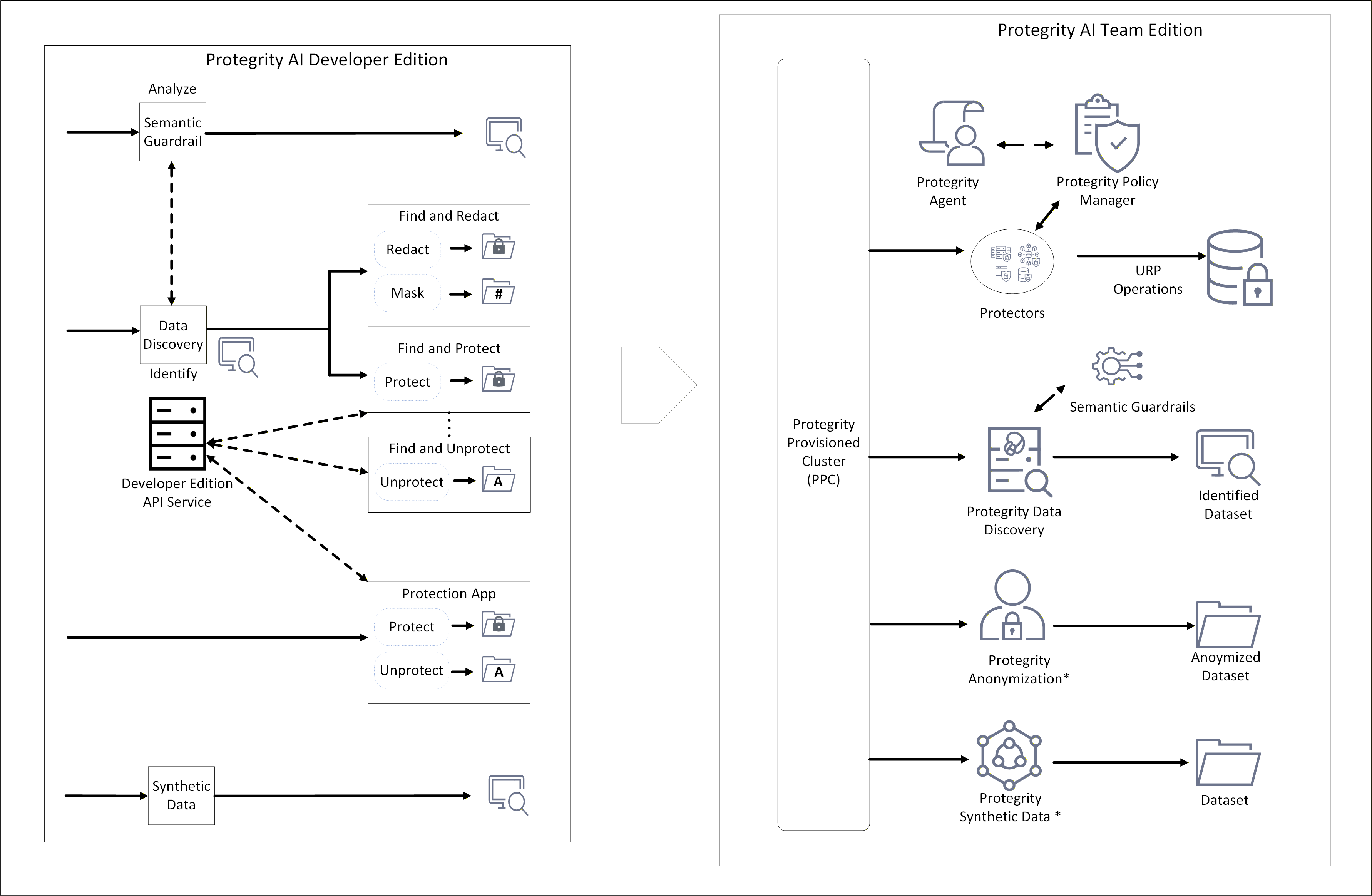
* - Available for purchase as an add-on. Can be installed as an individual product.
An overview of the process is provided here:
- Install the Protegrity Provisioned Cluster (PPC) and the required AI Team Edition features.
- Update the endpoints for Data Discovery, Semantic Guardrails, and Synthetic Data to point to the PPC.
- Install the AI Team Edition Application Protector Python modules and Application Protector Java libraries.
Note: Policy migration is not supported. Data protected in AI Developer Edition cannot be unprotected with the policy in AI Team Edition. Ensure that you unprotect the data before porting and reprotect it after the port to AI Team Edition is complete.
Feature version
Ensure that the final version you are porting to is the same or higher than the existing version. The version number of the features are provided here for reference.
| Product name | AI Developer Edition | AI Team Edition |
|---|---|---|
| Developer Edition API Service | Not applicable | PPC 1.0.0 with Protegrity Policy Manager |
| Data Discovery | 1.1.1 | 2.0.0 |
| Semantic Guardrails | 1.1.0 | 1.1.1 |
| Synthetic Data | 1.0.0 | 1.0.0 |
| Application Protector Python | 1.0.0 | 1.0.0 |
| Application Protector Java | 1.0.0 | 1.0.0 |
Installing the AI Team Edition
Install the AI Team Edition using the steps from the AI Team Edition documentation.
8.2 - Updating Python Modules
Note: When the policy is set up on the AI Team Edition, ensure that the same data elements added for the AI Developer Edition are used. For more information about the data elements policy, refer to Policy Definition.
If you use different data elements while creating the policy, then modify the data elements used in the AI Developer Edition accordingly before running the modules.
Install and set up the Protegrity Provisioned Cluster (PPC) and AI Team Edition using the steps from the PPC documentation and the respective feature documentation.
Select the venv where protegrity-developer-python is installed.
Install Application Protector Python using the steps from the Application Protector Python documentation.
Note:
When prompted for the ESA IP address, enter the hostname of the PPC. Similarly, when prompted for the ESA listening port number, enter25400. This enables the protector to integrate with the PPC.
After installation, the AP Python module of AI Developer Edition is replaced with the AP Python module of AI Team Edition.Run the samples.
8.3 - Updating Java Libraries
Note: When the policy is set up on the AI Team Edition, ensure that the same data elements added for the AI Developer Edition are used. For more information about the data elements policy, refer to Policy Definition.
If you use different data elements while creating the policy, then modify the data elements used in the AI Developer Edition accordingly before running the modules.
Install and set up the Protegrity Provisioned Cluster (PPC) and AI Team Edition using the steps from the PPC documentation and the respective feature documentation.
Install Application Protector Java libraries using the steps from the Application Protector Java documentation.
Note: When prompted for the ESA IP address, enter the hostname of the PPC. Similarly, when prompted for the ESA listening port number, enter
25400. This enables the protector to integrate with the PPC.Include the
ApplicationProtectorJava.jarin the classpath of your applications.Navigate to the location where the AI Developer Edition is cloned.
Go to the
protegrity-developer-edition/samples/javadirectory.a. Update the
pom.xmland theapplication-protector-javadependency.``` <dependency> <groupId>com.protegrity</groupId> <artifactId>application-protector-java</artifactId> <version>1.0.1</version> <scope>system</scope> <systemPath>/opt/protegrity/sdk/java/lib/ApplicationProtectorJava.jar</systemPath> </dependency> ```Note: The AP Java libraries are expected to be in the default path
/opt/protegrity/sdk/java/lib/. If the installation uses a different directory, update the environment or configuration so the system can locate the correct JAR files.b. Run the following command.
```
./mvnw clean package
```
c. Update the sample shell script to include
ApplicationProtectorJava.jarin the classpath.d. Run the samples.
9 - Policy Definition
The superuser has all permissions, that is, protect, unprotect, and reprotect operations. Users assigned the admin role will receive protected data when performing an unprotect operation, except in the case of the text data elements, which will return null. All other user roles will receive null as the output for any unprotect operation.
Generic Data Elements
| Data Element | Method | Use Case | UTF Set | LP | PP | eIV | Role | |||||||
|---|---|---|---|---|---|---|---|---|---|---|---|---|---|---|
| Admin | Finance | Marketing | HR | |||||||||||
| P | U | P | U | P | U | P | U | |||||||
| datetime | Tokenization | A date or datetime string. Formats accepted: YYYY/MM/DD HH:MM:SS and YYYY/MM/DD. Delimiters accepted: /, - This data element is required. | N/A | N/A | N/A | No | ✓ | X | X | X | X | ✓ | X | X |
| datetime_yc | Tokenization | A date or datetime string. Formats accepted: YYYY/MM/DD HH:MM:SS and YYYY/MM/DD. Delimiters accepted: /, - This data element is required. Leaves the year in the clear. | N/A | N/A | N/A | No | ✓ | X | X | X | X | ✓ | X | X |
| int | Tokenization | An integer string (4 bytes). | Numeric | No | No | Yes | ✓ | X | X | X | X | ✓ | X | X |
| number | Tokenization | A numeric string. May produce leading zeroes. | Numeric | Yes | No | Yes | ✓ | X | X | X | X | ✓ | X | X |
| string | Tokenization | An alphanumeric string. | Latin + Numeric | Yes | No | Yes | ✓ | X | X | X | X | ✓ | X | X |
| text | Encryption | A long string, such as a comment field using any character set. Use hex or base64 encoding to utilize. | All | No | No | Yes | ✓ | X | X | X | X | ✓ | X | X |
| fpe_numeric | FPE (Format Preserving Encryption) | Encrypts numeric data using FPE NIST 800-38G standard. Preserves length and uses Numeric (0-9) as plaintext and ciphertext alphabet. | Numeric | Yes | Yes | Yes | ✓ | X | X | X | X | ✓ | X | X |
| fpe_alpha | FPE (Format Preserving Encryption) | Encrypts alphabetic data using FPE NIST 800-38G standard. Preserves length and uses Alpha (a-z, A-Z) as plaintext and ciphertext alphabet. | Alpha | Yes | Yes | Yes | ✓ | X | X | X | X | ✓ | X | X |
| fpe_alphanumeric | FPE (Format Preserving Encryption) | Encrypts alphanumeric data using FPE NIST 800-38G standard. Preserves length and uses Alpha-Numeric (0-9, a-z, A-Z) as plaintext and ciphertext alphabet. | Alpha-Numeric | Yes | Yes | Yes | ✓ | X | X | X | X | ✓ | X | X |
| fpe_latin1_alpha | FPE (Format Preserving Encryption) | Encrypts alphabetic data using FPE NIST 800-38G standard. Preserves length and uses Unicode, such as Basic Latin and Latin-1 Supplement Alpha as plaintext and ciphertext alphabet. | Unicode (Basic Latin + Latin-1 Supplement Alpha) | Yes | Yes | Yes | ✓ | X | X | X | X | ✓ | X | X |
| fpe_latin1_alphanumeric | FPE (Format Preserving Encryption) | Encrypts alphanumeric data using FPE NIST 800-38G standard. Preserves length and uses Unicode, such as Basic Latin and Latin-1 Supplement Alpha-Numeric as plaintext and ciphertext alphabet. | Unicode (Basic Latin + Latin-1 Supplement Alpha-Numeric) | Yes | Yes | Yes | ✓ | X | X | X | X | ✓ | X | X |
| mask | Masking | Mask all the characters in the input; output is configured as the mask. It is set to "mask". | N/A | N/A | N/A | N/A | ✓ | X | X | X | X | ✓ | X | X |
| no_encryption | No Encryption | No encryption applied to the data element. | N/A | N/A | N/A | N/A | ✓ | X | X | X | X | ✓ | X | X |
| short | Tokenization | Protect or unprotect a 2-byte integer string. | Numeric | Yes | Yes | Yes | ✓ | X | X | X | X | ✓ | X | X |
| long | Tokenization | Protect or unprotect an 8-byte integer string. | Numeric | Yes | Yes | Yes | ✓ | X | X | X | X | ✓ | X | X |
PCI DSS Data Elements
| Data Element | Method | Use Case | UTF Set | LP | PP | eIV | Role | |||||||
|---|---|---|---|---|---|---|---|---|---|---|---|---|---|---|
| Admin | Finance | Marketing | HR | |||||||||||
| P | U | P | U | P | U | P | U | |||||||
| ccn | Tokenization | Credit card numbers. | Numeric | No | No | Yes | ✓ | X | X | ✓ | X | X | X | ✓ |
| ccn_bin | Tokenization | Credit card numbers. Leaves 8-digit BIN in the clear. | Numeric | No | No | Yes | ✓ | X | X | ✓ | X | X | X | ✓ |
| iban | Tokenization | IBAN numbers. Preserves the length, case, and position of the input characters but may create invalid IBAN codes. | Latin + Numeric | Yes | Yes | No | ✓ | X | X | ✓ | X | X | X | ✓ |
| iban_cc | Tokenization | IBAN numbers. Leaves letters in the clear. | Latin + Numeric | No | No | Yes | ✓ | X | X | ✓ | X | X | X | ✓ |
Generic PII Data Elements
| Data Element | Method | Use Case | UTF Set | LP | PP | eIV | Role | |||||||
|---|---|---|---|---|---|---|---|---|---|---|---|---|---|---|
| Admin | Finance | Marketing | HR | |||||||||||
| P | U | P | U | P | U | P | U | |||||||
| address | Tokenization | Street names | Latin + Numeric | Yes | No | Yes | ✓ | X | X | ✓ | X | X | X | ✓ |
| city | Tokenization | Town or city name | Latin | Yes | No | Yes | ✓ | X | X | ✓ | X | ✓ | X | ✓ |
| Tokenization | Email address. Leaves the domain in the clear. | Latin + Numeric | Yes | No | Yes | ✓ | X | X | ✓ | X | ✓ | X | ✓ | |
| nin | Tokenization | National Insurance Number. Preserves the length, case, and position of the input characters but may create invalid NIN codes. | Latin + Numeric | Yes | Yes | No | ✓ | X | X | X | X | X | X | X |
| name | Tokenization | Person's name | Latin | Yes | No | Yes | ✓ | X | X | ✓ | X | ✓ | X | ✓ |
| passport | Tokenization | Passport codes. Preserves the length, case, and position of the input characters but may create invalid passport numbers. | Latin + Numeric | Yes | Yes | No | ✓ | X | X | X | X | X | X | X |
| phone | Tokenization | Phone number. May produce leading zeroes. | Latin + Numeric | Yes | No | Yes | ✓ | X | X | X | X | X | X | X |
| postcode | Tokenization | Postal codes with digits and characters. Preserves the length, case, and position of the input characters but may create invalid post codes. | Latin + numeric | Yes | Yes | No | ✓ | X | X | ✓ | X | ✓ | X | ✓ |
| ssn | Tokenization | Social Security Number (US) | Latin + Numeric | Yes | No | Yes | ✓ | X | X | X | X | X | X | X |
| zipcode | Tokenization | Zip codes with digits only. May produce leading zeroes. | Numeric | Yes | No | Yes | ✓ | X | X | ✓ | X | ✓ | X | ✓ |
PII Data Elements
| Data Element | Method | Use Case | UTF Set | LP | PP | eIV | Role | |||||||
|---|---|---|---|---|---|---|---|---|---|---|---|---|---|---|
| Admin | Finance | Marketing | HR | |||||||||||
| P | U | P | U | P | U | P | U | |||||||
| address_de | Tokenization | Street names (German) | Latin + German + Numeric | Yes | No | Yes | ✓ | X | X | ✓ | X | X | X | ✓ |
| address_fr | Tokenization | Street names (French) | Latin + French + Numeric | Yes | No | Yes | ✓ | X | X | ✓ | X | X | X | ✓ |
| city_de | Tokenization | Town or city name (German) | Latin + German | Yes | No | Yes | ✓ | X | X | ✓ | X | ✓ | X | ✓ |
| city_fr | Tokenization | Town or city name (French) | Latin + French | Yes | No | Yes | ✓ | X | X | ✓ | X | ✓ | X | ✓ |
| name_de | Tokenization | Person's name (German) | Latin + German | Yes | No | Yes | ✓ | X | X | ✓ | X | ✓ | X | ✓ |
| name_fr | Tokenization | Person's name (French) | Latin + French | Yes | No | Yes | ✓ | X | X | ✓ | X | ✓ | X | ✓ |
LEGEND
- eIV: External IV
- LP: Length Preservation
- PP: Position Preservation
- P: User group can protect data
- U: User group can unprotect data
10 - Removing AI Developer Edition
Open a command prompt.
Navigate to the cloned repository location.
Run the following command to remove the containers and images.
docker compose --profile synthetic down --rmi allRun the following command to remove the Python module.
pip uninstall protegrity-developer-python
11 - Supported Classification Entities
Supported Entity Types
PII entities supported by Data Discovery with their Harmonized Categories, mapped to the expected Data Element.
| Harmonized Category | Entity Name | Data Element | Description |
|---|---|---|---|
| ACCOUNT_NAME | ACCOUNTNAME | string | Name associated with a financial account. |
| ACCOUNT_NUMBER | ACCOUNTNUMBER | number | Bank account number used to identify financial accounts. |
| AGE | AGE | number | Age information used to identify individuals. |
| AMOUNT | AMOUNT | number | Specific amount of money, which can be linked to financial transactions. |
| BANK_ACCOUNT | BIC | number | Bank Identifier Code used to identify financial institutions. |
| BANK_ACCOUNT | IBAN | iban | International Bank Account Number used to identify bank accounts globally. |
| BANK_ACCOUNT | IBAN_CODE | iban | International Bank Account Number used to identify bank accounts globally. |
| BANK_ACCOUNT | US_BANK_NUMBER | number | Bank account number used to identify financial accounts in the United States. |
| CREDIT_CARD | CCN | ccn | Credit card number used for financial transactions. |
| CREDIT_CARD | CREDIT_CARD | ccn | Credit card number used for financial transactions. |
| CRYPTO_ADDRESS | BITCOINADDRESS | address | Bitcoin wallet address used for digital transactions. |
| CRYPTO_ADDRESS | CRYPTO | address | Cryptocurrency wallet address used for digital transactions. |
| CRYPTO_ADDRESS | ETHEREUMADDRESS | address | Ethereum wallet address used for digital transactions. |
| CRYPTO_ADDRESS | LITECOINADDRESS | address | Litecoin wallet address used for digital transactions. |
| CURRENCY | CURRENCY | string | Currency information used in financial transactions. |
| CURRENCY_CODE | CURRENCYCODE | string | Code representing currency used in financial transactions. |
| CURRENCY_NAME | CURRENCYNAME | string | Name of currency used in financial transactions. |
| CURRENCY_SYMBOL | CURRENCYSYMBOL | string | Symbol representing currency, sometimes linked to financial transactions. |
| DATETIME | DATE | datetime | Specific date that can be linked to personal activities. |
| DATETIME | DATE_TIME | datetime | Specific date and time that can be linked to personal activities. |
| DATETIME | TIME | datetime | Specific time that can be linked to personal activities. |
| DRIVER_LICENSE | DRIVERLICENSE | number | Driver’s license number used to identify individuals. |
| DRIVER_LICENSE | IT_DRIVER_LICENSE | number | Driver’s license number used to identify individuals in Italy. |
| DRIVER_LICENSE | US_DRIVER_LICENSE | number | Driver’s license number used to identify individuals in the United States. |
| EMAIL_ADDRESS | Email address used for communication and identification. | ||
| EMAIL_ADDRESS | EMAIL_ADDRESS | Email address used for communication and identification. | |
| GENDER | GENDER | string | Gender information used to identify individuals. |
| HEALTH_CARE_ID | AU_MEDICARE | number | Medicare number used to identify individuals for healthcare services in Australia. |
| HEALTH_CARE_ID | MEDICAL_LICENSE | number | License number used to identify medical professionals. |
| HEALTH_CARE_ID | UK_NHS | number | National Health Service number used to identify individuals for healthcare services in the United Kingdom. |
| IN_VEHICLE_REGISTRATION | IN_VEHICLE_REGISTRATION | number | Vehicle registration number used to identify vehicles in India. |
| IN_VOTER | IN_VOTER | number | Voter ID number used to identify registered voters in India. |
| IP_ADDRESS | IP | address | Internet Protocol address used to identify devices on a network. |
| IP_ADDRESS | IP_ADDRESS | address | Internet Protocol address used to identify devices on a network. |
| LOCATION | BUILDING | address | Building information used to identify specific locations. |
| LOCATION | CITY | city | City information used to identify geographic locations. |
| LOCATION | COUNTRY | string | Country information used to identify geographic locations. |
| LOCATION | COUNTY | string | County information used to identify geographic locations. |
| LOCATION | GEOCOORD | address | Geographic coordinates used to identify specific locations. |
| LOCATION | LOCATION | address | Specific location or address that can be linked to an individual. |
| LOCATION | SECADDRESS | address | Additional address information used to identify locations. |
| LOCATION | SECONDARYADDRESS | address | Additional address information used to identify locations. |
| LOCATION | STATE | string | State information used to identify geographic locations. |
| LOCATION | STREET | address | Street address used to identify specific locations. |
| LOCATION | ZIPCODE | zipcode | Postal code used to identify specific geographic areas. |
| MAC_ADDRESS | MAC | address | Media Access Control address used to identify devices on a network. |
| NATIONAL_ID | AU_ACN | number | Australian Company Number used to identify businesses in Australia. |
| NATIONAL_ID | ES_NIE | nin | Foreigner Identification Number used to identify non-residents in Spain. |
| NATIONAL_ID | FI_PERSONAL_IDENTITY_CODE | nin | Personal identity code used to identify individuals in Finland. |
| NATIONAL_ID | IDCARD | nin | Identity card number used to identify individuals. |
| NATIONAL_ID | IN_AADHAAR | nin | Unique identification number used to identify residents in India. |
| NATIONAL_ID | IT_IDENTITY_CARD | nin | Identity card number used to identify individuals in Italy. |
| NATIONAL_ID | PL_PESEL | nin | Personal Identification Number used to identify individuals in Poland. |
| NATIONAL_ID | SG_NRIC_FIN | nin | National Registration Identity Card number used to identify residents in Singapore. |
| NATIONAL_ID | SG_UEN | number | Unique Entity Number used to identify businesses in Singapore. |
| NRP | NRP | number | National Registration Number used to identify individuals. |
| ORGANIZATION | COMPANYNAME | string | Name of a company used to identify businesses. |
| PASSWORD | CREDITCARDCVV | number | Card Verification Value used to secure credit card transactions. |
| PASSWORD | PASSWORD | string | Password used to secure access to personal accounts. |
| PASSWORD | PIN | number | Personal Identification Number used to secure access to accounts. |
| PASSPORT | IN_PASSPORT | passport | Passport number used to identify individuals in India. |
| PASSPORT | IT_PASSPORT | passport | Passport number used to identify individuals in Italy. |
| PASSPORT | PASSPORT | passport | Passport number used to identify individuals. |
| PASSPORT | US_PASSPORT | passport | Passport number used to identify individuals in the United States. |
| PERSON | NAME | string | Name or identifier used to identify an individual. |
| PERSON | PERSON | string | Name or identifier used to identify an individual. |
| PHONE_NUMBER | PHONE | phone | Number used to contact or identify an individual. |
| PHONE_NUMBER | PHONE_NUMBER | phone | Number used to contact or identify an individual. |
| SOCIAL_SECURITY_ID | SSN | ssn | Social Security Number used to identify individuals. |
| SOCIAL_SECURITY_ID | UK_NINO | nin | National Insurance Number used to identify individuals in the United Kingdom. |
| SOCIAL_SECURITY_ID | US_SSN | ssn | Social Security Number used to identify individuals in the United States. |
| TAX_ID | AU_ABN | number | Australian Business Number used to identify businesses in Australia. |
| TAX_ID | AU_TFN | number | Tax File Number used to identify taxpayers in Australia. |
| TAX_ID | ES_NIF | number | Tax Identification Number used to identify taxpayers in Spain. |
| TAX_ID | IN_PAN | number | Permanent Account Number used to identify taxpayers in India. |
| TAX_ID | IT_FISCAL_CODE | nin | Fiscal code used to identify taxpayers in Italy. |
| TAX_ID | IT_VAT_CODE | string | VAT code used to identify taxpayers in Italy. |
| TAX_ID | US_ITIN | number | Individual Taxpayer Identification Number used to identify taxpayers in the United States. |
| TITLE | TITLE | string | Title or honorific used to identify individuals. |
| URL | URL | address | Web address that can sometimes contain personal information. |
| USERNAME | USERNAME | string | Username used to identify individuals in online systems. |
| KR_RRN | KR_RRN | number | The Korean Resident Registration Number (RRN) is a 13-digit number issued to all Korean residents. |
| IN_GSTIN | IN_GSTIN | string | The Indian Goods and Services Tax Identification Number (GSTIN) is a 15-character identifier with state code (01-37), Permanent Account Number (PAN), registration number, “Z”, and checksum. |
| ADDRESS | ADDRESS | address | Address information used to identify locations. |
| DOB | DOB | datetime | Date of Birth. Standard personal-identification detail that specifies the exact day, month, and year a person was born. |
| TH_TNIN | TH_TNIN | nin | The Thai National ID Number (TNIN) is a unique 13-digit number issued to all Thai residents. |